slidev-addon-archify-explorer
Slidev Archify Explorer
Make an Archify diagram a clickable, print-safe preview in Slidev. Authors provide the static SVG and interactive HTML once; the preview itself opens the full Archify viewer in a dialog.
Component site and live demo · Open the presentation


What it does
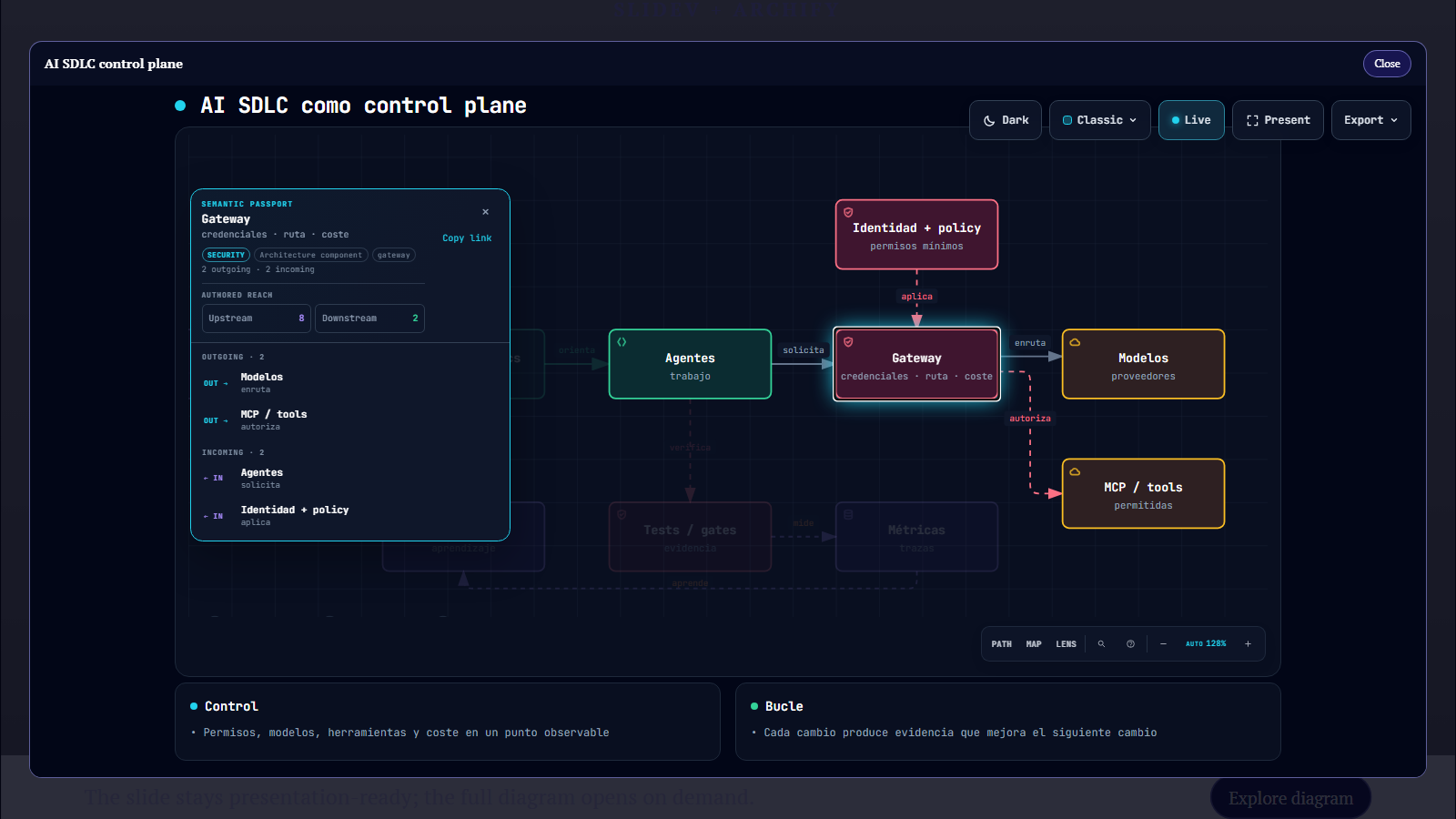
ArchifyExplorer.vue renders the static SVG as a clickable preview. Clicking anywhere on the preview opens a native dialog containing Archify's standalone HTML viewer, so viewers can focus nodes, follow relationships, search, and use the Archify controls without leaving the presentation.
- Works with Archify standalone HTML files; the HTML carries its viewer with it.
- Respects Slidev's configured base path.
- Uses a keyboard-operable native button and
<dialog>, with an accessible preview, labelled dialog, and titled iframe. - Keeps the static preview in Slidev PDF/print mode and omits the interactive controls.
- Supports a default preview prop and a slot for custom preview/layout content.
- Button and close labels can be localized.
- In presenter mode, mirrors this component's open, focused-node, and close state to the matching audience slide.
Try the demo
npm ci
npm run dev
Slidev opens the one-slide example at http://localhost:3030. Click the diagram preview, then select a node in the Archify view.
The demo pairs public/diagrams/ai-sdlc-control-plane.svg (static slide/PDF image) with public/diagrams/ai-sdlc-control-plane.html (interactive viewer). Its editable Archify source is in diagrams/.
Use it in your deck
Install the published package from npm:
npm install --save-dev slidev-addon-archify-explorer
Declare the addon in the deck frontmatter:
addons:
  - slidev-addon-archify-explorer
Put the standalone Archify HTML and SVG under public/, then use one component:
Concurrent sessions using the same origin, base path, and deck title should pass a shared explicit sync-session value; the fallback scope is the current origin, base path, and deck title.
<ArchifyExplorer
  preview="diagrams/system.svg"
  src="diagrams/system.html"
  title="System architecture"
  alt="System architecture diagram"
  button-label="Explore diagram"
  close-label="Close"
/>
preview and src are paths under public/, not remote URLs. Slidev's base URL is prepended automatically. Clicking anywhere on the SVG opens the explorer, and the preview uses a zoom cursor to communicate that behavior. The default labels are English; pass button-label and close-label to localize them.
Presenter mode syncs only the explorer state for the current slide. Messages are scoped to the same-origin deck title/base path and component; they never include presenter notes or slide content. If a slide contains multiple explorers with the same src and title, give each pair a distinct sync-key:
<ArchifyExplorer
  preview="diagrams/system.svg"
  src="diagrams/system.html"
  title="System architecture"
  sync-key="system-overview"
  sync-session="room-a"
/>
The sync uses a narrowly named same-origin BroadcastChannel. Without sync-session, the fallback scope is the current origin, base path, and deck title; use the prop to separate concurrent rooms. The channel is not sender authentication: trust scripts served from the deck origin. Only explorer state is sent, not speaker notes or slide contents. It is additive: a normal standalone slide still opens and controls its own dialog, and print/PDF mode continues to render only the static preview.
For a custom preview or layout, provide slot content instead of preview; the slot is preserved in print mode:
<ArchifyExplorer src="diagrams/system.html" title="System architecture">
  <div class="custom-preview">...</div>
</ArchifyExplorer>
Commands
| Command | Description |
|---|---|
npm run dev |
Start the addon demo presentation |
npm run build |
Build the demo deck |
npm run build:pages |
Build the component site and hosted demo into dist/ |
npm run export |
Export the demo deck to PDF |
Requires Node.js 22 or newer.
Contributing
Issues and pull requests are welcome. Use Conventional Commits for commit messages and PR titles, for example feat: support custom button labels. See CONTRIBUTING.md, SECURITY.md, and CODE_OF_CONDUCT.md.
Release tags and GitHub releases are generated from Conventional Commits with semantic-release. npm releases are published by GitHub Actions when npm Trusted Publishing is configured; see npm release setup and the release security notes.
License
The component and demo source are MIT-licensed; see LICENSE. The included standalone diagram embeds Archify and third-party viewer code. See THIRD_PARTY_NOTICES.md and ARCHIFY-LICENSE.
Related Packages
A fork of the slidev addon to embed asciinema casts to presentations. In this fo...
A visual editor for Slidev. Select, drag, resize, animate and compose slides on...
Version History
| Version | Released | License |
|---|---|---|
| 1.3.0 | MIT | |
| 1.2.2 | MIT | |
| 1.2.1 | MIT | |
| 1.2.0 | MIT |