rt-chat-input
rt-chat-input
一个基于 Vue 3 的多模态聊天输入框组件,集成了文本输入、语音录制(支持实时转写)、文件上传等功能。零外部 UI 框架依赖,轻量且易于集成。
预览
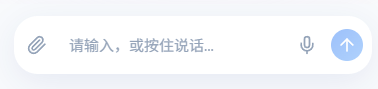
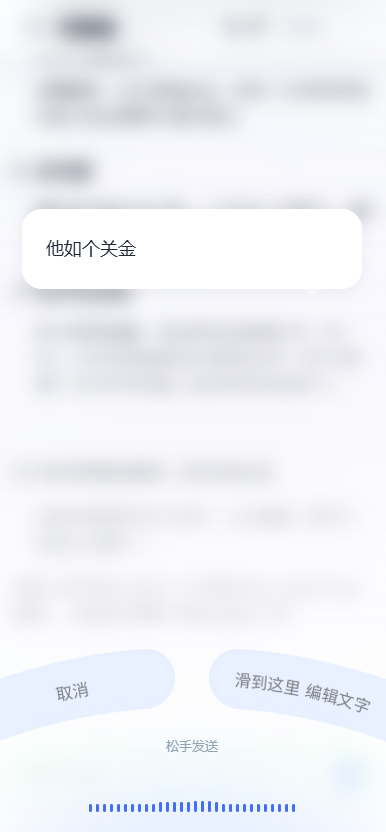
| 默认状态 | 语音录制模式 |
|---|---|
| 文本输入、附件上传、语音按钮 | 波形显示、取消/编辑选项 |
特性
- 🎤 高级语音录制:支持波形可视化、音量检测、实时 WebSocket 转写。
- 📱 移动端优化:专为移动端设计的手势交互(上滑取消、侧滑编辑)。
- 📂 文件预览:内置图片和文件预览区域。
- 🎨 主题定制:内置 Light/Dark 主题,支持 CSS 变量自定义。
- 🔌 零依赖:完全移除 Element Plus 等重型 UI 库依赖,仅依赖 Vue 3。
- 🔋 H5Plus 支持:兼容 UniApp/H5Plus 环境的原生麦克风权限调用。
安装
npm install rt-chat-input
# 或
yarn add rt-chat-input
快速使用
<template>
  <div class="chat-container">
    <!-- 消息列表区域 (自定义) -->
    <div class="message-list">...</div>

    <!-- 输入框组件 -->
    <ChatInput
      placeholder="请输入消息..."
      :ws-url="wsUrl"
      @send="handleSend"
      @voice="handleVoice"
      @attach="handleAttach"
    />
  </div>
</template>

<script setup>
import { ChatInput } from "rt-chat-input";
import "rt-chat-input/style.css"; // 引入样式

const wsUrl = "wss://your-api.com/ws/transcription";

const handleSend = (text, files) => {
  console.log("发送消息:", text, files);
};

const handleVoice = (audioBlob, duration) => {
  console.log("语音录制完成:", audioBlob, duration);
};

const handleAttach = (files) => {
  console.log("文件列表更新:", files);
};
</script>
开箱即用(固定底部)
只需添加 fixed 属性,组件会自动固定在页面底部,无需额外 CSS。
<template>
  <div class="page-content">
    <!-- 聊天记录... -->

    <!-- 自动固定在底部 -->
    <ChatInput fixed />
  </div>
</template>
API 文档
ChatInput 组件
Props
| 属性名 | 类型 | 默认值 | 说明 |
|---|---|---|---|
placeholder |
string |
'请输入,或按住说话...' |
输入框占位符 |
disabled |
boolean |
false |
是否禁用 |
wsUrl |
string |
undefined |
语音转写 WebSocket 地址(见下方后端接入指南) |
maxVoiceDuration |
number |
60 |
最大录音时长(秒) |
theme |
'light' | 'dark' | 'auto' |
'light' |
主题模式 |
fixed |
boolean |
false |
是否开启固定底部定位(开箱即用模式) |
bottomOffset |
number | string |
36 |
底部距离偏移量(仅 fixed=true 时有效),数字单位 px |
showVoiceButton |
boolean |
true |
是否显示语音按钮 |
showAttachmentButton |
boolean |
true |
是否显示附件按钮 |
acceptFileTypes |
string |
'image/*,.pdf,.doc...' |
允许上传的文件类型(默认为常见图片及办公文档格式) |
onRequestPermission |
() => Promise<boolean> |
undefined |
外部权限请求处理函数(返回 true 表示已获得权限) |
Events
| 事件名 | 参数 | 说明 |
|---|---|---|
send |
(text: string, files: File[]) |
点击发送按钮或回车时触发 |
voice |
(audio: Blob, duration: number) |
语音录制完成时触发(仅非实时转写模式或纯语音模式) |
change |
(text: string) |
输入框内容变化时触发 |
attach |
(files: File[]) |
附件列表变化时触发 |
error |
(message: string) |
发生错误时触发 |
stop |
- |
点击停止按钮时触发(仅 loading=true 时) |
focus |
(e: FocusEvent) |
输入框获得焦点时触发 |
blur |
(e: FocusEvent) |
输入框失去焦点时触发 |
VoiceRecorder 组件
如果你只需要单独的语音录制按钮,可以使用此组件。
<script setup>
import { VoiceRecorder } from "rt-chat-input";
</script>

<template>
  <VoiceRecorder variant="block" @voiceRecorded="(blob, duration) => {}" />
</template>
后端接入指南
组件通过 WebSocket 发送 16k 采样率的 PCM 音频流,并期望接收 JSON 格式的转写结果。
1. 通信协议
- 客户端发送:Raw PCM Audio (Int16, 16000Hz, Mono)
- 服务端返回:JSON 字符串
{
  "text": "转写文本内容",
  "isFinal": false // true 表示句尾(最终结果),false 表示中间结果
}
2. Spring WebFlux 实现示例
推荐使用后端作为代理连接 FunASR 服务(避免前端直接处理复杂的握手协议)。
// WebSocketHandler 实现
@Component
class RealTimeTranscriptionHandler(
    private val objectMapper: ObjectMapper
) : WebSocketHandler {

    // FunASR 服务地址 (e.g. ws://192.168.1.100:10095)
    @Value("\${asr.service.url}")
    private lateinit var asrServiceUrl: String

    override fun handle(session: WebSocketSession): Mono<Void> {
        val client = ReactorNettyWebSocketClient()
        return client.execute(URI(asrServiceUrl)) { asrSession ->
            // 1. 发送 FunASR 握手包 (必须配置如下参数以匹配模型要求)
            val handshake = mapOf(
                "mode" to "2pass",
                "chunk_size" to listOf(5, 10, 5),
                "encoder_chunk_look_back" to 4,
                "decoder_chunk_look_back" to 1,
                "wav_name" to "microphone",
                "wav_format" to "pcm",
                "audio_fs" to 16000,
                "is_speaking" to true
            )
            val handshakeMsg = asrSession.textMessage(objectMapper.writeValueAsString(handshake))

            // 2. 转发音频流 (Frontend -> FunASR)
            val upstream = session.receive()
                .filter { it.type == WebSocketMessage.Type.BINARY }
                .map { msg ->
                     // 提取二进制数据并转发
                     val bytes = ByteArray(msg.payload.readableByteCount())
                     msg.payload.read(bytes)
                     asrSession.binaryMessage { it.wrap(bytes) }
                }

            // 3. 接收结果并转换 (FunASR -> Frontend)
            val downstream = asrSession.receive()
                .map { it.payloadAsText }
                .mapNotNull { json ->
                    // 解析 FunASR 响应并转换为组件所需格式
                    val node = objectMapper.readTree(json)
                    val text = node.path("text").asText()
                    val mode = node.path("mode").asText()
                    if (!text.isNullOrBlank()) {
                        val response = mapOf(
                            "text" to text,
                            "isFinal" to (mode == "2pass-offline")
                        )
                        session.textMessage(objectMapper.writeValueAsString(response))
                    } else null
                }

            // 合并流:发送握手 + 双向转发
            // 关键修复:在前端断开或流结束时,发送 {"is_speaking": false} 以触发 2pass-offline 最终结果
            val endSignal = Mono.defer {
                 Mono.just(asrSession.textMessage("{\"is_speaking\":false}"))
            }

            asrSession.send(upstream.startWith(handshakeMsg).concatWith(endSignal))
                .then(session.send(downstream))
        }
    }
}
主题定制
组件使用 CSS 变量进行样式定义,你可以通过覆盖这些变量来定制主题:
:root {
  --chat-primary: #409eff; /* 主色调 */
  --chat-bg: #ffffff; /* 输入框背景色 */
  --chat-text: #303133; /* 文字颜色 */
  --chat-border-radius: 8px; /* 圆角 */

  /* 页面背景匹配 (用于 fixed 模式底栏) */
  --chat-page-bg: #f8fafc; /* 浅色模式页面背景 */
  --chat-page-bg-dark: #0f172a; /* 深色模式页面背景 */
}
更多变量请参考 src/styles/variables.css。
License
MIT
Related Packages
Version History
| Version | Released | Vue | License |
|---|---|---|---|
| 1.1.3 | ^3.3.0 | MIT | |
| 1.1.2 | ^3.3.0 | MIT | |
| 1.1.1 | ^3.3.0 | MIT | |
| 1.1.0 | ^3.3.0 | MIT | |
| 1.0.9 | ^3.3.0 | MIT | |
| 1.0.8 | ^3.3.0 | MIT | |
| 1.0.7 | ^3.3.0 | MIT | |
| 1.0.6 | ^3.3.0 | MIT | |
| 1.0.5 | ^3.3.0 | MIT | |
| 1.0.4 | ^3.3.0 | MIT | |
| 1.0.3 | ^3.3.0 | MIT | |
| 1.0.2 | ^3.3.0 | MIT | |
| 1.0.1 | ^3.3.0 | MIT | |
| 1.0.0 | ^3.3.0 | MIT |