pyz-knowledge-graph-vue
pyz-knowledge-graph-vue
Vue 3 知识图谱可视化组件库(当前 2.0.0)。
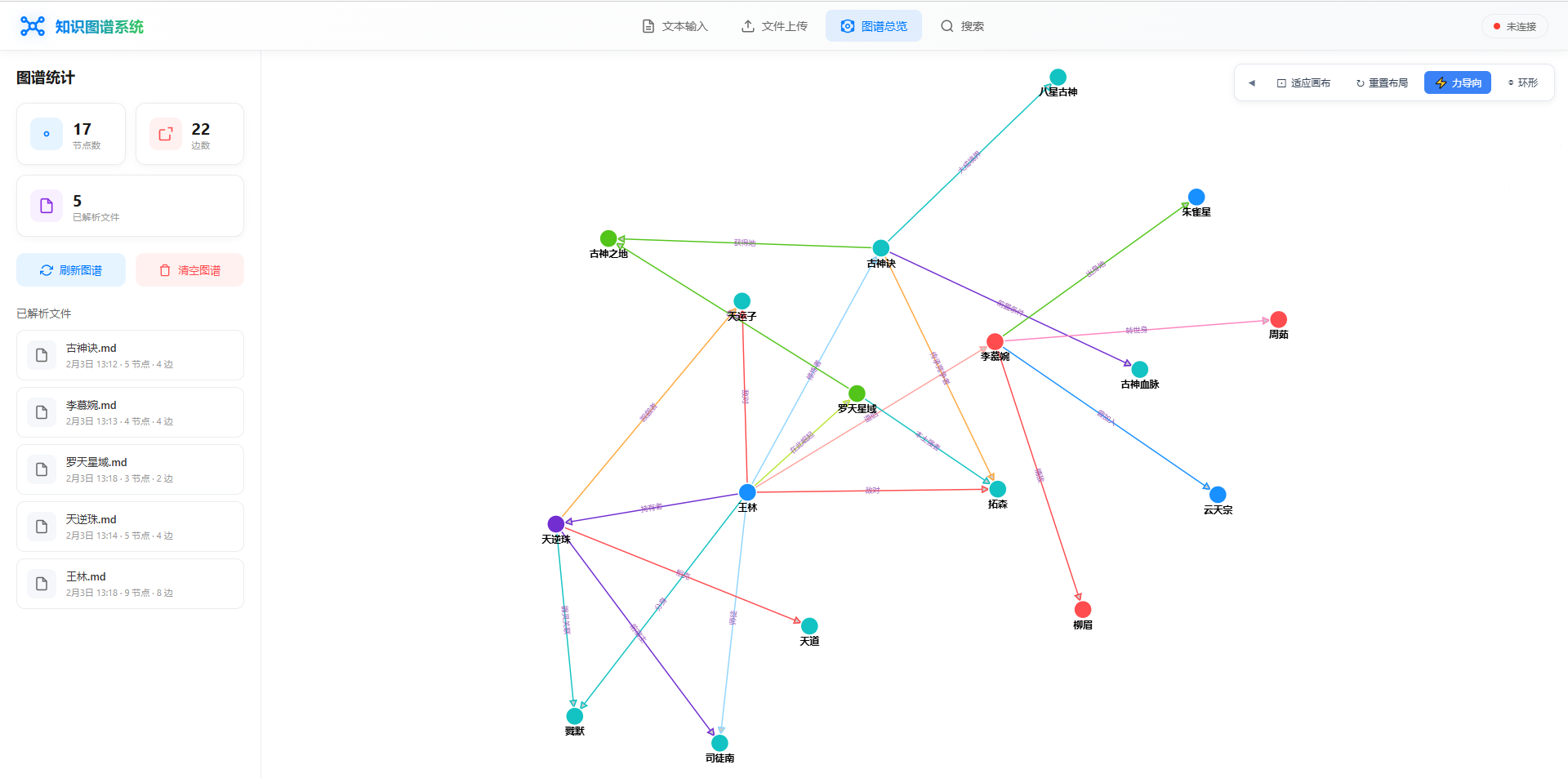
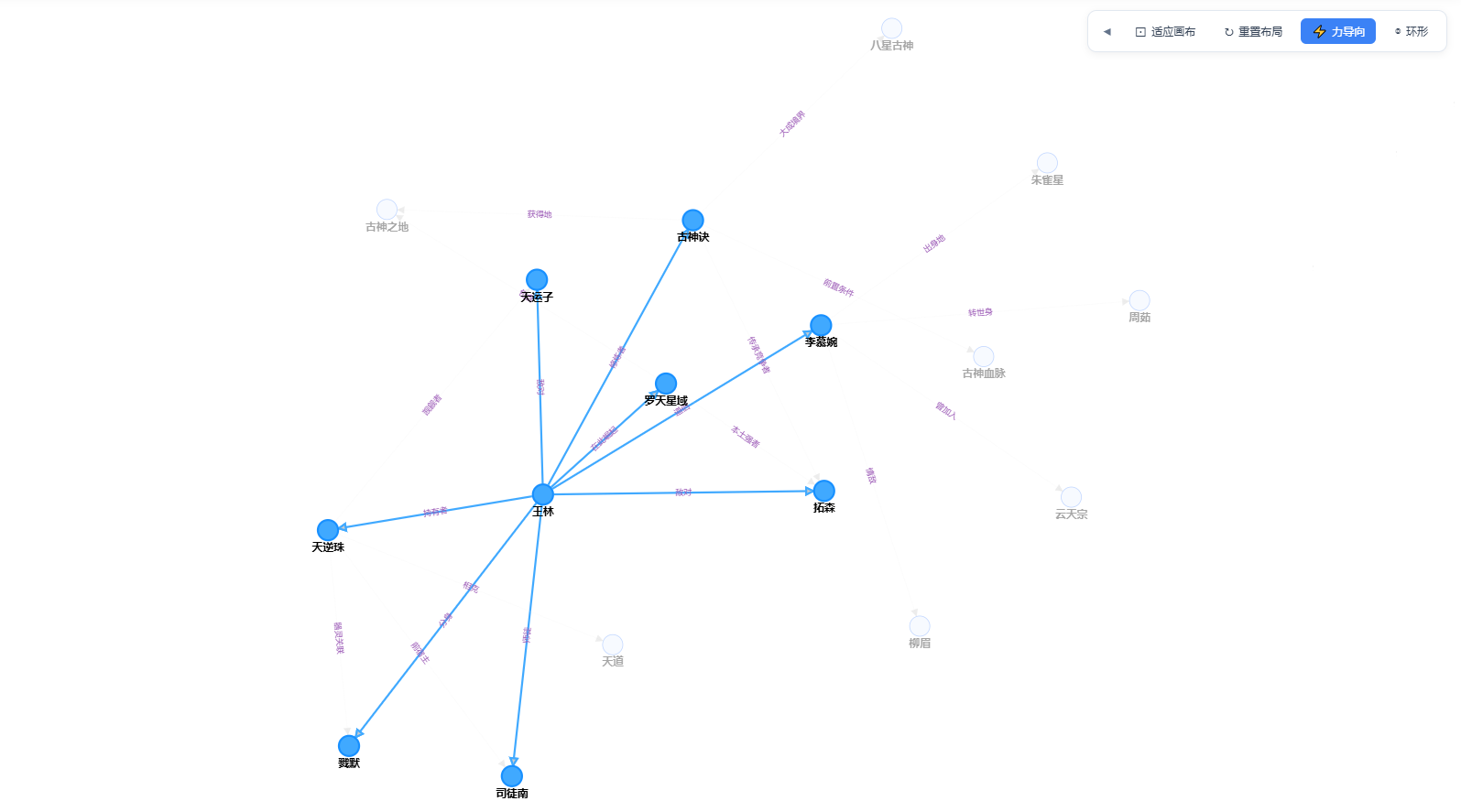
- 浏览模式(Vis):标准 / 关系 / 因果视图,悬停与点击高亮,因果关系流动画,简约/立体节点样式
- 结构模式(X6):左→右层级树,主干树边、直角折线、边标签、顶部引导线
- 编辑模式(G6):节点/边增删改、连线工具
- 引擎随编辑态与视图模式自动切换,一般无需手动指定



安装
npm install pyz-knowledge-graph-vue
Peer 依赖(需自行安装)
npm install vue @antv/g6 vis-network element-plus
包内已包含 @antv/x6、@antv/layout(结构模式使用)。
必须引入样式
组件样式在 dist/style.css。不引入则画布容器、工具栏、编辑工具条都没有样式。
import 'pyz-knowledge-graph-vue/dist/style.css'
导出一览
import {
  GraphVisualization,   // 主画布组件
  GraphToolbar,         // 右侧工具栏(模式 / 设置 / 编辑 / 主题 / 导出)
  GraphEditorToolbar,   // 左侧编辑工具条
  KnowledgeGraph,       // G6 底层类(高级用法)
  VisKnowledgeGraph,    // Vis 底层类(高级用法)
  X6StructureTree,      // X6 结构树引擎(高级用法)
  useGraphEditor,       // 编辑会话 composable
  NODE_SHAPE_LEGEND,    // 节点形状图例
  resolveNodeShape,     // 解析节点 shape
  inferShapeFromNode,   // 按 type/label 推断形状
  install
} from 'pyz-knowledge-graph-vue'

import type {
  GraphNode,
  GraphEdge,
  GraphNodeShape,
  LayoutType,
  RenderEngine,
  GraphViewMode,      // 'standard' | 'relation' | 'causal' | 'structure'
  NodeRenderStyle,    // 'flat' | 'stereo'
  GraphEditorOptions,
  BatchUpdateRequest,
  BatchUpdateResponse
} from 'pyz-knowledge-graph-vue'
快速开始
<template>
  <div style="width: 100%; height: 600px; position: relative;">
    <GraphVisualization
      ref="graphRef"
      :nodes="nodes"
      :edges="edges"
      :theme="theme"
      v-model:flow-animation="flowAnimation"
      v-model:view-mode="viewMode"
      v-model:node-render-style="nodeRenderStyle"
    />
    <GraphToolbar
      :layout-type="layoutType"
      :theme="theme"
      :nodes="nodes"
      :edges="edges"
      v-model:flow-animation="flowAnimation"
      v-model:view-mode="viewMode"
      v-model:node-render-style="nodeRenderStyle"
      @fit-view="graphRef?.fitView()"
      @reset-layout="graphRef?.resetLayout()"
      @switch-to-force="switchLayout('force')"
      @switch-to-circular="switchLayout('circular')"
      @update:theme="theme = $event"
      @export-svg="graphRef?.exportSvg()"
      @focus-node="graphRef?.focusNode($event)"
    />
  </div>
</template>

<script setup lang="ts">
import { ref } from 'vue'
import {
  GraphVisualization,
  GraphToolbar,
  type GraphViewMode,
  type NodeRenderStyle
} from 'pyz-knowledge-graph-vue'
import 'pyz-knowledge-graph-vue/dist/style.css'

const graphRef = ref()
const theme = ref<'light' | 'dark'>('light')
const flowAnimation = ref(true)
const viewMode = ref<GraphViewMode>('standard')
const nodeRenderStyle = ref<NodeRenderStyle>('flat')
const layoutType = ref<'force' | 'circular'>('force')

const nodes = ref([
  { id: '1', label: '人工智能', type: '概念', shape: 'circle' },
  { id: '2', label: '机器学习', type: '概念', shape: 'diamond' },
  { id: '3', label: '深度学习', type: '概念' }
])

const edges = ref([
  { id: 'e1', source: '1', target: '2', label: '包含' },
  { id: 'e2', source: '2', target: '3', label: '属于' }
])

const switchLayout = (type: 'force' | 'circular') => {
  layoutType.value = type
  graphRef.value?.switchLayout(type)
}
</script>
容器需要明确高度(或由父级撑开)。
width/height传0(默认)表示跟随容器尺寸。
渲染引擎如何选择
| 状态 | 引擎 | 说明 |
|---|---|---|
浏览 + viewMode !== 'structure' |
Vis | 标准 / 关系 / 因果 |
浏览 + viewMode === 'structure' |
X6 | 横向层级树 |
| 编辑模式 | G6 | 增删改节点与边 |
浏览视图模式(viewMode)
通过工具栏「模式」或 v-model:view-mode 切换:
| 模式 | 值 | 行为 |
|---|---|---|
| 标准模式 | standard |
悬停/点击高亮邻接;非高亮元素灰显约 10% 透明度 |
| 关系模式 | relation |
点击高亮上下游层级链(橙色系) |
| 因果模式 | causal |
点击高亮上游因链 + 下游果链(蓝色系);开启流动画时分层淡入 |
| 结构模式 | structure |
X6 左→右层级树:多根纵向并列、同层 X 对齐、主干树边、顶部引导线 |
结构模式要点
- 布局:根在左,子级向右;同层节点 X 对齐;多根上下并列
- 连线:仅渲染主干树边(每个非根节点一条入边),父子一对一,便于辨识关系
- 边标签:始终显示在边的水平段附近
- 引导线:结构包围盒上方约 50px 有水平虚线,文案为「逻辑层关系从左到右」
- 点击:高亮到根的路径与全子树;开启「因果关系跟踪动画」时做流动淡入 + 虚线流动
组件
GraphVisualization
主可视化组件。浏览默认用 Vis;结构模式用 X6;进入编辑后自动切到 G6,并内置左侧 GraphEditorToolbar。
Props
| 属性 | 类型 | 默认值 | 说明 |
|---|---|---|---|
nodes |
GraphNode[] |
— | 节点数据 |
edges |
GraphEdge[] |
— | 边数据 |
width |
number |
0 |
画布宽,0 = 自适应容器 |
height |
number |
0 |
画布高,0 = 自适应容器 |
layoutType |
'force' | 'circular' |
'force' |
初始布局(编辑/G6) |
theme |
'light' | 'dark' |
'light' |
主题 |
flowAnimation |
boolean |
true |
因果关系跟踪动画(Vis 因果 / X6 结构) |
viewMode |
GraphViewMode |
'standard' |
浏览视图模式 |
nodeRenderStyle |
NodeRenderStyle |
'flat' |
节点视觉:简约 / 立体 |
editor |
EditorProps |
— | 传入后由组件内部托管编辑/保存 |
renderEngine |
'g6' | 'vis' |
'vis' |
已废弃:引擎由编辑态与 viewMode 自动决定 |
editor 对象字段:
| 字段 | 说明 |
|---|---|
api.batchUpdate |
批量保存 API((req) => Promise<BatchUpdateResponse>) |
batchExtra |
保存时合并字段的函数,如 file_source / userId / project |
onSaveSuccess |
保存成功回调(含增删改统计) |
onSaveError |
保存失败回调 |
Events
| 事件 | 说明 |
|---|---|
edit-mode-change |
编辑态变化(便于外层工具栏同步 isEditing) |
update:editMode |
兼容旧用法 |
update:flowAnimation |
流动画开关(可 v-model:flow-animation) |
update:viewMode |
视图模式(可 v-model:view-mode) |
update:nodeRenderStyle |
节点样式(可 v-model:node-render-style) |
graph-updated |
图谱数据已更新 |
save / cancel |
未传 editor、由外部接管编辑时触发 |
Ref 方法
graphRef.value?.fitView()
graphRef.value?.resetLayout()
graphRef.value?.switchLayout('force' | 'circular')
graphRef.value?.getLayoutType()
graphRef.value?.focusNode('node-id')
graphRef.value?.exportSvg()
graphRef.value?.setFlowAnimationEnabled(true)
graphRef.value?.setViewMode('standard' | 'relation' | 'causal' | 'structure')
graphRef.value?.setNodeRenderStyle('flat' | 'stereo')

// 编辑相关
graphRef.value?.handleToggleEdit()
graphRef.value?.handleSave()
graphRef.value?.handleCancel()
graphRef.value?.promptAddNodeAtCenter()
graphRef.value?.hintHowToAddRelation()
graphRef.value?.getEditData()
graphRef.value?.applyEditData(nodes, edges)
推荐:内置编辑(传 editor)
<template>
  <div class="wrap">
    <GraphToolbar
      :is-editing="isEditing"
      :theme="theme"
      :nodes="nodes"
      :edges="edges"
      v-model:flow-animation="flowAnimation"
      v-model:view-mode="viewMode"
      v-model:node-render-style="nodeRenderStyle"
      @toggle-edit="graphRef?.handleToggleEdit()"
      @save="onSave"
      @cancel="onCancel"
      @fit-view="graphRef?.fitView()"
      @reset-layout="graphRef?.resetLayout()"
      @switch-to-force="graphRef?.switchLayout('force')"
      @switch-to-circular="graphRef?.switchLayout('circular')"
      @add-node="graphRef?.promptAddNodeAtCenter()"
      @add-relation="graphRef?.hintHowToAddRelation()"
      @export-svg="graphRef?.exportSvg()"
      @focus-node="graphRef?.focusNode($event)"
      @update:theme="theme = $event"
    />
    <GraphVisualization
      ref="graphRef"
      :nodes="nodes"
      :edges="edges"
      :editor="editorConfig"
      :theme="theme"
      v-model:flow-animation="flowAnimation"
      v-model:view-mode="viewMode"
      v-model:node-render-style="nodeRenderStyle"
      @edit-mode-change="isEditing = $event"
    />
  </div>
</template>

<script setup lang="ts">
import { ref, computed } from 'vue'
import {
  GraphVisualization,
  GraphToolbar,
  type GraphViewMode,
  type NodeRenderStyle
} from 'pyz-knowledge-graph-vue'

const graphRef = ref()
const isEditing = ref(false)
const theme = ref<'light' | 'dark'>('light')
const flowAnimation = ref(true)
const viewMode = ref<GraphViewMode>('standard')
const nodeRenderStyle = ref<NodeRenderStyle>('flat')

const editorConfig = computed(() => ({
  api: { batchUpdate: yourBatchUpdateApi },
  batchExtra: () => ({ file_source: 'demo.md' }),
  onSaveSuccess: () => { /* 刷新数据 */ },
  onSaveError: (e: Error) => console.error(e)
}))

async function onSave() {
  await graphRef.value?.save?.()
}

function onCancel() {
  graphRef.value?.cancelEdit?.()
}
</script>
GraphToolbar
右侧工具栏:视图模式、设置(主题 / 节点样式 / 流动画)、布局、适应画布、编辑进出、导出 SVG、节点列表面板、形状图例等。
Props
| 属性 | 类型 | 默认值 | 说明 |
|---|---|---|---|
layoutType |
'force' | 'circular' |
'force' |
当前布局高亮 |
isEditing |
boolean |
false |
是否编辑中 |
isSaving |
boolean |
false |
保存中 |
theme |
'light' | 'dark' |
'light' |
工具栏主题 |
flowAnimation |
boolean |
true |
因果关系跟踪动画 |
viewMode |
GraphViewMode |
'standard' |
浏览视图模式 |
nodeRenderStyle |
NodeRenderStyle |
'flat' |
简约 / 立体 |
nodes / edges |
数组 | [] |
列表面板与图例 |
activeNodeId |
string |
'' |
当前高亮节点 |
renderEngine |
'g6' | 'vis' |
— | 已废弃 |
Events
| 事件 | 说明 |
|---|---|
toggle-edit / save / cancel |
编辑流程 |
fitView / resetLayout |
视口与布局 |
switchToForce / switchToCircular |
布局切换 |
add-node / add-relation |
编辑快捷入口 |
focus-node |
定位到节点 |
update:theme |
主题 |
update:flowAnimation |
流动画 |
update:viewMode |
视图模式 |
update:nodeRenderStyle |
节点视觉样式 |
export-svg |
导出 SVG |
GraphEditorToolbar
编辑模式下画布左侧工具条(GraphVisualization 在编辑态会自动挂载;也可单独使用)。
| 属性 | 类型 | 默认值 | 说明 |
|---|---|---|---|
activeTool |
ToolType |
'select' |
select / addNode / addEdge / deleteNode / deleteEdge |
isEditing |
boolean |
false |
为 false 时不渲染 |
theme |
'light' | 'dark' |
'light' |
主题 |
事件:update:activeTool、tool-change。
useGraphEditor
若不想用 editor prop,可在外层自行管理编辑会话:
import { useGraphEditor } from 'pyz-knowledge-graph-vue'

const editor = useGraphEditor({
  api: { batchUpdate: yourBatchUpdateApi },
  batchExtra: () => ({ userId: 'u1', project: 'p1' }),
  onSaveSuccess: (stats) => { /* ... */ },
  onSaveError: (err) => { /* ... */ }
})

editor.enterEditMode(nodes, edges)
await editor.save()
editor.cancelEdit()

// 状态:editor.isEditing / editor.hasChanges / editor.isSaving
数据类型
interface GraphNode {
  id: string
  label: string
  type?: string
  /** 形状编码,见下方「节点形状」;未指定时按 type/label 推断 */
  shape?: string
  size?: number       // 直径像素;过小时组件会按度数推算
  style?: { fill?: string; stroke?: string; lineWidth?: number }
  x?: number
  y?: number
}

interface GraphEdge {
  id: string
  source: string
  target: string
  label?: string
  relation_type?: string
  style?: { stroke?: string; lineWidth?: number }
}

type GraphViewMode = 'standard' | 'relation' | 'causal' | 'structure'
type NodeRenderStyle = 'flat' | 'stereo'
节点形状
后端可写 shape 字段;前端通过 resolveNodeShape / inferShapeFromNode 映射到 Vis / G6。
支持编码包括:circle、square、diamond、triangle、triangleDown、star、hexagon、ellipse、database、box、rounded、dot 等。
工具栏设置面板中有形状图例(NODE_SHAPE_LEGEND)。
节点视觉样式
| 值 | 说明 |
|---|---|
flat |
简约平面(默认) |
stereo |
立体:球体渐变 / 斜面浮雕贴图(Vis / G6) |
结构模式使用自定义切角节点板,不受 nodeRenderStyle 影响。
交互与能力
| 能力 | 浏览 Vis | 结构 X6 | 编辑 G6 |
|---|---|---|---|
| 滚轮缩放 / 拖动画布 | ✓ | ✓ | ✓ |
| 拖拽节点 | ✓ | — | ✓ |
| 悬停 / 点击高亮 | ✓ | 点击链路高亮 | ✓ |
| 因果关系跟踪动画 | ✓(因果) | ✓(点击淡入+流动) | — |
| 四种视图模式 | ✓ | structure | — |
| 简约 / 立体节点 | ✓ | — | ✓ |
| 增删节点、连边、改标签 | — | — | ✓ |
| 导出 SVG | ✓ | — | ✓ |
| 明暗主题 | ✓ | ✓ | ✓ |
布局
- force:力导向,适合复杂关系(Vis 开场 / G6)
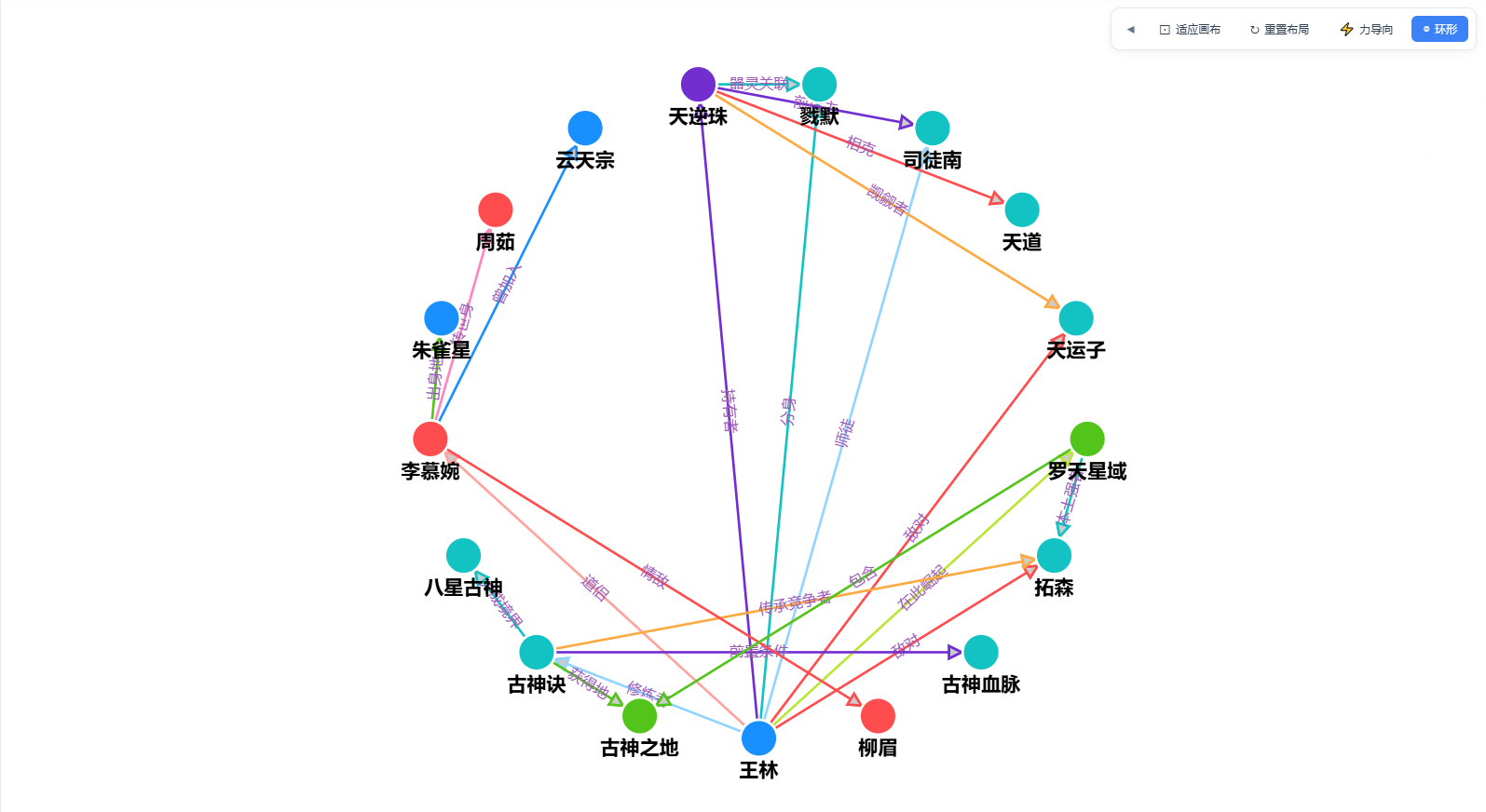
- circular:环形,适合枢纽型结构(G6)
- 结构树:自研左→右森林布局(X6),同层对齐、多根并列
默认配色
节点 type
| 类型 | 颜色 |
|---|---|
| 人物 | #ff4d4f |
| 地点 | #52c41a |
| 组织 | #1890ff |
| 概念 | #faad14 |
| 事件 | #722ed1 |
| 其他 | #13c2c2 |
边 relation_type / label
| 类型 | 颜色 |
|---|---|
| 因果 | #e74c3c |
| 所属 | #2ecc71 |
| 引用 | #3498db |
| 相关 | #9b59b6 |
也可在节点/边的 style 上覆盖颜色。
作为 Vue 插件
import { createApp } from 'vue'
import PyzKnowledgeGraph from 'pyz-knowledge-graph-vue'
import 'pyz-knowledge-graph-vue/dist/style.css'
import App from './App.vue'

const app = createApp(App)
app.use(PyzKnowledgeGraph)
app.mount('#app')
注册组件名:GraphVisualization、GraphToolbar、GraphEditorToolbar。
本地开发(本仓库 monorepo)
cd vue3/packages/knowledge-graph-vue
npm install
npm run build    # 产出 dist/
npm run dev      # vite build --watch
主应用在 vue3 下通过 file:packages/knowledge-graph-vue 引用;改包后需 rebuild 或 watch,前端建议 Ctrl+F5 强刷。
License
MIT
作者
彭一真(小游码匠)
Related Packages
Version History
| Version | Released | Vue | License |
|---|---|---|---|
| 2.0.0 | ^3.2.0 | MIT | |
| 1.2.2 | ^3.2.0 | MIT | |
| 1.2.1 | ^3.2.0 | MIT | |
| 1.2.0 | ^3.2.0 | MIT | |
| 1.1.2 | ^3.2.0 | MIT | |
| 1.1.1 | ^3.2.0 | MIT | |
| 1.1.0 | ^3.2.0 | MIT | |
| 1.0.4 | ^3.2.0 | MIT | |
| 1.0.3 | ^3.2.0 | MIT | |
| 1.0.2 | ^3.2.0 | MIT | |
| 1.0.1 | ^3.2.0 | MIT | |
| 1.0.0 | ^3.2.0 | MIT |