nuxt-unlayer
 Nuxt Unlayer




Add the Unlayer drag-and-drop email builder to your Nuxt application in minutes.
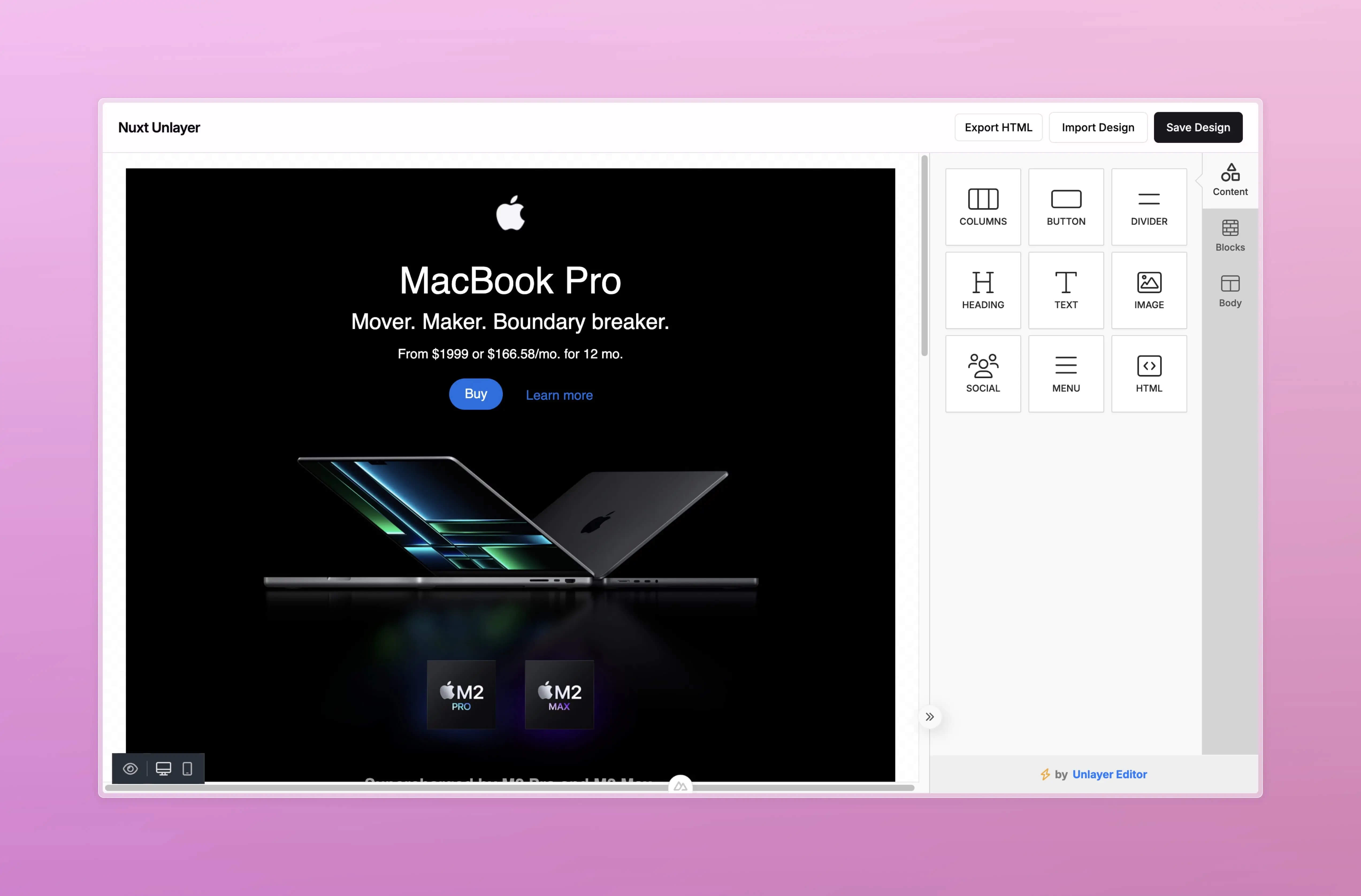
Features
- Drop-in component —
<EmailEditor>is registered globally and works as a client-only component with zero extra config - Full Unlayer API as props — every option from the Unlayer
Configinterface is available as a Vue prop with full TypeScript types initialDesignprop — preload a saved design at mount time; reactively callsloadDesignwhenever the value changes- Smart reactivity — props with a live Unlayer setter method (
mergeTags,appearance,locale,linkTypes,user,tabs, and more) update the canvas in-place without destroying the editor or losing the user's work - Vue events —
@ready,@design:updated,@design:loaded, and@image:uploadedare wired up automatically - TypeScript — all Unlayer types are re-exported from
#unlayer/propsso you only need one import
 Demo
Demo
Live demo and full documentation: nuxt-unlayer.behonbaker.com
 Quick Setup
- Add
nuxt-unlayerto your project
# ✨ Auto-detect
npx nypm install nuxt-unlayer
# npm
npm install nuxt-unlayer
# yarn
yarn add nuxt-unlayer
# pnpm
pnpm install nuxt-unlayer
# bun
bun install nuxt-unlayer
# deno
deno install nuxt-unlayer
- Add
nuxt-unlayerto yournuxt.config.ts
export default defineNuxtConfig({
  modules: ["nuxt-unlayer"],
});
That's it. The module registers <EmailEditor> globally and injects the Unlayer embed script into <head> automatically.
Note —
EmailEditoris a client-only component. It will never execute on the server; you do not need to wrap it in<ClientOnly>.
 Basic Usage
Give the parent element a fixed height — the editor fills 100% of its container.
<template>
  <div style="height: 100dvh">
    <EmailEditor @ready="onReady" />
  </div>
</template>

<script setup lang="ts">
  import type { EditorInstance } from "#unlayer/props";

  const editor = shallowRef<EditorInstance>();

  const onReady = (instance: EditorInstance | undefined) => {
    editor.value = instance;
  };
</script>
 Loading a Design
Pass a saved JSONTemplate to the initial-design prop. It loads the design once the editor is ready and reloads whenever the value changes — no manual loadDesign() call needed.
<template>
  <EmailEditor :initial-design="myDesign" @ready="onReady" />
</template>

<script setup lang="ts">
  import type { JSONTemplate, EditorInstance } from "#unlayer/props";

  const myDesign = ref<JSONTemplate>(); // fetch from your API
  const editor = shallowRef<EditorInstance>();

  const onReady = (instance: EditorInstance | undefined) => {
    editor.value = instance;
  };
</script>
 Saving & Exporting
// Save the design as JSON (to store in your database)
editor.value?.saveDesign((design) => {
  // design is a JSONTemplate — persist it however you like
});

// Export finished HTML (ready to send as an email)
editor.value?.exportHtml((data) => {
  const html = data.html;    // full HTML document
  const json = data.design;  // JSONTemplate
});

// Export as plain text (multi-part emails)
editor.value?.exportPlainText((data) => {
  const text = data.text;
});
 Props
Props
<EmailEditor> accepts every option from the Unlayer Config interface. The table below covers the most commonly used props.
| Prop | Type | Default | Description |
|---|---|---|---|
display-mode |
'email' | 'web' | 'popup' | 'document' |
'email' |
Editor mode |
locale |
string |
'en-US' |
BCP 47 locale for UI translations |
appearance |
AppearanceConfig |
— | Theme and panel layout options |
fonts |
Fonts |
{ showDefaultFonts: false } |
Font list shown in the editor |
merge-tags |
MergeTags |
— | Dynamic content placeholders |
features |
Features |
— | Enable/disable editor features (AI, stock images, etc.) |
tools |
ToolsConfig |
— | Enable/disable/reorder content blocks |
exclude-tools |
string[] |
— | Remove specific tools by name |
user |
User |
— | Authenticated user for saved blocks |
project-id |
number |
— | Unlayer project ID |
initial-design |
JSONTemplate |
— | Design to load on mount (reactive) |
tabs |
Tabs |
— | Customise sidebar panel tabs |
Reactive props (change these at any time without losing the user's work): merge-tags, appearance, locale, text-direction, translations, link-types, display-conditions, special-links, design-tags-config, merge-tags-config, display-mode, tabs, user, validator, initial-design.
Re-init props (editor is destroyed and recreated — save the design first): tools, exclude-tools, blocks, editor, fonts, safe-html, custom-css, custom-js, features, design-tags, project-id.
 Events
| Event | Payload | Description |
|---|---|---|
@ready |
EditorInstance | undefined |
Editor is created and ready |
@design:updated |
{ type, item?, changes? } |
User modified the design |
@design:loaded |
{ design: JSONTemplate } |
A design was loaded into the canvas |
@image:uploaded |
{ image: { url, width?, height? } } |
User uploaded an image |
 TypeScript
All types are re-exported from #unlayer/props:
import type {
  EditorInstance,        // live editor reference from @ready
  EditorProps,           // full props type (= UnlayerOptions)
  JSONTemplate,          // saved design JSON
  ExportHtmlResult,      // exportHtml callback data
  ExportHtmlOptions,
  ExportPlainTextResult,
  MergeTags,
  Features,
  Fonts,
  AppearanceConfig,
  Tabs,
  User,
  // ...and more
} from "#unlayer/props";
Development
# Install dependencies
bun install

# Generate type stubs
bun run dev:prepare

# Develop with the docs
bun run dev

# Build the docs
bun run dev:build

# Run ESLint
bun run lint

# Run Vitest
bun run test
bun run test:watch

# Release new version
bun run release
Contributors
Published under the MIT license. Made by @BayBreezy with ❤️
🤖 auto updated with automd (last updated: Mon Oct 21 2024)
Related Packages
This is a Nuxt 3 compatible module built with the official Nuxt 3 (module-builde...
Version History
| Version | Released | Vue | License |
|---|---|---|---|
| 0.1.1 | ^3.0 | MIT | |
| 0.1.0 | ^3.0 | MIT | |
| 0.0.22 | ^3.0 | MIT | |
| 0.0.21 | ^3.0 | MIT | |
| 0.0.20 | ^3.0 | MIT | |
| 0.0.19 | ^3.0 | MIT | |
| 0.0.18 | ^3.0 | MIT | |
| 0.0.17 | ^3.0 | MIT | |
| 0.0.16 | ^3.0 | MIT | |
| 0.0.15 | ^3.0 | MIT | |
| 0.0.14 | ^3.0 | MIT | |
| 0.0.13 | ^3.0 | MIT | |
| 0.0.12 | ^3.0 | MIT | |
| 0.0.11 | ^3.0 | MIT | |
| 0.0.10 | ^3.0 | MIT | |
| 0.0.9 | ^3.0 | MIT | |
| 0.0.8 | ^3.0 | MIT | |
| 0.0.7 | ^3.0 | MIT | |
| 0.0.6 | ^3.0 | MIT | |
| 0.0.5 | ^3.0 | MIT | |
| 0.0.4 | ^3.0 | MIT | |
| 0.0.3 | ^3.0 | MIT | |
| 0.0.2 | ^3.0 | MIT | |
| 0.0.1 | ^3.0 | MIT |