nuxt-stories
| Install | |
|---|---|
npm install nuxt-stories |
|
| Latest Version: | 3.0.18 |
| Vue: | 3 |
| License: | MIT |
| Last Updated: | Nov 8, 2023 |
| Links: | GitHub · npm |





nuxt-stories
Painless (and now insanely fast) storybooking for Nuxt
Video overview
Features
- ✅ Insanely fast configuration and usage (one install, one line in config, and you're good to go!)
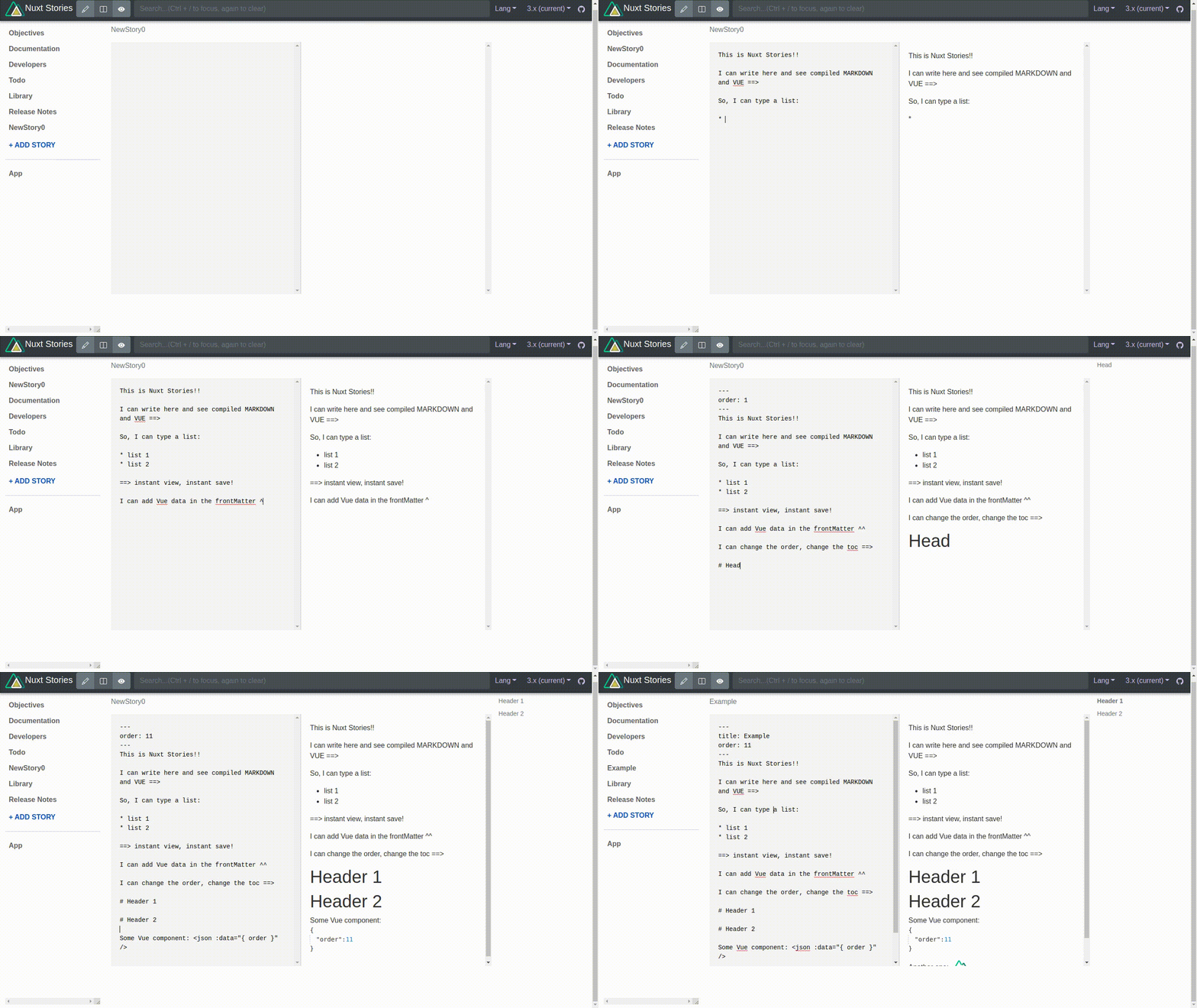
- ✅ Live markdown editing and previewing directly on the UI! Faster than Hot Module Reloading!
- ✅ Stories that get written on the UI get auto saved back to the filesystem (local dev only)
- ✅ Easily toggle the view mode in the stories header.
- ✅ Instant compiling of vue components as you type them on the UI!
- ✅ Ordering of stories using story frontMatter.
- ✅ Instant updating of table of contents as you type the headers
- ✅ Auto importing of components. Just place components in your components directory and just use them!
- ✅ Emoji support! Don't believe it? Just look at this bulleted list!
- ✅ Built-in json viewer. Just type
<json :data="[your data]"/>to see the tree. - ✅ The perfect development tool for rapidly jotting down notes, gameplans, or even writing official documentation! Documentation that is also functional.
- ✅ Built-in fetch. Quickly fetch on the client or server side, right in your story! (v2.0.13+)
- ✅ Component-browser and style-editor with direct tie-in to Google fonts.
Demo
See it in ACTION: DEMO @ Netlify (Ctrl+Click for new tab)
Setup
- Add
nuxt-storiesdependency to your project
- Nuxt 3.x
npm i -D nuxt-stories@next
- Nuxt 2.x
npm i -D nuxt-stories
You may also need to install the following deps if they didn't get installed when you first created your nuxt app:
After installing, a postinstall script will run to "gently copy" sample stories, assets, and layout(s) to your workspace to get you setup asap. It will also create a "components" directory if it doesn't already exist.
- Add
nuxt-storiesto thebuildModulessection ofnuxt.config.js
{
  buildModules: [
    'nuxt-stories'
  ],
  stories: {
    /* stories options here */
  }
}
- There is no step 3! You're good to go! Try it out!
npm run dev
Then view your stories running on your local dev server: http://localhost:3000/stories
All the stories that you edit there will get auto saved back to [project root]/stories/[language]. Read on to learn more. More explanation will follow.
Related Packages
Storybook for Nuxt and Vite: Develop Vue3 components in isolation with Hot Reloa...
Storybook for Nuxt and Vite: Develop Vue3 components in isolation with Hot Reloa...
Version History
| Version | Released | Vue | License |
|---|---|---|---|
| 3.0.18 | ^3.0 | MIT | |
| 3.0.17 | ^3.0 | MIT | |
| 3.0.16 | ^3.0 | MIT | |
| 3.0.15 | ^3.0 | MIT | |
| 3.0.14 | ^3.0 | MIT | |
| 3.0.13 | MIT | ||
| 3.0.12 | MIT | ||
| 3.0.11 | MIT | ||
| 3.0.10 | MIT | ||
| 3.0.9 | MIT | ||
| 3.0.8 | MIT | ||
| 3.0.7 | MIT | ||
| 3.0.6 | MIT | ||
| 3.0.5 | MIT | ||
| 3.0.4 | MIT | ||
| 3.0.3 | MIT | ||
| 3.0.2 | MIT | ||
| 3.0.1 | MIT | ||
| 3.0.0 | MIT | ||
| 2.5.0 | MIT | ||
| 2.0.17 | MIT | ||
| 2.0.16 | MIT | ||
| 2.0.15 | MIT | ||
| 2.0.14 | MIT | ||
| 2.0.13 | MIT | ||
| 2.0.12 | MIT | ||
| 2.0.11 | MIT | ||
| 2.0.10 | MIT | ||
| 2.0.9 | MIT | ||
| 2.0.8 | MIT |
Showing the latest 30 of 54. See every release on npm