nergous-ui-vue
| Install | |
|---|---|
npm install nergous-ui-vue |
|
| Latest Version: | 1.2.0 |
| Vue: | 3 |
| License: | MIT |
| Last Updated: | Oct 6, 2026 |
| Links: | GitHub · npm |
nergous-ui-vue — Vue 3




Token-driven component library for the nergous-ui-vue design system. Light/dark themes, three density levels, keyboard and accessibility support. Zero runtime dependencies beyond Vue 3.
The package includes components, composables, formatting helpers, design tokens and bundled fonts. Its entry point imports the token stylesheet automatically.
Preview
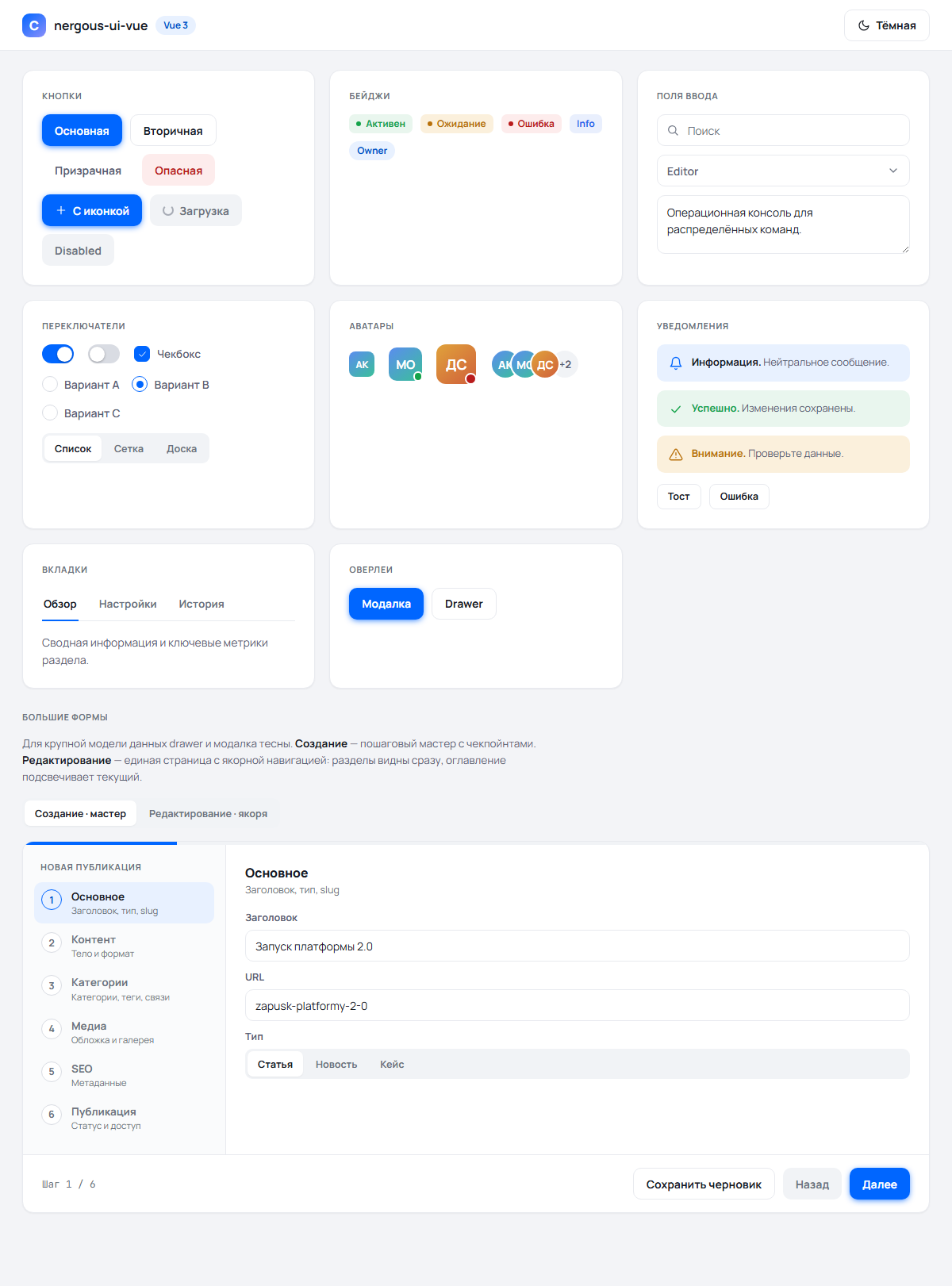
Actual Chromium screenshots of the included examples, using bundled fonts and local demo data. Click an image to inspect it at full size.
Admin shell — sidebar, member table, badges, search and pagination
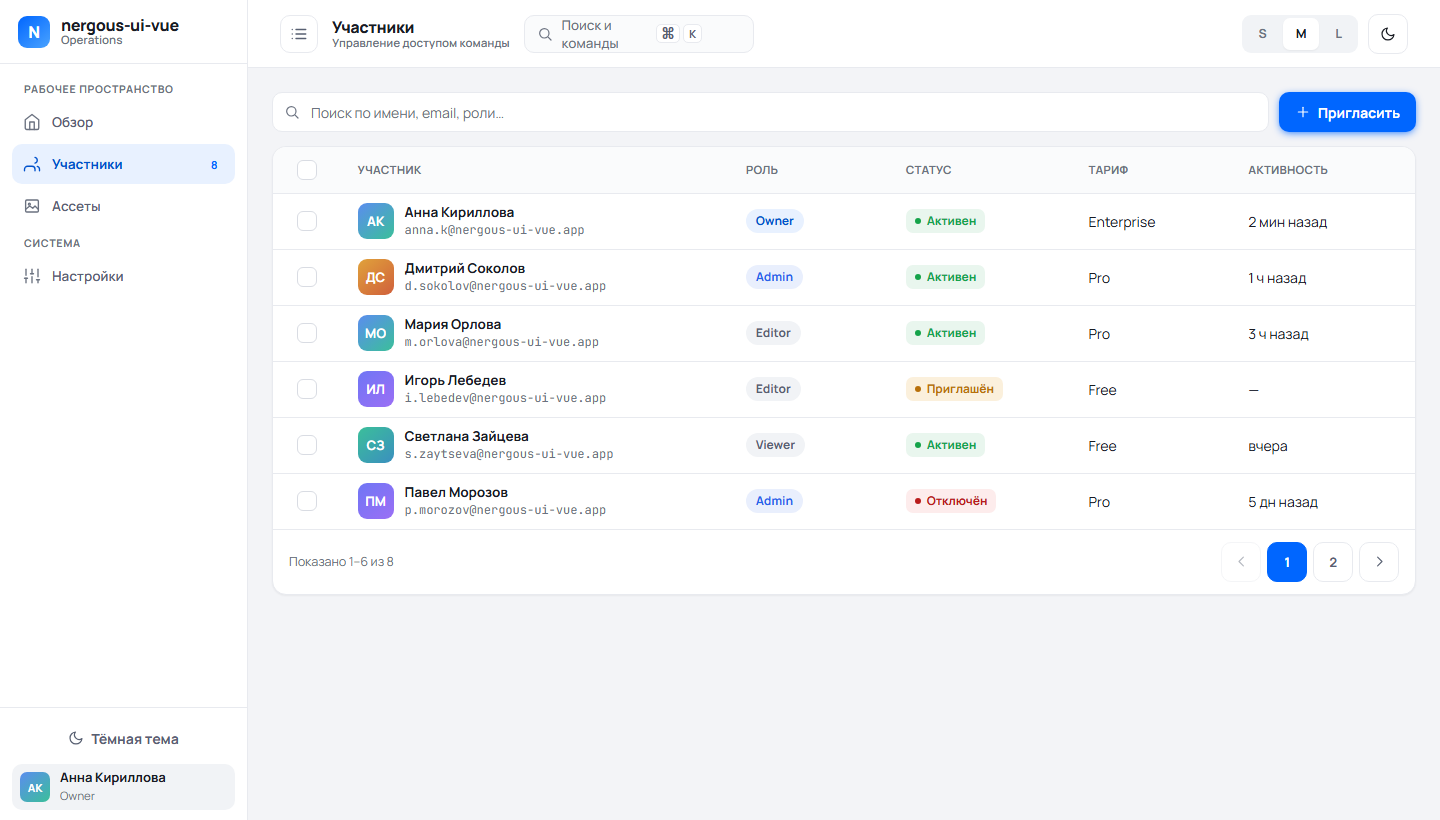
| Light theme | Dark theme |
|---|---|
 |
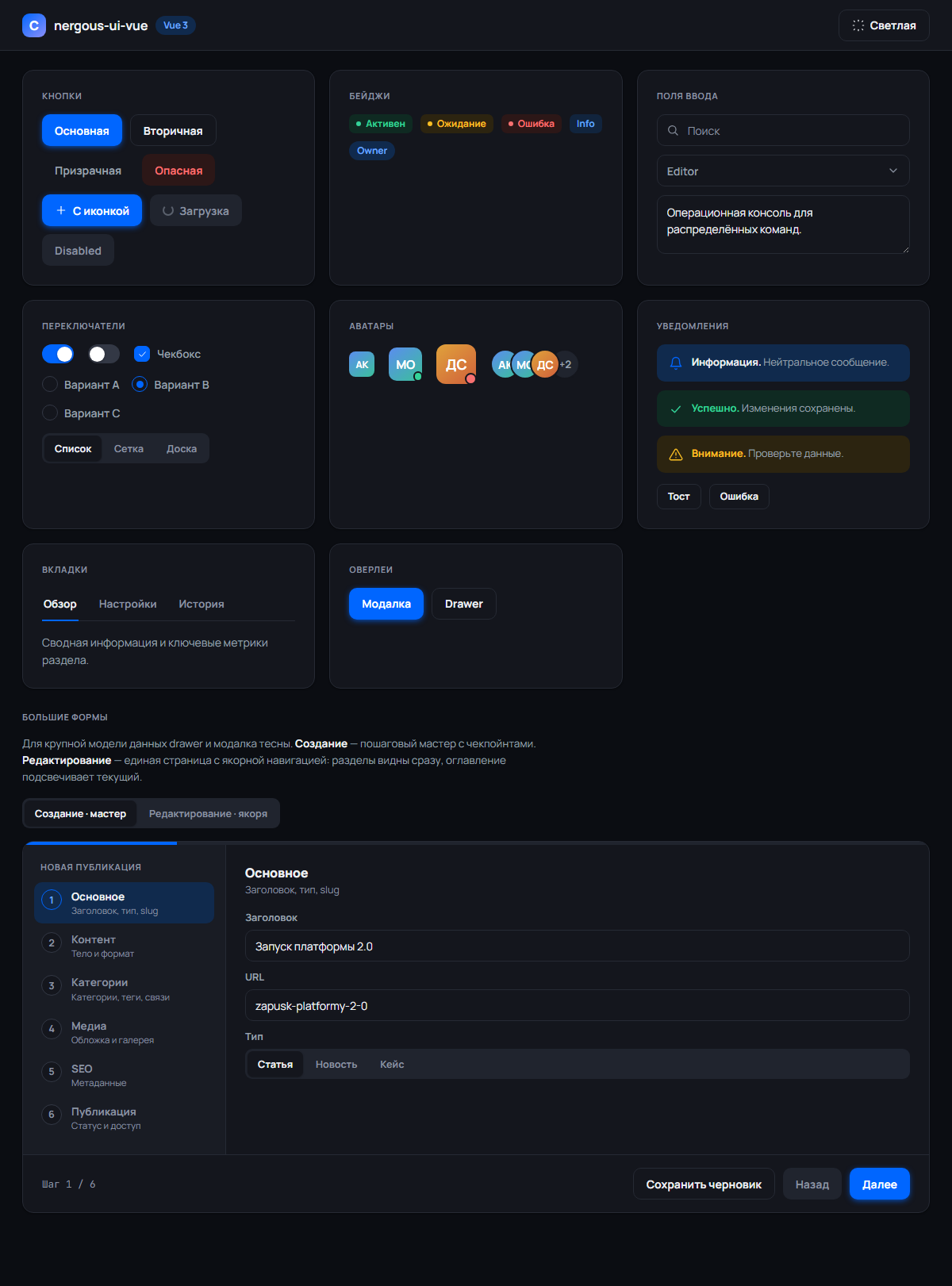 |
Buttons, inputs, selection controls, avatars, alerts, tabs and the form wizard. Screenshots are hosted in the repository and are not included in the npm archive.
Requirements
- Vue 3 (
^3.5) — the only peer dependency. - A bundler that understands
.vuesingle-file components and.cssimports (Vite, Rollup, webpack, …). Vite is the reference setup.
Install as a versioned source package
The package ships Vue SFC source, CSS, fonts and TypeScript declarations; a generated bundle is not required. Consumers need Vue 3.5+ and a Vue bundler plugin. Application routing, data access, authentication and backend integration stay in the consuming application.
For a local/unpublished release, run npm pack --ignore-scripts here and install
the resulting archive with npm install /path/to/package.tgz in each consumer.
After a registry release, install the package and commit the consumer lockfile:
npm install nergous-ui-vue
No automatic publishing is configured; packing is not publishing.
import { NButton, NModal, useTheme } from "nergous-ui-vue";
// The entry imports tokens. An explicit stylesheet import is also available:
import "nergous-ui-vue/styles";
See API contracts, migration, and
development/release checks.
index.d.ts documents all public components, props, events, scoped slots,
composables and formatter return values. TypeScript-aware editors show these
TSDoc descriptions on hover and during completion.
Usage
Use named imports from the barrel only — global registration via app.use() is
intentionally not supported (named imports give editor autocomplete and make a
page's real dependencies visible).
<script setup>
import { NButton, NBadge, useToast } from "nergous-ui-vue";

const toast = useToast();
</script>
The entry imports styles automatically. To load only the stylesheet, use
import "nergous-ui-vue/styles".
Themes and density
<script setup>
import { useTheme } from "nergous-ui-vue";

const { theme, density, toggle, setTheme, setDensity } = useTheme();
// theme   → ref("light" | "dark")
// density → ref("compact" | "comfortable" | "spacious")
</script>

<template>
  <button @click="toggle">Toggle theme</button>
  <button @click="setDensity('compact')">Compact</button>
</template>
useTheme sets data-theme and data-density on <html> and persists both to
localStorage. Every color and spacing value comes from CSS variables, so
theming and density apply automatically to your own components when you use the
tokens. State is a module-level singleton, so every useTheme() caller shares
the same reactive theme/density.
Density has three levels — compact, comfortable (default) and spacious —
selected via [data-density="…"] rules in tokens.css.
Anti-flash on first paint (optional)
To avoid a flash of the wrong theme before your JS runs, set the
data-theme/data-density attributes on <html> from an inline script in your
HTML head, reading the same localStorage keys useTheme uses. Those keys are
exported so you don't hardcode them:
import { THEME_STORAGE_KEY, DENSITY_STORAGE_KEY } from "nergous-ui-vue";
// THEME_STORAGE_KEY   === "nergous-ui-vue-theme"
// DENSITY_STORAGE_KEY === "nergous-ui-vue-density"
<script>
    var root = document.documentElement;
    var theme = "light";
    var density = "comfortable";
    try {
        theme = localStorage.getItem("nergous-ui-vue-theme") ?? theme;
        density = localStorage.getItem("nergous-ui-vue-density") ?? density;
    } catch (_) {
        // Storage can be unavailable.
    }
    root.dataset.theme = ["light", "dark"].includes(theme) ? theme : "light";
    root.dataset.density = ["compact", "comfortable", "spacious"].includes(density)
        ? density
        : "comfortable";
</script>
Toasts
Render <NToaster /> once near the app root, then push messages from anywhere:
<script setup>
import { NToaster, useToast } from "nergous-ui-vue";

const toast = useToast();
</script>

<template>
  <NToaster />
  <button @click="toast.success('Saved', 'Profile updated')">OK</button>
  <button @click="toast.error('Error', 'Could not save')">Fail</button>
</template>
useToast() returns the reactive toasts list plus:
success(title, msg)/error(title, msg)/warning(title, msg)/info(title, msg)— tone shortcuts.push(opts)—optsis a string (title only) or{ tone, title, msg, duration }; returns the new toast's id.dismiss(id)— remove a toast early.
Auto-dismiss timing depends on tone: errors linger longest (7 s), warnings 5 s,
ok/info 3.6 s, unless you pass an explicit duration (0 disables auto-dismiss).
Timers pause while the pointer or focus is inside the toaster, so messages don't
vanish mid-read (WCAG 2.2.1).
Formatting
createFormat(locale) builds locale-bound formatters on top of plain Intl —
no hardcoded language; the host app passes the active BCP-47 locale:
<script setup>
import { createFormat } from "nergous-ui-vue";

const { formatDateTime, formatDateShort, formatRelative, formatNumber } =
    createFormat("en-US");
// formatDateTime("2025-03-12T10:00:00Z") → "03/12/2025, 10:00 AM"
// formatDateShort(...) → "Mar 12, 2025" · formatRelative(...) → "2 minutes ago"
// formatNumber(1284) → "1,284"
</script>
Invalid/empty values render as an em dash (—). toDate(value) uses the native
Date parser and returns a valid Date or null; prefer ISO 8601 strings for
portable parsing. The helper is also exported standalone from the barrel.
createFormat(locale, { timeZone }) renders dates in a display time zone (for
example the site's zone instead of the browser's). formatBytes(1536) gives
locale units ("1.5 kB", "1,5 КБ"), and plural(count, forms) picks a form by
Intl.PluralRules, with # standing for the count:
plural(5, { one: "# файл", few: "# файла", many: "# файлов", other: "# файла" }).
Localization
Every built-in label defaults to English. Set the language once for the app and each label resolves as: explicit prop → provided dictionary → English default.
import { createApp } from "vue";
import { createLocale, ruMessages } from "nergous-ui-vue";

createApp(App).use(createLocale(ruMessages)).mount("#app");
Pass a partial object to override a few keys ({ "dialog.close": "Закрыть окно" }),
or a ref/getter to switch language at runtime. provideLocale(messages) does the
same for one component subtree, and useMessages() reads the effective
dictionary in your own components. The Messages type lists every key; function
keys such as "table.selection" build text from counts.
Components
| Component | Purpose | Key props / v-model |
|---|---|---|
NButton |
Button | variant (primary/secondary/ghost/danger), size (sm/md/lg), tone (''/accent/danger), icon, loading, block, as (polymorphic root — e.g. a router-link component or "a") |
NFormField |
Field wrapper: label + control + error/hint | label, error, hint, required, tag (label/div), labelId; passes an a11y contract to the nested control via useFormField (provide/inject — aria-describedby/aria-invalid/aria-required) |
NInput |
Text input | v-model, type, icon, error, placeholder |
NSelect |
Themed listbox (replaces native <select>) |
v-model (value), options: [{value,label,disabled?}], placeholder, error; aria-label/id go to the combobox |
NSelectWithSearch |
Searchable single-select listbox; English search/empty defaults | v-model (value), options: [{value,label,disabled?}], placeholder, searchPlaceholder, noResultsText, error |
NDatePicker |
Date / datetime / time / month / year picker: typed field + themed calendar popup | v-model (string in the native input format: 2026-10-06, 2026-10-06T14:30, 14:30, 2026-10, 2026), type, min, max, clearable, locale, weekStart, minuteStep, defaultTime, error |
NMultiSelect |
Checkbox-panel multi-select (list filters) | v-model (array, options order), options, label, placeholder, search; summary "First +N", highlighted while set |
NTextarea |
Multi-line input | v-model, rows |
NRichText |
Mini WYSIWYG on contenteditable |
v-model (HTML string), placeholder, error, disabled, labels (toolbar captions), tools (limit the button set), preset="full" (images, tables, alignment, undo/redo, sub/sup, full screen), pickImage/pickLink (app media pickers). With NFormField use tag="div" |
NSwitch |
Toggle | v-model (Boolean) |
NCheckbox |
Checkbox | v-model (Boolean) + label slot |
NRadioGroup |
Radio group | v-model, options: [{value,label}] |
NSegmented |
Segmented control | v-model, options: [{value,label}] |
NBadge |
Badge / status | tone, dot, pill |
NAvatar |
Avatar | name, src, size, status (online/busy/away) |
NAvatarGroup |
Avatar stack | items: string[], max |
NCard |
Card container | hover, padding |
NAlert |
Inline notice | tone, title + slot |
NTabs |
Tabs (WAI-ARIA tablist) | v-model, tabs: [{value,label}], id-base (stable id prefix that ties tabs to panels via aria-controls/aria-labelledby) |
NModal |
Modal dialog | v-model (open), title, #footer slot |
NDrawer |
Side panel | v-model (open), title, #footer slot |
NLightbox |
Fullscreen image viewer | items: [{url,caption}], v-model:index (-1 = closed), dialogLabel/closeLabel/prevLabel/nextLabel; focus trap + Escape + arrow keys |
NToaster |
Toast container | — (driven by useToast) |
NIcon |
Icon | name, size |
NConfirmDialog |
Confirmation on top of NModal |
v-model (open), title, message, confirmLabel, cancelLabel, danger, loading; @confirm, @cancel. Pair with useConfirm() |
NPopover |
Button with a non-modal panel | label, icon, width, align; default slot {close} |
NIconTooltip |
One shared tooltip for icon-only buttons (shows their aria-label) |
mount once; delay, selector; data-no-tip opts out |
Layout and data (admin shell)
| Component | Purpose | Key props / v-model |
|---|---|---|
NSidebar |
Collapsible sidebar | v-model (active id), groups: [{label,items:[{id,label,icon,badge}]}], collapsed, brand: {name,sub,glyph,logo}, #footer slot |
NBreadcrumbs |
Location trail | items: [{label,href?}], linkAs (router link component); last item is aria-current="page" |
NToolbar |
List toolbar | slots #search (grows), default (filters), #actions (far end) |
NFilterChips |
Active filters as removable chips | filters: [{key,label,value}]; @remove(key), @reset |
NColumnPicker |
Popover to hide optional table columns | columns, v-model:hidden; pair with useColumnVisibility() |
NActionBar |
Sticky form save bar | dirty, idleText, dirtyText, sticky; actions in the default slot |
NSortHandle |
Drag/keyboard grip for useSortable rows |
label, active |
NTopbar |
Top bar | title, subtitle, @toggle event; slots #left, default, #right |
NBrand |
Logo lockup: glyph + name | glyph, logo (image URL instead of the glyph; falls back to the glyph if it fails), name, sub, size (sm/md/lg), showSub (hide text for an icon-only rail) |
NStepper |
Vertical step rail | v-model (active step), steps: [{value,label,sub}], completed (explicit done-set; default = linear by index), navLabel |
NWizard |
Stepped-form shell (create) | v-model, steps, completed, title (rail eyebrow), progress; scoped default slot {step,index,count} for the active panel, #footer slot {index,count,isFirst,isLast,prev,next,goTo} |
NAnchorNav |
Section table-of-contents | v-model (active section), sections: [{value,label,count}], navLabel — presentational; pair with useScrollSpy or use NAnchoredForm |
NAnchoredForm |
Anchored single-page editor shell (edit) | v-model, sections: [{value,label,count}], sectionsLabel, height, offset; slots #section-<value> (fields, scoped {section,index}), #header, #status, #savebar. Owns the scroll container + scroll-spy |
NDataTable |
Data table | columns, rows, selectable, v-model:selected, page-size; controlled sorting via sort-key/sort-dir + manual-sort (server-side; the header syncs the arrow and aria-sort); "select all N" for server lists via total + v-model:all-matching; stacked turns rows into cards below 640px; slots #cell-<key>, #bulk, #empty; events @row-click, @sort-change |
NPagination |
Pagination | v-model:page, pages, optional jumpable direct page input; optional rows-per-page selector via v-model:page-size + page-sizes; hide-on-single-page (+ total) hides it while the list fits one page |
NStatCard |
KPI card | label, value, delta, trend (up/down), spark: number[], icon |
NActivityRow |
Activity-feed row | tone (ok/info/danger/warn/accent), icon, actor, verb, object, tag, time, meta. Presentational — the localized verb/tag is passed in by the host |
NDropzone |
Drag-and-drop upload | accept, multiple, hint; @files event |
NEmptyState |
Empty state | icon, title, description + action slot |
NProgress |
Progress bar | value (0–100), label, showValue, tone |
NSkeleton |
Skeleton placeholder | width, height, circle |
NSpinner |
Spinner | size, width |
NTooltip |
Tooltip | content, placement + trigger slot |
NDropdown |
Dropdown menu | items: [{label,icon,danger,divider,action}], align; trigger slot; @select event |
NCommandPalette |
Command palette (⌘K) | v-model (open), commands: [{label,icon,hint,action}], shortcut; @run event |
A complete admin shell is assembled in examples/AdminApp.vue (sidebar + topbar
- KPIs + table with bulk actions + drawer + modal + command palette).
Large forms. When a record outgrows a drawer or modal, reach for the two
big-form shells: NWizard (a stepped create flow) and NAnchoredForm (a single
scrollable edit page with a sticky table of contents). examples/App.vue shows
both behind an NSegmented switch. The useScrollSpy(containerRef, { offset })
composable — which powers NAnchoredForm — is also exported for anchored pages
you wire yourself; it returns { active, scrollTo } and keys off data-spy
attributes on the scroll container's children.
Pass { scroller: "ancestor" } when the page (or the nearest scrolling ancestor)
scrolls instead, so a long form keeps normal page flow.
Lists. NToolbar + NMultiSelect + NFilterChips + NDataTable +
NPagination cover a filtered server list; useColumnVisibility with
NColumnPicker lets users hide columns, and useSortable with NSortHandle adds
drag and keyboard reordering. useHotkeys registers layout-independent
shortcuts, and installEnterSubmit() lets Enter press the
[data-enter-submit] button of the current form or dialog.
Example
<script setup>
import { ref } from "vue";
import {
    NCard,
    NBadge,
    NInput,
    NSegmented,
    NButton,
    NModal,
} from "nergous-ui-vue";

const open = ref(false);
const q = ref("");
const role = ref("editor");
</script>

<template>
  <NCard>
    <NBadge tone="ok" dot>Active</NBadge>
    <NInput v-model="q" icon="search" placeholder="Search" />
    <NSegmented v-model="role" :options="[
      { value: 'admin', label: 'Admin' },
      { value: 'editor', label: 'Editor' },
    ]" />
    <NButton variant="primary" icon="plus" @click="open = true">Create</NButton>

    <NModal v-model="open" title="New member">
      Form content…
      <template #footer="{ close }">
        <NButton variant="secondary" block @click="close">Cancel</NButton>
        <NButton variant="primary" block @click="close">Save</NButton>
      </template>
    </NModal>
  </NCard>
</template>
Tokens
Every value lives in styles/tokens.css as a CSS variable (--accent,
--surface, --radius-md, --sp-4, …). Use them in your own components to stay
inside the system; they react to the active theme and density for free:
.my-block {
  background: var(--surface);
  border-radius: var(--radius-lg);
  padding: var(--sp-4);
}
Selects inside forms and dialogs
Use the options prop and v-model; native <option> children are not supported.
Option clicks suppress the wrapping label's default activation so picking an option
closes the list without reopening it. Popups are teleported outside scrolling bodies,
within their owning overlay when one exists. Escape closes an open select before
dismissing the dialog. Style component classes, not consumer ancestor selectors.
NSelectWithSearch defaults to searchPlaceholder="Search…" and
noResultsText="No results". Pass localized strings at the call site.
NDataTable accepts rowClass(row) for consumer-defined row highlighting;
NToaster centers single-line notifications vertically.
Demos
examples/App.vue— a showcase of the base components.examples/AdminApp.vue— a full admin app built on the shell components (sidebar, topbar, table, KPIs, dropzone, command palette, modal, drawer, toasts).
Examples live in the repository and are excluded from the npm package. Replace
their ../index.js import with nergous-ui-vue when copying into a consumer.
Copy either one into a fresh Vite project as the root App.vue to see the
library in action.
— MIT
Related Packages
Blessing UI — Themed Flat Interface. Flat by design, raised with Vue, blessed fo...
Adkompas UI — design tokens, Vuetify theme preset, framework-agnostic CSS, and p...
FusionUI — a soft, modern Vue 3 design library. Accessible, token-driven and SSR...
Version History
| Version | Released | Vue | License |
|---|---|---|---|
| 1.2.0 | ^3.5.0 | MIT | |
| 1.1.0 | ^3.5.0 | MIT | |
| 1.0.7 | ^3.5.0 | MIT | |
| 1.0.6 | ^3.5.0 | MIT | |
| 1.0.5 | ^3.5.0 | MIT | |
| 1.0.4 | ^3.5.0 | MIT | |
| 1.0.3 | ^3.5.0 | MIT |