nepali-datepicker-pro
| Install | |
|---|---|
npm install nepali-datepicker-pro |
|
| Latest Version: | 0.5.0 |
| Vue: | 3 |
| License: | MIT |
| Last Updated: | Oct 12, 2026 |
| Links: | GitHub · npm |
nepali-datepicker-pro





A framework-agnostic Bikram Sambat (BS) ↔ Gregorian (AD) date picker, with a same-screen time picker, a range picker, month, year, time-only and multi-date pickers — built for real production forms, not just demos.
Zero runtime dependencies. Works from plain <script> tags, jQuery, Vue 3, React, and as custom elements (Angular, Svelte, Astro, plain HTML) — same core, every entry point.
📅 Date & Time   —  BS/AD toggle, 12h/24h wheel time picker (two-step on phones), keyboard-editable input
📆 Date Range    —  presets rail, fiscal-year helpers, two months side by side, min/max span
🗓️  Month         —  pick a BS month, get the AD start/end range for reporting
📘 Year          —  pick a BS or AD year, get its first/last day
🕐 Time          —  time of day only, 12h/24h, optional seconds
📌 Multi-date    —  pick several days, with an optional maximum
Date Picker
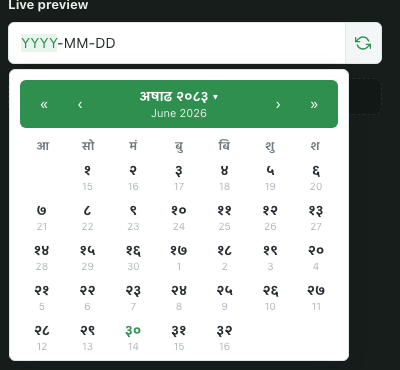
Date Picker |
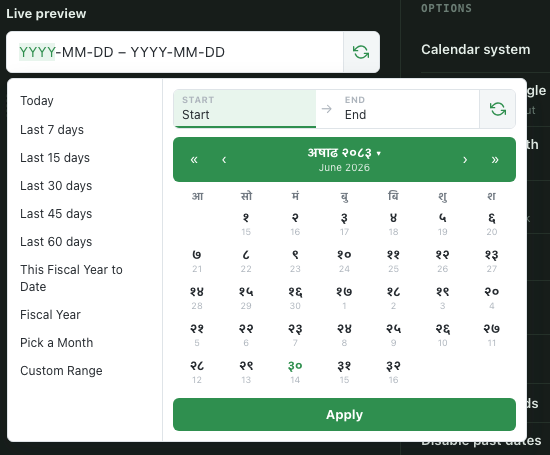
Date Range Picker |
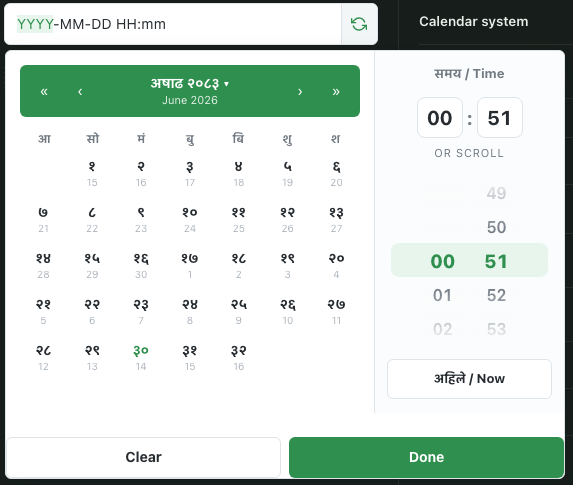
Date Time Picker |
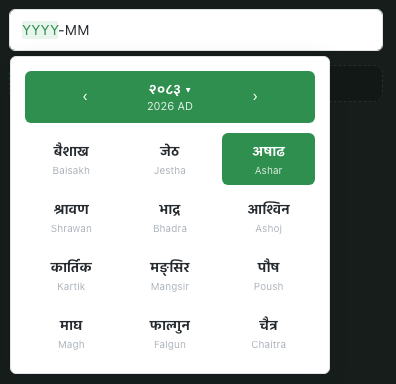
Month Picker |
Table of contents
- Why this exists
- Features
- Install
- Quick start
- Pickers
- Sending the right value to your backend
- Shared options
- Holidays & events
- Language & script
- Forms & validation
- One calendar for the whole app
- Events
- Keyboard
- Accessibility
- Styling
- Bundle size
- TypeScript
- Browser support
- AI agent skill
- Contributing
- License
📖 Full documentation, with live configurable demos: https://nepali-datepicker-pro.vercel.app/
Why this exists
Most "Nepali date picker" packages on npm are jQuery plugins from 2016, ship no types, hard-code the display format, and give you no sane way to actually get an AD date back to your server. This package was built to solve that properly:
- One conversion engine, five bindings. The BS↔AD math lives once in the core; React/Vue/jQuery/vanilla are thin wrappers, so behavior never drifts between frameworks.
- The value you display is never assumed to be the value you submit.
valueFormat,submitName, andaltFieldexist specifically so a BS-mode picker can still hand your Laravel/Express backend a clean AD ISO string without you writing conversion glue. - Accessible by default. Segmented, keyboard-editable inputs (arrow keys to step, digits to type, Nepali or ASCII numerals) instead of a read-only trap that forces a mouse.
- No dependencies. No dayjs, no moment, no jQuery required unless you're using the jQuery binding.
Features
- 🔁 BS ⇄ AD mode — a swap button on the input, or pick one calendar for the whole app and hide the switcher (
setDefaults({ mode, allowModeToggle: false })). The field shows a small "BS"/"AD" label so users always know which calendar they're typing in - 🕐 Time picker — 12-hour (default) or 24-hour, optional seconds, minute-step control, min/max time, disabled times, wheels or native dropdowns. Date and time side by side on wide screens; on phones it's two steps, the date then the time on big wheels
- 📏 Date range picker — presets rail (incl. "Pick a Month") with built-in presets you can pick by id, configurable Nepali fiscal year start month, two months side by side, min/max span, a time for each end, auto-apply
- 🗓️ Month, year, time-only and multi-date pickers — the month picker returns the full AD
{ start, end }range for a BS month, ideal for payroll/report filters; the year picker does the same for a BS or AD year - 🎉 Holidays & events — mark holidays (red) and events (a dot) from a list or an async loader; Nepal's fixed-date national days ship as
nepali-datepicker-pro/holidays. Custom day cells withdayCellProps - 🌐 Language & script — UI in English, Nepali, or both (
language); every string overridable; BS in Latin or AD in Devanagari (script); Nepali or English digits and month names (locale) - 🚫 Disabling —
minDate/maxDate(absolute or relative, e.g.'+7d'),disabledWeekdays,disabledDates(date) => boolean,dayCellProps,minMonth/maxMonth/disabledMonths - 📝 Forms & validation —
requiredworks with native form validation, refused typed values show a message linked to the field,onInvalid,disabled, form reset restores the initial value, paste a whole date in almost any format - 🎯 Decoupled machine value —
valueFormat: 'iso' | 'iso-bs' | 'timestamp', plussubmitName/altFieldto wire straight into a native<form>POST - ⌨️ Keyboard-first — type or arrow-key through the field's segments; Alt+↓ moves into the calendar, where arrows / PageUp / PageDown / Home / End move by day, week, month or year, Enter picks, Escape closes; Ctrl/⌘+Backspace clears. Month/year grids and time wheels work with arrows too
- ♿ Accessible — WCAG 2.2 AA, checked by axe-core in CI: an ARIA grid with full spoken day names, live-region announcements, AA contrast, a modal bottom sheet on phones
- 🌓 Themeable — CSS custom properties, a dark theme (
theme: 'dark' | 'auto'ordata-ndp-theme), three densities, or an always-visibleinlinecalendar - 🖼️ Portal-based popup —
appendTo,opens,dropsfor layout-safe positioning inside modals/tables - 📱 Phone-friendly — on narrow screens (≤ 560px) the popup becomes a bottom sheet with a tap-to-close backdrop, range presets turn into a swipeable chip row, swipe to change month, and the year view is a single scrollable list of every supported year
- 🧩 Every stack —
vanilla,/react,/vue,/jquery,/element(custom elements), and a UMD build for a plain<script>tag - 📦 Tree-shakeable ESM + CommonJS for every subpath + UMD, full
.d.tstypes, single CSS file
Install
npm install nepali-datepicker-pro
# or
pnpm add nepali-datepicker-pro
# or
yarn add nepali-datepicker-pro
React and Vue are optional peer dependencies — only required if you import nepali-datepicker-pro/react or nepali-datepicker-pro/vue. The vanilla/UMD/jQuery bindings pull in nothing extra.
Don't forget the stylesheet, once, anywhere in your app:
import 'nepali-datepicker-pro/style.css';
Quick start
Vanilla JS
import { mountDateTimePicker } from 'nepali-datepicker-pro';
import 'nepali-datepicker-pro/style.css';

mountDateTimePicker(document.querySelector('#picker'), {
  mode: 'BS',
  withTime: true,
  valueFormat: 'iso',
  onChange: (result) => console.log(result.formatted, result.value),
});
HTML / <script> tag
No build step required — good for a legacy Blade/PHP page or a CMS.
<link rel="stylesheet" href="https://unpkg.com/nepali-datepicker-pro/dist/style.css">
<script src="https://unpkg.com/nepali-datepicker-pro/dist/nepali-datepicker-pro.umd.cjs"></script>

<input data-nepali-datepicker data-with-time="true" data-value-format="iso" readonly>
<script>NepaliPicker.autoInit()</script>
Only need the date / date-time and range pickers? Load the core build instead. It's about 35 KB gzipped instead of 39 KB, with the same global and API minus the month, year, time-only and multi-date pickers:
<script src="https://unpkg.com/nepali-datepicker-pro/dist/nepali-datepicker-pro.core.umd.cjs"></script>
data-*auto-init covers the date-time (data-nepali-datepicker), range (data-nepali-daterange) and month (data-nepali-monthpicker) pickers, and only the options listed in each picker's "HTML attrs" line below. Anything else (callbacks,disabledDates, etc.) needs the JS API. For the year, time and multi-date pickers without a build step, callNepaliPicker.mountYearPicker(el, options)(and friends), or use the custom elements.autoInit()can be called again after AJAX/Turbo swaps in new content; fields it already set up are skipped.
React
Every React component (NepaliDateTimePicker, NepaliDateRangePicker, NepaliMonthPicker, NepaliYearPicker, NepaliTimePicker, NepaliMultiDatePicker) accepts every picker option as a prop — no options wrapper object needed. Event callbacks (onChange, onApply, onClear, onCancel, onInvalid, onOpen, onClose, onChangeMonthYear) never go stale, so inline arrow functions are fine there. Other options are compared per prop when you re-render, and only the ones that changed are applied. Function-valued options such as disabledDates count as changed when you pass a new function, so wrap them in useCallback to avoid a refresh on every render. A changed value prop replaces the picker's value silently (no change event). The bundle starts with 'use client', so it works in the Next.js App Router.
import { NepaliDateTimePicker, NepaliDateRangePicker, NepaliMonthPicker } from 'nepali-datepicker-pro/react';
import 'nepali-datepicker-pro/style.css';

// Single date + time
function AppointmentForm() {
  return (
    <NepaliDateTimePicker
      withTime
      valueFormat="iso"
      submitName="appointment_date"
      onChange={(result) => console.log(result)}
    />
  );
}

// Date range
function ReportFilter() {
  return (
    <NepaliDateRangePicker
      mode="BS"
      numberOfMonths={2}
      onApply={(result) => console.log(result.startValue, result.endValue)}
    />
  );
}

// Month picker
function PayrollFilter() {
  return (
    <NepaliMonthPicker
      locale="ne"
      submitName={{ start: 'from_date', end: 'to_date' }}
      onChange={(result) => console.log(result.start, result.end)}
    />
  );
}
ref and inputProps. Every component takes a ref (type PickerHandle) for imperative control, and inputProps puts attributes such as id, name, placeholder or aria-* on the <input> the component creates, so a <label htmlFor> points at it:
import { useRef } from 'react';
import { NepaliDateTimePicker, type PickerHandle } from 'nepali-datepicker-pro/react';
import type { DateTimePickerOptions, DateTimeResult } from 'nepali-datepicker-pro';

function DobField() {
  const picker = useRef<PickerHandle<DateTimeResult, DateTimePickerOptions, Date | DateTimeResult>>(null);
  return (
    <>
      <label htmlFor="dob">Date of birth</label>
      <NepaliDateTimePicker ref={picker} inputProps={{ id: 'dob' }} required maxDate="today" />
      <button type="button" onClick={() => picker.current?.show()}>Open</button>
      <button type="button" onClick={() => picker.current?.clear()}>Clear</button>
    </>
  );
}
ref member |
Does |
|---|---|
show() / hide() |
Open / close the popup |
clear() |
Clear as the user would (fires onClear) |
getValue() / setValue(v) |
Read the current result / set a value (setValue(null) clears silently) |
update(patch) |
Patch options |
focus() |
Focus the field |
instance |
The underlying PickerInstance (null before mount / after unmount) |
Vue 3
Every Vue component (NepaliDateTimePicker, NepaliDateRangePicker, NepaliMonthPicker, NepaliYearPicker, NepaliTimePicker, NepaliMultiDatePicker) supports v-model for two-way binding and emits typed events you can listen to with @event in the template. Options are passed via the :options prop. v-model is the controlled value; a value inside :options is ignored after mount.
<script setup lang="ts">
import { ref } from 'vue';
import {
  NepaliDateTimePicker,
  NepaliDateRangePicker,
  NepaliMonthPicker,
} from 'nepali-datepicker-pro/vue';
import type { DateTimeResult, DateRangeResult, MonthResult } from 'nepali-datepicker-pro';
import 'nepali-datepicker-pro/style.css';

const appointmentDate = ref<Date | null>(null);
const reportRange = ref<{ start: Date; end: Date } | null>(null);
const payrollMonth = ref<MonthResult | null>(null);
</script>

<template>
  <!-- Single date + time — v-model syncs the AD Date -->
  <NepaliDateTimePicker
    v-model="appointmentDate"
    :options="{ mode: 'BS', withTime: true, valueFormat: 'iso' }"
    @change="(r: DateTimeResult) => console.log(r)"
    @open="() => console.log('opened')"
    @close="() => console.log('closed')"
    @changeMonthYear="(y, m) => console.log(y, m)"
  />

  <!-- Date range — v-model syncs { start, end } -->
  <NepaliDateRangePicker
    v-model="reportRange"
    :options="{ mode: 'BS', numberOfMonths: 2 }"
    @change="(r: DateRangeResult) => console.log(r)"
  />

  <!-- Month picker — v-model syncs the full MonthResult -->
  <NepaliMonthPicker
    v-model="payrollMonth"
    :options="{ locale: 'ne' }"
    @change="(r: MonthResult) => console.log(r.start, r.end)"
  />
</template>
Vue v-model and events reference
| Component | v-model |
Events |
|---|---|---|
NepaliDateTimePicker |
AD Date |
@change, @clear, @invalid, @open, @close, @changeMonthYear |
NepaliDateRangePicker |
{ start, end } |
@change, @clear, @invalid, @cancel, @open, @close |
NepaliMonthPicker |
MonthResult (a plain { year, month } works as input) |
@change, @clear, @invalid, @open, @close |
NepaliYearPicker |
number (the year) |
@change, @clear, @invalid, @open, @close |
NepaliTimePicker |
{ hour, minute, second } |
@change, @clear, @invalid, @open, @close |
NepaliMultiDatePicker |
Date[] |
@change, @clear, @invalid, @open, @close |
@invalid receives (reason, message) — see Forms & validation. @cancel fires when the user dismisses the range popup with Cancel.
Template ref. Each component expose()s the same API as the React ref (type PickerExpose): show, hide, clear, getValue, setValue, update, focus, and instance.
<script setup lang="ts">
import { ref } from 'vue';
import { NepaliDateRangePicker } from 'nepali-datepicker-pro/vue';

const picker = ref<InstanceType<typeof NepaliDateRangePicker> | null>(null);
</script>

<template>
  <NepaliDateRangePicker ref="picker" :options="{ numberOfMonths: 2 }" @cancel="() => console.log('cancelled')" />
  <button type="button" @click="picker?.show()">Pick a range</button>
</template>
jQuery
The jQuery plugin is installed automatically when this package is imported and window.jQuery is available. If jQuery loads after the module (e.g. via a <script> tag after the bundle), the plugin waits for DOMContentLoaded before registering itself.
<script src="https://code.jquery.com/jquery-3.7.1.min.js"></script>
<script src="https://unpkg.com/nepali-datepicker-pro/dist/nepali-datepicker-pro.umd.cjs"></script>

<script>
  // Init
  $('#picker').nepaliDateTimePicker({ withTime: true, valueFormat: 'iso' });

  // Update a single option
  $('#picker').nepaliDateTimePicker('option', 'minDate', new Date());

  // Read the current value (first element, jQuery convention)
  const result = $('#picker').nepaliDateTimePicker('getValue');

  // Set a value programmatically
  $('#picker').nepaliDateTimePicker('setValue', undefined, new Date());

  // Show / hide / destroy
  $('#picker').nepaliDateTimePicker('show');
  $('#picker').nepaliDateTimePicker('hide');
  $('#picker').nepaliDateTimePicker('destroy');

  // React to a pick: pass a callback in the init options...
  $('#picker').nepaliDateTimePicker({ onChange: (result) => console.log(result) });

  // ...or listen for the DOM event natively. Not with jQuery's .on(): jQuery reads
  // ".nepaliDatePicker" as an event namespace, so the handler would never fire.
  document.getElementById('picker')
    .addEventListener('select.nepaliDatePicker', (e) => console.log(e.detail));
</script>
The UMD <script> bundle includes the plugin. When you bundle with npm instead, import the jQuery entry once: import 'nepali-datepicker-pro/jquery'. That registers the plugin on window.jQuery. If your jQuery isn't on window (e.g. import $ from 'jquery'), register it explicitly:
import $ from 'jquery';
import { install } from 'nepali-datepicker-pro/jquery';

install($);
jQuery methods reference
| Method | Returns | Description |
|---|---|---|
'getValue' |
result or undefined |
Value of the first matched element |
'getState' |
state or undefined |
Internal state of the first matched element |
'setValue' |
$ (chainable) |
('setValue', undefined, newValue) |
'option' |
$ (chainable) |
('option', 'minDate', new Date()) |
'show' |
$ (chainable) |
Open the popup |
'hide' |
$ (chainable) |
Close the popup |
'clear' |
$ (chainable) |
Clear the value as the user would (fires onClear) |
'destroy' |
$ (chainable) |
Tear down the instance and clean up |
Plugins: nepaliDateTimePicker, nepaliDateRangePicker, nepaliMonthPicker, nepaliYearPicker, nepaliTimePicker, nepaliMultiDatePicker.
Custom elements
import 'nepali-datepicker-pro/element' registers six custom elements. Use them from Angular, Svelte, Astro, Lit or plain HTML:
<script type="module">
  import 'nepali-datepicker-pro/element';
  import 'nepali-datepicker-pro/style.css';
</script>

<form>
  <nepali-date-picker name="dob" mode="BS" max-date="today" required></nepali-date-picker>
  <nepali-date-range-picker name="period" number-of-months="2"></nepali-date-range-picker>
  <nepali-month-picker name="month"></nepali-month-picker>
  <nepali-year-picker name="year"></nepali-year-picker>
  <nepali-time-picker name="at" time-format="24h"></nepali-time-picker>
  <nepali-multi-date-picker name="days" max-dates="5"></nepali-multi-date-picker>
</form>
| Tag | Picker |
|---|---|
<nepali-date-picker> |
mountDateTimePicker |
<nepali-date-range-picker> |
mountDateRangePicker |
<nepali-month-picker> |
mountMonthPicker |
<nepali-year-picker> |
mountYearPicker |
<nepali-time-picker> |
mountTimePicker |
<nepali-multi-date-picker> |
mountMultiDatePicker |
- Attributes map to options in kebab-case:
min-date→minDate,with-time→withTime, and so on. Supported:mode,language,theme,density,script,locale,time-format,display-format,value-format,min-date,max-date,opens,drops,invalid-behavior,time-input-style; numbersminute-step,number-of-months,fiscal-start-month,max-range-span-days,min-range-span-days,max-dates,min-year,max-year,week-starts-on; booleans (present, or"true"/"false")with-time,with-seconds,inline,required,disabled,allow-mode-toggle,clearable,allow-input,auto-apply,show-secondary-calendar,show-calendar-suffix,linked-calendars. Attribute changes apply live. namebecomessubmitName, so the machine value submits with the surrounding<form>.placeholdergoes on the field.valuetakesYYYY-MM-DD(date),YYYY-MM-DD,YYYY-MM-DD(range, multi-date),YYYY-MM(BS month),YYYY(year) orHH:mm[:ss](time).- Richer options (functions,
events,presets,strings) go on theoptionsproperty:el.options = { disabledDates: (d) => d.getDay() === 6 }. - DOM events on the element:
change(detail= the result),clear,open,close,invalid(detail={ reason, message }). - Properties and methods:
value(get the result / set a value),instance,show(),hide(),clear(). - Light DOM, no shadow root: the theme's CSS variables and your page styles apply. Put your own
<input>inside the element to have it used as the field; otherwise one is created.
Pickers
NepaliDateTimePicker
Single date, optional same-screen time picker. Click the header to jump by month/year.
| Option | Type | Default | Description |
|---|---|---|---|
mode |
'BS' | 'AD' |
'BS' |
Calendar system the picker opens in |
allowModeToggle |
boolean |
true |
Show the BS/AD swap button on the input |
showSecondaryCalendar |
boolean |
true |
Show the other calendar as a small hint on the header, month/year grid, and day cells. false shows only the active mode |
value / defaultValue |
Date | null |
— | Controlled / initial selected date |
withTime |
boolean |
false |
Show the time picker (keyboard-accessible spinbuttons + wheel) |
timeFormat |
'12h' | '24h' |
'12h' |
Clock style when withTime is on (12-hour with AM/PM by default; the submitted value is always 24-hour ISO) |
minuteStep |
number |
1 |
Increment of the minute spinner |
minTime / maxTime |
{ hour, minute } |
— | Clamp the selectable time of day |
disabledTimes |
(h, m) => boolean |
— | Disable specific hours/minutes |
defaultTime |
{ hour, minute } |
now | Time used when withTime turns on with no value |
locale |
'ne' | 'en' |
'en' |
Digit and month-name language |
withSeconds |
boolean |
false |
Also pick seconds (needs withTime) |
timeInputStyle |
'spinner' | 'dropdown' |
'spinner' |
'spinner': typeable fields plus scroll wheels. 'dropdown': native selects — compact, and familiar to screen-reader users |
minDate / maxDate |
Date | 'today' | '+7d' |
— | Earliest / latest selectable day (relative tokens allowed) |
disabledWeekdays |
number[] |
[] |
0 = Sunday … 6 = Saturday |
disabledDates |
(date) => boolean |
— | Disable a specific day |
dayCellProps |
(date, bs) => DayCellProps | null |
— | Per-day { disabled, className, title, badge, holiday } — see Holidays & events |
beforeShowDay |
(date) => { selectable, cssClass?, tooltip? } |
— | jQuery-UI-style alias for dayCellProps |
events |
CalendarEvent[] | loader |
— | Holidays and events to mark on the calendar — see Holidays & events |
weekStartsOn |
0–6 |
0 (Sunday) |
First column of the week |
weekendDays |
number[] |
[6] (Saturday) |
Days shown in red as the weekend |
displayFormat |
string |
YYYY-MM-DD[ HH:mm] |
dayjs-style tokens for the input text. A numeric format also sets the typing order: DD/MM/YYYY is typed day first |
showButtonPanel |
{ today?, clear?, close? } |
Today chip; plus Clear/Done with withTime |
Choose the footer buttons, including in date-only mode |
closeOnSelect |
boolean |
true unless withTime |
Close the popup right after a day is picked |
allowInput |
boolean |
true |
Segmented, keyboard-editable input instead of read-only |
valueFormat |
see below | 'iso' |
Shape of the machine value |
submitName |
string |
— | Hidden <input name> carrying the machine value |
altField |
string | HTMLElement |
— | Write the machine value into an existing field |
altFormat |
ValueFormat |
valueFormat |
Override format for altField/submitName only |
Events: onChange(result), onChangeMonthYear(year, month), onClear(), onInvalid(reason, message), onOpen(), onClose(), and bubbling DOM events select.nepaliDatePicker / clear.nepaliDatePicker.
HTML attrs: data-with-time, data-with-seconds, data-time-format, data-minute-step, plus the shared data-mode, data-language, data-theme, data-display-format, data-min-date, data-max-date, data-inline, data-required, data-value-format, data-submit-name, data-alt-field.
NepaliDateRangePicker
Start/end range with a presets rail, fiscal-year helpers, and a BS/AD switch.
| Option | Type | Default | Description |
|---|---|---|---|
mode |
'BS' | 'AD' |
'BS' |
Calendar system the range opens in |
allowModeToggle |
boolean |
true |
Show the BS/AD swap button |
showSecondaryCalendar |
boolean |
true |
Show the other calendar as a small hint on the header, month/year grid, and day cells. false shows only the active mode |
value / defaultValue |
{ start, end } | null |
— | Controlled / initial range |
presets |
Array<PresetDefinition | BuiltInPresetId> | 'default' | false |
'default' |
Quick-range rail, includes "Pick a Month"; false hides it. Mix built-in ids with your own definitions (see below) |
ranges |
Record<string, [Date, Date]> |
— | daterangepicker.js-style fixed ranges |
defaultPresetId |
string | null |
— | Preset highlighted when the popup opens |
fiscalStartMonth |
number (1–12) |
4 |
BS month the fiscal year starts (Shrawan = 4) |
fiscalYearLookback |
number |
5 |
How many fiscal years (current and past) the fiscal-year submenu lists |
numberOfMonths |
1 | 2 |
1 |
Months shown side by side (stacked on phones) |
linkedCalendars |
boolean |
true |
With two months: page them together, or false to navigate each one independently |
alwaysShowCalendars |
boolean |
true |
false shows only the presets until "Custom Range" is chosen |
autoApply |
boolean |
false |
Commit on the second click instead of an Apply button |
minDate / maxDate |
Date | 'today' | '-1y' |
— | Earliest / latest selectable day |
disabledWeekdays |
number[] |
[] |
Grey-out weekdays |
disabledDates |
(date) => boolean |
— | Disable a specific day |
dayCellProps / beforeShowDay / events / weekStartsOn / weekendDays |
Same as the date-time picker | ||
maxRangeSpanDays |
number | null |
— | Longest allowed range, in days (counting both ends) |
minRangeSpanDays |
number | null |
— | Shortest allowed range, in days (counting both ends) |
allowDisabledInRange |
boolean |
false |
Allow a range with disabled days inside it. By default the end can't be picked past the first disabled day |
withTime |
boolean |
false |
Pick a time for each end of the range |
timeFormat |
'12h' | '24h' |
'12h' |
Clock style with withTime |
minuteStep |
number |
1 |
Minute increment with withTime |
locale |
RangePickerLocale |
— | daterangepicker-style block: format, separator, applyLabel, cancelLabel, customRangeLabel, daysOfWeek, monthNames, firstDay (weekLabel is deprecated and ignored) |
autoUpdateInput |
boolean |
true |
Write the applied range back into the input text |
allowInput |
boolean |
true |
Segmented YYYY-MM-DD – YYYY-MM-DD typing |
displayFormat |
string |
YYYY-MM-DD |
dayjs-style tokens for each bound |
valueFormat |
see below | 'iso' |
Shape of the machine value(s) |
submitName |
string | { start, end } |
— | One combined field, or a start/end pair |
altField |
string | HTMLElement | { start, end } |
— | Same, targeting existing field(s) |
altFormat |
ValueFormat |
valueFormat |
Override format for altField/submitName only |
Events: onApply(result), onChange({ start?, end? }) (fires on first click / preset selection, before Apply), onCancel() (popup dismissed with Cancel, unapplied changes discarded), onClear(), onInvalid(reason, message), onOpen(), onClose(), DOM events apply.nepaliDateRangePicker / clear.nepaliDateRangePicker.
HTML attrs: data-fiscal-start-month, data-number-of-months, plus the shared ones listed under the date-time picker (except the time attributes).
Built-in presets. List them by id next to your own definitions: 'today', 'yesterday', 'last7', 'last15', 'last30', 'last45', 'last60', 'last90', 'next7', 'next15', 'next30', 'thisWeek', 'lastWeek', 'thisMonth', 'lastMonth', 'nextMonth', 'fytd' (fiscal year to date), 'fiscalYear' (submenu), 'month' ("Pick a Month") and 'custom'. The default rail is today, last7–last60, fytd, fiscalYear, month, custom. "Last N days" includes today. "This month" follows the active calendar (a BS or an AD month) and "this week" starts on weekStartsOn. Presets are trimmed to minDate/maxDate. buildPresetLibrary(options, adapter) returns every built-in definition keyed by id.
mountDateRangePicker(input, {
  numberOfMonths: 2,
  maxRangeSpanDays: 31,
  presets: ['today', 'next7', 'thisWeek', 'thisMonth', 'lastMonth', 'custom'],
});
NepaliMonthPicker
Pick one BS month — for a monthly report or a payslip filter — and get back the AD date range it covers.
| Option | Type | Default | Description |
|---|---|---|---|
value / defaultValue |
{ year, month } | null |
— | Controlled / initial selected BS month |
locale |
'ne' | 'en' |
'en' |
Digit and month-name language |
showSecondaryCalendar |
boolean |
true |
Show the AD calendar as a small hint on the header and month/year grid. false shows only BS |
minYear / maxYear |
number (BS) |
1970 / 2100 |
Range of BS years the grid can navigate |
minMonth / maxMonth |
{ year, month } | null (BS) |
— | Earliest / latest pickable month |
disabledMonths |
(year, month) => boolean |
— | Show a month but don't let it be picked |
displayFormat |
string |
MMMM YYYY |
dayjs-style tokens for the input text |
allowInput |
boolean |
true |
Segmented YYYY-MM typing |
valueFormat |
see below | 'iso' |
A month is emitted as a date range (first → last day) |
submitName |
string | { start, end } |
— | e.g. { start: 'from_date', end: 'to_date' } for WHERE date BETWEEN filters |
altField |
string | HTMLElement | { start, end } |
— | Same, targeting existing field(s) |
altFormat |
ValueFormat |
valueFormat |
Override format for altField/submitName only |
onChange payload: { year, month, start, end (AD Dates), startValue, endValue, value ('from,to'), formatted }
Events: onChange(result), onClear(), onInvalid(reason, message), onOpen(), onClose(), DOM events select.nepaliMonthPicker / clear.nepaliMonthPicker.
HTML attrs: the shared ones listed under the date-time picker (data-value-format, data-submit-name, …).
NepaliYearPicker
Pick one year, BS (default) or AD, from a scrollable list of every supported year. Like the month picker, a year is reported as the date range it covers.
import { mountYearPicker } from 'nepali-datepicker-pro';

mountYearPicker(document.querySelector('#fy'), {
  mode: 'BS',
  minYear: 2075,
  submitName: { start: 'from_date', end: 'to_date' },
  onChange: (r) => console.log(r.year, r.start, r.end), // 2081, first and last day as AD Dates
});
| Option | Type | Default | Description |
|---|---|---|---|
mode |
'BS' | 'AD' |
'BS' |
Calendar the year is in |
allowModeToggle |
boolean |
true |
Show the BS/AD swap button |
showSecondaryCalendar |
boolean |
true |
Show the other calendar's years as a hint |
value / defaultValue |
number | null |
— | Controlled / initial year |
locale |
'ne' | 'en' |
'en' |
Language of the formatted value ('ne' for Devanagari digits) |
minYear / maxYear |
number |
supported range | Bounds, in the active calendar |
disabledYears |
(year) => boolean |
— | Show a year but don't let it be picked |
allowInput |
boolean |
true |
Type the year (YYYY) |
valueFormat |
see below | 'iso' |
Machine values for the year's first and last day |
submitName |
string | { start, end } |
— | One combined start,end field, or a pair |
altField |
string | HTMLElement | { start, end } |
— | Same, targeting existing field(s) |
altFormat |
ValueFormat |
valueFormat |
Override format for altField/submitName only |
onChange payload (YearResult): { year, mode, start, end (AD Dates), startValue, endValue, value ('start,end'), formatted }
Events: onChange(result), onClear(), onInvalid(reason, message), onOpen(), onClose(), DOM events select.nepaliYearPicker / clear.nepaliYearPicker. React/Vue: NepaliYearPicker (Vue v-model is the year number). jQuery: nepaliYearPicker. Element: <nepali-year-picker>.
NepaliTimePicker
A time of day on its own, with the same controls as the date-time picker's time panel.
import { mountTimePicker } from 'nepali-datepicker-pro';

mountTimePicker(document.querySelector('#opens-at'), {
  timeFormat: '24h',
  minuteStep: 15,
  minTime: { hour: 9, minute: 0 },
  maxTime: { hour: 17, minute: 0 },
  submitName: 'opens_at',
  onChange: (r) => console.log(r.value), // "09:30" — always 24-hour
});
| Option | Type | Default | Description |
|---|---|---|---|
value / defaultValue |
{ hour, minute, second? } | null |
— | Controlled / initial time |
timeFormat |
'12h' | '24h' |
'12h' |
Clock style of the field and wheels |
withSeconds |
boolean |
false |
Also pick seconds |
minuteStep |
number |
1 |
Minute increment |
minTime / maxTime |
{ hour, minute } |
— | Earliest / latest selectable time |
disabledTimes |
(h, m) => boolean |
— | Disable specific hours/minutes |
timeInputStyle |
'spinner' | 'dropdown' |
'spinner' |
Wheels plus typeable fields, or native selects |
allowInput |
boolean |
true |
Type the time into the field |
submitName |
string |
— | Hidden field carrying the 24-hour HH:mm[:ss] value |
altField |
string | HTMLElement |
— | Write the value into an existing field |
onChange payload (TimeResult): { hour, minute, second, formatted ('09:30 AM'), value ('09:30', 24-hour) }
Events: onChange(result), onClear(), onInvalid(reason, message), onOpen(), onClose(), DOM events select.nepaliTimePicker / clear.nepaliTimePicker. React/Vue: NepaliTimePicker (Vue v-model is { hour, minute, second }). jQuery: nepaliTimePicker. Element: <nepali-time-picker>.
NepaliMultiDatePicker
Pick several days from one calendar: click a day to add it, click again to remove it.
import { mountMultiDatePicker } from 'nepali-datepicker-pro';

mountMultiDatePicker(document.querySelector('#leave-days'), {
  maxDates: 5,
  minDate: 'today',
  disabledWeekdays: [6],
  submitName: 'leave_days',
  onChange: (r) => console.log(r.dates, r.value), // Date[], "2025-06-02,2025-06-03"
});
| Option | Type | Default | Description |
|---|---|---|---|
mode / allowModeToggle / showSecondaryCalendar / locale |
Same as the date-time picker | ||
value / defaultValue |
Date[] | null |
— | Controlled / initial days |
maxDates |
number |
no limit | Most days that can be picked |
minDate / maxDate / disabledDates / disabledWeekdays |
Same as the date-time picker | ||
dayCellProps / beforeShowDay / events / weekStartsOn / weekendDays |
Same as the date-time picker | ||
displayFormat |
string |
YYYY-MM-DD |
Tokens for each day in the field. Past three days the field shows a count ("5 dates") |
valueFormat |
see below | 'iso' |
Shape of each day's machine value |
valueSeparator |
string |
',' |
Separator between days in the submitted value |
submitName |
string |
— | Hidden field carrying the joined value |
altField |
string | HTMLElement |
— | Write the joined value into an existing field |
altFormat |
ValueFormat |
valueFormat |
Override format for altField/submitName only |
The field isn't typeable (allowInput is always off for this picker).
onChange payload (MultiDateResult): { dates (AD Dates, in date order), bs, formatted, values, value (joined by valueSeparator) }
Events: onChange(result), onClear(), onInvalid(reason, message), onOpen(), onClose(), DOM events select.nepaliMultiDatePicker / clear.nepaliMultiDatePicker. React/Vue: NepaliMultiDatePicker (Vue v-model is Date[]). jQuery: nepaliMultiDatePicker. Element: <nepali-multi-date-picker>.
Sending the right value to your backend
The picker you show the user (BS, Nepali digits, YYYY-MM-DD) does not have to be the value you submit. Every picker exposes the same three knobs to decouple display from payload:
{
  valueFormat: 'iso',        // 'iso' (AD ISO, default) | 'iso-bs' | 'timestamp'
  submitName: 'joined_date'  // injects <input type="hidden" name="joined_date">
                              // and drops `name` from the visible field
}
valueFormatcontrols the value carried ononChange/DOM events and written toaltField/submitName. It is independent ofmodeanddisplayFormat— a user can pick a date in BS mode with Nepali digits on screen while your form silently submits AD ISO underneath.submitNameis select2-style: it creates a hidden input so a plain<form method="post">submits the machine value with zero JS on your end.altFieldis jQuery-UI-style: point it at an existing element/selector instead of creating a new hidden input.altFormatoverrides the format used foraltField/submitNameonly, if you need the visible input and the submitted value in two different formats.
Shared options
Available on every picker, on top of what is listed above. The first group is CommonPickerOptions (presentation, language and forms):
| Option | Type | Default | Description |
|---|---|---|---|
language |
'en' | 'ne' | 'bilingual' |
'bilingual' |
Language of every label, hint and message — see Language & script |
strings |
Partial<PickerStrings> |
— | Override any single UI string |
script |
'auto' | 'latin' | 'devanagari' |
'auto' |
Script for calendar names and numbers. 'auto': BS in Devanagari, AD in Latin. 'latin': BS too in Latin (Baisakh 2082). 'devanagari': AD too in Devanagari (जनवरी २०२५) |
theme |
'light' | 'dark' | 'auto' |
follows the page | Color theme; 'auto' follows the OS — see Styling |
density |
'compact' | 'comfortable' | 'touch' |
per picker | Cell and control sizing |
inline |
boolean |
false |
Draw the calendar always-visible in the page instead of a popup. Mounted on a non-input element, the calendar is drawn inside it |
required |
boolean |
false |
The field must have a value: native form validation treats an empty picker as invalid |
disabled |
boolean |
false |
No typing, no popup, not submitted |
invalidBehavior |
'revert' | 'keep' |
'revert' |
What happens to an invalid or incomplete typed value on blur: restore the last good value, or keep the text and mark the field invalid |
showValidationMessage |
boolean |
true |
Show the validation message under the field |
showFieldIcon |
boolean |
true |
A calendar icon at the start of the field |
showCalendarSuffix |
boolean |
true where the picker can be in either calendar |
A small "BS" / "AD" label after the value and placeholder. Display only |
onInvalid |
(reason, message) => void |
— | A typed value was rejected, or a required field was left empty |
And the popup/field options:
| Option | Type | Default | Description |
|---|---|---|---|
clearable |
boolean |
true |
Let the user clear the value: Ctrl/⌘ + Backspace (or Delete) in the field, plain Backspace/Delete on a read-only field, or a small × that appears on hover (always visible on touch screens, never in the Tab order). false turns all of these off |
appendTo |
string | HTMLElement |
document.body |
Where the popup portal is mounted |
opens |
'left' | 'right' | 'center' | 'auto' |
'auto' |
Horizontal alignment relative to the input |
drops |
'down' | 'up' | 'auto' |
'auto' |
Whether the popup opens below or above the input |
adapter |
CalendarAdapter |
built-in | Swap the BS↔AD conversion engine (advanced; not on the time picker) |
Holidays & events
Mark holidays (shown in red, like Saturdays) and events (shown as a dot) on the date-time, range and multi-date calendars. Their labels appear in the day's tooltip and are read by screen readers.
import { mountDateTimePicker } from 'nepali-datepicker-pro';
import { nepalFixedHolidays, mergeEvents } from 'nepali-datepicker-pro/holidays';

mountDateTimePicker(input, {
  events: mergeEvents(
    nepalFixedHolidays(),                                   // fixed-date national days
    [
      { date: '2082-07-03', calendar: 'BS', label: 'Office closed', type: 'holiday' }, // a BS date
      { date: new Date(2025, 9, 20), label: 'Team offsite', color: '#7c3aed' }, // an event (dot)
    ],
    async ({ start, end }) => (await fetch(`/api/events?from=${start.toISOString()}&to=${end.toISOString()}`)).json(),
  ),
});
eventstakes a list ofCalendarEvent({ date, calendar?, label, type?, color? }), or a loader({ start, end }) => CalendarEvent[] | Promise<CalendarEvent[]>called with each shown month's AD span.dateis aDateor aYYYY-MM-DDstring incalendar(default'AD').type: 'holiday'colors the day red;'event'(default) adds a dot incolor.- Loader results are cached per month, so the loader runs once for each month that's shown, not on every render. Passing a new loader function (e.g.
picker.update({ events: newLoader })) drops the cache; in React, keep the loader stable withuseCallback. nepali-datepicker-pro/holidaysexportsnepalFixedHolidays({ language?: 'en' | 'ne', holidaysOnly?, adapter? }), a loader for Nepal's national days that fall on a fixed date every year (New Year, Loktantra Diwas, Labour Day, Republic Day, Constitution Day, Prithvi Jayanti, Martyrs' Day, Prajatantra Diwas, Christmas, and Women's Day as an event).mergeEvents(...sources)combines lists and loaders into one source.- Lunar festivals are not included. Dashain, Tihar, Holi, Teej, Buddha Jayanti, Chhath, Lhosar and the like move every year and are set by the government's annual holiday notice. Add them yourself with
events.
Custom day cells. dayCellProps(date, bs) returns { disabled?, className?, title?, badge?, holiday? } for any day — a short badge under the number (a price, a count), a tooltip, an extra class, a holiday mark, or disabling it. beforeShowDay(date) is the jQuery-UI-style alias ({ selectable, cssClass?, tooltip? }).
mountDateTimePicker(input, {
  dayCellProps: (date, bs) => (bs.day === 1 ? { badge: 'Rs 900', title: 'First of the month offer' } : null),
});
Week layout. weekStartsOn sets the first column (0 = Sunday, the default, … 6 = Saturday). weekendDays sets which days show red (default [6], Saturday).
Language & script
Three independent knobs:
| Option | Controls | Values |
|---|---|---|
language |
Every UI label, hint, button and message | 'bilingual' (default: Nepali / English side by side), 'en', 'ne' |
locale |
Digits and month names in the formatted value | 'en' (default), 'ne' |
script |
Digits and names in the calendar | 'auto' (default: BS in Devanagari, AD in Latin), 'latin', 'devanagari' |
import { setDefaults, regional } from 'nepali-datepicker-pro';

setDefaults(regional.ne);                       // the whole UI in Nepali (regional.en for English)
mountDateTimePicker(input, { language: 'en', script: 'latin' }); // English UI, "Baisakh 2082"
mountDateTimePicker(input, { strings: { today: 'Aaja', clear: 'Reset' } }); // override single strings
stringsoverrides individual entries of the active pack. The full key list is thePickerStringstype;STRING_PACKS(exported) holds the built-inen,neandbilingualpacks. Strings with{n},{date},{start}or{end}have those placeholders filled in.- The range picker's daterangepicker-style
localeblock also works:applyLabel,cancelLabel,customRangeLabel(shorthands for the matchingstrings),daysOfWeek(Sunday first),monthNames(Baisakh/January first),firstDay(shorthand forweekStartsOn). - With
language: 'ne', the range picker'sformattedstring follows it too. - Typed and pasted input accepts both Nepali (०–९) and ASCII digits whatever the settings.
Forms & validation
The pickers behave like native form fields:
requiredworks with native validation: an empty picker is:invalid,form.reportValidity()reports it, and submit is blocked.- A refused typed value shows a message under the field — for example "Date must be on or after 2081-01-01" for a date before
minDate. The message is linked to the field for screen readers (aria-describedby) and set as the field's custom validity.showValidationMessage: falsehides the visible message. onInvalid(reason, message)reports it to your code.reasonis one of'invalid','before-min','after-max','unavailable','incomplete','required','time-unavailable','span'. The messages come fromstrings, so they're translatable.invalidBehavior:'revert'(default) restores the last good value when an invalid entry loses focus;'keep'leaves the text so the user can fix it.disabled: truedisables the field: no typing, no popup, not submitted.- A form reset restores the picker's initial value.
- Typing follows a numeric
displayFormat. WithdisplayFormat: 'DD/MM/YYYY'the user types the day first. - Paste a whole date into a typeable field: ISO (
2082-03-15), slashed, day-first or month-first per the display format, Devanagari digits, or month names in either calendar (15 Ashar 2082,१५ असार २०८२,Jun 29 2025,29 June 2025). Ranges paste asstart – end. Times paste as09:30,9:30 pm, etc. - The "BS" / "AD" label after the value shows which calendar the field is in. It's display only: the field's value,
formattedand the submitted value don't include it.showCalendarSuffix: falsehides it.
mountDateTimePicker(input, {
  required: true,
  minDate: 'today',
  invalidBehavior: 'keep',
  onInvalid: (reason, message) => console.warn(reason, message),
});
One calendar for the whole app
By default every date and range picker shows a BS ⇄ AD swap button. If your app should use one calendar everywhere, for example an AD-only or BS-only product, or a calendar the user picks once in your settings page, set it once with setDefaults before mounting any picker and hide the switcher:
import { setDefaults } from 'nepali-datepicker-pro';

setDefaults({ mode: 'AD', allowModeToggle: false }); // or mode: 'BS'
- Applies to every picker mounted afterwards (date-time, range, year and multi-date pickers use
mode), in vanilla JS, React, Vue, jQuery and custom elements alike (they all mount through the same core). Call it once at your app's entry point, before rendering.setDefaultstakes any shared option too, e.g.setDefaults({ language: 'en', theme: 'auto' }). - Hides both switchers: the swap button on the input and the one inside the range picker's popup.
- Per-picker options still win, so one picker can opt back in with
{ mode: 'BS', allowModeToggle: true }. <script>tag:NepaliPicker.setDefaults({ mode: 'AD', allowModeToggle: false }).setDefaultsonly affects pickers mounted after the call. To switch pickers that are already on screen (for example when the user changes your app's calendar setting), callupdateon each one:picker.update({ mode: 'AD' }). In React or Vue, pass the newmodein the options/props.NepaliMonthPickeris always BS, since it picks BS months, somodedoesn't apply to it. The time picker has no calendar.
Events
Every picker fires onOpen() / onClose() in addition to its own change event, and dispatches a matching bubbling DOM CustomEvent on the underlying <input> — so you can listen with plain addEventListener even outside a JS framework:
document.querySelector('#picker')
  .addEventListener('select.nepaliDatePicker', (e) => {
    console.log(e.detail); // DateTimeResult
  });
With jQuery, use addEventListener (or the onChange/onApply options), not $(el).on('select.nepaliDatePicker', …). jQuery treats everything after the dot as a namespace and listens for a plain select event instead.
| Picker | JS callback | DOM event |
|---|---|---|
NepaliDateTimePicker |
onChange(result), onChangeMonthYear(y, m) |
select.nepaliDatePicker |
NepaliDateRangePicker |
onApply(result), onChange({ start?, end? }), onCancel() |
apply.nepaliDateRangePicker |
NepaliMonthPicker |
onChange(result) |
select.nepaliMonthPicker |
NepaliYearPicker |
onChange(result) |
select.nepaliYearPicker |
NepaliTimePicker |
onChange(result) |
select.nepaliTimePicker |
NepaliMultiDatePicker |
onChange(result) |
select.nepaliMultiDatePicker |
Every picker also takes onInvalid(reason, message) — see Forms & validation. Custom elements dispatch plain change, clear, open, close and invalid events on the element instead — see Custom elements.
Clearing. When the user clears a picker (the × button, the date-time panel's Clear button, or erasing the typed text), every picker calls onClear() and dispatches a bubbling clear.* event (clear.nepaliDatePicker, clear.nepaliDateRangePicker, clear.nepaliMonthPicker, clear.nepaliYearPicker, clear.nepaliTimePicker, clear.nepaliMultiDatePicker). The change events don't fire for a clear. instance.clear() does the same from code, and instance.onClear(cb) subscribes. setValue(null) clears silently. In Vue, a clear sets v-model to null and emits @clear.
Vue template events
In Vue 3 you can use @event syntax directly instead of passing callbacks through :options:
<NepaliDateTimePicker
  v-model="date"
  :options="{ mode: 'BS' }"
  @change="onDateChange"
  @changeMonthYear="onMonthYear"
  @invalid="(reason, message) => console.warn(reason, message)"
  @open="onOpen"
  @close="onClose"
/>
Passing the same callback both via :options and @event is safe — both will fire.
Keyboard
| Where | Key | Does |
|---|---|---|
| Field | digits, ←/→, ↑/↓ | Type or step the focused segment (year, month, day, time). Nepali or ASCII digits |
| Field | Ctrl/⌘+V | Paste a whole date, range or time — see Forms & validation |
| Field | Alt+↓ (↓ on a read-only field) | Open the popup and move focus into the calendar |
| Field | Ctrl/⌘+Backspace (Backspace on a read-only field) | Clear the value |
| Calendar | ←/→, ↑/↓ | Previous/next day, previous/next week |
| Calendar | PageUp / PageDown (+Shift) | Previous/next month (year) — the calendar turns the page |
| Calendar | Home / End | Start/end of the week |
| Calendar | Enter / Space | Pick the focused day |
| Month / year grid | ←/→, ↑/↓ | Move between months or years |
| Month / year grid | Home / End, PageUp / PageDown | Start/end of the row, four rows up/down |
| Month / year grid | Enter / Space | Pick |
| Time wheel | ↑/↓, PageUp / PageDown, Home / End | Previous/next value, five steps, first/last |
| Time wheel | digits / letters | Type-ahead: 0, 3 → 03; p → PM |
| Time field (spinner) | ↑/↓, PageUp / PageDown | Step by one / by five; Enter commits |
| Popup | Escape | Close and return focus to the field |
Only one popup is open at a time, and tabbing out of a field closes its popup. Only one day is in the Tab order at a time. On phones, swipe left/right on the calendar to change month.
Accessibility
Accessibility targets WCAG 2.2 AA and is checked with axe-core in CI.
- The day grid is an ARIA grid, with the weekday headers and week rows inside it. Every day has a full spoken name — e.g. "Saturday, 01 Baisakh 2081 (13 April 2024)" — plus "holiday", "start of range" or "unavailable" where they apply, and any event label. Today is
aria-current="date". - Announcements: month changes and picks are announced through a live region.
- Focus: the field is a
comboboxthat opens a dialog. Focus stays put when the panel re-renders (e.g. after "Next month"). Escape returns focus to the field. On phones the bottom sheet is modal: focus moves in, Tab stays inside, and the page behind is inert. - Keyboard: everything above, including month/year grids and time wheels.
timeInputStyle: 'dropdown'swaps the wheels for native selects, which many screen-reader users find more familiar. - Forms:
requiredmaps to native validation; validation messages are linked to the field and set as its custom validity;inputProps(React) or your own<label for>names the field. - Contrast and size: colors meet AA (text ≥ 4.5:1, controls and focus indicators ≥ 3:1) in both light and dark themes; the focus ring is always visible; small text is at least 10–11px; touch targets grow on touch screens (
density: 'touch'makes them bigger still). - Motion: all animation respects
prefers-reduced-motion. - Language:
language: 'en'or'ne'gives screen readers a single language instead of the bilingual labels; every label is overridable throughstrings.
Styling
Import the single stylesheet once; every picker shares the same design tokens (CSS custom properties), so overriding the theme is one block of CSS:
:root {
  --ndp-color-primary: #2563eb;
  --ndp-color-primary-hover: #1d4ed8;
  --ndp-color-primary-bg: #eff6ff;
  --ndp-radius: 8px;
  --ndp-font: 'Inter', sans-serif;
}
| Token | Default | Used for |
|---|---|---|
--ndp-color-primary / -hover / -bg |
#257a41 / #1f6837 / #e8f5ed |
Selected days, header, Apply; hover; tints |
--ndp-color-on-primary |
#ffffff |
Text/icons drawn on the primary color |
--ndp-color-accent |
#245c7a |
Accent, default event dot and focus color |
--ndp-color-surface / -subtle / -hover |
#ffffff / #f3f6f7 / #e8ecef |
Panel and control backgrounds |
--ndp-color-page |
#f6f7f8 |
Page-level background behind panels |
--ndp-color-text / -muted / -faint |
#262b30 / #5f6670 / #636b74 |
Text |
--ndp-color-border |
#dfe4e8 |
Borders |
--ndp-color-danger |
#c53030 |
Errors, validation messages |
--ndp-color-weekend / --ndp-color-holiday |
var(--ndp-color-danger) |
Weekend days / holidays |
--ndp-color-event |
var(--ndp-color-accent) |
Event dot |
--ndp-color-range-bg |
var(--ndp-color-primary-bg) |
Days inside a range |
--ndp-color-focus / --ndp-focus-ring |
accent / 2px solid var(--ndp-color-focus) |
Keyboard focus |
--ndp-color-backdrop |
rgba(15, 23, 32, 0.45) |
Phone bottom-sheet backdrop |
--ndp-radius / --ndp-radius-lg |
8px / 14px |
Corner radii |
--ndp-shadow |
soft drop shadow | Popup shadow |
--ndp-z-index |
1000 |
Popup stacking |
--ndp-font |
system UI stack incl. Noto Sans Devanagari | Font family |
--ndp-font-size / -sm / -xs |
14px / 12px / 11px |
Font sizes |
--ndp-cell-height / --ndp-gap |
44px / 2px |
Day cell height and spacing (set per density) |
--ndp-transition |
short ease | Hover/focus transitions (none under reduced motion) |
Dark theme. Pass theme: 'dark' (or 'auto' to follow the OS), or set data-ndp-theme="dark" (or "auto") on any ancestor, such as <html>, to theme every picker inside it. Leaving theme unset follows the page. The dark palette redefines the same tokens, so your overrides still work — scope them under [data-ndp-theme="dark"] to change only the dark colors.
<html data-ndp-theme="auto">
Density. density: 'compact' (32px cells), 'comfortable' (44px) or 'touch' (48px cells and 44px header buttons). The default depends on the picker.
Inline. inline: true draws an always-visible calendar in the page instead of a popup.
No CSS-in-JS, no Tailwind requirement, no shadow DOM — plain classes you can override normally.
On viewports ≤ 560px wide the popup is shown as a bottom sheet: the portal gets the ndp-sheet class (target .ndp-sheet .ndp-panel to restyle it), and opens/drops don't apply there.
Bundle size
Zero runtime dependencies. A page with one date field downloads about 18 KB gzipped of JavaScript, plus 6 KB for style.css. That covers the field itself: the typed mask, validation and the BS/AD label. The popup's code (calendar, time wheels, positioning) is a separate chunk of about 7 KB. It's fetched when someone hovers, focuses or taps the field, so it's usually there before the click.
| Picker | First load | Once opened |
|---|---|---|
| Date | ~18 KB | ~25 KB |
| Date + time | ~18 KB | ~29 KB |
| Range | ~21 KB | ~29 KB |
| Date-time + range together | ~23 KB | ~36 KB |
| Month / Year | ~15 KB | ~22 KB |
| Time | ~19 KB | ~29 KB |
All sizes are gzipped. The date-time and range pickers share their calendar logic, so using both costs far less than the two added up. Bundlers drop the pickers you don't import, and the repo's npm run size check enforces these numbers as budgets. The holidays data and custom elements are separate opt-in subpaths.
For <script> tags there are two single-file builds: nepali-datepicker-pro.umd.cjs with everything (about 39 KB), and nepali-datepicker-pro.core.umd.cjs with the date / date-time and range pickers only (about 35 KB).
Because the popup's code arrives on first use, show() draws it a moment later on the very first open. In tests that open a picker and inspect the popup right away, or to load everything at startup, await preloadPickers() first:
import { preloadPickers } from 'nepali-datepicker-pro';
await preloadPickers(); // e.g. in a test setup file
TypeScript
Ships with .d.ts for every entry point (., /react, /vue, /jquery, /element, /holidays). No @types/* package needed.
import type {
  DateTimeResult,
  DateRangeResult,
  MonthResult,
  YearResult,
  TimeResult,
  MultiDateResult,
  CalendarEvent,
  DayCellProps,
  InvalidReason,
  PickerStrings,
  ValueFormat,
  PickerInstance,
} from 'nepali-datepicker-pro';
import type { PickerHandle } from 'nepali-datepicker-pro/react';
import type { PickerExpose } from 'nepali-datepicker-pro/vue';
All framework wrappers are fully typed:
- React — every prop is inferred from the picker's options interface; callbacks receive their narrowly-typed result objects;
refis aPickerHandle. - Vue —
v-modeltype,:optionstype, and all@eventpayload types are inferred automatically; no casting needed. - jQuery — every plugin is declared on
JQuerywith overloaded signatures for method calls vs. init calls.
Browser support
Evergreen browsers (Chrome, Firefox, Safari, Edge — last 2 versions), tested with Playwright on Chromium, Firefox and WebKit, desktop and phone. No IE11 support; the package targets ES2020+.
AI agent skill
The package ships an Agent Skill
at node_modules/nepali-datepicker-pro/skills/nepali-datepicker-pro/ — a
SKILL.md + reference.md pair covering install, every entry point, every
option, events, and common gotchas, kept in sync with this README. If you use
Claude Code (or another agent that reads skills from a project directory), copy or
symlink it into your project so the agent integrates this package from ground-truth
docs instead of guessing:
mkdir -p .claude/skills
cp -r node_modules/nepali-datepicker-pro/skills/nepali-datepicker-pro .claude/skills/
Contributing
Issues and PRs are welcome.
git clone https://github.com/nrngajurel/nepali-datepicker-pro.git
cd nepali-datepicker-pro
npm install
npm run dev      # VitePress docs site, with live component demos
npm run test     # vitest
npm run test:e2e # Playwright: real browsers, desktop + phone viewports
npm run test:e2e:webkit # same on WebKit/Safari (iPhone + desktop), via Docker
npm run lint     # tsc --noEmit
npm run build    # ESM + UMD + .d.ts into dist/
Please open an issue before large changes so we can agree on the approach first — the BS↔AD conversion table in particular needs to stay verified against the official calendar, and changes there get extra scrutiny.
License
Related Packages
drp-datepicker — Bikram Sambat (BS) ↔ Gregorian (AD) date conversion engine + a...
Vue 3 + TypeScript date range picker with two-month calendar, drag-to-adjust, op...
Version History
| Version | Released | Vue | License |
|---|---|---|---|
| 0.5.0 | >=3 | MIT | |
| 0.4.1 | >=3 | MIT | |
| 0.4.0 | >=3 | MIT | |
| 0.3.0 | >=3 | MIT | |
| 0.2.0 | >=3 | MIT | |
| 0.1.5 | >=3 | MIT | |
| 0.1.4 | >=3 | MIT | |
| 0.1.3 | >=3 | MIT | |
| 0.1.2 | >=3 | MIT | |
| 0.1.1 | >=3 | MIT | |
| 0.1.0 | >=3 | MIT |