mochikao
| Install | |
|---|---|
npm install mochikao |
|
| Latest Version: | 0.2.1 |
| Vue: | 3 |
| License: | MIT |
| Last Updated: | Oct 22, 2026 |
| Links: | GitHub · npm |
mochikao
English · Français
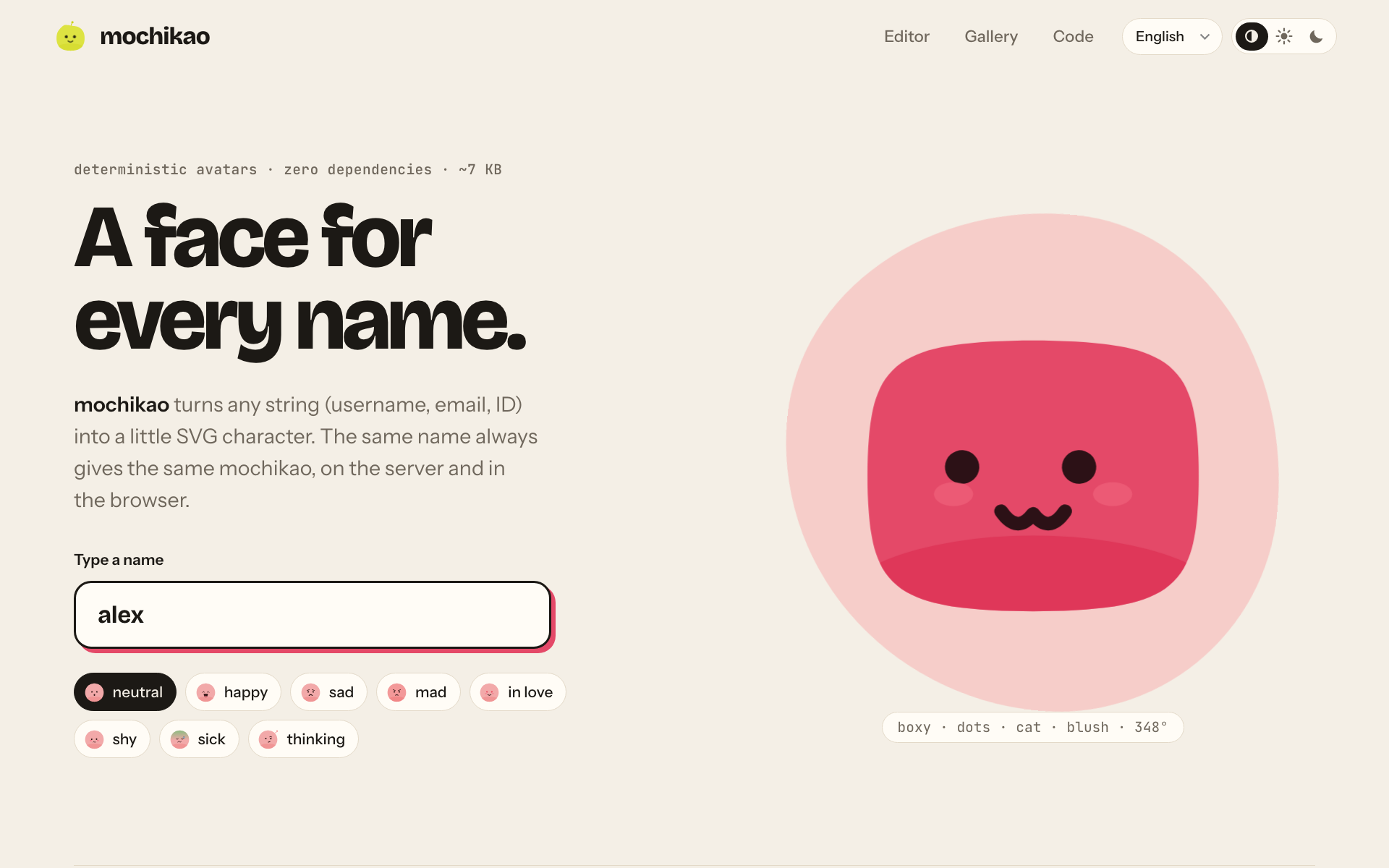
A face for every name. mochikao turns any string (username, email, ID) into a little SVG character. The same name always gives the same mochikao.
- Deterministic:
cyrb53→mulberry32, no network calls, no state. - Zero dependencies, ~7 KB min+gzip.
- 10 blob shapes, plus two optional families imported separately: 6 animals (
mochikao/animals, +1.1 KB) and 6 fruits & veggies (mochikao/produce, +1.5 KB, each with its natural color). - 5 eyes, 6 mouths, 11 accessories (blush, freckles, antenna, sprout, shine, glasses, sunglasses, bow, crown, party hat).
- 10 continuous axes you can tune (body size and proportion, squareness, wobble, eye size/spacing/lean, gaze x/y, mouth size) and 6 color presets.
- 8 expressions:
idle,happy,sad,mad,love,shy,sick,thinking. - Face-to-body contrast ≥ 4.5:1 for every hue and tone (checked by the tests). The avatar against your page is not guaranteed: see Contrast.
- CSS animations (breathing, blinking, glances), animated transitions between expressions and eyes that follow the pointer.
- A function, React / Vue / Svelte / Solid components, a web component, an HTTP API and a CLI.
Inspired by blobatar.
When to use it
- Default avatars for users who haven't uploaded a photo: feed it a username or an ID and every account gets a face, with nothing to store.
- Anonymous or pseudonymous people: commenters, chat and multiplayer participants, guest users, reviewers. Each one is recognizable at a glance without revealing who they are.
- Placeholders and seed data in lists, mockups, demos and screenshots, instead of grey circles or stock photos.
- Anywhere you can't or don't want to call a service: the avatar is computed from the string alone, so it renders the same in the browser, on the server, at the edge or in a script, with no network request.
- A face that shows a mood: the 8 expressions fit statuses (
thinkingwhile loading,sickon an error,happyon success) while the character stays the same. - A playful, recognizable look for a community, a game or a side project, where a generic identicon feels too cold.
When not to use it:
- You need a real photo or a verified identity. A mochikao is a stand-in, not proof of who someone is.
- You need every user to be guaranteed unique. Two different names can, in theory, look alike.
- Pick a stable key (an ID rather than a pseudonym a user can rename): change the string and the face changes.
Getting started
npm install
npm run dev        # site (home + /editor.html) on http://localhost:5173, with the /api/*.svg API
npm test           # node:test tests
npm run api        # API alone on :8787
npm run build      # library + CLI into dist/
npm run build:site # static site into dist-site/
Development needs Node ≥ 22.18: the .ts sources run directly (type stripping). The published package is plain ES2022 JavaScript (ESM): Node ≥ 20 and every bundler. The tests use the mochikao-source export condition to import the package from its sources, with no build step.
Usage
Function
import { mochikao, resolve } from 'mochikao';

const svg = mochikao({ name: 'alex@mail.com', size: 64, background: 'squircle' });
resolve('alex'); // { shape: 'boxy', eyes: 'dot', mouth: 'cat', extra: 'blush', hue: 348, colors: {...} }
| Option | Values | Default |
|---|---|---|
name |
any string (case-insensitive, surrounding spaces ignored) | — |
size |
px | 128 |
background |
none circle squircle square |
none |
hue |
0–360 | from the name |
tone |
0 (dark) – 1 (light) | 0.5 |
saturation |
0–1 | 0.74 |
color |
tone + saturation preset: pastel pale mid deep bright ink |
— |
family |
an imported family: animals, produce (see below) |
blobs |
expression |
idle happy sad mad love shy sick thinking |
idle |
animate |
none hover always |
none |
shape eyes mouth extra |
pin a trait by name (shape among the family's shapes) |
from the name |
traits |
pin 0–1 axes: bodySize proportion squareness wobble eyeSize spacing lean gazeX gazeY mouthSize |
from the name |
gaze |
adds the CSS for pointer tracking (--gx, --gy) |
false |
toParams(options) (from mochikao/params) turns the same options into URL parameters, and parseParams does the reverse: that is what the API, the CLI, the web component and the editor links use.
mochikaoDataUri(options) returns the same image as a data URI, encoded as compactly as possible for an HTML attribute. mochikaoImage(options) returns { src, width, height, alt } directly.
Pinning one axis leaves the others alone: you can force the shape without losing the color or the face.
React, Vue, Svelte, Solid
import { Mochikao } from 'mochikao/react';      // React 18+ (and Preact via preact/compat)
<Mochikao name="alex" size={48} animate="hover" className="avatar" />
<script setup>
import { Mochikao } from 'mochikao/vue';        // Vue 3.3+
</script>
<template>
  <Mochikao name="alex" :size="48" animate="hover" />
</template>
<script>
  import Mochikao from 'mochikao/svelte';       // Svelte 5
</script>
<Mochikao name="alex" size={48} animate="hover" />
import { Mochikao } from 'mochikao/solid';      // Solid 1.8+
<Mochikao name="alex" size={48} animate="hover" class="avatar" />
Same props as the mochikao() options (except gaze), plus inline. Other attributes (class, style, event handlers…) are passed to the rendered element. The React component is a client component ('use client', for the expression transition): it still renders on the server and can be used from Server Components. The frameworks are optional peerDependencies: only the one you import is required.
<img> or inline SVG? Without animation, the components render a plain <img src="data:image/svg+xml,...">: 1 DOM node instead of about twenty (18 to 27 depending on the avatar), which matters in long lists. With animate="hover" or "always", they render inline SVG, which the animation needs. inline forces inline SVG, for example to style it with CSS. The web component follows the same rule, and also switches to inline SVG with gaze.
The Svelte component ships as a .svelte source file, compiled by your bundler (svelte export condition). The Solid component is written without JSX: no Solid Babel plugin needed to consume it, and every prop stays reactive.
Shape families
mochikao only bundles the blobs. The other families are modules you import and pass as an option, so only the people who use them pay for their size:
import { mochikao } from 'mochikao';
import { animals } from 'mochikao/animals';   // cat, bear, bunny, frog, pig, mouse
import { produce } from 'mochikao/produce';   // apple, pear, strawberry, lemon, carrot, avocado

mochikao({ name: 'alex', family: animals });
mochikao({ name: 'alex', family: produce, shape: 'lemon' });
Picking a family only changes the shape: eyes, mouth, accessory and settings still come from the name. Where options arrive as text (HTML attributes, URLs, CLI), declare the available families once: defineMochikao({ families: [animals] }) then <mochikao-avatar family="animals">, or parseParams(name, params, [animals, produce]). The bundled API and CLI accept both.
Mixing families. mix() combines several families: the name then picks among all their shapes, each shape equally likely.
import { mochikao, blobs, mix } from 'mochikao';

mochikao({ name: 'alex', family: mix(blobs, animals) });            // blobs + animals
mochikao({ name: 'alex', family: mix(animals, produce) });          // animals + fruits & veggies
mochikao({ name: 'alex', family: mix(blobs, animals, produce) });   // everything
| Mode | family= |
Shapes |
|---|---|---|
| Blobs (default) | blob |
10 |
| Animals | animals |
6 |
| Fruits & veggies | produce |
6 |
| Blobs + animals | animals+blob |
16 |
| Blobs + fruits & veggies | blob+produce |
16 |
| Animals + fruits & veggies | animals+produce |
12 |
| Everything | all (or animals+blob+produce) |
22 |
In URLs, HTML attributes and the CLI, join names with + (?family=blob+animals); all takes every family you declared plus the blobs. The order doesn't matter, and a mix with the same families always gives the same avatar for a given name.
A family is a ShapeFamily object (name, shapes, silhouette, and optionally decorate and hue): src/families/ shows how to write one.
Letting users customize their avatar
mochikao has no built-in picker: an avatar is name + pinned options, so your app stores what the user touched and passes it back. Store only the pinned keys; removing a key puts that trait back on "auto" (drawn from the name).
import { useState } from 'react';
import { Mochikao } from 'mochikao/react';
import { EYES, MOUTHS, EXTRAS, resolve, mix, blobs, type MochikaoOptions } from 'mochikao';
import { animals } from 'mochikao/animals';

const family = mix(blobs, animals);               // the shapes you offer
type Prefs = Omit<MochikaoOptions, 'name' | 'family'>;

const CHOICES = { shape: family.shapes, eyes: EYES, mouth: MOUTHS, extra: EXTRAS } as const;

export function AvatarEditor({ userId, saved, onSave }: {
  userId: string;                                  // a stable ID, not a renamable pseudonym
  saved: Prefs;                                    // loaded from your database
  onSave: (prefs: Prefs) => void;
}) {
  const [prefs, setPrefs] = useState<Prefs>(saved);
  const auto = resolve({ name: userId, family });  // what the name gives when nothing is pinned

  // value === undefined puts the trait back to "auto"
  const pin = (key: keyof typeof CHOICES, value?: string) =>
    setPrefs(({ [key]: _, ...rest }) => (value ? { ...rest, [key]: value } : rest));

  return (
    <div>
      <Mochikao name={userId} family={family} size={128} {...prefs} />

      {(Object.keys(CHOICES) as (keyof typeof CHOICES)[]).map((key) => (
        <label key={key}>
          {key}
          <select value={prefs[key] ?? ''} onChange={(e) => pin(key, e.target.value || undefined)}>
            <option value="">auto ({auto[key]})</option>
            {CHOICES[key].map((v) => <option key={v}>{v}</option>)}
          </select>
        </label>
      ))}

      <label>
        hue
        <input type="range" min={0} max={360} value={prefs.hue ?? auto.hue}
               onChange={(e) => setPrefs({ ...prefs, hue: +e.target.value })} />
      </label>

      <button onClick={() => onSave(prefs)}>Save</button>
      <button onClick={() => setPrefs({})}>Reset</button>
    </div>
  );
}
Anywhere else in your app, display it the same way: <Mochikao name={user.id} family={family} {...user.avatarPrefs} />.
- Store text:
toParams(prefs).toString()gives a compact string (shape=frog&eyes=sleepy&hue=140) andparseParams(userId, new URLSearchParams(str), [animals])reads it back. Invalid values are ignored, which makes it the right way to validate what comes from the client. - Same avatar elsewhere: build
/api/<id>.svg?family=animals+blob&<prefs>for emails, OG images or non-JS clients. - Previews: a tile is just
mochikao({ name, family, ...prefs, eyes: 'wide' }). - Keep it small: the more traits you let people pin, the less two users differ.
The full guide (model, pitfalls, a framework-free reference, previews, server-side validation) is in docs/editor.md, with a Vue 3 version as well. A complete Vue example, close to the site's editor, is in examples/vue/AvatarEditor.vue.
Transitions between expressions
With inline SVG (animate, inline or gaze), changing expression plays a short transition: the eyes blink, the mouth closes, the face changes while they are shut, then everything reopens with a little bounce (~450 ms). The components and the web component do it on their own. An <img> cannot animate: in image mode the change is immediate.
For your own rendering, morphTo(element, svg) (from mochikao/morph) replaces the SVG inside element with the transition. It only applies between two expressions of the same character (same data-mochikao attribute); otherwise, or when prefers-reduced-motion is on, the replacement is instant. A call during a transition starts again from what is on screen, with no intermediate step.
Web component
<script type="module">
  import { defineMochikao } from 'mochikao/element';
  defineMochikao();
</script>

<mochikao-avatar name="alex" animate="hover" background="circle" gaze></mochikao-avatar>
Same attributes as the options; gaze makes the eyes follow the pointer.
HTTP API
GET /api/<name>.svg?size=&bg=&hue=&tone=&color=&expression=&animate=&family=&shape=&eyes=&mouth=&extra=
Hosted instance: https://mochikao.alexvolkihar.ovh/api/<name>.svg. Try it in the editor.
Responds with image/svg+xml and Cache-Control: immutable (same input → same output). Invalid parameters are ignored. The handler (api/handler.ts) is a plain node:http (req, res) function you can mount anywhere.
CLI
npx mochikao alex --bg circle --expression happy -o alex.svg
npx mochikao alex --info   # traits and colors as JSON
Site
- Home: type a name, try expressions, browse the families and the gallery, copy code examples.
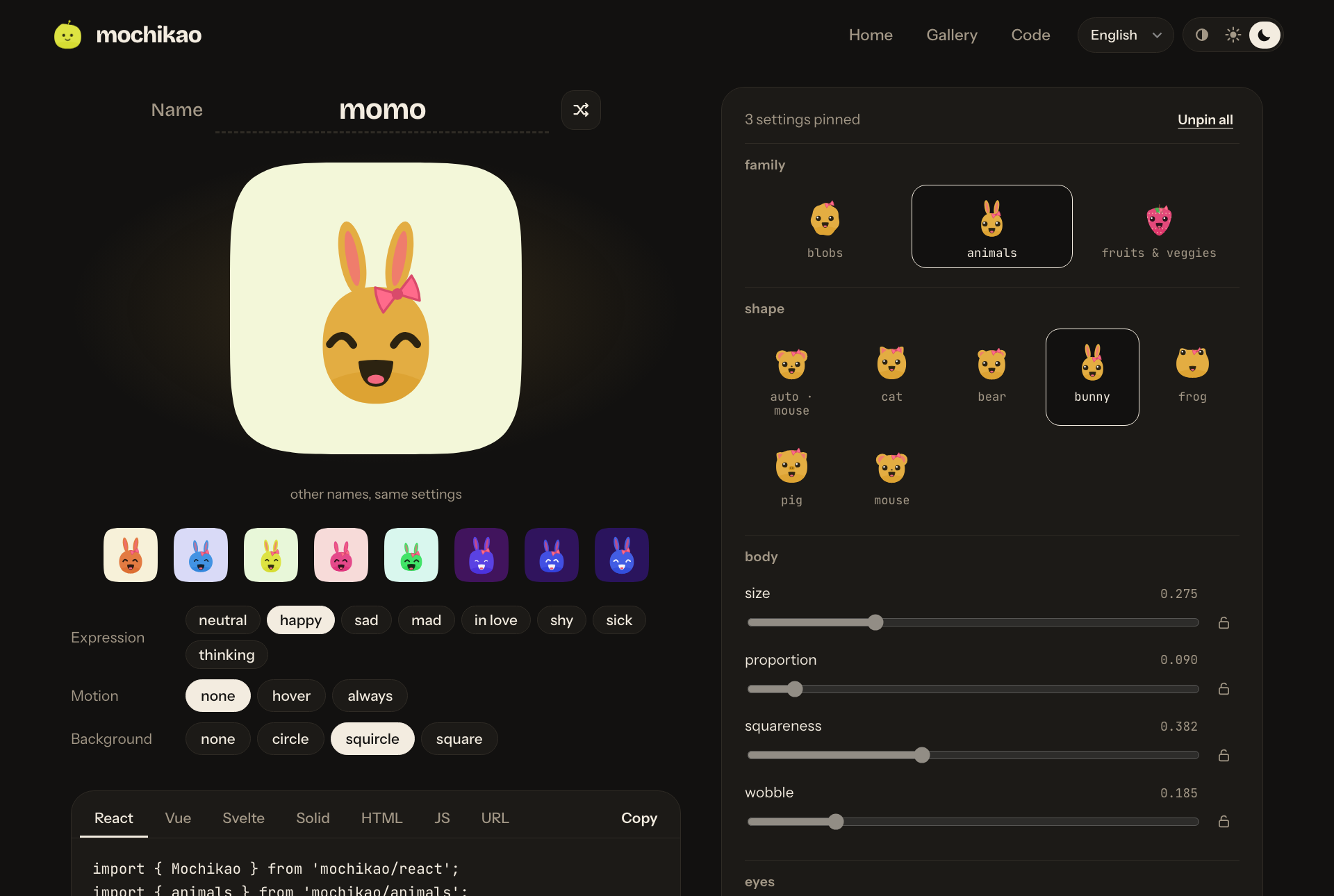
- Editor (
/editor.html): pin each trait (grids with previews, sliders with locks), see the result on other names, get the code (React, Vue, Svelte, Solid, HTML, JS, URL), download as SVG/PNG. The page URL holds the config: copying the link is enough to share it. - Light / dark / system theme (remembered, no flash on load) and languages: English, French, Spanish, Japanese (
?lang=en, otherwise the browser language).
Stability
The GENERATION constant (src/traits.ts) and the order of the random draws are part of the seed. Changing them changes every avatar, and so every URL already in use. The "alex's traits do not move" test guards against that.
Project structure
src/
  random.ts   cyrb53 hash + mulberry32 PRNG
  traits.ts   axes, trait lists, derivation from the name
  shape.ts    silhouettes (polar functions → Catmull-Rom → Bézier)
  color.ts    HSL palette with guaranteed contrast
  face.ts     eyes, mouths, brows, accessories, expressions
  index.ts    SVG rendering + animations
  params.ts   options from query strings / attributes / flags
  family.ts   shape family contract (ShapeFamily)
  families/   animals.ts, produce.ts (separate modules) and kit.ts (shared helpers)
  morph.ts    animated transitions between expressions (Web Animations)
  element.ts  <mochikao-avatar>
  react.ts    React component
  vue.ts      Vue component
  solid.ts    Solid component
  svelte/     Svelte component (shipped as source)
api/          HTTP handler + Node server
bin/          CLI
site/         home + editor (Vite); site/shared: light/dark theme, en/fr/es/ja translations
test/         node:test
Publishing
A single package, mochikao, serves npm, pnpm, yarn and bun: they all install from the npm registry. The integrations are subpaths (mochikao/react, mochikao/animals…), and React, Vue, Svelte and Solid are optional peerDependencies.
First release, by hand (the package has to exist before automated publishing can be turned on):
npm pack --dry-run      # exact list of the files that will be published
npm login
npm publish             # prepublishOnly runs types, tests and build first
Later releases, from CI (.github/workflows/release.yml, Trusted Publishing: no npm token, provenance attached automatically):
- On npmjs.com, in the package settings: add GitHub Actions as a trusted publisher (repository, workflow
release.yml, environmentnpm), then pick "Require two-factor authentication and disallow tokens". - To publish:
npm version patch          # or minor / major: updates package.json and creates the tag
git push --follow-tags     # the vX.Y.Z tag triggers the release
CI (.github/workflows/ci.yml) checks types, tests and builds on Node 22 and 24 for every push and pull request, plus an audit of the published dependencies and publint.
Once published, the avatars' rendering is a contract: see Stability.
Credit
mochikao is MIT: you can use it freely, credit is not required. If you ship it, though, a mention helps a lot, and I'd love to see where it ends up:
- In your app: a line in the footer or the "about" page, such as
Avatars by <a href="https://mochikao.alexvolkihar.ovh">mochikao</a>. - In your repo: a link to https://github.com/Alexvolkihar/mochikao in your README (credits or acknowledgements section).
- Tell me: open an issue with a link to your project and I'll consider listing it.
Badge
A small SVG badge for a README or an "about" page, in a dark and a light version (text above 4.5:1 in both, and a border that holds on a white or a dark page):
| Dark | Light |
|---|---|
 |
 |
badge-dark.svg |
badge-light.svg |
[](https://mochikao.alexvolkihar.ovh)
<a href="https://mochikao.alexvolkihar.ovh"><img src="https://mochikao.alexvolkihar.ovh/badge-dark.svg" alt="avatars by mochikao" height="24"></a>
To follow the reader's theme automatically (GitHub READMEs and any page that supports <picture>):
<a href="https://mochikao.alexvolkihar.ovh">
  <picture>
    <source media="(prefers-color-scheme: dark)" srcset="https://mochikao.alexvolkihar.ovh/badge-light.svg">
    <img src="https://mochikao.alexvolkihar.ovh/badge-dark.svg" alt="avatars by mochikao" height="24">
  </picture>
</a>
badge.svg is kept as an alias of the dark one. The files live in site/public/ if you prefer to host a copy.
License
MIT
Related Packages
Deterministic SVG avatars from a name, with expressions and components for React...
Version History
| Version | Released | Vue | License |
|---|---|---|---|
| 0.2.1 | >=3.3 | MIT | |
| 0.2.0 | >=3.3 | MIT | |
| 0.1.3 | >=3.3 | MIT | |
| 0.1.2 | >=3.3 | MIT | |
| 0.1.1 | >=3.3 | MIT | |
| 0.1.0 | >=3.3 | MIT |
Pre-releases (1)
| Version | Released | License |
|---|---|---|
| 0.0.0-stage |