markdown-it-multiple-choice
markdown-it-multiple-choice
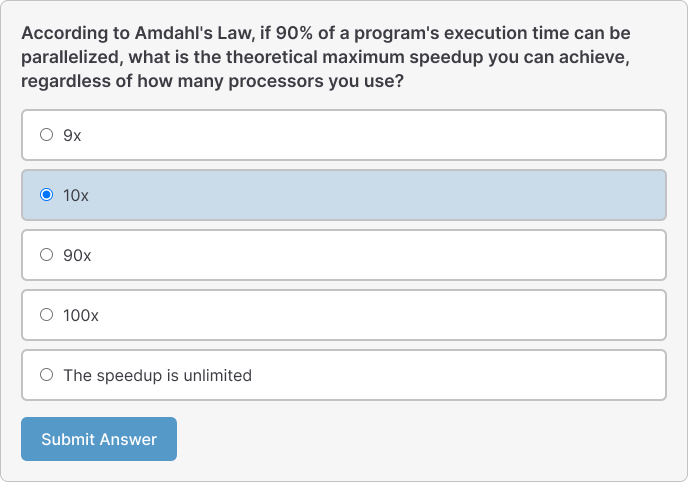
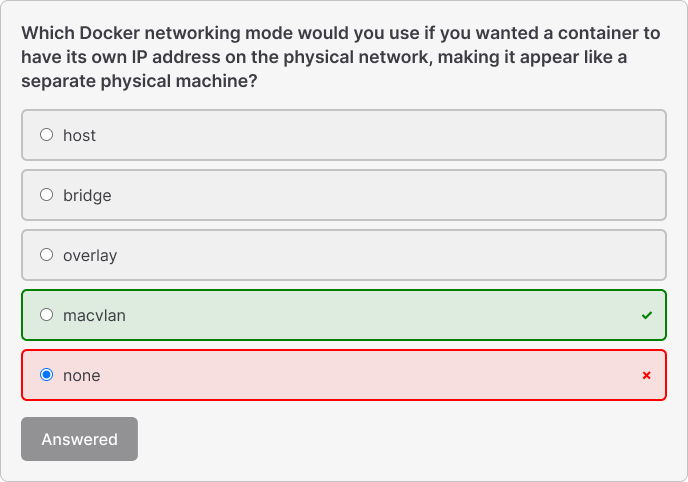
A markdown-it plugin that converts todo lists into interactive multiple choice questions with Vue.js support.
How to use
Installation
You can install markdown-it-multiple-choice as one of your VitePress project dependencies with the following command:
npm install markdown-it-multiple-choice
Integrate with VitePress
Configure VitePress config
// .vitepress/config.js
import { defineConfig } from 'vitepress'
import multipleChoicePlugin from 'markdown-it-multiple-choice'

export default defineConfig({
  markdown: {
    config: (md) => {
      md.use(multipleChoicePlugin)
    }
  },
  vite: {
    ssr: {
      noExternal: ['markdown-it-multiple-choice']
    }
  }
})
Step 3: Setup theme
Create .vitepress/theme/index.js:
import DefaultTheme from 'vitepress/theme'
import { onMounted } from 'vue'
import { setupMultipleChoice } from 'markdown-it-multiple-choice'
import 'markdown-it-multiple-choice/style.css'

export default {
  extends: DefaultTheme,
  setup() {
    onMounted(() => {
      setupMultipleChoice();
    });
  }
}
Markdown Syntax
The plugin recognizes a special syntax for multiple choice questions:
[?] Your question goes here?
[ ] Wrong answer option
[x] Correct answer option (marked with 'x')
[ ] Another wrong answer option
[ ] Yet another wrong answer option
Syntax Rules
- Question: Start with
[?]followed by your question text - Correct Answer: Use
[x]to mark the correct option - Wrong Answers: Use
[ ](empty brackets) for incorrect options - Multiple Questions: Separate questions with blank lines
API Reference
Plugin Options
const md = new MarkdownIt().use(multipleChoicePlugin, {
  // Plugin options (currently no options available)
});
Vue Component Props
interface MultipleChoiceQuestion {
  id: string;
  question: string;
  options: MultipleChoiceOption[];
}

interface MultipleChoiceOption {
  text: string;
  isCorrect: boolean;
  isQuestion?: boolean; // Internal use
}
Styling
Custom Styling
You can override the default styles by targeting these CSS classes:
.multiple-choice-question {
  /* Question container */
}

.mcq-question {
  /* Question text */
}

.mcq-options {
  /* Options container */
}

.mcq-option {
  /* Individual option */
}

.mcq-option--correct {
  /* Correct option (after submission) */
}

.mcq-option--incorrect {
  /* Incorrect selected option (after submission) */
}

.mcq-submit {
  /* Submit button */
}

.mcq-result {
  /* Result message */
}
Development
# Install dependencies
npm install

# Build the project
npm run build

# Run tests
npm test

# Development mode (watch for changes)
npm run dev
License
MIT License - see the LICENSE file for details.
Related Packages
vue-markdown-render
A simple, lightweight markdown-it wrapper for Vue written in pure typescript.
5,081,259
138
vue3-markdown-it
An awesome Vue 3 markdown-it wrapper plugin that can even support external plugi...
462,640
250
Version History
| Version | Released | Vue | License |
|---|---|---|---|
| 1.1.5 | ^3.0.0 | MIT | |
| 1.1.2 | ^3.0.0 | MIT | |
| 1.1.1 | ^3.0.0 | MIT | |
| 1.1.0 | ^3.0.0 | MIT | |
| 1.0.3 | ^3.0.0 | MIT | |
| 1.0.1 | ^3.0.0 | MIT | |
| 1.0.0 | ^3.0.0 | MIT |