kirbyuse
| Install | |
|---|---|
npm install kirbyuse |
|
| Latest Version: | 1.4.2 |
| Vue: | 2 |
| License: | MIT |
| Last Updated: | Oct 20, 2026 |
| Links: | GitHub · npm |
kirbyuse


A collection of Vue Composition utilities and type hints to improve the DX for writing Kirby Panel plugins. It is intended for the Composition API, but also works with the Options API.
[!IMPORTANT] The current version targets Kirby 4 and Kirby 5. Check out the v2 branch for Kirby 6 support.
Features
- 🧃 IntelliSense support for Kirby's global
window.panelobject - 🍿 Helpers like
usePanelto write future-proof Kirby plugins - 🚀 Aliases for Composition API functions like
refandcomputed - 📇 Ready for Kirby 4 & Kirby 5
Setup
# pnpm
pnpm add -D kirbyuse

# npm
npm i -D kirbyuse

# yarn
yarn add -D kirbyuse
Kirby Panel Type Augmentation
[!NOTE] This works for Vue components written in the Options API as well as the Composition API. TypeScript is not required. The type hints are provided by the package itself.
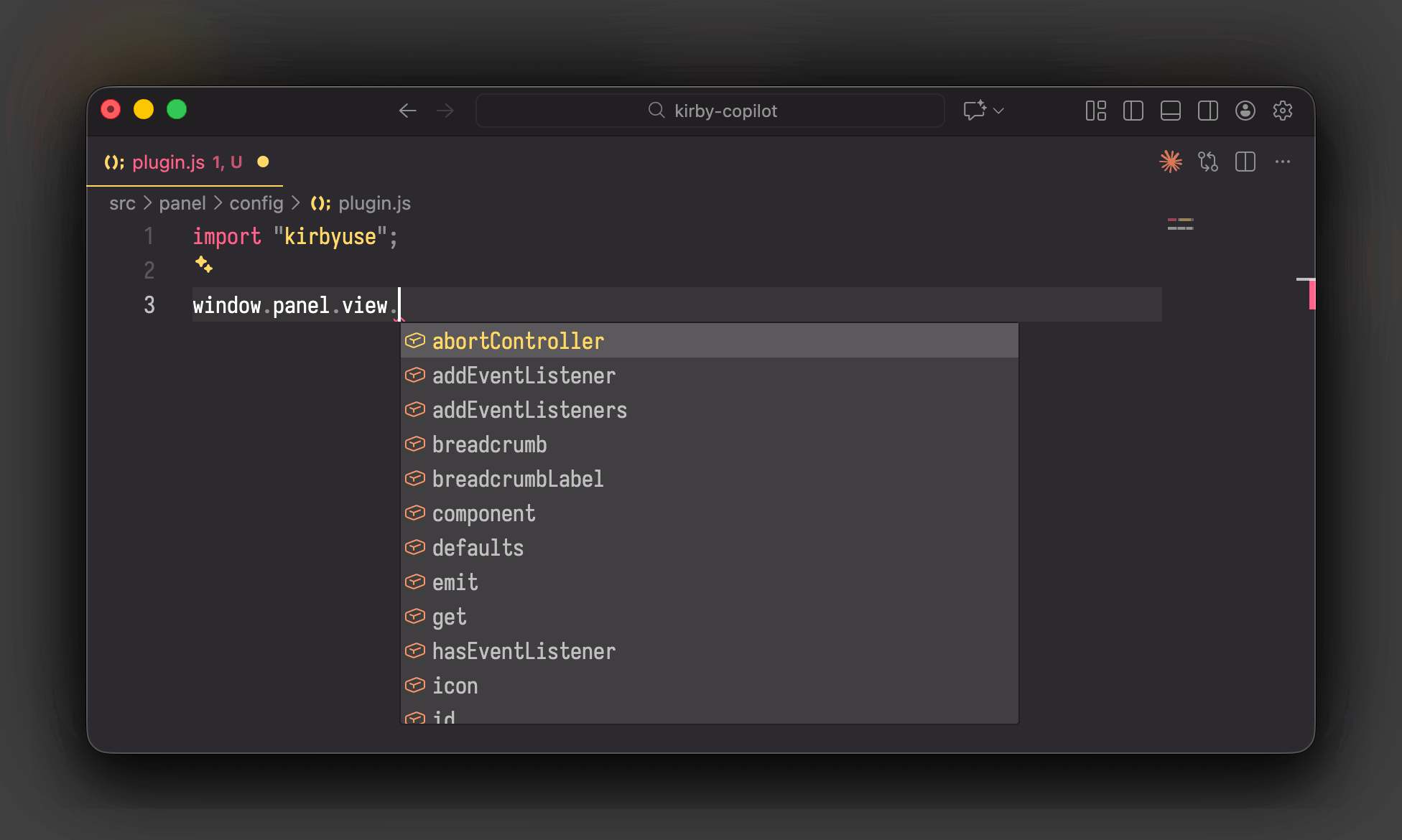
Kirby's window.panel global object provides the main Panel instance, including all methods and props. This package augments the window.panel object to provide type hints out of the box.
Type augmentations are generated based on the Kirby Panel JavaScript build. Especially types of function arguments and return types cannot be inferred. But for working with the Panel API, this should be sufficient.
Depending on the component type, you can choose how to import the type hints:
Panel Access With usePanel
In order to benefit from type completions, you can import the usePanel function from this package. This function returns a typed window.panel object. This works both in the Options API and the Composition API.
For example, the notification service is available on the panel object. With each method call, you get IntelliSense support in your editor:
import { usePanel } from "kirbyuse";

const panel = usePanel();
panel.notification.success("Kirby is awesome!");
//                 ^? (property) PanelNotification.success: (arg1: any) => any
If you are writing a Vue component in the Options API, you can use the panel instance in methods like created:
import { usePanel } from "kirbyuse";

export default {
  mounted() {
    const panel = usePanel();
    panel.notification.success("Guten Tag!");
  },
};
Augmenting the window.panel Object
Instead of the explicit usePanel import, you can also augment the window.panel object directly. In this case, you have to import the kirbyuse package once in your main entry file:
import "kirbyuse";

window.panel.notification.success("Kirby is awesome!");
//                        ^? (property) PanelNotification.success: (arg1: any) => any
The import will provide global type augmentations for the window.panel object. Every time you access the panel object, you get IntelliSense support for all available methods and services.
API
Composables Overview
| Composable | Description | Returns |
|---|---|---|
useApi |
Access Kirby's Panel API | PanelApi |
useApp |
Access the main Panel Vue instance | PanelApp |
useBlock |
Block methods for custom block components | { field, open, update } |
useContent |
Reactive content getters and methods | { content, currentContent, contentChanges, hasChanges, isEditable, update } |
useDialog |
Open different types of dialogs | { openTextDialog, openFieldsDialog } |
useI18n |
Translation utility functions | { t } |
usePanel |
Access the reactive Kirby Panel object | Panel |
useSection |
Load section data | { load } |
useHelpers |
Access internal Fiber helpers | PanelHelpers |
useLibrary |
Access internal Kirby Panel libraries | PanelLibrary |
useApi
Returns Kirby's Panel API for making HTTP requests to the backend. This composable is a simple shortcut to window.panel.api.
Example:
import { useApi } from "kirbyuse";

const api = useApi();
// Make API calls
await api.get("pages/my-page");
useApp
Returns the main Panel Vue instance. This composable is a simple shortcut to window.panel.app.
Example:
import { useApp } from "kirbyuse";

const app = useApp();
// Access Vue instance methods and properties
console.log(app.$root);
useBlock
Provides utilities for building custom block components, including access to field configuration and block update methods.
Example:
<script setup>
import { computed, useBlock } from "kirbyuse";

// Props and emits are inherited from Kirby's default block component
const props = defineProps({
  // Block props provided by Kirby
  content: Object,
  endpoints: Object,
  fieldset: Object,
  id: String,
  name: String,
});
const emit = defineEmits(["update"]);

// Initialize block utilities
const { field, open, update } = useBlock(props, emit);

// Access field configuration (e.g., get the `marks` option from a `caption` field)
const captionMarks = computed(() => field("caption", { marks: true }).marks);

// Access block content
const source = computed(() => props.content?.source?.[0]);

// Update block content
function updateCaption(newCaption) {
  update({ caption: newCaption });
}
</script>
The field function retrieves field configuration from the block's fieldset, with optional default values. The update function merges new values into the block's content.
useContent
Provides reactive getters and methods to work with content of the current view.
[!TIP] Compatible with both Kirby 4 and 5. The returned getters and methods are shimmed for Kirby 4 in a Kirby 4 environment.
Example:
import { useContent } from "kirbyuse";

const { currentContent, contentChanges, hasChanges, isEditable, update } =
  useContent();

// Watch for content changes
watch(currentContent, (newContent) => {
  console.log("Content changed:", newContent);
});

// Update content of the current view, unless the model denies `update` or,
// in Kirby 5, another user holds the lock
if (isEditable.value) {
  update({ excerpt: "Hello, Kirby!" });
}
useDialog
Provides methods to open different types of dialogs.
Example:
import { useDialog } from "kirbyuse";

const { openTextDialog, openFieldsDialog } = useDialog();

const isOk = await openTextDialog("Are you sure?");
console.log(isOk); // -> true or false

const fields = {
  email: {
    type: "email",
    label: "Email",
  },
};

const result = await openFieldsDialog({ fields });
console.log(result); // -> { email: "..." }
useI18n
Returns translation utility functions.
[!NOTE] In most cases, use
window.panel.tfor Kirby's built-in translation function. This composable is useful for custom translation objects, such as those returned by a section'slabelproperty.
Example:
const { t } = useI18n();

// Simple string
t("Hello"); // -> "Hello"

// Translation object
t({ en: "Hello", de: "Hallo" }); // -> Returns value based on current Panel language
usePanel
Returns the reactive Kirby Panel object with type hints. This composable is a simple shortcut to window.panel.
Example:
import { usePanel } from "kirbyuse";

const panel = usePanel();
// Access panel services
panel.notification.success("Success!");
useSection
Provides the load method for fetching section data from the backend. This is essential for custom sections that need to retrieve their configuration and data.
Example:
import { ref, useSection } from "kirbyuse";
import { section } from "kirbyuse/props";

const props = defineProps({ ...section });

const { load } = useSection();

// Fetch section data (typically in an IIFE since async setup isn't supported in Vue 2)
(async () => {
  const response = await load({
    parent: props.parent,
    name: props.name,
  });

  // Access section properties from the response
  console.log(response.label);
})();
[!NOTE] The
loadmethod requiresparentandnameprops. Use thesectionprops helper fromkirbyuse/propsto ensure these are defined.
useHelpers
Returns the internal Fiber helpers. This composable is a simple shortcut to window.panel.app.$helper. See the Lab documentation for details.
Example:
import { useHelpers } from "kirbyuse";

const helpers = useHelpers();
// Access a helper
helpers.link.detect("https://getkirby.com");
useLibrary
Returns the internal Kirby Panel libraries (dayjs, colors and autosize). This composable is a simple shortcut to window.panel.app.$library. See the Lab documentation for colors and dayjs.
Example:
import { useLibrary } from "kirbyuse";

const library = useLibrary();
// Access a library component
library.dayjs(); // now
Props Helpers
This package provides pre-defined prop definitions for common Kirby Panel component types. Import them from kirbyuse/props:
section
Props required for custom Panel sections. Use with defineProps to inherit the necessary props for section components:
import { section } from "kirbyuse/props";

const propsDefinition = {
  ...section,
};

export default {
  inheritAttrs: false,
};

// In <script setup>
const props = defineProps(propsDefinition);
These props include parent and name, which are required for loading section data with useSection.
field
Props Kirby passes to a custom field component, matching the Panel's Field.vue:
import { field } from "kirbyuse/props";

const props = defineProps({ ...field });
The individual field props such as label, disabled or required are exported as well, so a component can pick only what it needs.
Examples
Panel Section
<script setup>
import { ref, useContent, usePanel, watch } from "kirbyuse";

const label = ref("");
const { currentContent, contentChanges } = useContent();

watch(currentContent, (newContent) => {
  console.log("Content has changed:", newContent);
});

function handleClick() {
  const panel = usePanel();
  panel.notification.success("Composition API is awesome!");
}
</script>

<template>
  <k-section :label="label">
    <k-text>
      <h1 @click="handleClick()">My Section</h1>
    </k-text>
  </k-section>
</template>
👉 How to load section data
<script>
import { ref, useSection, watch } from "kirbyuse";
import { section } from "kirbyuse/props";

// Define the component props
const propsDefinition = {
  ...section,
};

export default {
  inheritAttrs: false,
};
</script>

<script setup>
const props = defineProps(propsDefinition);

const label = ref("");

// Async components are not supported in Vue 2, so we use
// a self-invoking async function as `created` replacement
(async () => {
  const { load } = useSection();
  const response = await load({
    parent: props.parent,
    name: props.name,
  });

  label.value = response.label || "My Section";
})();
</script>

<template>
  <k-section :label="label">
    <k-text>
      <h1>My Section</h1>
    </k-text>
  </k-section>
</template>
Background
The Kirby Panel runs Vue 2.7 as the global window.Vue, which Panel plugins can't import as a module. The Composition API hangs off that constructor: Kirby 4 loads Vue's UMD build, which attaches it, and Kirby 5 copies the named exports onto window.Vue itself. The main Kirby Panel instance is accessible at window.panel.app.
Importing the Composition API from "vue" bundles a second copy of Vue into the plugin, unless the build maps vue to window.Vue – as kirbyup 3 does. Refs and lifecycle hooks from a second copy don't reach the Panel's components.
The global works, but gets tedious across many components:
const label = window.Vue.ref("");
kirbyuse reads the Composition API from window.Vue and re-exports it with types. Additionally, some helpers are provided to make working with Kirby easier:
// Inside `<script setup>`
import { computed, ref, usePanel } from "kirbyuse";

const label = ref("");

const panel = usePanel();
panel.notification.success("Composition API is awesome!");
Composition API in Panel Plugins
The following open source plugins are written with the Vue Composition API:
License
MIT License © 2024-PRESENT Johann Schopplich
Related Packages
Version History
| Version | Released | License |
|---|---|---|
| 1.4.2 | MIT | |
| 1.4.1 | MIT | |
| 1.4.0 | MIT | |
| 1.3.1 | MIT | |
| 1.3.0 | MIT | |
| 1.2.12 | MIT | |
| 1.2.11 | MIT | |
| 1.2.10 | MIT | |
| 1.2.9 | MIT | |
| 1.2.8 | MIT | |
| 1.2.7 | MIT | |
| 1.2.6 | MIT | |
| 1.2.5 | MIT | |
| 1.2.4 | MIT | |
| 1.2.3 | MIT | |
| 1.2.2 | MIT | |
| 1.2.1 | MIT | |
| 1.2.0 | MIT | |
| 1.1.0 | MIT | |
| 1.0.0 | MIT | |
| 0.12.1 | MIT | |
| 0.12.0 | MIT | |
| 0.11.3 | MIT | |
| 0.11.2 | MIT | |
| 0.11.1 | MIT | |
| 0.10.0 | MIT | |
| 0.9.2 | MIT | |
| 0.9.1 | MIT | |
| 0.9.0 | MIT | |
| 0.8.8 | MIT |
Showing the latest 30 of 50. See every release on npm
Pre-releases (3)
| Version | Released | License |
|---|---|---|
| 2.0.0-beta.3 | MIT | |
| 2.0.0-beta.2 | MIT | |
| 2.0.0-beta.1 | MIT |