guapikeji-color-picker-v3
guapikeji-color-picker-v3



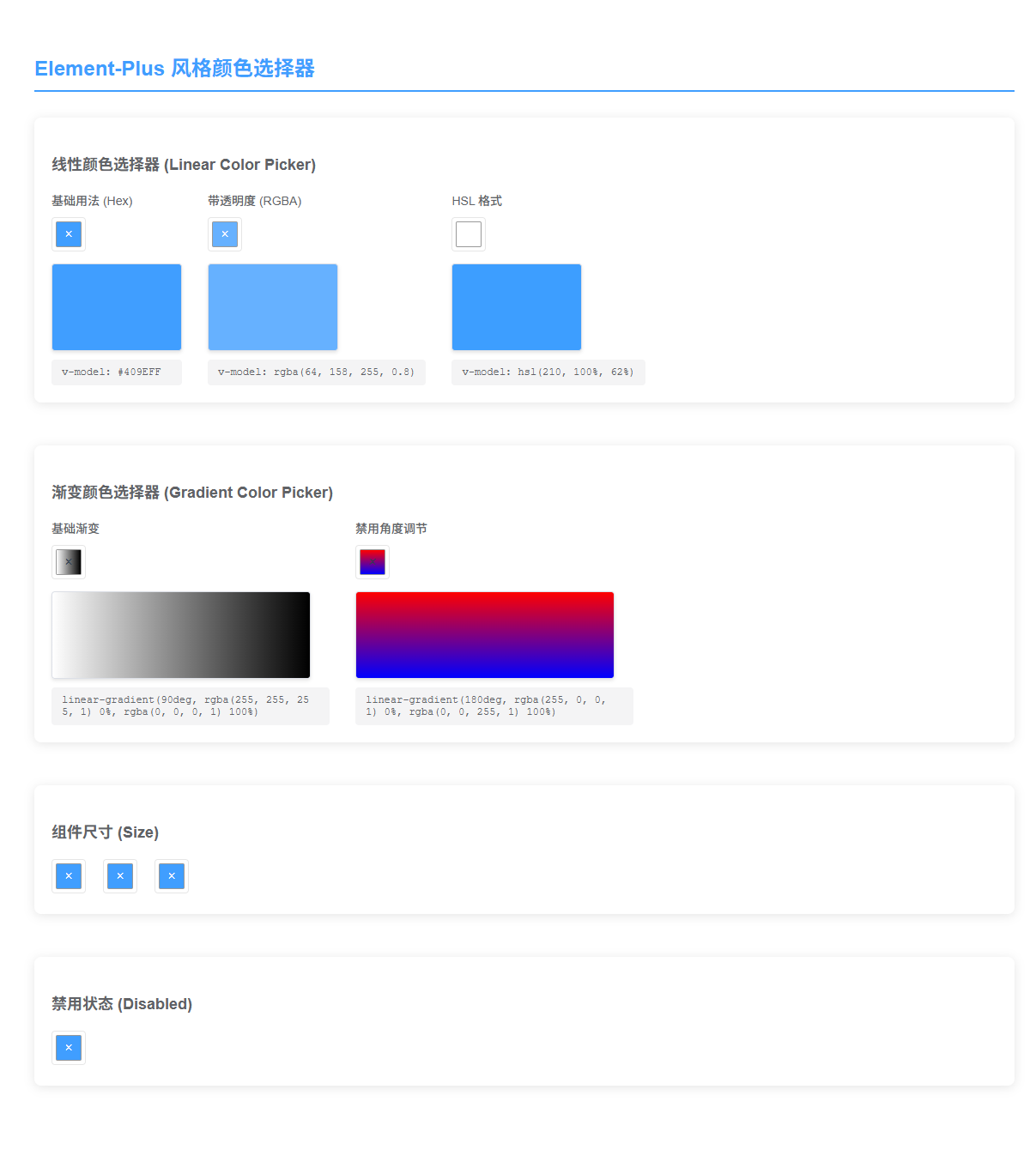
Element-Plus 风格的 Vue 3 颜色选择器,支持纯色和渐变色选择。
采用 Element-Plus ColorPicker 的 API 设计,提供简洁易用的 v-model 双向绑定和标准化的事件系统。
✨ 特性
- 🎨 支持线性颜色和渐变色选择
- 🔄 v-model 双向绑定
- 📦 多种颜色格式支持(hex、rgb、rgba、hsl、hsla)
- 🎯 Element-Plus 风格的 API 设计
- 🌈 渐变色支持角度调节和多色点
- 💪 TypeScript 友好
- 📱 响应式设计
Live Demo
📦 安装
NPM
npm install guapikeji-color-picker-v3
# 或
yarn add guapikeji-color-picker-v3
🔨 使用
全局注册
import { createApp } from 'vue'
import ColorPicker from 'guapikeji-color-picker-v3'

const app = createApp(App)
app.use(ColorPicker)
app.mount('#app')
局部注册
import ColorPicker from 'guapikeji-color-picker-v3'

export default {
  components: {
    ColorPicker
  }
}
📖 示例
基础用法
<template>
  <!-- 线性颜色选择器 -->
  <ColorPicker v-model="color" @change="handleChange" />
</template>

<script setup>
import { ref } from 'vue'

const color = ref('#409EFF')

function handleChange(value) {
  console.log('颜色改变:', value)
}
</script>
模式切换
组件内置了纯色/渐变模式切换功能,用户可以在选择器面板内自由切换:
<template>
  <ColorPicker
    v-model="color"
    @change="handleChange"
    @mode-change="handleModeChange"
  />
</template>

<script setup>
import { ref } from 'vue'

const color = ref('#409EFF')

function handleChange(value) {
  console.log('颜色改变:', value)
}

function handleModeChange(mode) {
  console.log('模式切换为:', mode) // 'linear' 或 'gradient'
}
</script>
禁用模式切换
如果你希望固定为某个模式,可以使用 disable-mode-switch 属性:
<template>
  <!-- 固定为纯色模式 -->
  <ColorPicker v-model="color" mode="linear" disable-mode-switch />

  <!-- 固定为渐变模式 -->
  <ColorPicker v-model="gradient" mode="gradient" disable-mode-switch />
</template>
带透明度
<template>
  <ColorPicker
    v-model="color"
    show-alpha
    color-format="rgba"
    @change="handleChange"
  />
</template>

<script setup>
import { ref } from 'vue'

const color = ref('rgba(64, 158, 255, 0.8)')
</script>
渐变色选择器
<template>
  <ColorPicker
    v-model="gradient"
    mode="gradient"
    @change="handleGradientChange"
  />
</template>

<script setup>
import { ref } from 'vue'

const gradient = ref('linear-gradient(90deg, #fff 0%, #000 100%)')

function handleGradientChange(value) {
  console.log('渐变改变:', value)
}
</script>
禁用角度调节
<template>
  <ColorPicker
    v-model="gradient"
    mode="gradient"
    disable-deg
  />
</template>
📚 API
Props
| 参数 | 说明 | 类型 | 可选值 | 默认值 |
|---|---|---|---|---|
| modelValue / v-model | 绑定值 | string | — | '#409EFF' |
| mode | 组件默认模式 | string | linear / gradient | linear |
| disable-mode-switch | 是否禁用内部模式切换按钮 | boolean | — | false |
| show-alpha | 是否支持透明度选择 | boolean | — | false |
| color-format | 颜色格式 | string | hex / rgb / rgba / hsl / hsla | hex |
| predefine | 预定义颜色 | array | — | [] |
| size | 组件尺寸 | string | large / default / small | default |
| disabled | 是否禁用 | boolean | — | false |
| disable-deg | 渐变模式下是否禁用角度调节 | boolean | — | false |
| popper-class | 下拉框的类名 | string | — | '' |
Events
| 事件名 | 说明 | 回调参数 |
|---|---|---|
| update:modelValue | v-model 更新事件 | (value: string) |
| change | 颜色值改变时触发(确认后) | (value: string) |
| active-change | 实时颜色改变(拖动时) | (value: string) |
| visible-change | 面板显示/隐藏时触发 | (visible: boolean) |
| mode-change | 模式切换时触发 | (mode: 'linear' | 'gradient') |
颜色值格式
线性模式(mode="linear")
- hex:
'#409EFF'或'#409EFF80'(带透明度) - rgb:
'rgb(64, 158, 255)' - rgba:
'rgba(64, 158, 255, 0.8)' - hsl:
'hsl(210, 100%, 62%)' - hsla:
'hsla(210, 100%, 62%, 0.8)'
渐变模式(mode="gradient")
CSS gradient 字符串,例如:
linear-gradient(90deg, rgba(255, 255, 255, 1) 0%, rgba(0, 0, 0, 1) 100%)
🎯 渐变色使用技巧
添加颜色点
点击渐变条可以添加新的颜色点
删除颜色点
选中颜色点后,按 Backspace 或 Delete 键可删除(至少保留2个颜色点)
调整颜色点位置
拖动颜色点可调整其在渐变条中的位置
调整渐变角度
使用角度滑块可调整渐变方向(0-360度)
🔄 从旧版本迁移
如果你正在使用旧版本的 API,这里是迁移指南:
Props 变更
| 旧 API | 新 API | 说明 |
|---|---|---|
type |
mode |
重命名为更清晰的 mode |
pColor |
v-model |
使用 v-model 绑定颜色值(字符串) |
pColors |
v-model |
渐变模式下使用 v-model(CSS gradient 字符串) |
pDeg |
包含在 v-model 中 | 角度信息包含在 gradient 字符串中 |
disabledColorDeg |
disable-deg |
重命名为 kebab-case |
showClose |
已移除 | 简化 UI,统一风格 |
closeOnClickBody |
已移除 | 简化交互逻辑 |
titleConfig |
已移除 | 简化 UI 配置 |
Events 变更
| 旧 API | 新 API | 说明 |
|---|---|---|
@changeColor |
@change |
标准化事件名 |
@onClose |
@visible-change |
更标准的事件命名 |
迁移示例
旧版本:
<ColorPicker
  type="linear"
  :p-color="pColor"
  :p-deg="90"
  :show-close="true"
  @changeColor="changeColor"
  @onClose="onClosePicker"
/>
新版本:
<script setup>
import { ref } from 'vue'
const color = ref('#409EFF')
</script>

<template>
  <ColorPicker
    mode="linear"
    v-model="color"
    @change="handleChange"
    @visible-change="handleVisibleChange"
  />
</template>
🛠️ 开发
本地开发
# 安装依赖
npm install

# 启动开发服务器
npm run dev

# 构建库文件
npm run build

# 构建演示文件
npm run build:demo

# 代码检查
npm run lint

# 代码格式化
npm run format
📄 许可证
MIT
🙏 致谢
- vue-color - 颜色选择器 UI 组件
- Element Plus - API 设计参考
- color-scales - 颜色计算库
Related Packages
Version History
| Version | Released | Vue | License |
|---|---|---|---|
| 2.0.4 | ^3.5.13 | ||
| 2.0.3 | ^3.5.13 | ||
| 2.0.2 | ^3.5.13 | ||
| 2.0.1 | ^3.5.13 | ||
| 2.0.0 | ^3.5.13 |