glassrender-vue
| Install | |
|---|---|
npm install glassrender-vue |
|
| Latest Version: | 0.1.2-beta |
| Vue: | 3 |
| License: | MIT |
| Last Updated: | Oct 14, 2026 |
| Links: | GitHub · npm |
Real-time refractive glass for the web, drawn on a WebGL2 canvas.
Blur, refraction, rim light, shadow and color fringes over any image, canvas or video,
with React, Svelte, Vue and Solid components that keep the glass under your layout.
The framework components include a built-in backdrop, or you can supply an image, canvas or video. GlassRender does not capture the page: HTML and CSS behind the canvas do not show through it.





Install · Quick start · Vanilla JS · Materials · Frameworks · Demos · API guide
Features
Choose a preset; the renderer resolves its values for the shape's size, appearance and surroundings.
- Refraction, blur and light. Every pixel of glass refracts, blurs and lights the backdrop you supply: an image, a canvas or a playing video.
- 28 built-in materials.
standard,clear,menu,sidebar,dock,widgetand more, with size, appearance and environment rules. Some role names share the same profile. - Glass that follows the DOM.
Glasscomponents for React, Svelte, Vue and Solid track their boxes as the page lays out, scrolls, resizes and animates. - Groups and masks. Neighboring shapes flow into one piece of glass, and any alpha mask becomes an outline.
- Chromatic aberration. Control and lens profiles include color separation around their edges.
chromaticAberrationadjusts it from0to1, with a subtle default of0.25. - Accessibility settings. Follows reduced transparency, increased contrast and reduced motion, or set them yourself.
- HDR pixel input. Upload encoded-sRGB premultiplied float32 or binary16 pixels directly with
setBackdropPixels(), retaining a snapshot through context loss. - No core runtime dependencies. One WebGL2 context, recovery from context loss, and float output where supported. Physical HDR presentation depends on browser compositing and display support.
Materials
Choose standard for a frosted surface, clear for transparent glass, or a role such as control, menu or dock. Set chromaticAberration on a shape, group or canvas to control color separation independently of other optical effects. Profiles respond to size, appearance and environment settings. Some role names share a profile.
Leave tint unset, rim-light rotation at 0 and chromaticAberration at 1 to use a preset unchanged. The default color-separation multiplier is 0.25. Geometry, visibility and interaction remain ordinary application options.
import { MATERIALS, getMaterialInfo } from "glassrender/materials";

console.log(MATERIALS.map(material => material.name)); // All 28 names.
console.log(getMaterialInfo("player")?.canonical); // "clear"
| Import | Use it for |
|---|---|
glassrender/core |
createGlass, shape/group options and convenience API types. |
glassrender/materials |
Preset names, material catalog and snapshot inspection. |
glassrender/advanced |
createRenderer, numeric helpers, constants and GPU block layout. |
glassrender |
The three above without the numeric helpers: createGlass, the catalog, createRenderer and its constants. |
Older material recipes, raw material overrides and the synthetic prominent preset are no longer accepted. See the migration notes before adapting an older example.
Showcase
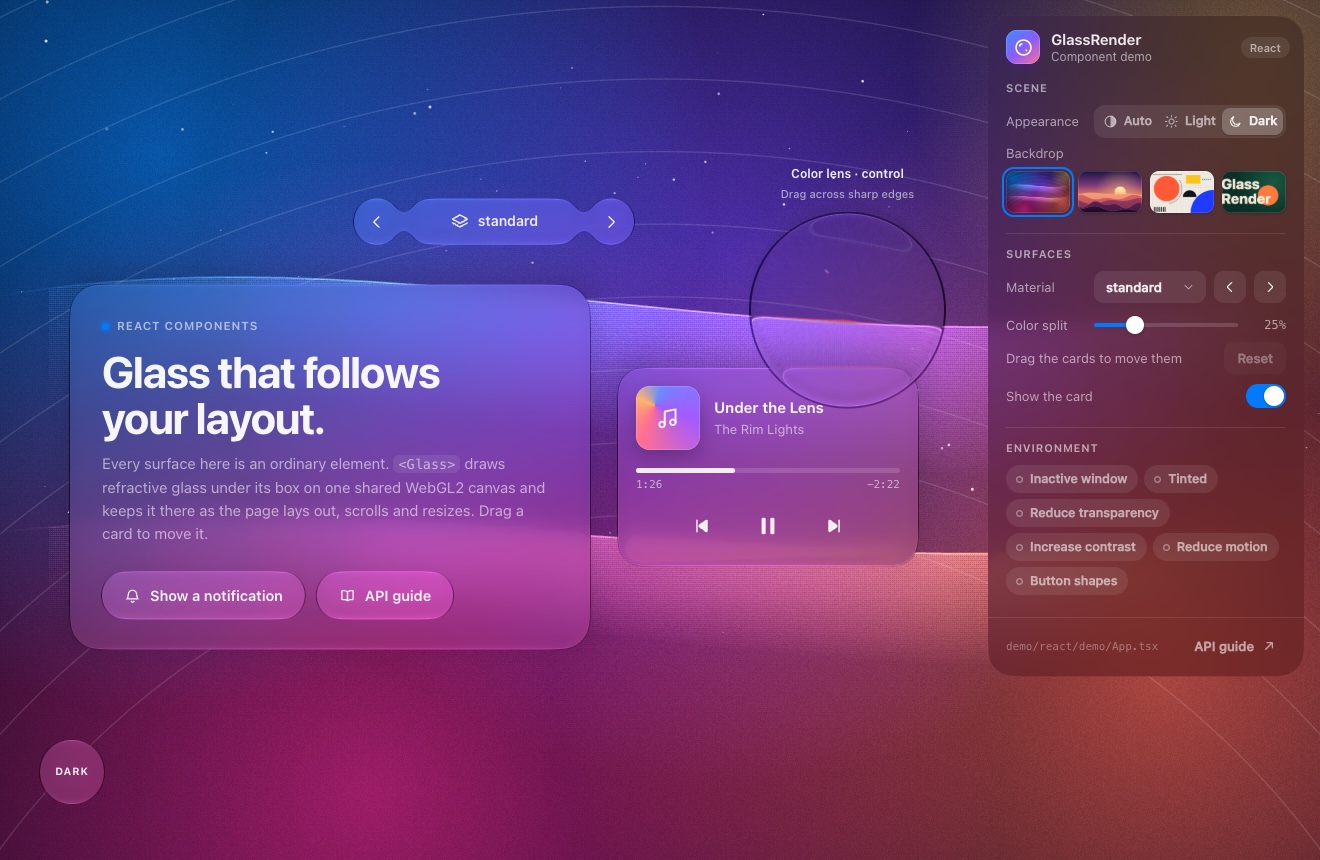
Component demo: glass under ordinary DOM boxes, a toolbar that merges, cards you can drag, and a notification moved by CSS
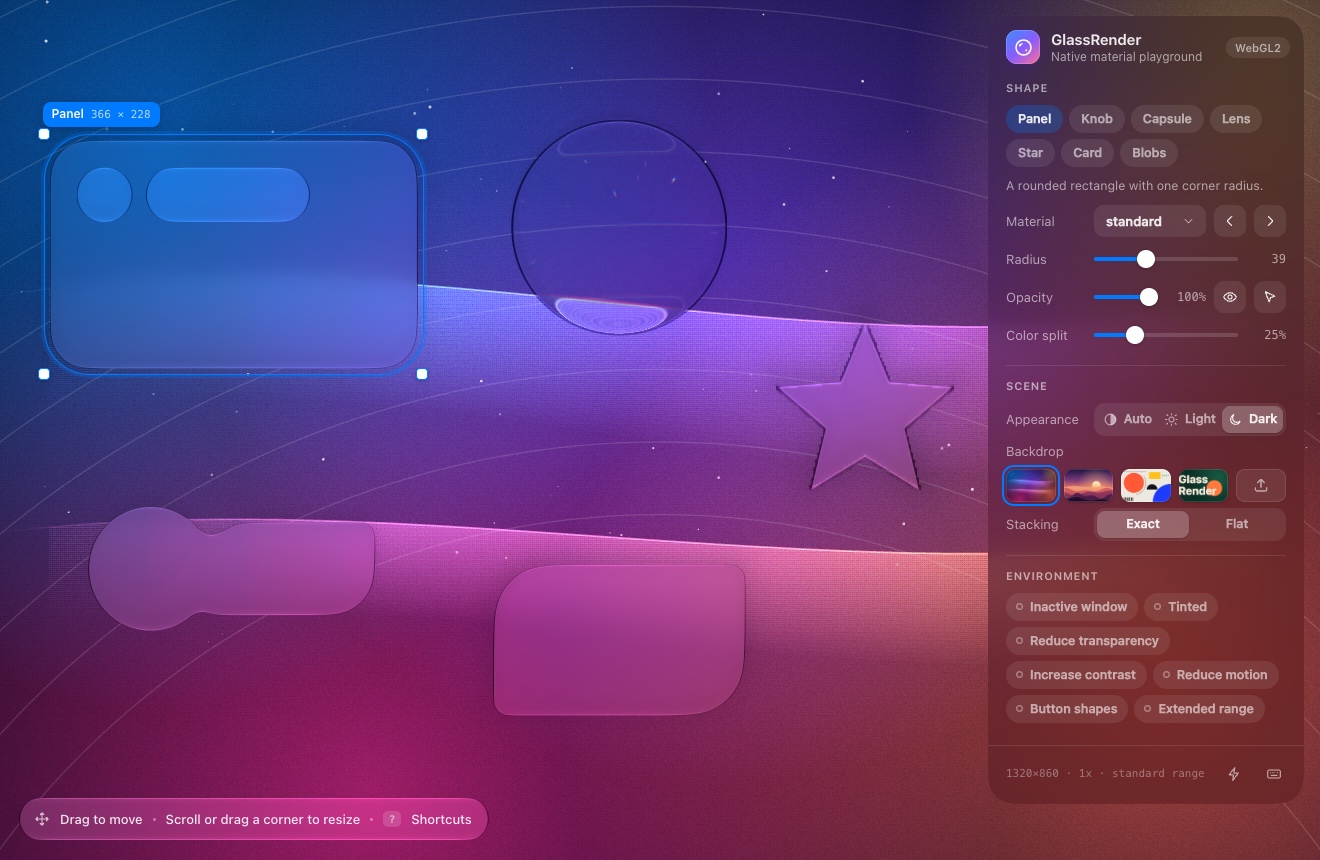 |
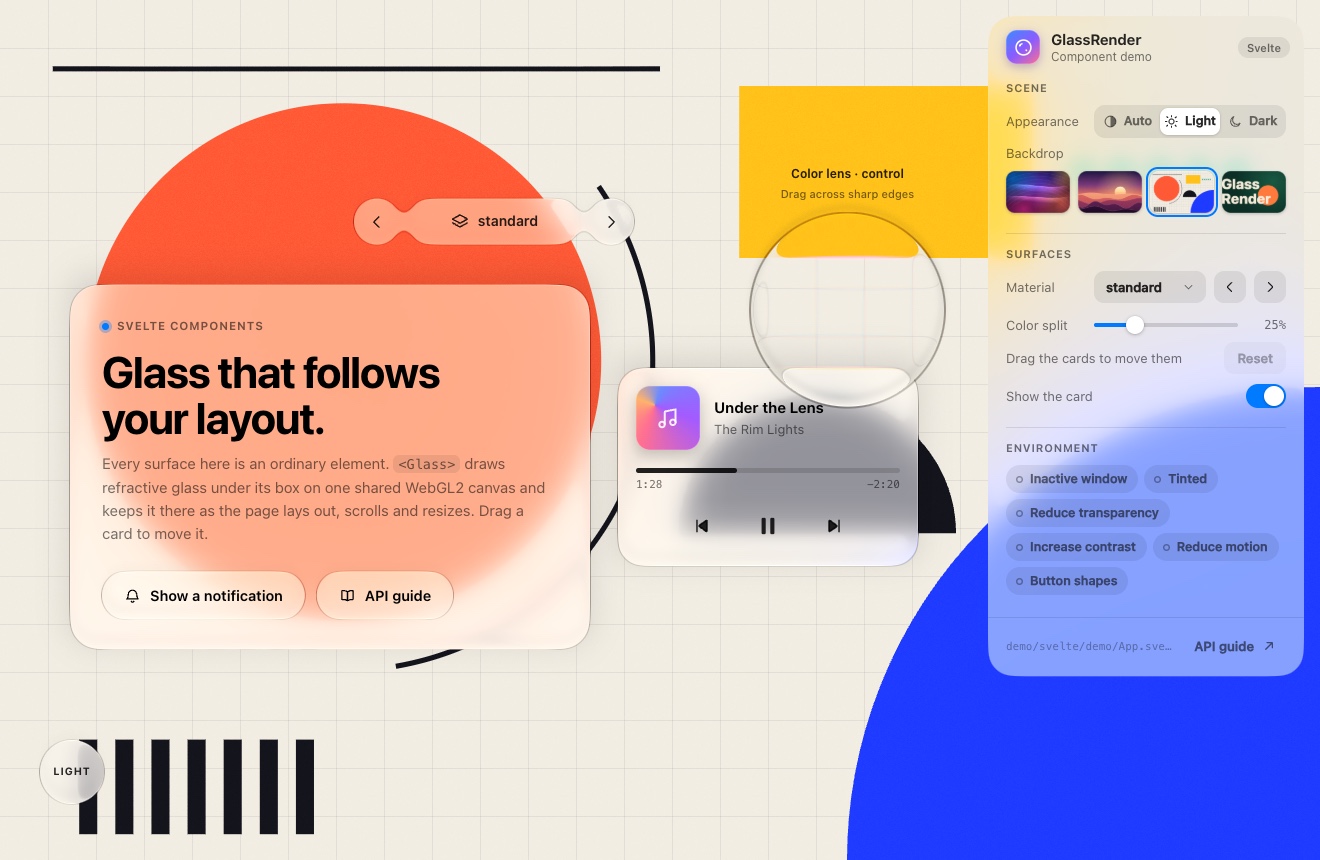 |
| Core playground: shapes and material profiles | Light appearance: the same demo in Svelte |
Install
GlassRender and its React, Svelte, Vue and Solid adapters are available on npm. The current release is 0.1.2 Beta (0.1.2-beta), published under the beta tag.
npm install glassrender@beta
For a framework app, install the core together with the adapter you use:
| Framework | Install command |
|---|---|
| React | npm install glassrender@beta glassrender-react@beta |
| Svelte | npm install glassrender@beta glassrender-svelte@beta |
| Vue | npm install glassrender@beta glassrender-vue@beta |
| Solid | npm install glassrender@beta glassrender-solid@beta |
The framework itself must already be installed in your app. To pin this release, replace @beta with @0.1.2-beta on both packages.
| Package | npm |
|---|---|
| Core | glassrender |
| React adapter | glassrender-react |
| Svelte adapter | glassrender-svelte |
| Vue adapter | glassrender-vue |
| Solid adapter | glassrender-solid |
Quick start
For React, Svelte, Vue or Solid, start with the framework components. For vanilla JavaScript, add a canvas to your page:
<canvas id="glass" style="display:block;width:100vw;height:100vh"></canvas>
Then use this module with your app's bundler:
import { createGlass, DEFAULT_BACKDROP } from "glassrender/core";

const image = new Image();
image.src = DEFAULT_BACKDROP;
await image.decode();

const made = createGlass(document.getElementById("glass"), { backdrop: image });
if (!made.ok) throw new Error(made.error);

const glass = made.value;
const panel = glass.add({ x: 40, y: 40, width: 320, height: 160, radius: 24, preset: "standard" });

// set() changes only what you pass and schedules the next frame.
panel.set({ preset: "clear" });
Coordinates are CSS pixels from the top-left corner of the canvas. This core example explicitly loads the built-in SVG; replace it with your own image, canvas or video. GlassCanvas components load that backdrop automatically when the prop is omitted.
The repository browser example, examples/quick-start.html
<!doctype html>
<html lang="en">
<head>
    <meta charset="utf-8">
    <meta name="viewport" content="width=device-width, initial-scale=1">
    <link rel="icon" href="data:,">
    <title>GlassRender browser quick start</title>
    <style>
        body { margin: 0; font: 16px/1.5 system-ui, sans-serif; }
        canvas { position: fixed; inset: 0; display: block; width: 100vw; height: 100vh; pointer-events: none; }
        main { position: relative; min-height: 100vh; padding: 24px; box-sizing: border-box; display: grid; place-items: center; }
        #panel { width: 320px; max-width: 100%; padding: 32px; box-sizing: border-box; color: var(--glass-foreground); }
        button { width: 100%; min-height: 48px; padding: 12px 16px; border: 0; border-radius: 24px; background: transparent; color: var(--glass-title); font: inherit; cursor: pointer; }
    </style>
</head>
<body>
    <canvas id="glass"></canvas>
    <main>
        <section id="panel">
            <h1>GlassRender</h1>
            <p>Material: <strong data-preset>standard</strong>.</p>
            <button id="switch" type="button">Switch to clear</button>
        </section>
    </main>
    <script type="module">
        import { createGlass, DEFAULT_BACKDROP } from "../dist/core.js";

        const image = new Image();
        image.src = DEFAULT_BACKDROP;
        await image.decode();

        const canvas = document.getElementById("glass");
        const result = createGlass(canvas, { backdrop: image });
        if (!result.ok) throw new Error(result.error);

        const glass = result.value;
        const panel = glass.add({
            x: 0, y: 0, width: 0, height: 0,
            radius: 24, preset: "standard",
        }).follow(document.getElementById("panel"));
        const button = document.getElementById("switch");
        glass.add({ x: 0, y: 0, width: 0, height: 0, radius: 24, preset: "control" }).follow(button);
        let preset = "standard";
        button.addEventListener("click", () => {
            preset = preset === "standard" ? "clear" : "standard";
            panel.set({ preset });
            document.querySelector("[data-preset]").textContent = preset;
            button.textContent = "Switch to " + (preset === "standard" ? "clear" : "standard");
        });
        window.addEventListener("pagehide", () => glass.destroy(), { once: true });
    </script>
</body>
</html>
This standalone repository example imports the locally built dist/ module. Follow Run the repository demos, then open http://127.0.0.1:5173/examples/quick-start.html.
The API guide covers options and defaults, all 28 presets, groups, masks, framework events, material metadata and the low-level renderer.
Vanilla JS
The core works directly with JavaScript and DOM elements. No framework adapter is needed. Install glassrender@beta and use this in a module built by your app's bundler:
import { createGlass } from "glassrender/core";

const image = new Image();
image.src = "/wallpaper.jpg";
await image.decode();

const canvas = document.getElementById("glass");
const element = document.getElementById("panel");
if (!canvas || !element) throw new Error("The canvas and panel elements are required.");
const result = createGlass(canvas, { backdrop: image });
if (!result.ok) throw new Error(result.error);

const glass = result.value;
const panel = glass.add({
    x: 0, y: 0, width: 0, height: 0,
    preset: "standard", radius: 24,
}).follow(element);

// Updates schedule their own frame.
panel.set({ tint: [0.2, 0.5, 1, 0.3] });
window.addEventListener("pagehide", () => glass.destroy(), { once: true });
The page supplies the canvas and panel, with CSS sizes and positioning:
<canvas id="glass" style="position:fixed;inset:0;width:100vw;height:100vh;pointer-events:none"></canvas>
<section id="panel" style="position:relative;width:320px;padding:24px;color:var(--glass-foreground)">My panel</section>
For plain HTML without a bundler, use a pinned CDN import inside <script type="module">:
import { createGlass } from "https://cdn.jsdelivr.net/npm/glassrender@0.1.2-beta/dist/core.js";
Serve the page over HTTP and provide a backdrop image, canvas or video. follow(element) measures the element again after resizes, scrolling, DOM changes, image and font loads and CSS transitions; follow(element, true) also measures it on every frame for CSS animations. Call glass.destroy() when your app removes the scene. The complete browser example above uses the same core API.
Frameworks
| Package | Version | Requires |
|---|---|---|
glassrender-react |
0.1.2 Beta | React 18 or later |
glassrender-svelte |
0.1.2 Beta | Svelte 5 |
glassrender-vue |
0.1.2 Beta | Vue 3.4 or later |
glassrender-solid |
0.1.2 Beta | Solid 1.9 or later |
GlassCanvas manages the canvas and render loop. Each Glass inside it follows its DOM box. Omit backdrop to use the built-in SVG background; supply a URL, image, canvas or video to use your own, or null to clear it.
Install the core and your adapter in an existing framework app, then use a component below.
React
npm install glassrender@beta glassrender-react@beta
Use this as App.tsx:
import { Glass, GlassCanvas } from "glassrender-react";

export default function App() {
    return (
        <GlassCanvas>
            <Glass preset="standard" radius={24} style={{ width: 320, padding: 24 }}>
                <h1>GlassRender</h1>
                <p>Hello, glass.</p>
            </Glass>
        </GlassCanvas>
    );
}
Svelte
npm install glassrender@beta glassrender-svelte@beta
Use this as App.svelte:
<script lang="ts">
    import { Glass, GlassCanvas } from "glassrender-svelte";
</script>

<GlassCanvas>
    <Glass preset="standard" radius={24} style="width: 320px; padding: 24px;">
        <h1>GlassRender</h1>
        <p>Hello, glass.</p>
    </Glass>
</GlassCanvas>
Vue
npm install glassrender@beta glassrender-vue@beta
Use this as App.vue:
<script setup lang="ts">
import { Glass, GlassCanvas } from "glassrender-vue";
</script>

<template>
    <GlassCanvas>
        <Glass preset="standard" :radius="24" style="width: 320px; padding: 24px;">
            <h1>GlassRender</h1>
            <p>Hello, glass.</p>
        </Glass>
    </GlassCanvas>
</template>
Solid
npm install glassrender@beta glassrender-solid@beta
Use this as App.tsx with your Solid JSX compiler:
import { Glass, GlassCanvas } from "glassrender-solid";

export default function App() {
    return (
        <GlassCanvas>
            <Glass preset="standard" radius={24} style={{ width: "320px", padding: "24px" }}>
                <h1>GlassRender</h1>
                <p>Hello, glass.</p>
            </Glass>
        </GlassCanvas>
    );
}
Change preset to select a material. Add GlassGroup to merge neighboring shapes. Use fixed={false} (:fixed="false" in Vue) to keep the canvas inside a container with a defined size. The API guide lists all props, and each repository quick-start demo includes a button that switches materials.
Demos
| Demo | Source | Address |
|---|---|---|
| Showcase reel | examples/showcase.html |
http://127.0.0.1:5173/examples/showcase.html |
| Renderer example | examples/renderer.html |
http://127.0.0.1:5173/examples/renderer.html |
| Core playground | examples/index.html |
http://127.0.0.1:5173/examples/ |
| React | demo/react/demo/App.tsx |
http://127.0.0.1:5175/ |
| Svelte | demo/svelte/demo/App.svelte |
http://127.0.0.1:5174/ |
| Vue | demo/vue/demo/App.vue |
http://127.0.0.1:5176/ |
| Solid | demo/solid/demo/App.tsx |
http://127.0.0.1:5177/ |
The showcase reel uses built-in presets and ordinary RGBA tints; run it from the source above to reproduce the banner. The playground offers the built-in material catalog, shape kinds and environment settings. Its optical values come from the selected preset. The React, Svelte and Vue demos show draggable cards and a control lens. Move the lens across sharp backdrop edges to see its built-in color separation. The Solid demo shows reactive material and opacity controls with a merged toolbar. The standard and clear profiles do not add color separation. Each framework also has quick-start.html; npm run build:demo includes both pages in demo-dist/. The quick starts switch between built-in standard and clear profiles using a real button.
Run the repository demos
Clone the repository to run the showcase and playground. The demo toolchain needs Node.js 22.12 or later and npm:
git clone https://github.com/Feralthedogg/GlassRender.git
cd GlassRender
npm ci
npm run build
npm run demo
The core examples are served at http://127.0.0.1:5173/examples/. Run a framework demo from a separate terminal in the repository root:
# React: http://127.0.0.1:5175/
npm --prefix demo/react ci
npm --prefix demo/react run demo -- --host 127.0.0.1 --strictPort

# Svelte: http://127.0.0.1:5174/
npm --prefix demo/svelte ci
npm --prefix demo/svelte run demo -- --host 127.0.0.1 --strictPort

# Vue: http://127.0.0.1:5176/
npm --prefix demo/vue ci
npm --prefix demo/vue run demo -- --host 127.0.0.1 --strictPort

# Solid: http://127.0.0.1:5177/
npm --prefix demo/solid ci
npm --prefix demo/solid run demo -- --host 127.0.0.1 --strictPort
Each framework server also provides /quick-start.html. These repository commands run local demo sources; the npm commands in Install are for adding GlassRender to your own app.
Tests
npm test                 # type-checked build and the Node tests
npm run test:browser     # functional tests in headless Chrome
npm run test:adapters    # Canvas and input tests (after `npm ci` in each demo folder)
npm run bench            # frame cost of the benchmark scenes
The browser tests and the benchmark start Chrome from its usual install location or from the CHROME environment variable. Extra Chrome switches come from CHROME_FLAGS. On a machine without a GPU, --use-angle=swiftshader --enable-unsafe-swiftshader selects the software renderer, which is much slower. Continuous integration runs the Node tests, a subset of the browser tests on that renderer, and the adapter type checks and builds.
Project layout
src/         built-in profile data, core API, catalog and WebGL2 renderer
demo/react/  glassrender-react and React demo
demo/svelte/ glassrender-svelte and Svelte demo
demo/vue/    glassrender-vue and Vue demo
demo/solid/  glassrender-solid and Solid demo
examples/    the core playground, the quick start and the assets the demos share
test/        Node tests, and functional and adapter tests run in headless Chrome
bench/       benchmark scenes and their headless Chrome runner
tools/       the headless Chrome driver shared by tests and benchmark
api.md       the API guide
Browser support
GlassRender runs wherever WebGL2 does. Mask outlines need EXT_color_buffer_float, and extended-range output needs a screen and a browser that support it. When WebGL2 is missing, createGlass returns an error instead of throwing.
License
MIT © 2026 Feralthedogg
The photographs in the reel are from Pexels, under the Pexels License: monstera leaves by Balázs Gábor and California poppies by Soly Moses.
Related Packages
Drop-in Materials3D scene for Vue, Svelte, or plain HTML: the custom element
Apple-style liquid glass in one line. Real WebGL2 refraction of the page behind...
Version History
Pre-releases (3)
| Version | Released | Vue | License |
|---|---|---|---|
| 0.1.2-beta | ^3.4.0 | MIT | |
| 0.1.1-beta | ^3.4.0 | ||
| 0.0.0-stage |