flowsvg
FlowSVG
English | 简体中文
FlowSVG(流形)用 SVG 播放逻辑图和架构图。用 JSON 或 TypeScript 定义节点、连线、场景与节拍,即可在浏览器播放或导出静态 SVG。
SDK 使用 ESM,提供无 DOM 核心及原生浏览器、Vue、React、Web Component 接入。各接入方式共用同一文档和时间线。
安装 · 快速开始 · Vue · React · 原生浏览器 · Web Component · API · License
安装
从 npm 安装:
pnpm add flowsvg
按所选入口安装框架依赖:
# Vue 应用
pnpm add vue
# React 应用
pnpm add react react-dom
# React TypeScript 应用
pnpm add -D @types/react @types/react-dom
核心与原生浏览器入口无需框架,类型声明随包提供。核心要求 Node.js 18+ 或 ES2022 ESM;浏览器要求 DOM、SVG 和 requestAnimationFrame;框架最低版本为 Vue 3.5、React 18。
| 导入路径 | 用途 |
|---|---|
flowsvg |
无 DOM 的文档校验、编译、求值、命中与 SVG 导出 |
flowsvg/browser |
原生浏览器播放器 |
flowsvg/vue |
Vue 组件与实例类型 |
flowsvg/react |
React 组件与 ref 类型 |
flowsvg/web-component |
显式注册自定义元素;也可使用 flowsvg/element |
flowsvg/styles.css |
控件布局与可见焦点样式 |
快速开始
1. 创建图解文档
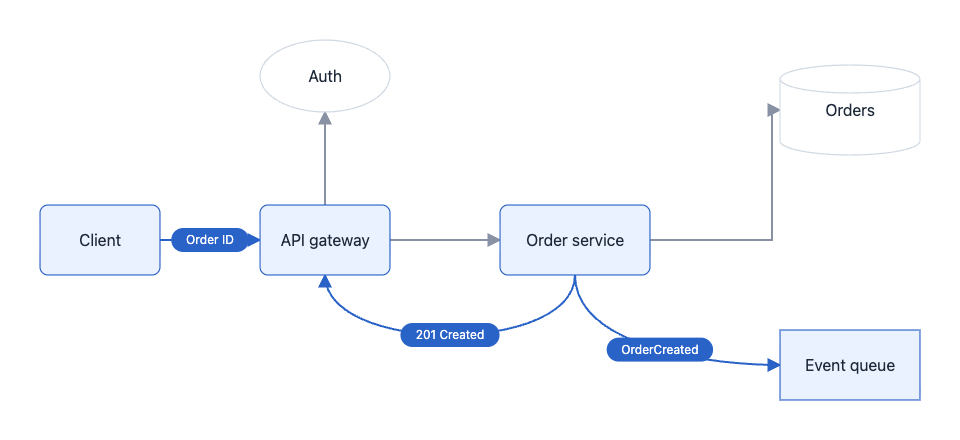
将下面内容保存为 diagram.ts。这个 5.2 秒的示例包含六个节点、三个场景和五个节拍,依次展示身份校验、订单写库,以及异步事件与响应的并行传递。后续集成示例复用此文件:
import type { DiagramDocument } from "flowsvg";

export const diagramDocument: DiagramDocument = {
  version: 1,
  title: "订单请求生命周期",
  viewport: { width: 960, height: 440 },
  nodes: [
    { id: "client", kind: "roundedRect", x: 40, y: 205, width: 120, height: 70, label: "Client" },
    { id: "gateway", kind: "roundedRect", x: 260, y: 205, width: 130, height: 70, label: "API gateway" },
    { id: "auth", kind: "ellipse", x: 260, y: 40, width: 130, height: 72, label: "Auth" },
    { id: "orders", kind: "roundedRect", x: 500, y: 205, width: 150, height: 70, label: "Order service" },
    { id: "database", kind: "cylinder", x: 780, y: 65, width: 140, height: 90, label: "Orders" },
    { id: "events", kind: "rect", x: 780, y: 330, width: 140, height: 70, label: "Event queue" }
  ],
  edges: [
    { id: "request", from: "client", to: "gateway", route: "straight" },
    { id: "authorize", from: "gateway", to: "auth", route: "straight", fromPort: "top", toPort: "bottom" },
    { id: "create", from: "gateway", to: "orders", route: "straight" },
    { id: "persist", from: "orders", to: "database", route: "orthogonal", fromPort: "right", toPort: "left" },
    { id: "publish", from: "orders", to: "events", route: "curved", fromPort: "bottom", toPort: "left" },
    { id: "result", from: "orders", to: "gateway", route: "curved", fromPort: "bottom", toPort: "bottom" }
  ],
  scenes: [
    { id: "request", label: "接收与认证", beats: [
      { durationMs: 800, caption: "接收订单请求", actions: [
        { type: "flow", target: "request", direction: "forward", text: "POST" }
      ] },
      { durationMs: 800, caption: "校验访问令牌", actions: [
        { type: "flow", target: "authorize", direction: "forward", text: "Token" }
      ] }
    ] },
    { id: "create-order", label: "创建订单", beats: [
      { durationMs: 1000, caption: "将已认证请求交给订单服务", actions: [
        { type: "flow", target: "create", direction: "forward", text: "Create" }
      ] },
      { durationMs: 1000, caption: "将新订单写入数据库", actions: [
        { type: "flow", target: "persist", direction: "forward", text: "INSERT" }
      ] }
    ] },
    { id: "response", label: "发布事件与响应", beats: [
      { durationMs: 1600, caption: "发布 OrderCreated 事件,同时返回订单号", actions: [
        { type: "flow", target: "publish", direction: "forward", text: "OrderCreated" },
        { type: "flow", target: "result", direction: "forward", text: "201 Created" },
        { type: "flow", target: "request", direction: "reverse", text: "Order ID" }
      ] }
    ] }
  ]
};
浅色主题下的 4400 ms 画面:事件与响应消息同时传递,仅高亮当前参与的节点。
2. 求值并导出 SVG
import { createDiagram, renderSvg } from "flowsvg";
import { diagramDocument } from "./diagram.js";

const diagram = createDiagram(diagramDocument);
const frame = diagram.evaluateAt(125);
console.log(diagram.totalDuration, frame.sceneId, frame.warnings);

const svg = diagram.renderSvg(125, { theme: "dark" });
const finalSvg = renderSvg(diagramDocument, 5200);
两种调用均返回静态 SVG 字符串。重复查询时复用 createDiagram;单次导出用 renderSvg。
Vue 集成
在 Vue 应用中创建组件,diagram.ts 与组件放在同一目录:
<script setup lang="ts">
import { ref } from "vue";
import { FlowPlayer, type FlowPlayerHandle } from "flowsvg/vue";
import type { PlayerErrorDetail } from "flowsvg/browser";
import "flowsvg/styles.css";
import { diagramDocument } from "./diagram.js";

const player = ref<FlowPlayerHandle | null>(null);
const timeMs = ref(0);

function handleError({ error }: PlayerErrorDetail): void {
  console.error(error);
}
</script>

<template>
  <FlowPlayer
    ref="player"
    :document="diagramDocument"
    :speed="1.25"
    theme="dark"
    @timeupdate="timeMs = $event.timeMs"
    @error="handleError"
  />
  <button type="button" @click="player?.play()">播放</button>
  <button type="button" @click="player?.seek(0)">回到开头</button>
  <output>{{ timeMs }} ms</output>
</template>
卸载时自动销毁。脚本中通过 player.value 调用方法,模板自动解包 ref。事件直接传入 detail:stepchange、timeupdate、playstatechange、error,也支持对应回调 props。
React 集成
import { useRef } from "react";
import { FlowPlayer, type FlowPlayerHandle } from "flowsvg/react";
import "flowsvg/styles.css";
import { diagramDocument } from "./diagram.js";

export default function DiagramExample() {
  const player = useRef<FlowPlayerHandle | null>(null);

  return (
    <section>
      <FlowPlayer
        ref={player}
        document={diagramDocument}
        speed={1.25}
        theme="dark"
        onError={({ error }) => console.error(error)}
      />
      <button type="button" onClick={() => player.current?.play()}>播放</button>
      <button type="button" onClick={() => player.current?.seek(0)}>回到开头</button>
    </section>
  );
}
组件卸载时自动清理资源。回调为 onStepChange、onTimeUpdate、onPlayStateChange、onError。
Vue / React 的参数与更新行为
| Prop | 默认或含义 |
|---|---|
document |
必填图解文档;对象引用变化时重新加载,成功后暂停在零时刻 |
speed |
正数倍率,默认 1;变化时更新速度 |
theme |
light / dark;未指定时使用文档主题,最终默认为浅色 |
controls |
默认 true,设为 false 隐藏内置控件 |
reducedMotion |
未指定时跟随浏览器减少动画偏好 |
hoverFill |
默认 false:悬停只高亮边框;设为 true 时同时高亮背景和内容 |
initialTimeMs |
仅初次挂载时应用;后续跳转用 seek |
className / style |
宿主容器样式 |
修改 theme、controls、reducedMotion 或 hoverFill 会重建播放器,暂停在零时刻,不再应用 initialTimeMs。更新文档需提供新对象引用。实例暴露播放器 API中的七个方法;挂载前或卸载后调用会抛出错误。
两种入口均支持服务端导入。SSR 输出容器,客户端挂载后创建播放器。服务端图解预览使用 renderSvg。
原生浏览器
在页面中放置容器:
<div id="diagram" style="width: 100%; height: 360px;"></div>
在应用的客户端模块中创建播放器:
import { createPlayer } from "flowsvg/browser";
import "flowsvg/styles.css";
import { diagramDocument } from "./diagram.js";

const host = document.querySelector<HTMLElement>("#diagram");
if (!host) throw new Error("Diagram host is missing");

const player = createPlayer(host, diagramDocument, { theme: "light" });
player.play();
createPlayer 替换容器子元素。卸载或复用容器前调用 destroy()。原生 HTML 使用包导入路径时,需配置 import map 或构建工具。
原生示例演示请求与响应传递,同一文档也可用于其余三种接入方式。
Web Component
先在 HTML 中放置元素,再从客户端模块显式注册:
<flowsvg-player controls="false"></flowsvg-player>
import { defineFlowPlayer, type FlowPlayerElement } from "flowsvg/web-component";
import "flowsvg/styles.css";
import { diagramDocument } from "./diagram.js";

defineFlowPlayer();
const element = document.querySelector<FlowPlayerElement>("flowsvg-player");
if (element) element.document = diagramDocument;
默认注册 <flowsvg-player>,重复注册安全。对象赋给 element.document;JSON 字符串赋给 HTML document 属性;JSON URL 赋给 src。URL 相对页面解析,遵循浏览器 CORS 规则。
支持 autoplay、controls、speed、theme、reduced-motion、hover-fill。默认显示控件,关闭自动播放与悬停背景;controls="false" 隐藏控件。主题、控件及动画/悬停选项变化时保留时间和播放状态;autoplay 则直接控制播放或暂停。移除元素会取消请求并销毁播放器,重新连接时使用保留的文档。
方法:play、pause、seek、step、setSpeed、getState、destroy。更换文档使用 element.document。挂载前或销毁后,getState() 返回 undefined。播放与错误事件可冒泡并穿越 Shadow DOM 边界。
请在 DOM 环境注册。无 DOM 导入安全,但该模块实例不能在稍后补上 DOM 后用于注册。
文档与时间线
| 文档字段 | 约定 |
|---|---|
version |
当前为 1 |
viewport |
有限且为正的 width、height,定义初始视口 |
nodes |
节点列表,id、kind、x、y、width、height 必填 |
edges |
连线列表,id、from、to 必填;端点引用节点或分组边界 |
scenes |
[] 表示静态图;场景具有唯一 id、label 和非空 beats |
title / theme |
可选标题与 light / dark 文档主题 |
节点与连线 ID 全局唯一。形状:rect、roundedRect、ellipse、cylinder、group。parentId 指向父分组,子节点坐标相对分组原点。标签为纯文本,visible 默认 true。节点样式:fill、stroke、strokeWidth、textColor、dashed(分组边框);连线样式:stroke、strokeWidth、dashed。颜色使用十六进制 RGB/RGBA,如 #2563eb、#2563eb80。
路由:straight(默认)、orthogonal、curved。曲线跟随端口切线,不避让其他节点;正交路径避开可见普通节点,受阻时固定回退,不保证最短路径或零交叉。fromPort / toPort 可设为 top、right、bottom、left。显式正交端口保留向外线段,曲线端口决定切线。省略时按中心连线主方向选择,椭圆端点位于轮廓。普通标签按估算宽度换行;高度溢出时仍显示全文,并报告 text-overflow。
连线可连接节点或分组边界。分组端点跟随当前几何和显式端口;祖先隐藏时遮蔽连线。传递仅高亮端点分组,不联动子节点。分组边框不作为布线障碍。
固定节点内的节点内容
rect、roundedRect、cylinder 支持 content;椭圆和分组仅支持普通标签。content 与 label 互斥,空标签也算声明。content.blocks 按顺序排列 title、paragraph、list、graph 内容块。段落角色为 body(默认)或 auxiliary(辅助文字);空数组只显示形状。
import type { DiagramNode } from "flowsvg";

const service = {
  id: "service", kind: "rect", x: 24, y: 24, width: 260, height: 312,
  content: {
    style: { padding: 16, blockGap: 14 },
    blocks: [
      { type: "title", text: "Order service" },
      { type: "paragraph", role: "auxiliary", text: "Core responsibilities" },
      { type: "paragraph", text: "Validate and persist incoming orders." },
      { type: "paragraph", text: "Return the order number.", style: { color: "#2563eb", align: "right" } }
    ]
  }
} satisfies DiagramNode;
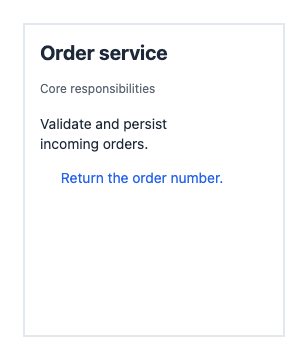
service 节点在浅色主题下的渲染结果:
文字字段接受字符串或 ContentTextSpan[]:{ text, style?: { fontSize, fontWeight, color } }。片段继承内容块样式并共用基线,对齐由内容块决定。每行使用最大字号;换行保留显式空行和完整 Unicode 字素,优先在英文空格处断行,必要时拆分长单词或 URL。跨片段的字素采用首字符样式。排版使用宽度估算,不测量 DOM。
文字样式:有限正数 fontSize、100–900 整数 fontWeight、十六进制 color、align(left、center、right)。内容的 padding、blockGap 为非负有限数。默认值按图解单位计:标题 20/700、正文 14/400、辅助文字 12/400、内边距 16、块间距 14;行高为 max(20, fontSize × 1.35)。显式颜色覆盖主题默认值。
列表接受 marker(默认 none,可选 bullet、number)、items 和 style。条目支持 tags、status、body、auxiliary、style、auxiliaryStyle、statusStyle。列表样式设置正文样式和非负有限数 itemGap(默认 12),条目正文样式可覆盖;辅助文字默认使用 12 单位弱化色。标记共用一列,与正文间隔 8 单位;正文续行与辅助文字对齐。标记对齐首个实际文字的基线。缺省条目/部分不占空间,显式空文字保留一行。
import type { ContentBlock } from "flowsvg";

const steps: ContentBlock = { type: "list", marker: "number", style: { itemGap: 16 }, items: [
  { body: "校验请求。", auxiliary: "输入检查" },
  { body: [{ text: "保存", style: { fontWeight: 700 } }, { text: "订单。" }] }
] };
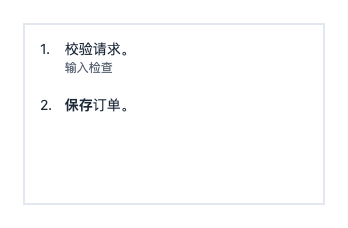
将 steps 放入 300 × 180 的矩形,设置 content: { blocks: [steps] }:
文字标签接受 { text, style?: { fontSize, fontWeight, color, fill } }。默认字号 11,水平/垂直内边距 6/2,圆角 3。列表 tagGap 默认 6,须为非负有限数。状态靠右,默认使用 12 单位强调色;statusStyle 支持 fontSize、fontWeight、color。宽度足够时标签与状态共用基线;否则先换行标签,再将状态放到下方。正文、辅助文字随后排列。显式颜色和底色覆盖主题默认值。
import type { ContentBlock } from "flowsvg";

const records: ContentBlock = { type: "list", items: [{
  tags: [{ text: "world" }, { text: "experience", style: { fill: "#eadfff", color: "#57319b" } }],
  status: "new", body: "Alice joined Google", auxiliary: "Mar 2026"
}] };
将 records 放入 300 × 180 的矩形,设置 content: { blocks: [records] }:

内容保持节点原尺寸。安全区在内边距之外额外避让:圆角矩形每侧 4 单位,圆柱上下各两倍端盖半径(min(14, height / 4));宽高最小为零。SVG 按安全区裁剪,宽/高不足时报告带节点 ID、nodes[index].content 路径和方向的 text-overflow。裁剪文字不扩大命中范围,普通标签沿用独立的溢出规则。
EvaluatedNode.contentLayout 提供安全区、文字行/片段、标签底色、可选图形几何及宽高溢出标志。几何使用绝对坐标,跟随节点尺寸、父级移动、显隐和透明度。文字行保留块/条目/标签索引,explicitColor、explicitFill 标识作者配色。浏览器与静态 SVG 共用布局;内容不改变端口、路由、传递几何或父级关系。参见段落与列表示例。
节点内的实体关系小图
graph 内容块按作者指定的局部坐标绘制无向实体关系图:
import type { ContentGraphBlock } from "flowsvg";

const entities: ContentGraphBlock = {
  type: "graph", height: 130,
  nodes: [
    { id: "alice", label: "Alice", x: 120, y: 30, highlighted: true },
    { id: "google", label: "Google", x: 50, y: 110, highlighted: true },
    { id: "ml", label: "ML project", x: 190, y: 110 }
  ],
  edges: [{ from: "alice", to: "google" }, { from: "alice", to: "ml" }]
};
将 entities 放入 280 × 180 的矩形,设置 content: { blocks: [entities] }:
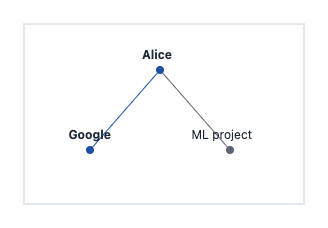
height 预留固定正数高度。实体中心 x/y 是相对区域左上角的非负有限坐标。ID 仅在块内唯一,关系端点引用块内 ID。12 单位标签位于半径为 4 的圆点上方。高亮实体使用强调色圆点与粗体;关系两端均高亮时使用强调色。溢出按方向报告,不移动后续内容块。图形共用父节点裁剪与主题,交互命中父节点。
contentLayout.graphs 按 blockIndex 提供绝对几何和高亮状态,标签进入 contentLayout.lines。在节拍起点替换 content 可切换选中状态。参见 Hindsight 示例。
编写完整 Facts 时间线
先确定尺寸,再排列内容块。记录用无标记列表,能力清单用圆点,步骤用编号。下例可用于全部四种接入方式:
import { createDiagram, type DiagramDocument, type NodeContent } from "flowsvg";

const facts: NodeContent = { blocks: [
  { type: "title", text: "Facts" },
  { type: "paragraph", role: "auxiliary", text: "已确认的信息记录" },
  { type: "list", marker: "none", items: [{
    tags: [{ text: "world" }, { text: "订单", style: { fill: "#eadfff", color: "#57319b" } }],
    status: "new",
    body: [{ text: "订单已保存", style: { fontWeight: 700 } }, { text: " 2026-10-17", style: { fontSize: 11 } }],
    auxiliary: "等待支付。"
  }] }
] };
const updated: NodeContent = { blocks: [
  { type: "title", text: "Facts" },
  { type: "list", items: [{ tags: [{ text: "verified" }], status: "done", body: "支付已确认", auxiliary: "2026-10-18" }] }
] };
const document: DiagramDocument = {
  version: 1, viewport: { width: 300, height: 480 },
  nodes: [{ id: "facts", kind: "cylinder", x: 24, y: 20, width: 240, height: 440, content: facts }], edges: [],
  scenes: [{ id: "records", label: "记录", beats: [
    { durationMs: 1000, actions: [] },
    { durationMs: 1000, actions: [{ type: "updateNode", target: "facts", value: { content: updated } }] },
    { durationMs: 1000, actions: [{ type: "updateNode", target: "facts", value: { label: "已归档" } }] },
    { durationMs: 1000, actions: [{ type: "updateNode", target: "facts", value: { content: facts } }] },
    { durationMs: 1000, actions: [{ type: "updateNode", target: "facts", value: { content: null } }] }
  ] }]
};
const diagram = createDiagram(document);
console.log(diagram.evaluateAt(1000).warnings);
const svg = diagram.renderSvg(1000, { theme: "dark", reducedMotion: true });
左图为 0 ms 的浅色主题初始画面,右图为 1000 ms 的深色主题替换后画面:

分享前检查 frame.warnings,按需增大节点或精简文字;SDK 不自动调整尺寸或缩小字号。优先使用默认颜色保持主题与高亮下的对比度。内容只有节点级交互,不支持内部链接、按钮、图片或 HTML。
内容时间线组合 Facts、列表、节点更新、传递与聚焦。共享文档也用于 Vue、React 示例。
每个节拍包含正数 durationMs 和 actions,可选 transitionMs 与 caption。过渡时长默认 min(250, durationMs),取值范围为 [0, durationMs];caption 省略时继承前文,空字符串可清空。
| 动作 | 示例或可更新字段 |
|---|---|
show / hide |
{ type: "show", target: "service" },作用于节点、分组或连线 |
highlight / unhighlight |
改变高亮层,取消高亮后显示最新普通样式 |
flow |
{ type: "flow", target: "request", direction: "forward" };在一个节拍内让标记沿连线移动。direction 为 forward 或 reverse,不会改变静态箭头方向;添加 text: "请求" 显示水平文字胶囊,省略 text 显示实心圆点。 |
updateNode |
value 支持 x、y、width、height、label、content、fill、stroke、opacity |
updateEdge |
value 支持 label、stroke、strokeWidth、opacity |
focus |
target 为节点/分组 ID;null 恢复完整视口 |
updateNode.value.content 在节拍起点整体替换内容,不受过渡时长影响,结果继承到后续节拍与场景。label 切换到普通标签,content 切换到节点内容;content: null 清空任一模式,不恢复旧标签或改变尺寸。同一节拍同时赋值两种模式或重复赋值会报告字段路径错误。
// 每个 value 分别用于不同节拍的 updateNode 动作。
import type { NodeVisualState } from "flowsvg";

const replacement: NodeVisualState = { content: { blocks: [{ type: "title", text: "Updated" }] } };
const simpleLabel: NodeVisualState = { label: "Summary" };
const clearText: NodeVisualState = { content: null };
场景共用毫秒时间线,继承前一场景的最终状态。文字在节拍起点切换,插值属性在过渡期变化。节拍左闭右开,最终时间返回完成画面。隐藏节点/分组会遮蔽关联连线,重新显示时恢复各连线保存的显隐状态。
每拍可在多条不同连线上各传递一次。标记共用 durationMs 内的线性进度,因此路径越长,移动越快。标记和端点临时高亮在拍末消失,下一拍提供新的一组传递;显式高亮和普通样式继续继承。
传递 text 按纯文本转义,始终水平,胶囊宽度按固定规则估算。文字不替换连线标签,也不产生独立交互目标;空字符串仍显示胶囊。
API
核心 API
从 flowsvg 导入:
| API | 返回与行为 |
|---|---|
validateDocument(input: unknown) |
返回 { path, message }[];空数组表示通过 |
createDiagram(document) |
校验、复制并编译,返回 Diagram;非法文档抛出 DiagramValidationError |
renderSvg(document, timeMs = 0, options?) |
一次性编译并导出静态 SVG 字符串 |
diagram.totalDuration |
全局总时长,静态文档为 0 |
diagram.evaluateAt(timeMs, options?) |
返回 DiagramFrameState |
diagram.renderSvg(timeMs = 0, options?) |
导出相同求值结果的 SVG |
diagram.hitTest(timeMs, point, options?) |
在文档坐标中返回 { id, type: "node" | "edge" } 或 null |
wrapText(label, maxWidth, typography?) |
按固定字宽估算换行,返回文本行数组 |
EvaluateOptions:{ theme?: "light" | "dark"; reducedMotion?: boolean }。时间限制在 [0, totalDuration],非有限值按零处理。命中跳过隐藏/零透明度对象,依次检查普通节点、连线、分组背景。
DiagramFrameState 包含时间、场景/节拍 ID、进度、求值后的节点/连线、镜头、说明文字及警告。坐标为绝对坐标。静态图的场景/节拍 ID 为 null;节拍 ID 为 ${scene.id}:${beatIndex},索引从零开始。活动连线的 flow 提供方向、进度、位置及可选文字;拍末、隐藏或减少动画时不显示标记。
类型及成员 JSDoc 随包提供:DiagramDocument、DiagramNode、DiagramEdge、Scene、Beat、Action、Diagram、DiagramFrameState、EvaluateOptions、ValidationIssue、LayoutWarning。
播放器 API
从 flowsvg/browser 导入 createPlayer(host, document, options?)。PlayerOptions 包含核心视觉选项以及 controls?: boolean 和 hoverFill?: boolean。
| 方法或属性 | 行为 |
|---|---|
element |
创建时传入的宿主元素,也是事件目标 |
play() / pause() |
播放或保留当前画面并暂停;静态图或终点不会开始播放 |
seek(timeMs) |
限制到时间线范围;保留播放状态,抵达终点时暂停 |
step(1) / step(-1) |
暂停并跳到相邻节拍起点;节拍中途后退到本拍起点,在起点后退到上一拍 |
setSpeed(speed) |
设置有限正数倍率,忽略非法值 |
load(document) |
成功后暂停并回到零;校验失败时发出 error,保留原文档、时间和播放状态 |
getState() |
返回 PlayerState:timeMs、totalDuration、playing、speed、frame |
destroy() |
幂等清理 DOM、监听器与调度;之后停止事件,状态仍可读取 |
创建时暂停在零时刻,默认显示控件。页面隐藏时暂停,恢复后保持暂停;播放在终点停止,静态图禁用时间控件。框架实例提供表中方法,但不暴露 element 和 destroy。
悬停形状、标签或内容时高亮当前节点边框。hoverFill: true 同时高亮背景与内容,也适用于分组。移出只解除悬停高亮,活动的传递/显式高亮仍保留。画面更新会重新检查未移动的指针;指针取消、文档成功替换和销毁会清除悬停。
默认内容颜色跟随主题与高亮底色,作者配色和标签底色保持原值。高亮不改变布局或命中范围。内容交互返回父节点,裁剪文字不增加命中区域。
PlayerState.frame 和静态 SVG 不含悬停;没有悬停时,浏览器输出与同时间导出一致。
事件
原生播放器在宿主元素上派发 CustomEvent:
| 事件 | detail |
|---|---|
timeupdate |
当前 PlayerState,画面更新后发送 |
stepchange |
当前 PlayerState,场景或节拍改变时发送,早于该次 timeupdate |
playstatechange |
当前 PlayerState,播放/暂停状态变化时发送 |
error |
PlayerErrorDetail:保留的播放器状态与 error |
hover / click |
PlayerInteractionDetail 或 null;也提供 objecthover / objectclick 同义事件 |
交互 detail 包含 id、type、point(文档坐标)、timeMs、sceneId、beatId,未命中为 null。包装层转发四类播放/错误事件;Web Component 挂载前的错误可能没有播放器状态。
指针移动会发送 hover;画面更新导致未移动的指针命中其他对象时也发送。移出或取消时发送 null。
import type { PlayerEventMap } from "flowsvg/browser";

function handleTimeUpdate(event: Event): void {
  const { detail } = event as PlayerEventMap["timeupdate"];
  console.log(detail.timeMs, detail.frame.caption);
}

player.element.addEventListener("timeupdate", handleTimeUpdate);
上例沿用原生集成创建的 player。宿主自行添加的监听器由宿主移除。
主题与无障碍
主题:显式选项 → 文档主题 → 浅色,核心不读取系统偏好。浏览器动画默认跟随 prefers-reduced-motion,核心默认正常动画。减少动画会立即完成过渡并隐藏传递标记,保留总时长。
默认样式使用中性边框与连线,以蓝色突出活动对象:
| 颜色 | 浅色 | 深色 |
|---|---|---|
| 背景 / 节点填充 | #ffffff / #ffffff |
#101828 / #1d2939 |
| 节点边框 / 文字 | #cfd8e3 / #1d2939 |
#475467 / #f2f4f7 |
| 连线 | #8892a4 |
#98a2b3 |
| 高亮填充 / 边框 | #eaf1ff / #2a63c8 |
#233b60 / #8ab4f8 |
| 传递标记 / 标记文字 | #2a63c8 / #ffffff |
#8ab4f8 / #101828 |
默认节点边宽为 1.2 图解单位,连线边宽为 2,圆角矩形的圆角半径上限为 8。节点标签使用无描边文字;连线标签保留背景描边,隔开穿过文字的路径。图解文字使用系统字体,并提供中文字体回退。显式样式替换普通默认值;时间线和悬停高亮叠加在普通样式上,解除高亮后恢复当前普通颜色。
导入 flowsvg/styles.css 可获得控件布局与焦点样式。CSS 变量只定制控件,图解本身颜色由核心主题和文档样式决定:
.flowsvg {
  --flowsvg-control-background: #101828;
  --flowsvg-control-color: #f4f7fb;
  --flowsvg-control-border: #64748b;
  --flowsvg-control-accent: #60a5fa;
  --flowsvg-control-focus: #fbbf24;
}
原生宿主添加 flowsvg 类即可应用变量,框架组件自动添加。画布聚焦后,Space 播放/暂停,方向键逐拍移动;表单控件保留原生按键。说明文字使用礼貌播报区,SVG 提供可访问名称。
校验与错误
校验拒绝未知字段、错误引用、循环分组、重复节拍赋值、非法颜色和尺寸/时长。文本按纯文本转义。检查外部 JSON 时,调用 validateDocument 并读取各条 path、message。
createDiagram 和首次 createPlayer 遇到非法文档会抛出 DiagramValidationError,issues 包含字段路径。后续 load 失败时发送 error,保留旧状态。文字溢出不阻止渲染,可读取 frame.warnings。
同一连线重复声明 flow 时,后一 target 报告 duplicate beat assignment,与方向、文字及其他字段错误无关。传递可与同一连线的显隐、显式高亮和样式动作共存。
License
MIT。可使用、修改及分发;保留许可证与版权声明。
Related Packages
JSON-defined visualization animations — framework-agnostic scene graph with Reac...
The Vue editor for dumbshow: ComposerApp and its panes over @dumbshow/core — mou...
Plays a Stew export: the artwork, the scene data Stew wrote next to it and Stew'...
Version History
| Version | Released | License |
|---|---|---|
| 0.1.1 | MIT | |
| 0.1.0 | MIT |
Pre-releases (1)
| Version | Released | License |
|---|---|---|
| 0.0.0-stage |