css-ghost
| Install | |
|---|---|
npm install css-ghost |
|
| Latest Version: | 1.3.5 |
| License: | MIT |
| Last Updated: | Oct 17, 2026 |
| Links: | GitHub · npm |
👻 css-ghost




Find and remove unused CSS selectors and orphaned CSS custom properties — selectors defined in your style files but never referenced in your components, across React, Vue, Svelte, SCSS, and CSS Modules
What it does
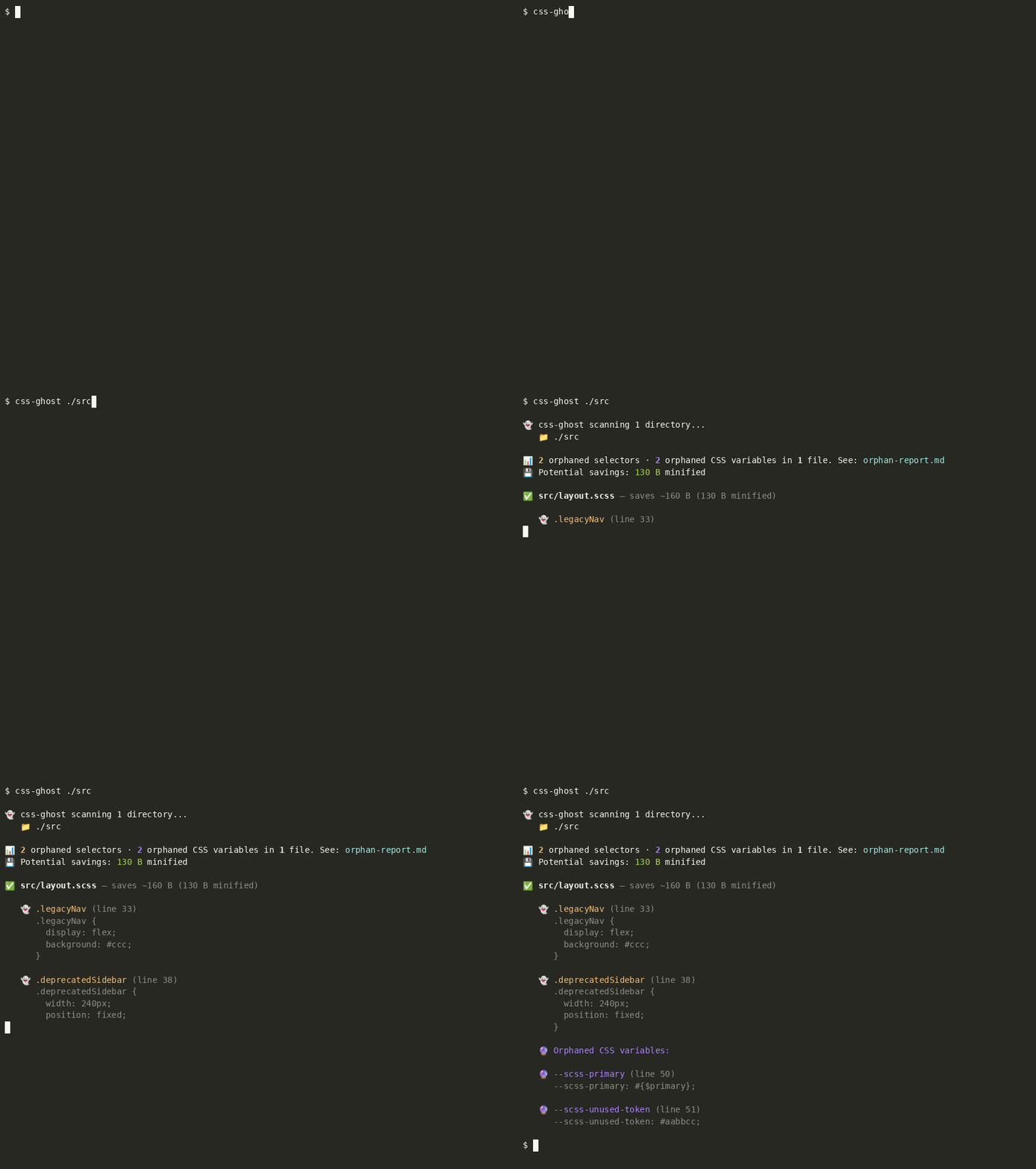
Scans one or more directories for style files, extracts every class selector defined, then cross-references them against usages in your component files. Anything defined but never used is reported as an orphan — with its line number and the actual CSS printed inline.
Supported style files: .css, .module.css, .scss, .sass, .less, .js/.ts using StyleSheet.create({}) / makeStyles({}) (MUI), .css.ts/.css.js using style() or styleVariants() (vanilla-extract)
Detected usage patterns: className="foo", className={styles.foo}, styles['foo'], ternary patterns, cx() / clsx() / classnames() (strings, objects and arrays), classes.foo (MUI), vanilla-extract named imports, Vue :class bindings, Svelte class:name directives
Dynamic class detection: Patterns where the class name can't be resolved statically — styles[variable] or template literals with ${} — are flagged with a ⚠️ warning per file in both the terminal output and the Markdown report.
Example output
When a component uses dynamic class access (styles[variant]), the file is flagged rather than reporting false positives:
✅ src/components/alert.module.css

   ⚠️  Dynamic class references detected — results may be incomplete.
   Dynamic references in: src/components/Alert.jsx

   👻 .hidden (line 30)
      .hidden { display: none; }
How is this different from PurgeCSS?
PurgeCSS is a build-time bundler — it hooks into webpack, PostCSS, or Gulp to strip unused CSS from your production output. It's designed for removing large framework utility classes (Bootstrap, Tailwind) that you never use.
css-ghost is a source code auditor — it finds dead selectors in your actual codebase, with no build step and no config file required. Just point it at a folder:
npx css-ghost ./src
| PurgeCSS | css-ghost | |
|---|---|---|
| Works on source files | ❌ Build output only | ✅ |
| Zero config, no build step | ❌ Requires webpack / PostCSS | ✅ (config file optional) |
| CSS custom property orphans | ❌ | ✅ |
| Git history per orphan | ❌ | ✅ |
| Pre-commit hook | ❌ | ✅ |
| Deletes dead code for you | ❌ | ✅ |
| MUI / vanilla-extract aware | ❌ | ✅ |
| Safe with dynamic classes | ❌ Silently removes them | ✅ Flags with ⚠️ |
The two tools are complementary: PurgeCSS for trimming framework output at build time; css-ghost for auditing your own hand-written CSS throughout development.
To enable AI features
Run the setup wizard once to save your free OpenRouter API key (openrouter.ai/keys), then pass --ai to any scan:
css-ghost --setup
css-ghost ./src --ai
The AI summary appears in both the terminal output and the markdown report. The core scan always runs without a key.
Install
npm install -g css-ghost
Or run without installing:
npx css-ghost ./src
Usage
css-ghost [directory] [directory2] ... [options]
Options:
| Flag | Description | Default |
|---|---|---|
--output <file> |
Output report file path | orphan-report.md |
--delete |
Delete all orphaned selectors from source files | off |
--yes |
Skip the deletion confirmation prompt | off |
--strict |
Exit with code 1 when any orphans are found (CI use) | off |
--ghost-trail |
Show the last git commit that touched each orphan | off |
--install-hook |
Write a pre-commit hook to .git/hooks/pre-commit |
— |
--ai |
Append an AI-generated summary (requires setup) | off |
--setup |
Save your OpenRouter API key for --ai |
— |
--init |
Create or update css-ghost.config.js interactively |
— |
-h, --help |
Show help | — |
Config file
For team projects, create a css-ghost.config.js in your project root so you never have to pass flags on the command line.
Generate it with the wizard:
css-ghost --init
The wizard asks which directories to scan, where to put the report, whether to enable strict mode, and so on — then writes css-ghost.config.js to the current directory. Run it again any time to update the config.
Or write it by hand:
// css-ghost.config.js
export default {
  dirs:       ['./src', './components'],   // directories to scan (replaces positional args)
  output:     'reports/orphan-report.md',  // where to write the report
  ignore:     ['legacy', 'vendor'],        // directory names to skip (added to the built-in list)
  strict:     true,                        // exit 1 when orphans found — great for CI
  ghostTrail: false,                       // show git history per orphan
};
Then just run css-ghost from anywhere in the project:
css-ghost
JSON alternative — if you prefer no JS in your config, use .css-ghostrc.json instead:
{
  "dirs": ["./src"],
  "output": "reports/orphan-report.md",
  "ignore": ["legacy", "vendor"],
  "strict": true
}
css-ghost looks for css-ghost.config.js first, then .css-ghostrc.json. CLI flags always override config file values, so you can still do one-off overrides:
css-ghost ./src/components          # scan a different dir, keep everything else from config
css-ghost --output custom-audit.md  # one-off output path
Supported config keys:
| Key | Type | Description | CLI equivalent |
|---|---|---|---|
dirs |
string[] |
Directories to scan when none are given as CLI arguments | positional args |
output |
string |
Output report file path | --output |
ignore |
string[] |
Directory names to skip (additive — built-in list still applies) | — |
strict |
boolean |
Exit with code 1 when orphans are found | --strict |
ghostTrail |
boolean |
Show last git commit per orphan | --ghost-trail |
ai |
boolean |
Append AI summary (requires css-ghost --setup first) |
--ai |
delete |
boolean |
Delete orphans (prompts for confirmation) | --delete |
yes |
boolean |
Skip the deletion prompt | --yes |
The built-in ignore list already covers
node_modules,.git,dist,build,.next,out,coverage, and.cache. Useignoreto add your own on top.
CSS variable orphan detection
css-ghost also catches orphaned CSS custom properties — variables defined with --my-token: value but never consumed via var(--my-token) anywhere in the codebase. Usages are detected across all file types: CSS, SCSS, JS, TS, JSX, TSX, Vue, Svelte, HTML. Orphaned variables appear under a 🔮 Orphaned CSS variables section in both the terminal output and the markdown report.
Ghost trail — git history for orphans
Pass --ghost-trail to fetch the last git commit that changed each orphan's occurrence count:
css-ghost ./src --ghost-trail
Note: ghost trail runs one
git log -Sper orphan in parallel. On large histories with many orphans it may take a few seconds.
Pre-commit hook
Install a hook that blocks commits when orphaned selectors are present:
css-ghost --install-hook ./src
This writes .git/hooks/pre-commit (executable, chmod 755). Pass multiple directories the same way you would to a normal scan. To uninstall: rm .git/hooks/pre-commit
--strict flag
Exit with code 1 when any orphans are found — the mechanism the hook depends on, also useful in CI:
css-ghost ./src --strict
Interactive folder picker
Run css-ghost with no arguments to open an arrow-key picker. Navigate with ↑↓, enter with ↵, press a to add the current folder to the scan list, d to start the scan. Add multiple folders before pressing d.
Deleting orphans
css-ghost ./src --delete        # prints report, then asks for confirmation
css-ghost ./src --delete --yes  # skip the prompt (CI / scripts)
Tip: commit or stash your work before running
--delete. There is no undo.
Examples
css-ghost                              # interactive folder picker
css-ghost ./src                        # scan a folder
css-ghost ./src --ghost-trail          # show git history per orphan
css-ghost ./src --strict               # CI: exit 1 on any orphan
css-ghost --install-hook ./src         # install pre-commit hook
css-ghost ./src --delete               # remove orphans (with prompt)
css-ghost ./src --delete --yes         # remove without prompting
css-ghost ./src ./components ./pages   # scan multiple directories
css-ghost ./src --ai                   # with AI summary
css-ghost ./src --output ./reports/audit.md
css-ghost --init                       # create / update css-ghost.config.js
Programmatic API
Use css-ghost as a library inside your own build tools, Vite plugins, or scripts:
npm install css-ghost
import { scan, generateReport } from 'css-ghost';
import { resolve } from 'path';

// Scan one or more directories
const results = scan([resolve(process.cwd(), 'src')]);

// Skip extra directories (additive — built-in ignores still apply)
const results = scan([resolve(process.cwd(), 'src')], { ignore: ['legacy', 'vendor'] });

// Optional: write a Markdown report and get the orphan totals
const { totalAllOrphans } = generateReport(results, 'orphan-report.md');

// Use in CI: fail the build if any orphans are found
if (totalAllOrphans > 0) process.exit(1);
TypeScript types are included — no @types/ package needed.
scan(dirs: string[], options?: { ignore?: string[] }) — returns a ScanResult[] array, one entry per style file. Each entry includes filePath, orphaned selectors, orphanedVars (CSS custom properties), hasDynamic flag, and more.
generateReport(results, outputPath?, aiSummary?) — writes a Markdown report and prints a colour summary to the terminal. Returns { totalOrphaned, totalVarsOrphaned, totalAllOrphans }.
Using with npm scripts
"scripts": {
  "scan": "css-ghost ./src"
}
npm run scan -- --output ./reports/audit.md
Dependencies
One runtime dependency: picocolors for terminal colours. Everything else uses Node.js built-ins (fs, path, readline).
License
Related Packages
A CSS-first utility framework with semantic tokens, four themes, accessible reci...
Code obfuscator CLI that protects your code regardless of the programming langua...
This CLI brings along all required tools to serve, test and build multi framewor...
The design-system compiler with compile-time accessibility and multi-target emis...
Version History
| Version | Released | License |
|---|---|---|
| 1.3.5 | MIT | |
| 1.3.4 | MIT | |
| 1.3.3 | MIT | |
| 1.3.2 | MIT | |
| 1.3.1 | MIT | |
| 1.3.0 | MIT |
Pre-releases (1)
| Version | Released | License |
|---|---|---|
| 0.0.0-stage |