colorpicker-v3
基于 vue3 的颜色选择器,支持透明度
18,156
17
| Install | |
|---|---|
npm install colorpicker-v3 |
|
| Latest Version: | 2.10.2 |
| Vue: | 3 |
| License: | ISC |
| Last Updated: | May 8, 2022 |
| Links: | GitHub · npm |
Maintainer: wcrane-ssr
一款支持vue3 的颜色选择器
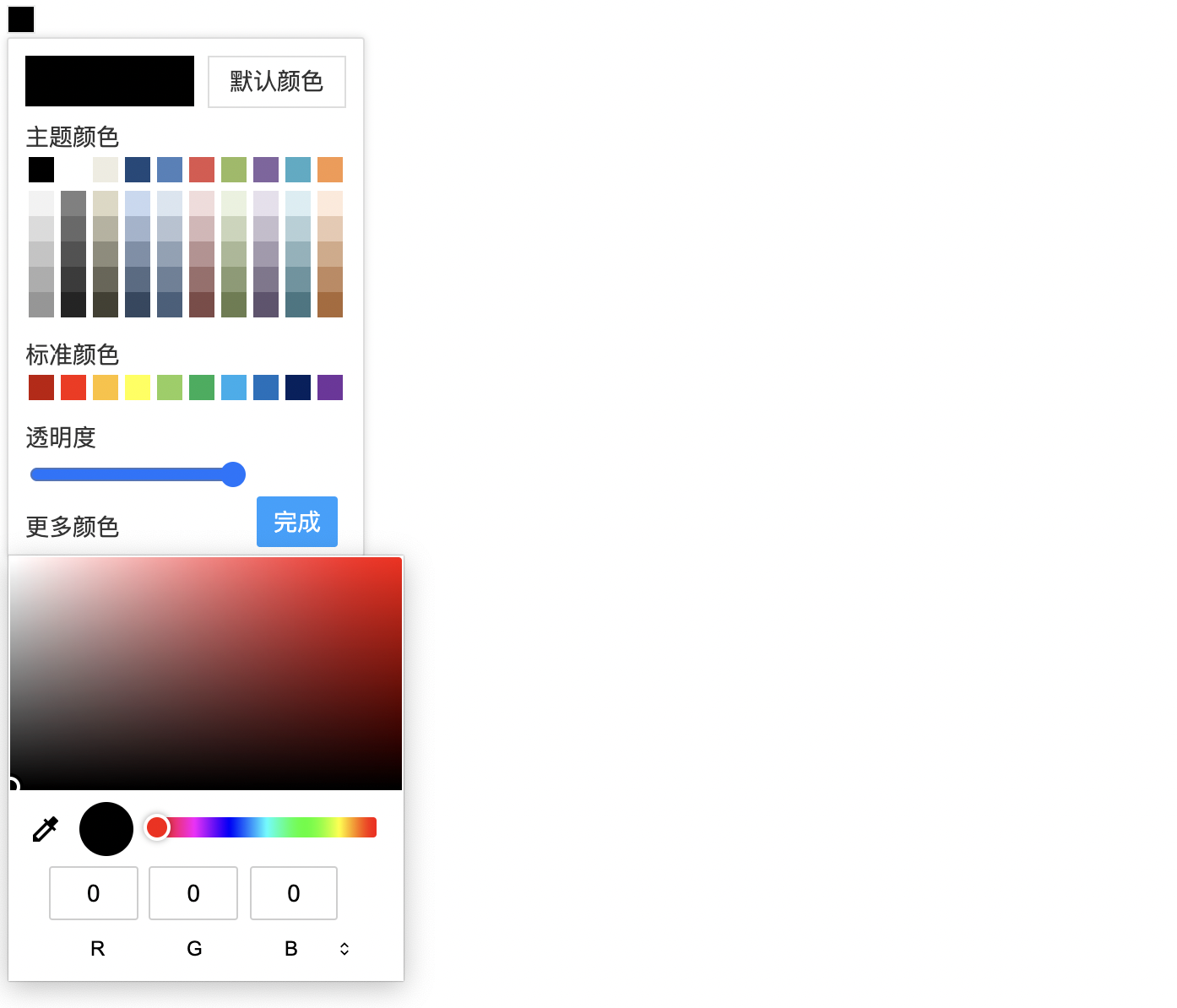
特点
- 简单易用,UI在原插件基础上优化增加了圆角和过渡动画
- 提供以 npm 的形式安装提供全局组件
- 在支持 html5 input[type='color'] 的浏览器实现了「更多颜色」的功能
安装
npm i colorpicker-v3
使用
在main中注册组件
在 main.js 文件中引入插件并注册
import { createApp } from 'vue'
import App from './App.vue'
import ColorPicker from 'colorpicker-v3'  // 注册组件
import 'colorpicker-v3/style.css' // 引入样式文件
const app = createApp(App)
app.use(ColorPicker)
app.mount('#app')
组件中使用
vue3 + js
使用 default-value 设置默认值
default-value设置颜色默认值
<template>
  <color-picker @change="change" :defaultColor="defaultColor" v-model:hex="hex"></color-picker>
</template>

<script setup>
import { ref } from 'vue';
const hex = ref("");
const defaultColor = ref("#6c8198")
const change = (e) => {
  console.log(e); // {hex: '#ddd8c3', rgba: 'rgba(221,216,195,0.5849)'}
}
</script>

<style>
</style>
使用 hex 值响应式
hex本身具有响应式功能,也可以通过@change事件获取 改变的值 说明:
- 如果默认
hex进行双向数据绑定, 该值如果不是""优先级会高于default-value- 优先显示
hex值
<template>
  <color-picker @change="change" v-model:hex="hex"></color-picker>
</template>

<script setup>
import { ref } from 'vue';
const hex = ref("#ffffff");
const change = (e) => {
  console.log(e); // {hex: '#ddd8c3', rgba: 'rgba(221,216,195,0.5849)'}
}
</script>

<style>
</style>
使用 rgba 值响应式
rgba本身具有响应式功能,也可以通过@change事件获取 改变的值
<template>
  <color-picker @change="change" v-model:rgba="rgba"></color-picker>
</template>

<script setup>
import { ref } from 'vue';
const rgba = ref("rgba(255,0,255,0.5)");

const change = (e) => {
  console.log(e); // {hex: '#ddd8c3', rgba: 'rgba(221,216,195,0.5849)'}
}
</script>

<style>
</style>
使用 rgba 与 hex 值响应式
rgba与hex本身具有响应式功能,也可以通过@change事件获取 改变的值- 注意点:
- 此时如果
hex与rgba都有值时 此时会优先显示rgba的值,优先级高于hex
<template>
  <color-picker @change="change" v-model:rgba="rgba" v-model:hex="hex"></color-picker>
</template>

<script setup>
import { ref } from 'vue';
const rgba = ref("rgba(255,0,255,0.5)");
const hex = ref("#ffffff");
const change = (e) => {
  console.log(e); // {hex: '#ddd8c3', rgba: 'rgba(221,216,195,0.5849)'}
}
</script>

<style>
</style>
vue+ts+setup
<template>
  <color-picker @change="change" v-model:hex="hex"></color-picker>
</template>

<script setup>
import { ref } from 'vue';
const hex = ref("#ffffff");
const change = (e) => {
  console.log(e); // {hex: '#ddd8c3', rgba: 'rgba(221,216,195,0.5849)'}
}
</script>

<style>
</style>
Props
| 参数名 | 描述 | 类型 | 默认值 | 备注 |
|---|---|---|---|---|
| default-color | 初始化颜色值 | string | #000000 | 使用16进制值 |
| v-model:hex | 初始化颜色值(双向数据绑定) | string | #000000 | 使用16进制值 |
| v-model:rgba | 初始化颜色值(双向数据绑定) | string | rgba(255,0,255,0.5) | 使用RGBA字符串 |
| btnStyle | 设置颜色块样式 | Object | - | - |
| opacity | 颜色透明度初始值 | numer | 1 | 0~1 数值越小透明度越低 |
| show-opacity | 是否显示透明度控制块 | boolean | true | |
| standard-color | 标准色初始化配置 | Array<string> |
standard-clolor详情 | 使用完整的hex16 进制值 |
| theme-color | 主题色初始化配置 | Array<string> |
theme-clolor详情 | 使用完整的hex16 进制值 |
注意点:
- 初始值优先级: default-color < hex < rgba
standard-clolor
const standardClolor = [
  '#c21401',
  '#ff1e02',
  '#ffc12a',
  '#ffff3a',
  '#90cf5b',
  '#00af57',
  '#00afee',
  '#0071be',
  '#00215f',
  '#72349d',
]

主题色theme-clolor
const themeClolor =[
                '#000000',
                '#ffffff',
                '#eeece1',
                '#1e497b',
                '#4e81bb',
                '#e2534d',
                '#9aba60',
                '#8165a0',
                '#47acc5',
                '#f9974c',
            ]

Events
| 事件名 | 描述 | 参数 | 返回值 |
|---|---|---|---|
| change | 颜色值改变时触发 | data: {hex:string,rgba: string} | - |
| finish | 点击完成按钮 | data: {hex:string,rgba: string} | - |
| close | 选色面板关闭 | data: {hex:string,rgba: string} | - |
使用示例
<template>
  <color-picker
    :hex="color"
    @change="change"
    :standard-color="bColor"
    @close="close"
    @finish="finish"
  ></color-picker>
</template>
<script lang="ts">
import { defineComponent, reactive, ref } from 'vue'
export default defineComponent({
  name: ''
})
</script>
<script lang="ts" setup>
const color = ref("")
const colorValue = ref({})

//  颜色值改变
const change = (e) => {
  // console.log("e", e)
  colorValue.value = e
}

// 颜色面板关闭
const close = (e) => {
  console.log("关闭了", e)
}

const finish = (e) => {
  console.log("点击完成", e)
}


const bColor = [
  '#c21401',
  '#ff1e02',
  '#ffc12a',
  '#ffff3a',
  '#90cf5b',
  '#00af57',
  '#00afee',
  '#0071be',
  '#00215f',
  '#72349d',
]
</script>
<style lang="less" scoped>
</style>
联系作者
微信
QQ:
1191814251
Related Packages
Version History
| Version | Released | License |
|---|---|---|
| 2.10.2 | ISC | |
| 2.10.1 | ISC | |
| 2.10.0 | ISC | |
| 2.0.9 | ISC | |
| 2.0.8 | ISC | |
| 2.0.7 | ISC | |
| 2.0.6 | ISC | |
| 2.0.5 | ISC | |
| 2.0.4 | ISC | |
| 2.0.3 | ISC | |
| 2.0.2 | ISC | |
| 2.0.1 | ISC | |
| 2.0.0 | ISC | |
| 1.1.0 | ISC | |
| 1.0.9 | ISC | |
| 1.0.8 | ISC | |
| 1.0.7 | ISC | |
| 1.0.6 | ISC | |
| 1.0.5 | ISC | |
| 1.0.4 | ISC | |
| 1.0.3 | ISC | |
| 1.0.2 | ISC | |
| 1.0.1 | ISC | |
| 1.0.0 | ISC |