codemeld
| Install | |
|---|---|
npm install codemeld |
|
| Latest Version: | 2.5.0 |
| License: | MIT |
| Last Updated: | Apr 8, 2026 |
| Links: | npm |
CodeMeld
Bidirectional converter between HTML/CSS/JS and modern frameworks (React, Next.js, Vue, Svelte, Angular).
Demo — Real Conversion Result
Original HTML site served locally:
.png)
After running codemeld convert — the same site running as a Vite + React + TypeScript app:
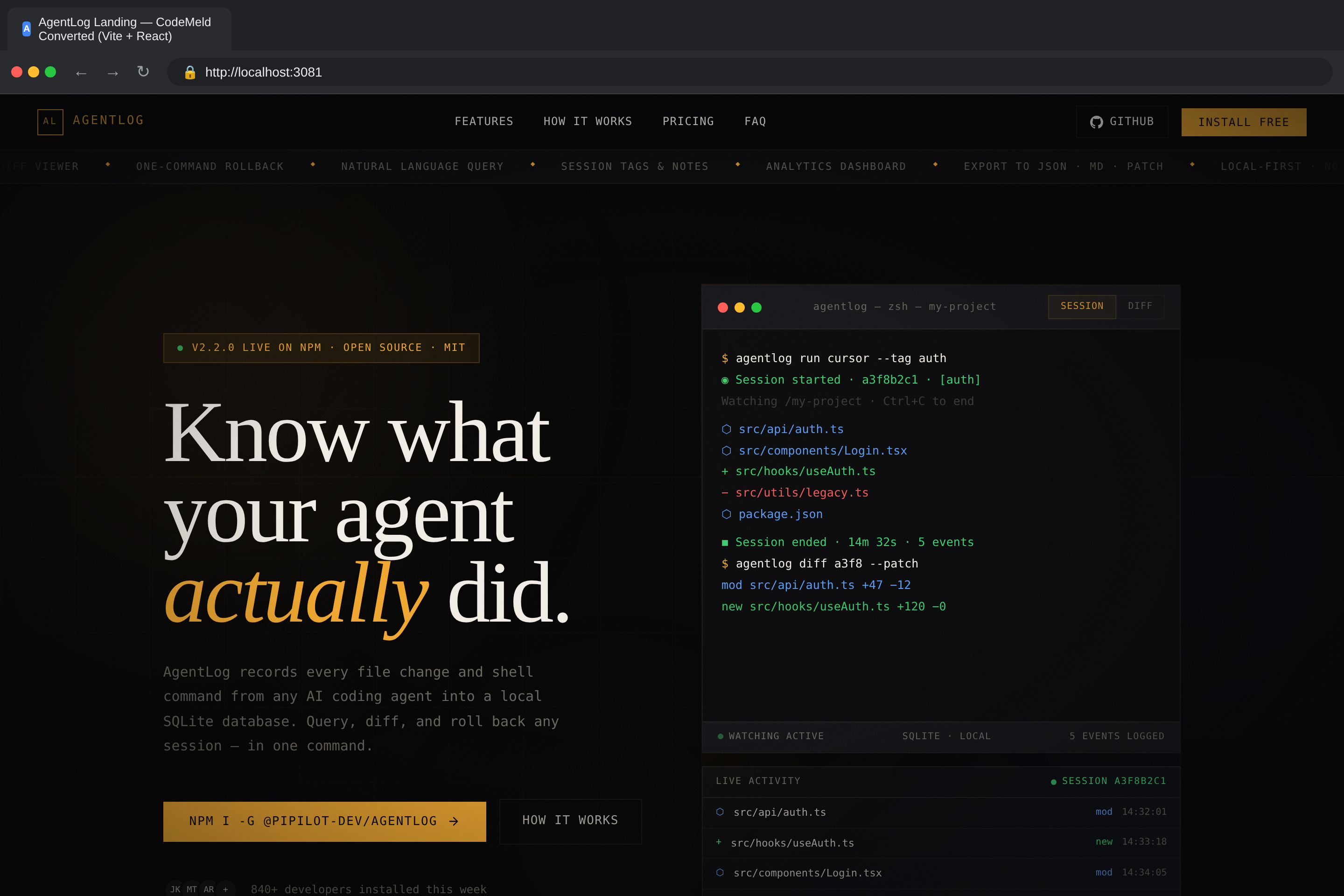
Both screenshots captured with Playwright. The converted React app is pixel-perfect compared to the original HTML — layout, styles, animations, and interactive elements all preserved.
Features
- Bidirectional Conversion — Convert HTML/CSS/JS to React and reverse-convert React/Vue/Svelte/Angular back to static HTML
- HTML Parsing — Extracts structure, inline styles, inline scripts, linked resources using Cheerio
- HTML to JSX Conversion — Converts
classtoclassName,fortohtmlFor, self-closes void elements, converts inline styles to object syntax, escapes literal braces in text content - CSS Processing — Supports global CSS and CSS Modules mode, rewrites asset URLs, merges stylesheets
- JavaScript Analysis — Detects mutable variables to
useState, DOM event listeners to event handlers,DOMContentLoadedtouseEffect, form handlers with proper event typing, DOM mutations to React state - Smart Component Extraction — Automatically splits large HTML files into smaller, reusable React components based on semantic sections (
<nav>,<header>,<section>,<footer>, etc.) - Custom React Hooks — Generates
useFetch,useLocalStorage,useInterval,useTimeouthooks when patterns are detected - Tailwind CSS Detection — Automatically detects and configures Tailwind CSS (or force/disable with flags)
- Multi-Framework Support — Target React, Next.js, Vue, Svelte, or Angular
- Project Scaffolding — Generates complete Vite + React + TypeScript project with proper config files
- Multi-page Support — Converts multiple HTML pages into separate React components with React Router
- Hash-based Routing — Automatically detects and preserves hash-based SPA routing
- Asset Handling — Discovers and copies images, fonts, and other assets to the correct directories
- Build Verification — Optional
--verifyflag installs deps and runsvite buildto validate output - AI-Powered Refinement — Optional
--aiflag uses Claude to fix build errors, enhance components, and improve code quality - Visual Comparison — Optional
--visual-compareflag takes Playwright screenshots of original vs converted sites - Interactive AI Chat — Claude Code-style TUI for iterating on your project with AI assistance
- SEO Generation — Sitemap, robots.txt, web manifest, and meta tag components
- Accessibility Enhancement — ARIA labels, semantic HTML, skip navigation
- Performance Optimizations — React.memo, lazy loading, code splitting
- Interactive Pattern Detection — Auto-detects scroll animations, tabs, accordions, hamburger menus and generates vanilla JS for deconverted output
Installation
npm install -g codemeld
Or use directly with npx:
npx codemeld <input-dir> <output-dir>
Or clone and build from source:
git clone https://github.com/hansade2005/html-to-vite-react.git
cd html-to-vite-react
npm install
npm run build
Then run with:
node dist/cli.js convert <input-dir> <output-dir>
Quick Start
1. Convert a single-page HTML site
codemeld ./my-website ./my-react-app
This reads all .html, .css, and .js files from ./my-website, converts them into React components, and outputs a complete Vite project in ./my-react-app.
2. Reverse-convert a React app back to HTML
codemeld deconvert ./my-react-app ./my-html-site
3. Install dependencies and run
cd my-react-app
npm install
npm run dev
Your converted site is now running as a React app at http://localhost:5173.
4. Build for production
npm run build
CLI Reference
convert (default command)
codemeld convert <input> <output> [options]
Since convert is the default command, you can omit it:
codemeld ./site ./app
Arguments:
| Argument | Description |
|---|---|
<input> |
Path to the HTML/CSS/JS source directory |
<output> |
Path for the generated Vite + React project |
Options:
| Option | Description | Default |
|---|---|---|
-n, --name <name> |
Project/component name | Directory name |
-m, --css-modules |
Use CSS Modules instead of global CSS | false |
-p, --preserve-structure |
Preserve original file/folder structure | false |
-f, --framework <fw> |
Target framework: react, nextjs, vue, svelte, angular |
react |
--verify |
Run npm install && vite build after conversion to verify output |
false |
--no-verify |
Skip build verification | — |
--no-extract |
Disable smart component extraction (keep everything in one component) | — |
--no-prettier |
Disable Prettier formatting on generated code | — |
--tailwind <mode> |
Tailwind CSS handling: auto, force, disable |
auto |
--ai |
Enable AI-powered refinement after conversion (requires API key) | false |
--ai-max-steps <n> |
Maximum AI agent iterations | 50 |
--ai-mode <mode> |
AI mode: full, build-fix, enhance, visual |
full |
--ai-verbose |
Show AI agent reasoning in real-time | false |
--visual-compare |
Take screenshots comparing original vs converted (requires Playwright) | false |
--tests |
Generate Vitest test files for components | false |
--deploy |
Generate deployment configs (Docker, CI/CD, Vercel, Netlify) | false |
--seo |
Generate SEO files (sitemap, robots.txt, manifest, meta tags) | false |
--seo-url <url> |
Base URL for SEO files | https://example.com |
--a11y |
Enhance accessibility (ARIA labels, semantic HTML, skip nav) | false |
--perf |
Add performance optimizations (React.memo, lazy loading, code splitting) | false |
--forms |
Generate form handling with validation | false |
--types |
Generate TypeScript type definitions | false |
--all-extras |
Enable all extras: --tests --deploy --seo --a11y --perf --forms --types |
false |
deconvert
Reverse-convert a framework project back to static HTML/CSS/JS:
codemeld deconvert <input> <output> [options]
| Option | Description |
|---|---|
-f, --framework <fw> |
Force framework detection: react, nextjs, vue, svelte, angular |
--no-prettier |
Disable Prettier formatting |
chat
Start an interactive AI chat session for your project:
codemeld chat [directory]
This opens a Claude Code-style terminal UI where you can ask the AI to read files, edit code, run commands, and fix build errors interactively.
| Argument | Description | Default |
|---|---|---|
[directory] |
Project directory to work in | Current directory |
Usage Examples
Basic conversion
codemeld ./my-html-site ./my-react-app
Convert with CSS Modules
codemeld ./site ./app --css-modules
Each component gets its own .module.css file with scoped class names.
Convert with build verification
codemeld ./site ./app --verify
After conversion, automatically runs npm install and vite build to confirm the output compiles without errors.
Convert with AI refinement
codemeld ./site ./app --ai --verify
After the initial conversion, an AI agent analyzes build errors and TypeScript issues, then iteratively fixes them. Modes:
full— Fix build errors, then enhance component qualitybuild-fix— Only fix build/TypeScript errorsenhance— Only improve code quality (assumes it already builds)visual— Focus on visual fidelity with the original
# Only fix build errors, up to 20 iterations
codemeld ./site ./app --ai --ai-mode build-fix --ai-max-steps 20

# Full refinement with verbose logging
codemeld ./site ./app --ai --ai-verbose
Convert and compare visually
codemeld ./site ./app --verify --visual-compare
Takes Playwright screenshots of the original HTML site and the converted Vite app side by side.
Keep everything in one component
codemeld ./site ./app --no-extract
Disables smart component extraction — the entire page is kept as a single React component.
Custom project name
codemeld ./site ./app --name "My Dashboard"
Target a different framework
codemeld ./site ./app --framework vue
codemeld ./site ./app --framework nextjs
codemeld ./site ./app --framework svelte
codemeld ./site ./app --framework angular
Disable Tailwind detection
codemeld ./site ./app --tailwind disable
Convert a multi-page site
If your input directory contains multiple .html files:
my-site/
├── index.html
├── about.html
├── contact.html
├── styles.css
└── script.js
codemeld ./my-site ./my-app
Each HTML file becomes a React component, and React Router is configured automatically:
index.html→/about.html→/aboutcontact.html→/contact
Enable all extras
codemeld ./site ./app --all-extras --verify
Generates tests, deployment configs, SEO files, accessibility enhancements, performance optimizations, form handling, and TypeScript types.
What Gets Converted
HTML to React Components
| HTML | React/JSX |
|---|---|
class="foo" |
className="foo" |
for="input" |
htmlFor="input" |
tabindex="0" |
tabIndex="0" |
readonly |
readOnly |
<img src="https://raw.githubusercontent.com/hansade2005/html-to-vite-react/HEAD/x"> |
<img src="https://raw.githubusercontent.com/hansade2005/html-to-vite-react/HEAD/x" /> |
<br> |
<br /> |
style="color: red; font-size: 14px" |
style={{color: 'red', fontSize: '14px'}} |
onclick="fn()" |
onClick={() => { fn() }} |
onsubmit="handleSubmit(event)" |
onSubmit={(e) => { handleSubmit(e) }} |
<!-- comment --> |
{/* comment */} |
checked (boolean) |
defaultChecked |
<option selected> |
<select defaultValue="..."> |
Text with { braces } |
Text with { braces } |
JavaScript to React Patterns
| Vanilla JS | React |
|---|---|
let count = 0; count = 1; |
const [count, setCount] = useState(0) |
DOMContentLoaded handler |
useEffect(() => {...}, []) |
addEventListener('click', ...) |
onClick={handler} |
element.classList.toggle('active') |
const [isActive, setIsActive] = useState(false) |
element.style.display = 'none' |
State-driven conditional rendering |
element.textContent = 'Hello' |
State-driven text content |
document.getElementById('x').value |
new FormData(e.currentTarget).get('x') |
this.reset() |
(e.target as HTMLFormElement).reset() |
setInterval(fn, 1000) |
useInterval(fn, 1000) custom hook |
setTimeout(fn, 500) |
useTimeout(fn, 500) custom hook |
fetch('/api/data') |
useFetch('/api/data') custom hook |
localStorage.getItem('key') |
useLocalStorage('key', default) custom hook |
SVG Attributes
All hyphenated SVG attributes are converted to their camelCase JSX equivalents:
stroke-width → strokeWidth, fill-opacity → fillOpacity, clip-path → clipPath, etc.
Event Handler Types
Generated handlers include proper TypeScript event types:
| Event | Type |
|---|---|
onSubmit |
React.FormEvent<HTMLFormElement> |
onChange |
React.ChangeEvent<HTMLInputElement> |
onClick |
React.MouseEvent<HTMLElement> |
onKeyDown |
React.KeyboardEvent<HTMLElement> |
onFocus |
React.FocusEvent<HTMLElement> |
onBlur |
React.FocusEvent<HTMLElement> |
onInput |
React.FormEvent<HTMLInputElement> |
Output Project Structure
Single-page site
output/
├── index.html
├── package.json
├── tsconfig.json
├── tsconfig.node.json
├── vite.config.ts
├── .gitignore
├── public/
│   └── (fonts, other assets)
└── src/
    ├── main.tsx
    ├── App.tsx
    ├── vite-env.d.ts
    ├── assets/
    │   └── (images)
    ├── components/
    │   ├── index.tsx          # Main page component
    │   ├── index.css          # Page styles
    │   ├── nav.tsx            # Extracted <nav> component
    │   ├── footer.tsx         # Extracted <footer> component
    │   ├── hero-section.tsx   # Extracted <section> components
    │   └── ...
    ├── hooks/
    │   ├── useInterval.ts     # Generated if setInterval detected
    │   ├── useTimeout.ts      # Generated if setTimeout detected
    │   ├── useFetch.ts        # Generated if fetch() detected
    │   └── useLocalStorage.ts # Generated if localStorage detected
    └── styles/
        └── global.css
Multi-page site
output/
└── src/
    ├── main.tsx
    ├── App.tsx               # React Router setup
    └── components/
        ├── index.tsx         # Home page (/)
        ├── index.css
        ├── about.tsx         # About page (/about)
        ├── about.css
        ├── contact.tsx       # Contact page (/contact)
        └── contact.css
Requirements
- Node.js >= 18.0.0
- For
--visual-compare: Playwright (npx playwright install chromium) - For
--ai: API key configured for AI refinement
License
MIT
Related Packages
Construction et rechargement à chaud des frontends de chaque module Nodefony — V...
Point at any UI element, leave a comment, and hand the feedback to an AI coding...
Scaffold React, Next.js, Vue, Nuxt, and SvelteKit projects with Feature-Sliced D...
Version History
| Version | Released | License |
|---|---|---|
| 2.5.0 | MIT | |
| 2.4.0 | MIT | |
| 2.3.0 | MIT | |
| 2.2.1 | MIT | |
| 2.2.0 | MIT | |
| 2.1.3 | MIT | |
| 2.1.2 | MIT | |
| 2.1.1 | MIT | |
| 2.1.0 | MIT |