canvas-color-disc
canvas-color-disc
A circular color picker built on Canvas, works on both desktop and mobile (Pointer Events). Available as a Vue 2 / Vue 3 component and as a framework-agnostic Web Component / vanilla JS class.

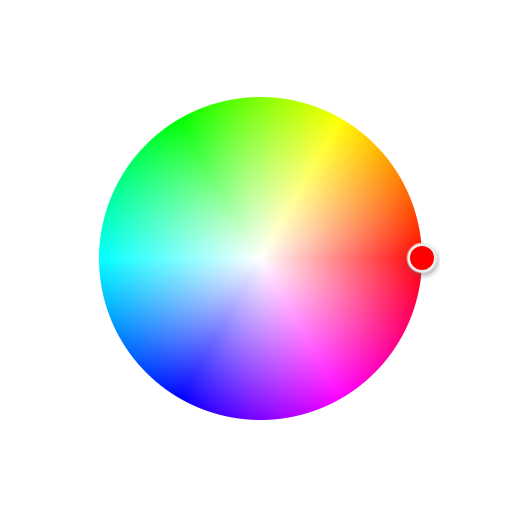
Usage at a glance
| Setup | Import | Usage | Styles |
|---|---|---|---|
| Plain HTML | <script src="https://unpkg.com/canvas-color-disc@1.4.1/dist/vanilla/canvas-color-disc.umd.js"> |
Render <canvas-color-disc> and listen for the change event |
auto-injected, no CSS import |
| React | import 'canvas-color-disc/vanilla' |
Same element; JSX props and onchange on React 19, a ref bridge on React 18 |
auto-injected, no CSS import |
Vue 2 (^2.5.0) |
import CanvasColorDisc from 'canvas-color-disc/vue2' |
v-model: value / input |
canvas-color-disc/dist/style.css |
Vue 3 (^3.0.0) |
import CanvasColorDisc from 'canvas-color-disc' (or canvas-color-disc/vue3) |
v-model: modelValue / update:modelValue |
canvas-color-disc/vue3/style.css |
Full examples live below in "Framework-agnostic build" (plain HTML / React) and "Import" (Vue 2 / Vue 3).
Both Vue builds come from the same source (src/components/CanvasColorDisc.vue); only the SFC compile target differs. The default entry . is the Vue 3 build; Vue 2 projects import canvas-color-disc/vue2 and non-Vue projects import canvas-color-disc/vanilla.
Framework-agnostic build (Web Component / vanilla JS)
A standalone build without Vue: CanvasColorDiscCore (vanilla JS class) + <canvas-color-disc> (Web Component).
The element registers itself on import and carries its styles through Shadow DOM, so no extra CSS import is needed.
Works in plain HTML, React, Angular and anything else.
| How to import | Path | Notes |
|---|---|---|
| ES module | canvas-color-disc/vanilla |
for non-Vue projects (React / Svelte / any bundler) |
| Script tag (UMD) | dist/vanilla/canvas-color-disc.umd.js |
global window.CanvasColorDisc, auto-registers <canvas-color-disc>, zero dependencies |
Plain HTML
Prefer to try it first? Open the live demo.
<!-- unpkg, pinned to the current version (drop @1.4.1 to always get the latest):
     https://unpkg.com/canvas-color-disc@1.4.1/dist/vanilla/canvas-color-disc.umd.js
     jsDelivr mirror (identical file, same version):
     https://cdn.jsdelivr.net/npm/canvas-color-disc@1.4.1/dist/vanilla/canvas-color-disc.umd.js -->
<script src="https://unpkg.com/canvas-color-disc@1.4.1/dist/vanilla/canvas-color-disc.umd.js"></script>

<canvas-color-disc width="300" height="300"></canvas-color-disc>

<script>
    const disc = document.querySelector('canvas-color-disc')
    disc.addEventListener('change', (event) => console.log(event.detail))
</script>
Both CDNs also resolve the bare package URL — https://unpkg.com/canvas-color-disc@1.4.1 and https://cdn.jsdelivr.net/npm/canvas-color-disc@1.4.1 — straight to that UMD file, thanks to the unpkg / jsdelivr fields in package.json.
React
React 19 supports custom elements natively, so attributes and events can be passed directly:
import 'canvas-color-disc/vanilla' // registers <canvas-color-disc>

function ColorPicker() {
    return (
        <canvas-color-disc
            format="hex"
            width="300"
            height="300"
            onchange={(event) => console.log(event.detail)}
        />
    )
}
React 18 and below need a ref to bridge properties and events:
import { useEffect, useRef } from 'react'
import 'canvas-color-disc/vanilla'

function ColorPicker({ color, onChange }) {
    const ref = useRef(null)

    useEffect(() => {
        const el = ref.current
        const handleChange = (event) => onChange(event.detail)
        el.addEventListener('change', handleChange)
        return () => el.removeEventListener('change', handleChange)
    }, [onChange])

    // object values must be set through the property (attributes only hold strings)
    useEffect(() => {
        ref.current.value = color
    }, [color])

    return <canvas-color-disc ref={ref} format="rgb" width="300" height="300"></canvas-color-disc>
}
For TSX projects, declare the tag in JSX.IntrinsicElements to make the type checker happy.
A complete runnable demo lives in demo/react: run npm run dev:react and open localhost:5175; the left picker uses the React 19 native API and the right one the ref bridge.
Imperative (vanilla JS)
import { CanvasColorDiscCore } from 'canvas-color-disc/vanilla'

const disc = new CanvasColorDiscCore('#app', { value: { r: 255, g: 0, b: 0 } })

disc.addEventListener('change', (event) => console.log(event.detail))
disc.setColor({ r: 0, g: 0, b: 255 })
Options, events and methods
Options match the Vue version: value / width / height / format / alpha / disabled / keyboardStep
(the attribute is keyboard-step; object values can only be set through the property).
input / change bubble and pierce the shadow boundary with event.detail as the current color.
Instance methods: getColor() / setColor(value) / reset() / setOptions(options) / destroy().
Extra content such as preset swatches goes inside <canvas-color-disc> with slot="palette".
Install
npm install canvas-color-disc
yarn add canvas-color-disc
Vue is a peer dependency (
^2.5.0 || ^3.0.0) and must be installed by yourself. There is no other runtime dependency.
Import
The package exports the component itself with an install method attached, so both global and local registration work.
Vue 2
import Vue from 'vue'
import CanvasColorDisc from 'canvas-color-disc/vue2'
import 'canvas-color-disc/dist/style.css'

Vue.use(CanvasColorDisc)
Vue 3
import { createApp } from 'vue'
import CanvasColorDisc from 'canvas-color-disc'
import 'canvas-color-disc/vue3/style.css'
import App from './App.vue'

createApp(App).use(CanvasColorDisc).mount('#app')
Local registration
// Vue 2
import CanvasColorDisc from 'canvas-color-disc/vue2'
import 'canvas-color-disc/dist/style.css'

// Vue 3
import CanvasColorDisc from 'canvas-color-disc'
import 'canvas-color-disc/vue3/style.css'

export default {
    components: { CanvasColorDisc }
}
The component is registered as CanvasColorDisc, use it as <canvas-color-disc /> in templates.
Use via CDN (Vue 2 / Vue 3 UMD)
<!-- unpkg, pinned to the current version (drop @1.4.1 to always get the latest);
     for the jsDelivr mirror replace the origin and keep the same version:
     https://cdn.jsdelivr.net/npm/canvas-color-disc@1.4.1/dist/style.css
     https://cdn.jsdelivr.net/npm/canvas-color-disc@1.4.1/dist/canvas-color-disc.umd.js -->
<link rel="stylesheet" href="https://unpkg.com/canvas-color-disc@1.4.1/dist/style.css">
<script src="https://unpkg.com/vue@2.7.16/dist/vue.js"></script>
<script src="https://unpkg.com/canvas-color-disc@1.4.1/dist/canvas-color-disc.umd.js"></script>

<script>
    // Without Vue.use, it can also be used directly as a component option
    new Vue({
        el: '#app',
        components: { CanvasColorDisc: window.CanvasColorDisc }
    })
</script>
For Vue 3 use dist/vue3/canvas-color-disc.umd.js together with dist/vue3/style.css (version pinning works the same way); the global is still window.CanvasColorDisc and it accepts an app instance via app.use(...).
Usage
The same template works for Vue 2 and Vue 3:
<template>
    <div id="app">
        <p>RGB: {{ rgb }}</p>
        <canvas-color-disc
            v-model="rgb"
            :width="300"
            :height="300"
            @change="onChange"
        />
    </div>
</template>

<script>
export default {
    data () {
        return {
            rgb: { r: 255, g: 255, b: 255 }
        }
    },
    methods: {
        onChange (rgb) {
            console.log('change:', rgb)
        }
    }
}
</script>
The shape of the bound value is decided by format. Updating it from the parent moves the selector accordingly.
Color formats
format (default rgb) decides the shape of the bound value:
| format | Value | Example |
|---|---|---|
rgb |
{ r, g, b }, channels 0~255 |
{ r: 255, g: 0, b: 0 } |
hex |
string, 3/4/6/8 digits | '#ff0000' |
hsv |
{ h, s, v }, h 0 |
{ h: 0, s: 100, v: 100 } |
hsl |
{ h, s, l }, h 0 |
{ h: 0, s: 100, l: 50 } |
Strings are always parsed as hex. Objects are parsed with format first, and by field names when format is not given.
With alpha enabled an extra a channel (0~1) is read and written, and hex output becomes 8 digits (e.g. #ff000080). The disc is two-dimensional, so it does not adjust alpha or value itself — provide them through the bound value or your own controls.
API
Props
| Prop | Description | Type | Default | Vue version |
|---|---|---|---|---|
| value | Current color, used by v-model |
Object / String | { r: 255, g: 255, b: 255 } |
Vue 2 |
| modelValue | Current color, used by v-model |
Object / String | undefined (falls back to value) |
Vue 3 |
| width | Canvas width in CSS pixels, 'auto' follows the container |
Number / String | 300 | both |
| height | Canvas height in CSS pixels, 'auto' follows the container |
Number / String | 300 | both |
| format | Bound value format: rgb / hex / hsv / hsl |
String | rgb |
both |
| alpha | Keep and emit the alpha channel | Boolean | false |
both |
| disabled | Disable pointer and keyboard interaction | Boolean | false |
both |
| keyboardStep | Arrow key step (saturation percentage / hue degrees), ×10 with Shift | Number | 1 | both |
Events
| Event | Description | Payload | Vue version |
|---|---|---|---|
| input | Fired in real time while the color changes (throttled per frame, used by v-model) |
matches format |
Vue 2 |
| update:modelValue | Same as input, used by v-model |
matches format |
Vue 3 |
| change | Fired when a pick gesture (press then release) or a key adjustment ends | matches format |
both |
Both input and update:modelValue are always emitted, so the unused one is simply ignored.
Slot
| Name | Scope | Description |
|---|---|---|
| palette | color (current color), setColor(value) |
Extra area rendered below the disc, typically used for preset swatches |
<canvas-color-disc v-model="rgb">
    <template #palette="{ setColor }">
        <button @click="setColor({ r: 255, g: 0, b: 0 })">Red</button>
    </template>
</canvas-color-disc>
Instance methods
Available through a ref (exposed via expose on Vue 3, directly on $refs on Vue 2):
| Method | Description |
|---|---|
getColor() |
Returns the current color; objects are returned as copies |
setColor(value) |
Sets the color; the value must match format, invalid values are ignored. Also emits change |
reset() |
Resets to white |
Keyboard
The interactive element is focusable (tabindex="0", role="slider" with aria-valuetext). Once focused:
| Key | Action |
|---|---|
| ← / → | Hue ∓/± keyboardStep degrees |
| ↑ / ↓ | Saturation ±/∓ keyboardStep |
| Home / End | Saturation to 0 / 100 |
| Shift + arrows | Step ×10 |
Notes
- The disc uses the HSV model: hue comes from the angle, saturation from the distance to the center ratio. Value is taken from the bound value and preserved, so passing a gray does not turn it into a fully saturated color
width/heightare logical canvas sizes in CSS pixels. The disc radius is the shorter half side minus a proportional padding (clamped to 8~18px) and the origin is centered; they do not have to be equal. The selector ring and the white dead zone at the center scale with the radius too, so tiny and large discs keep the same proportions- The canvas is rendered with
devicePixelRatioscaling, so it stays sharp on high-DPI screens - Pointer coordinates are converted back to logical canvas coordinates: even if the canvas is scaled by external CSS (e.g. a global
canvas { max-width: 100% }, a squeezed parent, or atransformscale), the picked position still matches the visual position - Clicking or dragging outside the disc pins the selector to the circumference and takes the color at that point
- Built on Pointer Events, so mouse and touch behave the same; dragging uses
setPointerCapture, so it continues even when the pointer leaves the canvas, and a window-level fallback ends the gesture if the capture could not be taken - Only the primary button / primary pointer starts a pick: right and middle clicks are ignored, and extra fingers in a multi-touch gesture do not take over an ongoing drag
- The cached canvas rect is invalidated on scroll, so picking stays accurate while the page is scrolled during a drag
- Passing
'auto'forwidth/heightmakes the canvas follow its container and redraw on container resizes; the parent needs a definite size on that axis - When
devicePixelRatiochanges (dragging the window to another screen, changing the OS scaling), the canvas is rebuilt at the new ratio - Disc pixels are cached by geometry, so nothing is recomputed while size and dpr stay the same; the circumference fades over one physical pixel to avoid aliasing
- Styles for the Vue build are shipped as plain CSS scoped by the
.canvas-color-discancestor selector; import the matchingstyle.cssonce per app. The framework-agnostic build injects its styles automatically, no import needed src/index.d.tsships with the package, so TS projects get prop and instance method types out of the box
Local development
# install dependencies
npm install

# serve the Vue 2 demo at localhost:5173
npm run dev

# serve the Vue 3 demo at localhost:5174
npm run dev:vue3

# serve the React demo at localhost:5175
npm run dev:react

# build Vue 2 (dist/), Vue 3 (dist/vue3/) and framework-agnostic (dist/vanilla/) bundles
npm run build

# build a single target
npm run build:vue2
npm run build:vue3
npm run build:vanilla

# run the unit tests
npm test
License
Related Packages
Version History
| Version | Released | Vue | License |
|---|---|---|---|
| 1.4.2 | ^2.5.0 || | MIT | |
| 1.4.1 | ^2.5.0 || | MIT | |
| 1.4.0 | ^2.5.0 || | MIT | |
| 1.3.0 | ^2.5.0 || | MIT | |
| 1.2.1 | ^2.5.0 || | MIT | |
| 1.2.0 | ^2.5.0 | MIT | |
| 1.1.3 | ^2.5.2 | MIT | |
| 1.1.2 | ^2.5.2 | MIT | |
| 1.1.1 | ^2.5.2 | MIT | |
| 1.1.0 | ^2.5.2 | MIT | |
| 1.0.14 | ^2.5.2 | MIT | |
| 1.0.13 | ^2.5.2 | MIT | |
| 1.0.12 | ^2.5.2 | MIT | |
| 1.0.11 | ^2.5.2 | MIT | |
| 1.0.10 | ^2.5.2 | MIT | |
| 1.0.9 | MIT | ||
| 1.0.8 | ^2.5.9 | MIT | |
| 1.0.7 | ^2.5.9 | MIT | |
| 1.0.6 | ^2.5.9 | MIT | |
| 1.0.5 | ^2.5.9 | MIT | |
| 1.0.4 | ^2.5.9 | MIT | |
| 1.0.3 | ^2.5.9 | MIT | |
| 1.0.2 | ^2.5.9 | MIT | |
| 1.0.1 | ^2.5.9 | MIT | |
| 1.0.0 | ^2.5.9 | MIT |