boilercraft
| Install | |
|---|---|
npm install boilercraft |
|
| Latest Version: | 1.1.0 |
| License: | MIT |
| Last Updated: | Sep 30, 2026 |
| Links: | GitHub · npm |
BoilerCraft
Production-ready projects in one command, built on each framework's official tooling.
Any version · Authentication · Themes · Windows, macOS & Linux




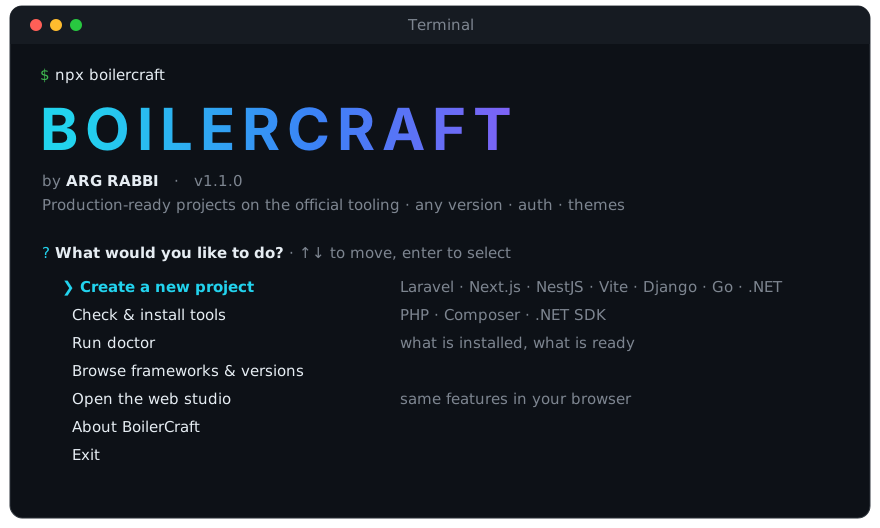
npx boilercraft
Why BoilerCraft
Most boilerplates are a frozen copy of someone's project. They go stale the day a new framework version ships. BoilerCraft works differently:
- Always the real thing. The base project is created by the framework's own creator (
composer create-project,create-next-app,nest new,create-vite,django-admin,dotnet new,go mod init), so it matches the version you pick exactly. - Any version, including future ones. Versions are fetched live from npm, Packagist, PyPI, the Go module proxy and the .NET release index. A new release shows up in the menu without an update to BoilerCraft.
- Ready to build on. Auth, database wiring, a themed landing page and UI components are added on top, so you start with a working app instead of a blank one.
- One command, zero setup. Everything happens inside
npx boilercraft. Missing PHP, Composer or the .NET SDK? It offers to install them for you.
Quick start
npx boilercraft
Choose Create a new project and answer a few questions (↑/↓ to move, Enter to select):
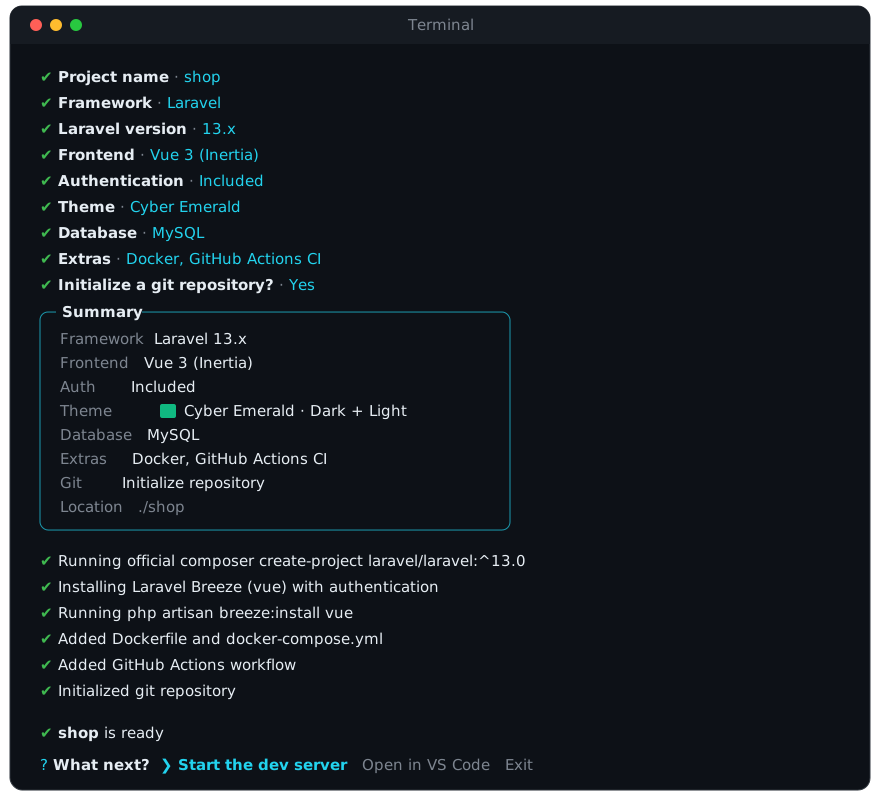
When it's done, pick Start the dev server or Open in VS Code from the same menu. You don't need to type cd or any other command.
What you can create
| Framework | Versions | Choices | Databases | Auth |
|---|---|---|---|---|
| Laravel | 10 – 13 | Blade · Vue 3 (Inertia) · React (Inertia) | MySQL · SQL Server | Sanctum API tokens, or full Breeze UI (login, register, profile) for Vue/React |
| Next.js | 14 – 16 | App Router · Pages Router | MongoDB · MySQL · SQL Server | JWT register/login API routes |
| .NET | 8 – 10 | MVC (Model · View · Controller) · Web API | SQL Server · MySQL | MVC: cookie login/register pages · API: JWT + Swagger |
| NestJS | 10 – 12 | — | PostgreSQL · MySQL · MongoDB · SQLite | — (add Prisma for the data layer) |
| Node.js + Express | 4 – 5 | — | MySQL · MongoDB · SQL Server | JWT middleware with roles |
| Vite | 6 – 9 | React · Vue · Svelte, TypeScript or JavaScript | — (frontend) | — |
| Django | 4 – 6 | — | SQLite · PostgreSQL | Built-in admin + auth |
| FastAPI | 0.x | — | SQLite · PostgreSQL (SQLAlchemy) · none | — |
| Go + Gin | 1.x | — | — | — |
| Raw PHP (MVC) | 8 | — | MySQL · PostgreSQL · SQLite · SQL Server | Session auth |
Every project also gets:
- A theme: Slate Midnight, Cyber Emerald, Royal Indigo or Crimson Amber, in dark, light or both with a toggle.
- Styling with Tailwind CSS, Bootstrap 5 or plain CSS.
- Optional UI components: skeleton loaders, spinners, modals, off-canvas drawers.
The version list above is just what's verified today. Newer releases appear automatically and are marked preview support until verified.
Extras
Pick any of these with space in the Extras step, or pass -e docker,ci:
| Extra | What you get | Available for |
|---|---|---|
| Docker | Dockerfile, .dockerignore and a docker-compose.yml that also starts your database (MySQL, PostgreSQL, MongoDB or SQL Server) |
every framework |
| GitHub Actions CI | .github/workflows/ci.yml that installs, lints, builds and tests on every push and pull request |
every framework |
| ESLint + Prettier | configs plus npm run lint and npm run format |
Next.js · NestJS · Express · Vite |
| Prisma ORM | prisma/schema.prisma, the client, a DATABASE_URL for your database, npm run db:migrate |
Next.js · NestJS · Express |
After the files are in place, BoilerCraft runs git init and makes an initial commit, so the project starts with a clean history (turn it off with --no-git).
Missing a toolchain?
BoilerCraft checks what's installed and offers to set up the rest. You can also do it any time from Check & install tools in the menu.
| Tool | Needed for | How BoilerCraft installs it |
|---|---|---|
| .NET SDK | .NET | Microsoft's official dotnet-install script, exact version, user folder, no admin rights |
| Composer | Laravel | Official installer, signature-verified, user folder |
| PHP | Laravel, Raw PHP | winget (Windows) · Homebrew (macOS) · apt / dnf / pacman (Linux) |
| Node.js | Next.js, NestJS, Express, Vite | Already there, since npx runs on it |
| Python 3 | Django, FastAPI | Install from python.org (BoilerCraft creates a .venv per project) |
| Go | Go + Gin | Install from go.dev/dl |
Tools installed into the user folder live in ~/.boilercraft/tools and are added to your user PATH.
npx boilercraft doctor
Doctor is a quick health check. Run it before your first project, when something fails, or paste its output into a bug report.
npx boilercraft doctor
It prints three sections:
- System: BoilerCraft version, Node.js version, OS and CPU, and where BoilerCraft keeps the tools it installs.
- Tools: each tool BoilerCraft can use (Node.js, npm, PHP, Composer, .NET SDK, Python, Go, git, Docker), with the version it found or ✖ not found, and which frameworks need it.
- Frameworks: every framework with ✔ ready or ✖ plus exactly what is missing and where to get it, e.g.
✖ Django · needs Python 3 (https://www.python.org/downloads).
Doctor only reads; it never installs or changes anything. It finishes with a line like 7/10 frameworks ready. The exit code is 0 when every framework is ready and 1 otherwise, so you can use it in CI:
npx boilercraft doctor || echo "some toolchains are missing"
To fix what doctor reports, run npx boilercraft tools (installs PHP, Composer or the .NET SDK for you) or follow the links it prints. Doctor is also in the main menu as Run doctor.
Presets
Creating the same kind of project often? Save your answers once and skip the questions next time.
- After a project is created, choose Save these choices as a preset, or add
--save-preset team-apito anewcommand. - Next time, the menu asks Start from a preset, or run
npx boilercraft new my-app --preset team-api. - A preset can also be a JSON file you commit and share with your team:
--preset ./boilercraft.json.
{ "stack": "nextjs", "version": "16", "router": "app", "db": "mysql", "extras": ["docker", "ci", "lint"], "theme": "emerald" }
Keys match the CLI flags. Saved presets live in ~/.boilercraft/presets, and npx boilercraft presets lists them.
Staying up to date
BoilerCraft checks npm for a newer release at most once a day (the result is cached) and shows a notice with the command to update: npx boilercraft@latest. Set BOILERCRAFT_NO_UPDATE_CHECK=1 to turn this off. It is always off in CI.
Web studio
Prefer a browser? Choose Open the web studio in the menu. You get the same generator as a visual form at http://localhost:4800.
Automation (scripts and CI)
Every question has a flag. Anything you leave out is asked interactively, or takes its default with -y.
npx boilercraft new shop  -s laravel -v 13 --frontend vue -t emerald -d mysql -y
npx boilercraft new web   -s nextjs --router pages --no-auth -d mongodb -y
npx boilercraft new admin -s dotnet-core -v 10 --template mvc -y --install-tools
npx boilercraft new ui    -s vite --framework vue --language ts -e lint,docker -y
npx boilercraft new api   -s nestjs -d postgresql -e prisma,docker,ci -y --open
npx boilercraft new blog  -s django -d postgresql -e docker -y
npx boilercraft new team  --preset ./boilercraft.json -y
npx boilercraft --help
How new framework versions are handled
Each framework is described by a small manifest in stacks/<id>/stack.json. It covers where versions come from, which official creator to run, and which BoilerCraft files to add, and each step can be limited to certain versions. In practice:
- A new release usually needs nothing. It appears in the menu automatically.
- If a release changes something BoilerCraft relies on, one version-scoped rule is added to the manifest. No code change is needed.
Full reference: docs/STACK_ENGINE.md.
Project structure
BoilerCraft/
├── bin/boilercraft.js        # CLI entry (npx boilercraft)
├── cli/                      # Interactive menus, banner and prompts
├── stacks/<id>/              # One folder per framework
│   ├── stack.json            #   versions, official creator, version-scoped steps
│   └── overlays/             #   files BoilerCraft adds on top
├── services/
│   ├── engine/               # Manifest runner, live version catalog, tool installer
│   ├── generate.js           # Shared entry for the CLI and web studio
│   ├── themeGenerator.js     # Theme palettes and dark/light CSS
│   └── componentGenerator.js # Skeleton, spinner, modal and drawer components
├── templates/                # Offline fallback templates (Raw PHP skeleton too)
├── test/                     # node --test suite (npm test)
├── public/index.html         # Web studio
└── server.js                 # Web studio API
Working on BoilerCraft
git clone https://github.com/itrabbi24/BoilerCraft.git
cd BoilerCraft
npm install
node bin/boilercraft.js
To test exactly what npm users get: run npm pack, then npx --package=./boilercraft-<version>.tgz boilercraft in an empty folder.
Releasing: bump version in package.json, then run npm publish. Alternatively, push a vX.Y.Z tag: GitHub Actions smoke-tests on Windows, macOS and Linux and then publishes (requires the NPM_TOKEN repository secret).
Contributing
Issues and pull requests are welcome. Please see the issues page.
- Fork the repository.
- Create a branch:
git checkout -b feature/my-feature. - Commit your changes and open a pull request.
Author
ARG RABBI · @itrabbi24
If BoilerCraft saves you time, a ⭐ on GitHub is appreciated.
License
MIT © 2026 ARG RABBI
Related Packages
A CLI tool for scaffolding a full-stack web application with your choice of fron...
AI-powered full-stack code generation framework - from requirements to code in o...
The Ultimate Multi-Tiered Project Orchestrator — an interactive CLI that scaffol...
Version History
| Version | Released | License |
|---|---|---|
| 1.1.0 | MIT | |
| 1.0.0 | MIT |