antigravity-tc
Antigravity Token Collector
Collect donated Antigravity tokens from anyone and sync them into your 9Router database.
English | Bahasa Indonesia (Tersedia dalam 2 Bahasa / Available in 2 Languages)




A tray app and dashboard for managing donated Antigravity tokens: customizable public portal, multilingual copy, free public tunnel, login auto-start, eligibility checks, and two-way 9Router sync.
⚡ Quick Start
npm install -g antigravity-tc
antigravity-tc
The dashboard opens at http://localhost:3456/dashboard, and the tray icon appears in your menu bar/system tray.
Default password:
1234567890. Change it immediately in Settings → Security.Forgot your password? Run
antigravity-tc-reset-password.
⬆️ App Updates
Starting with 1.1.5, the admin dashboard and CLI recommend an optional update when a newer version is available on npm. The dashboard includes a manual check, a copyable update command, and a changelog link. The CLI provides a Check for Updates menu item. Network failures do not prevent app use.
Exit the app from the tray/CLI, then run:
npm install -g antigravity-tc@latest
antigravity-tc
Existing settings and donation data are preserved. Users on 1.1.4 or earlier must update manually once to receive update notifications for later releases.
🔄 How It Works
- Run
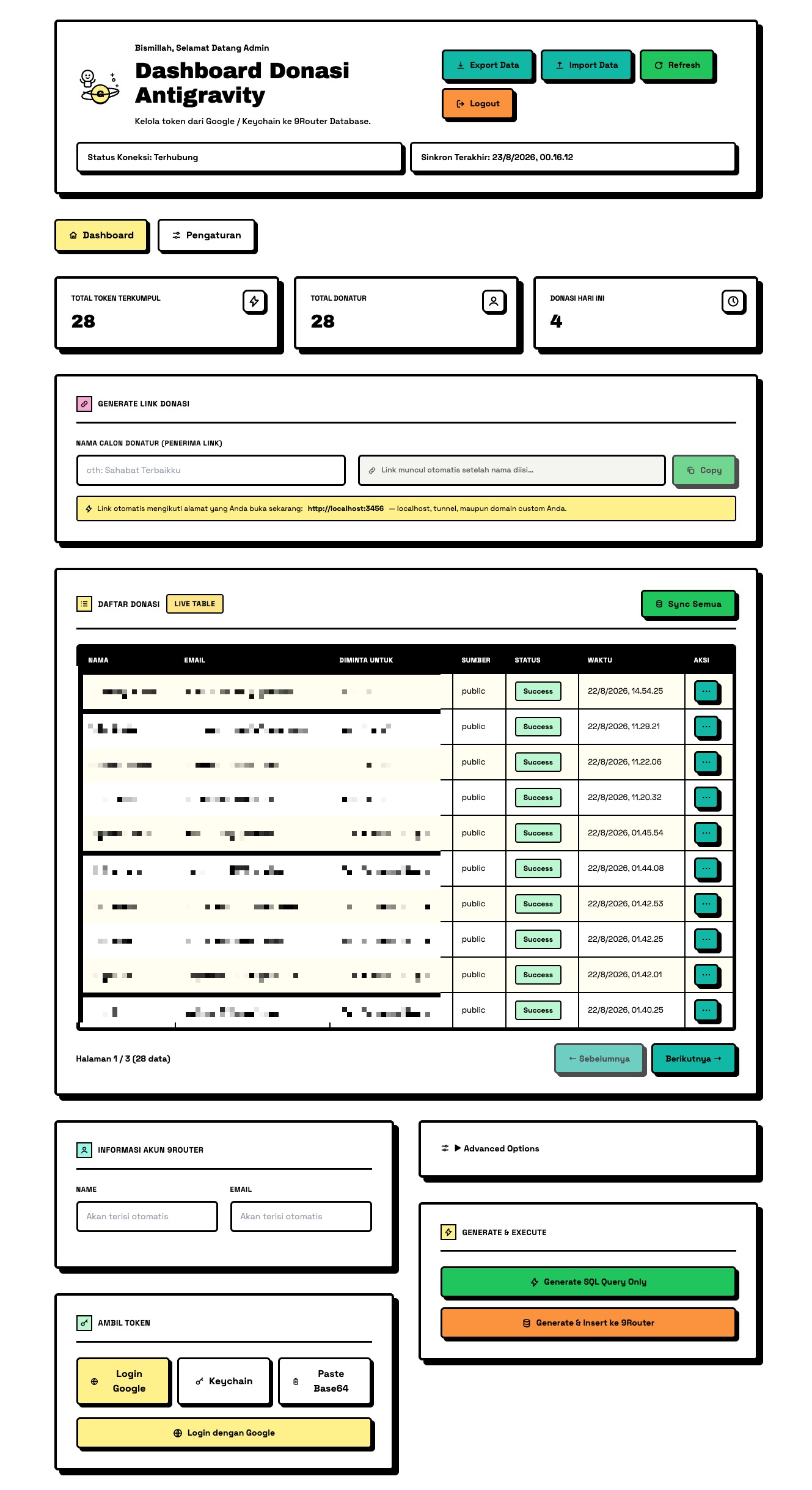
antigravity-tc. - Generate a personal donation link from the dashboard, or enable the public tunnel.
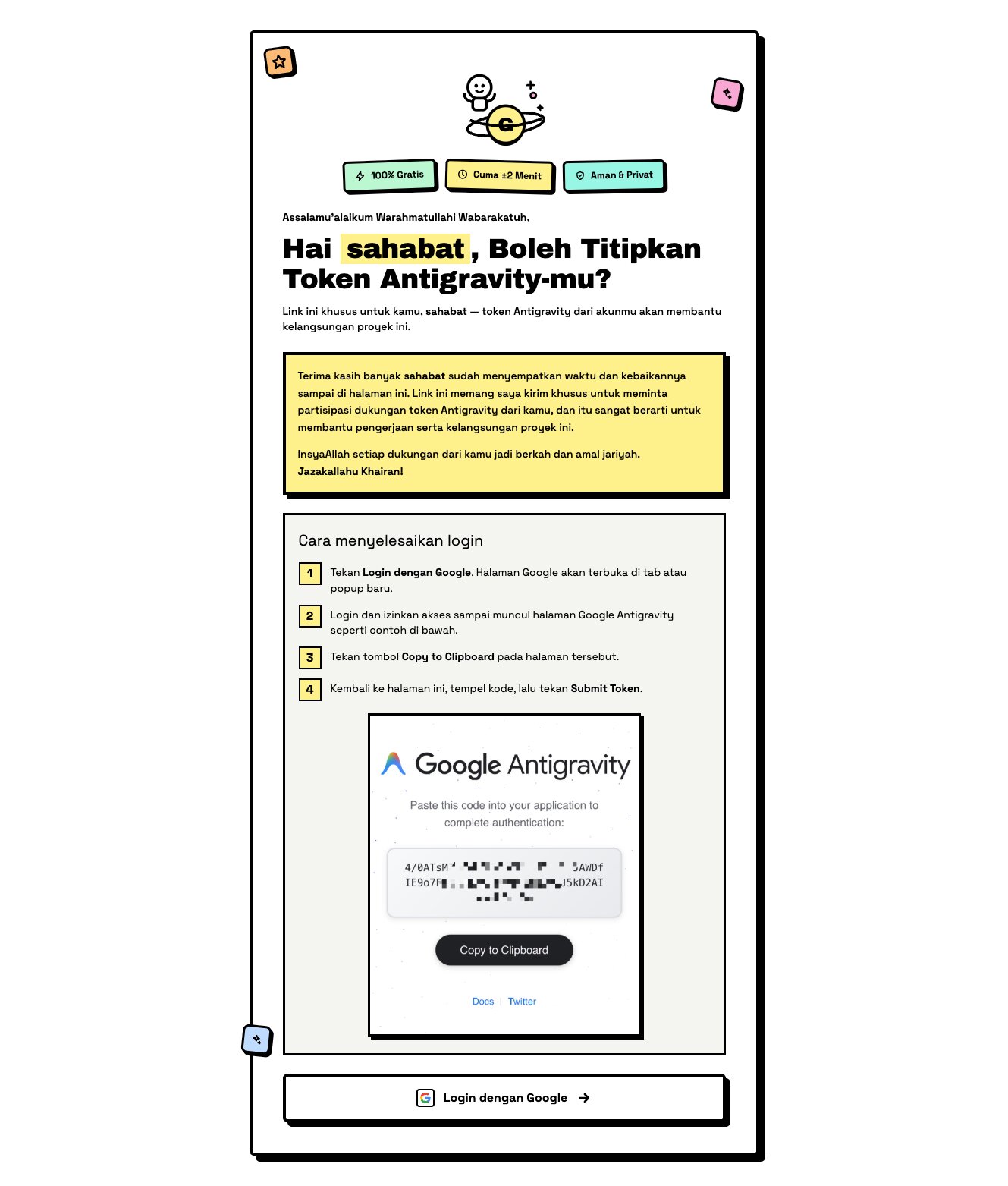
- Donors sign in with Google and paste the Antigravity code.
- ATC checks eligibility, refreshes tokens when needed, and stores donation logs locally.
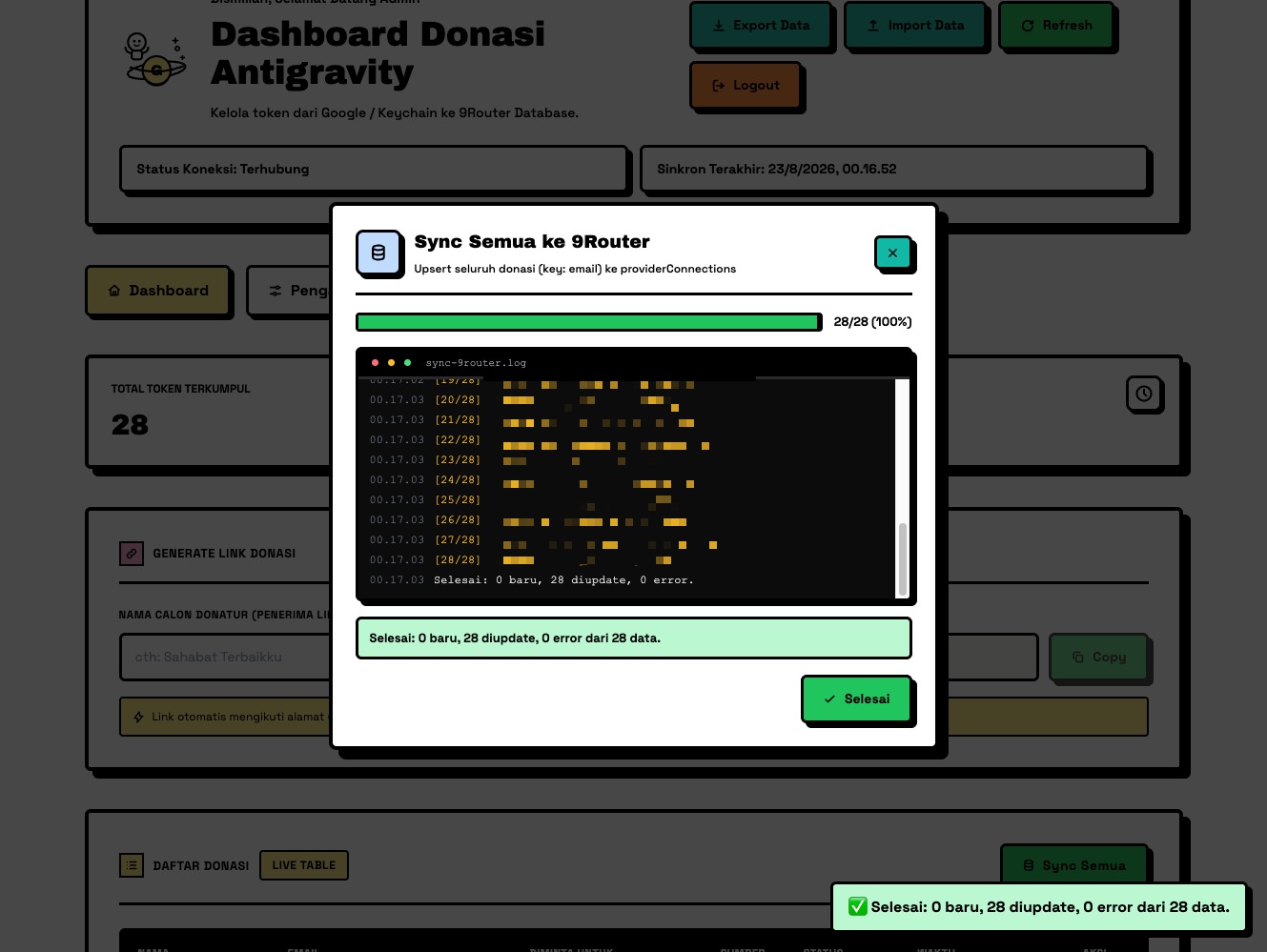
- Sync eligible tokens into 9Router when you are ready.
- Customize the public portal wording and layout from Settings → Portal Settings.
🖼️ Screenshots
| Dashboard | Bulk Sync | Settings |
|---|---|---|
 |
 |
 |
📋 Features
| Feature | Description |
|---|---|
| Public donation portal | Google login + manual code paste flow for donors |
| Portal Settings | Customize layout and front-page wording; stored in ATC app config, not 9Router DB |
| Multilingual support | Fully localized dashboard and portal in English and Bahasa Indonesia |
| Personal donation links | ?for=Name automatically customizes the greeting |
| Admin dashboard | Stats, live table, search, status/source/tier filters, CSV import/export |
| Tier Detection & Filter | Displays donor tier (Free, Plus, Pro, Ultra) with quick filters |
| Go Keyring Export | Export donor token as go-keyring-base64 to force login into official Antigravity apps |
| Sync to 9Router | Upsert local donation logs into 9Router providerConnections |
| Sync from 9Router | Import 9Router providerConnections back into local donation logs |
| Check ALL Eligibility | Check all token rows with per-row delay and status recap |
| Token refresh | Expired access tokens are refreshed before eligibility checks when possible |
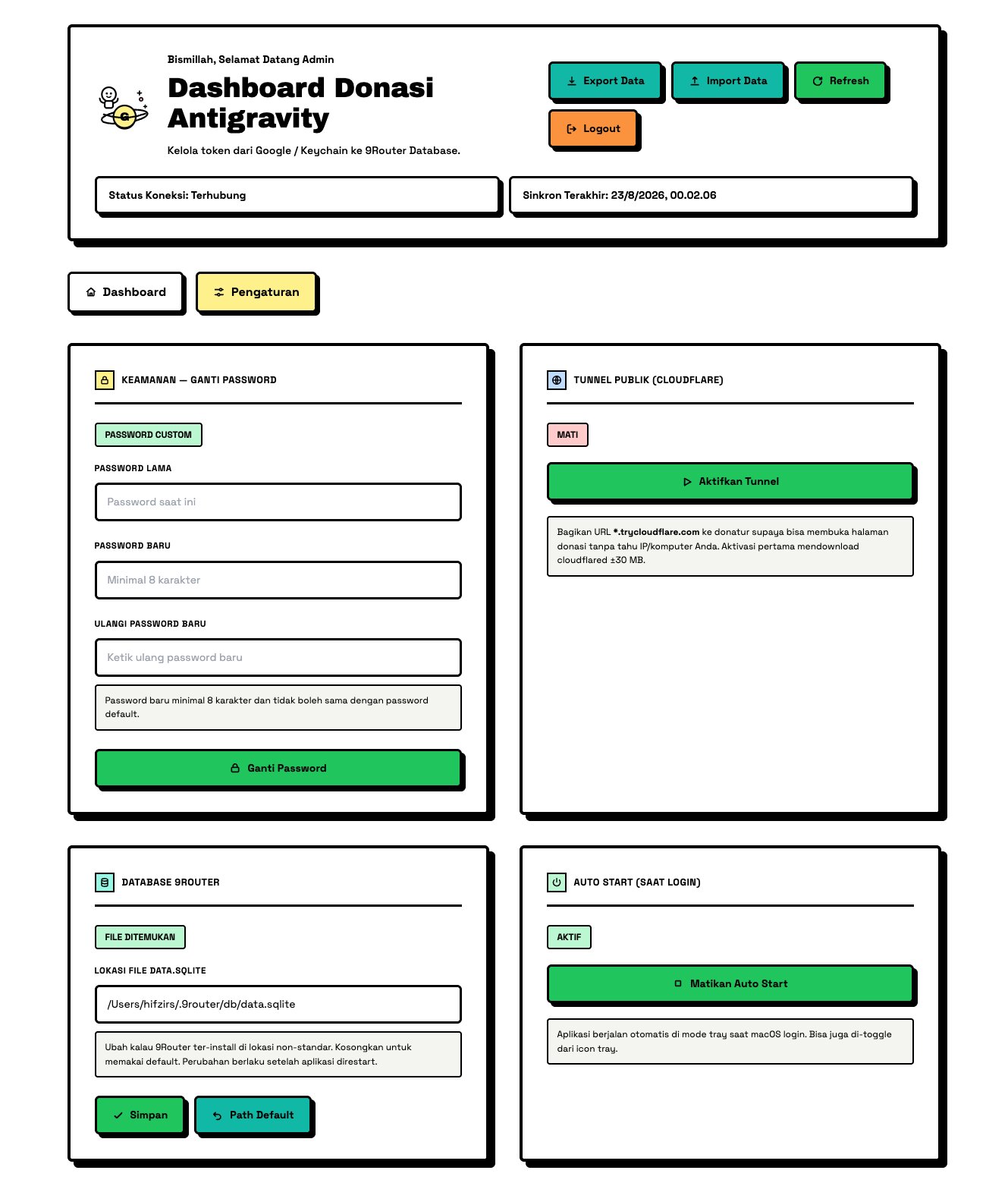
| Free public tunnel | Cloudflare Quick Tunnel gives you a public URL without exposing your IP |
| Restart Services | Restart from tray or Settings after config changes such as 9Router DB path |
| Auto-start | Launches in tray mode when the OS starts |
| Security | JWT admin login, per-install secret, tunnel blocked while default password is active |
🚀 Log in to Official Apps (Antigravity & antigravity-cli)
You can use donated tokens to authenticate directly into the official Antigravity app or antigravity-cli without going through browser OAuth:
- In the admin donation table, click the action menu (...) for any donor → select Go Keyring.
- Copy the
go-keyring-base64:...string or use the provided one-click terminal commands:- macOS (Keychain):
security add-generic-password -s gemini -a antigravity -w "<KEYRING_STRING>" -U - Windows (CMD / PowerShell):
(Or manually add under Windows Credential Manager → Generic Credentials).cmdkey /generic:"gemini:antigravity" /user:"antigravity" /pass:"<KEYRING_STRING>"
- macOS (Keychain):
- Launch Antigravity or execute
antigravity-cli— the donor session will be active immediately.
📁 Data Locations
9Router database
| OS | Default path |
|---|---|
| macOS / Linux | ~/.9router/db/data.sqlite |
| Windows | %APPDATA%/9router/db/data.sqlite |
| Docker | /app/data/db/data.sqlite |
You can override this path from Dashboard → Settings → 9Router Database or by setting DB_PATH. Restart services after changing it.
ATC app data
| OS | Path |
|---|---|
| macOS / Linux | ~/.antigravity-tc/ |
| Windows | %USERPROFILE%\.antigravity-tc\ |
| Docker | /root/.antigravity-tc/ |
| Content | Description |
|---|---|
.env |
Local environment configuration |
logs/donation-logs.sqlite |
Donation log database |
bin/cloudflared |
Downloaded tunnel binary |
| App config | Admin password, portal settings, language, auto-start, 9Router DB path |
🖥️ Platform Support
| Capability | macOS | Linux | Windows | Docker |
|---|---|---|---|---|
| Server + dashboard + public portal | ✅ | ✅ | ✅ | ✅ |
| Tray icon | ✅ | ✅ | ✅ | — |
| Login auto-start | ✅ | ✅ | ✅ | — |
| Cloudflare Tunnel | ✅ | ✅ | ✅ | ✅ |
| Automatic 9Router DB path detection | ✅ | ✅ | ✅ | ✅ |
🔑 Password & .env
- Default password:
1234567890. - Password priority: dashboard setting >
APP_PASSWORD> default. - The public Antigravity CLI OAuth credentials are bundled by default.
- You can still override
OAUTH_CLIENT_IDandOAUTH_CLIENT_SECRETif needed.
❓ Troubleshooting
| Problem | Fix |
|---|---|
| Forgot admin password | Run antigravity-tc-reset-password |
| Tunnel cannot be enabled | Change the default password first |
| Tray icon missing | Make sure the systray2/traybin/ binary is executable |
| 9Router DB not found | Check Settings → 9Router Database, then restart services |
| Refresh token fails | The donor may need to sign in again if Google rejects the refresh token |
🛠️ Development
📄 License
MIT © decolua and contributors
Related Packages
Vite plugin that generates VERSION and COMMITHASH files during build based on a...
A temporary workaround for issue No loader is configured for ".vue"
Version History
| Version | Released | Vue | License |
|---|---|---|---|
| 1.1.5 | ^3.5.41 | MIT | |
| 1.1.4 | ^3.5.41 | MIT | |
| 1.1.3 | ^3.5.41 | MIT | |
| 1.1.2 | ^3.5.41 | MIT | |
| 1.1.1 | ^3.5.41 | MIT | |
| 1.1.0 | ^3.5.41 | MIT |