allycat
| Install | |
|---|---|
npm install allycat |
|
| Latest Version: | 1.9.0 |
| License: | MIT |
| Last Updated: | Oct 9, 2026 |
| Links: | GitHub · npm |







A source-first accessibility scanner — catch WCAG violations in your editor, on every save, or as a CI gate that blocks inaccessible code from shipping.
Most accessibility violations reach production because the tools that catch them need a deployed app — too late, and disconnected from the code that caused them. AllyCat closes that gap.
Built for how developers actually work: a CLI that scans your source files, jumps to the exact line with a clickable link, and feeds your AI agent ready-made fix prompts that save tokens. Runs in pre-commit hooks and CI — no deployed app required.
Supports: JSX/TSX, Vue, Angular, HTML • RTL (experimental) • Contrast checking
Table of Contents
- Features
- Why AllyCat
- Quick Start
- Installation
- Commands
- Configuration
- Supported File Types
- Output Formats
- CI/CD Integration
- More
- License
Features
- ⚡ Lightning-fast JSDOM scans (~1s/file, no browser needed)
- 🔍 Full browser scans with real contrast checking via Playwright
- 🔤 RTL support (experimental) — opt-in for Hebrew, Arabic, Persian interfaces
- 📍 Exact line numbers with clickable VS Code links
- 📋 AI-ready fix prompts — copy-paste into your AI agent (no API key, no data sent)
- 🤖 One-command fixes —
allycat fixhands your last scan to Claude Code - ⚙️ Watch mode with NEW/FIXED delta detection
- 🛠️ CI-ready — baselines, exit codes, and
--changedgit scoping - 📊 Terminal, JSON, and self-contained HTML outputs
Why AllyCat
Most accessibility tools need a deployed app. AllyCat scans your source files directly — JSX, Vue, Angular, HTML — giving you exact line numbers and AI-ready fix prompts before anything ships.
Why AllyCat vs axe-core/cli
@axe-core/cli excels at scanning live URLs. AllyCat is designed for source code in your editor and pipelines.
| Aspect | AllyCat | @axe-core/cli |
|---|---|---|
| Scanning target | Source files (no server) | Live URL only |
| HTML source files | Yes | No — rendered DOM at URL only |
| JSX / TSX | Yes — Babel transformer | No |
| Vue SFCs | Yes — Vue compiler | No |
| Angular templates | Yes — inline + external | No |
| Exact source line numbers | Yes — clickable VS Code links | No — DOM selector only |
| Watch + git-changed scoping | Yes | No |
| RTL support (experimental) | Yes | No |
| AI-ready fix prompts | Yes | No |
| Quick scan (no browser) | Yes — JSDOM, ~1s/file | No — always full browser |
Use AllyCat for pre-commit hooks, local development, and PR pipelines without a deployed app.
Quick Start
# 1. Install
npm install -g allycat

# 2. Initialize
allycat init

# 3. Scan
allycat scan
Full scans (contrast checking) require Chromium — install once with
npx playwright install chromium, then runallycat scan --full.
See all options with allycat scan --help.
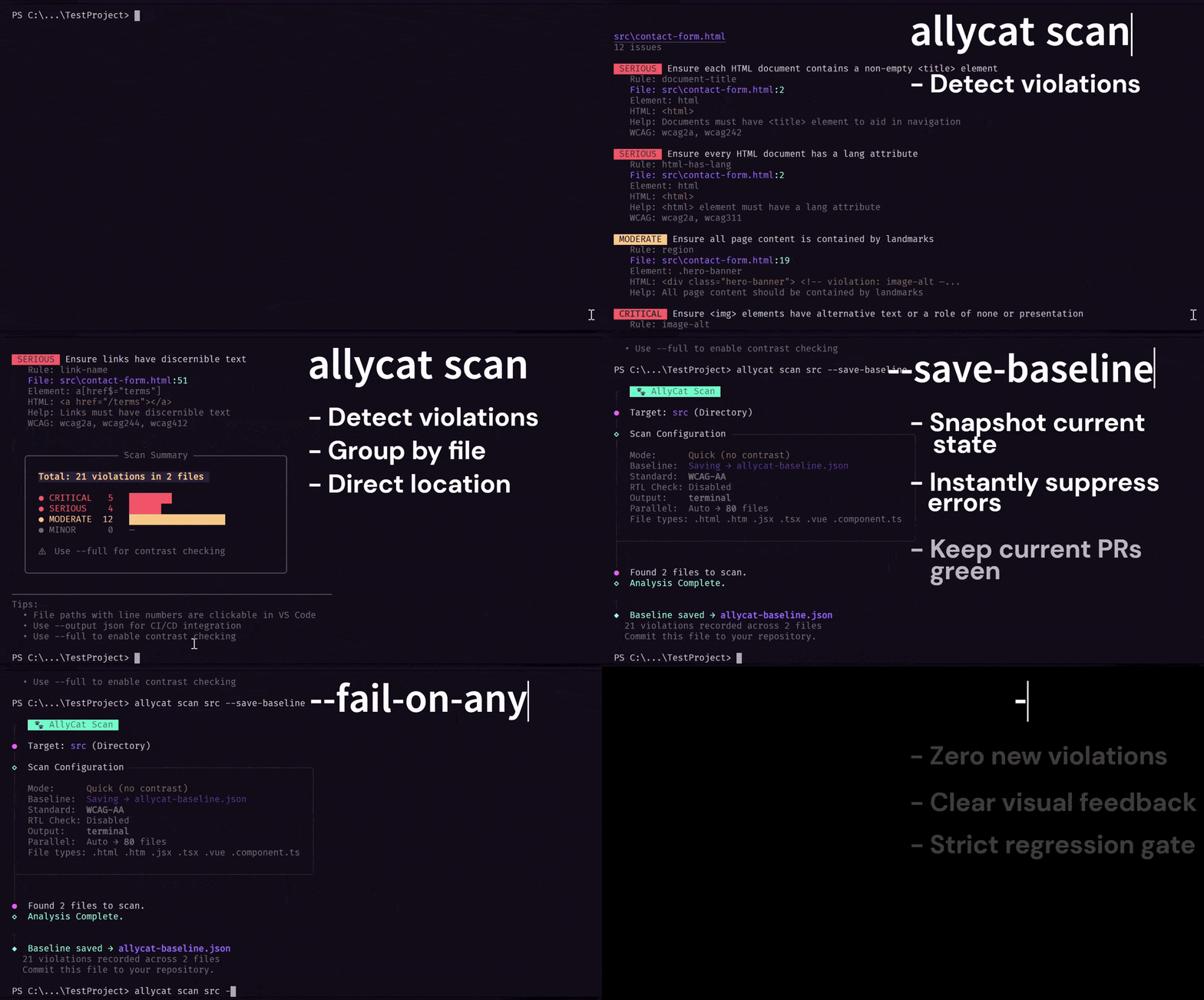
Scan violations with exact line numbers → save a baseline → catch only new violations with
--fail-on-new
Installation
# Global — for personal use
npm install -g allycat

# Per-project — recommended for teams and CI/CD (version-pinned per project)
npm install --save-dev allycat
For full scans (contrast checking):
npx playwright install chromium
Requirements: Node.js ≥ 20
Commands
allycat init
Interactive setup wizard. Creates allycat.config.json in your project root.
allycat init
Prompts for:
- Accessibility standard (WCAG 2.1 AA, WCAG 2.2 AA, WCAG AAA)
- RTL support (experimental, opt-in)
- Default scan mode (quick or full)
- AI-ready fix prompts (enabled/disabled)
- AI agent preference — Claude, Cursor, ChatGPT, Gemini, Copilot, Other / Skip (shown when AI is enabled)
- Report delivery — Auto-open in browser / Save and print path / Ask each time / Never generate (shown when AI is enabled)
- Concurrency override (optional advanced setting)
No framework selection needed — the scanner automatically detects
.html,.jsx,.tsx,.vue, and Angular template files.
allycat scan [target]
Scan files for accessibility violations.
allycat scan                        # entire project
allycat scan ./src                  # specific directory
allycat scan ./src/pages/Home.tsx   # specific file
Scan Mode
| Option | Short | Description |
|---|---|---|
--quick |
-q |
Fast scan — no browser, skips contrast check (default) |
--full |
-f |
Full scan — real contrast checking via Playwright |
--summary |
-s |
Show violation counts only, no details |
allycat scan            # quick scan (default)
allycat scan --full     # full scan with contrast checking
allycat scan --summary  # counts only — no per-violation details
Watch & Scope
| Option | Short | Description |
|---|---|---|
--watch |
-w |
Re-scan automatically on every file save |
--existing |
-e |
Show full details of pre-existing violations on startup (requires --watch) |
--changed |
-c |
Scan only files changed since the last git commit |
allycat scan --watch              # re-scans on every save
allycat scan --watch --existing   # include pre-existing violations on startup
allycat scan --watch --summary    # watch mode with counts only
allycat scan --changed            # git-changed files only (great for CI / PR pipelines)
allycat scan --changed ./src      # scoped to a directory

# After each save, watch mode shows a delta:
#   [NEW]   — violation appeared since the last scan
#   [FIXED] — violation was present before and is now resolved
#   (no label) — violation is unchanged
Path Filtering
| Option | Description |
|---|---|
--exclude <path> |
Exclude a path or glob from the scan. Repeatable. When scanning a scoped path, --exclude names are automatically resolved relative to that target — no need to type the full path. |
allycat scan --exclude tests                          # skip the tests folder
allycat scan --exclude tests --exclude src/generated  # skip multiple paths
allycat scan --exclude "**/*.stories.*"               # skip all Storybook stories (glob)
allycat scan --watch --exclude tests                  # exclusion applies on every rescan too
allycat scan scripts --exclude test.html              # scans scripts/ — auto-resolves to scripts/test.html
allycat scan src/components --exclude fixtures        # auto-resolves to src/components/fixtures (entire folder)
allycat scan src/test --exclude __mocks__             # auto-resolves to src/test/__mocks__
Stacks on top of the built-in ignores (node_modules/, dist/, build/, allycat-report.html). Works in normal scan, watch, and --changed modes.
CI & Gates
| Option | Short | Description |
|---|---|---|
--ci |
CI preset: compact output + --fail-on-critical |
|
--fail-on-critical |
Exit code 1 if any critical violations found | |
--fail-on-serious |
Exit code 2 if any serious or critical violations found | |
--fail-on-any |
Exit code 3 if any violations found (strictest gate) | |
--save-baseline |
Snapshot current violations to allycat-baseline.json — exits 0 always |
|
--fail-on-new |
Exit code 4 if any violation is not in the saved baseline | |
--json-file [name] |
-j |
Save report to a JSON file |
allycat scan --ci                                     # CI preset — compact output + critical gate
allycat scan --fail-on-critical --json-file report    # block on critical, save report
allycat scan --fail-on-any                            # strictest gate — block on any violation
allycat scan --save-baseline                          # snapshot today's violations
allycat scan --fail-on-new                            # only fail on violations not in baseline
allycat scan --json-file                              # auto-named: allycat-report-2026-06-02-143052.json
allycat scan --json-file ci-report                    # custom name: ci-report.json
→ See CI/CD Integration Guide for exit code reference, baseline workflow, pre-commit hooks, and full pipeline examples.
Output
| Option | Short | Description |
|---|---|---|
--output <format> |
-o |
Output format: terminal (default) or json |
--no-snippet |
Hide source/HTML snippet per violation | |
--no-help |
Hide help text per violation | |
--no-wcag |
Hide WCAG tags per violation | |
--no-selector |
Hide element selector per violation | |
--no-affected |
Hide affected element count per violation | |
--no-tips |
Hide the tip box after scan results | |
--summary-style <style> |
Summary style: default (box) or compact (single line) |
allycat scan -o json                   # JSON to terminal (pipe-friendly)
allycat scan --no-snippet --no-help    # cleaner terminal output
allycat scan --summary-style compact   # single-line summary
Full reference: allycat scan --help
allycat help [topic]
allycat help           # List all topics
allycat help faq       # Common questions and answers
allycat help examples  # Real-world usage examples
allycat help ci        # CI/CD integration guide
allycat help standards # Standards explained (WCAG AA vs AAA)
Command-specific help:
allycat --help        # All commands overview
allycat init --help   # Init command details
allycat scan --help   # Scan command with all options
allycat report
Opens the last generated HTML accessibility report (allycat-report.html) in your browser.
allycat report
Run allycat scan first. Prints a message and exits if no report file is found.
allycat fix
Opens Claude Code in a new terminal and hands it every violation from your last scan to fix.
allycat scan      # 1. Find the violations
allycat fix       # 2. Claude Code fixes them
- Requires Claude Code. If it isn't installed,
fixtells you where to get it. - Uses your last scan.
fixdoesn't scan again, so runallycat scanin the same folder first. - Warns about stale results. If files changed since the scan,
fixtells you and still continues. - Never gets stuck. If a new terminal can't be opened,
fixprints the command to run yourself.
fix runs Claude Code with your own account and settings. Review its changes before committing, then run allycat scan again to confirm.
allycat feedback
Opens GitHub Issues in your browser to report a bug or request a feature.
allycat feedback
allycat repo
Opens the AllyCat GitHub repository in your browser.
allycat repo
allycat update
Check for updates and view release notes.
allycat update
Configuration
Run allycat init to create allycat.config.json in your project root.
Valid standards are wcag-aa (default), wcag-22-aa, and wcag-aaa.
→ See Configuration Reference for all fields, valid values, and manual editing details.
.allycatignore
Create a .allycatignore file in your project root to permanently exclude paths from every scan. One glob pattern per line, # for comments:
# Generated files — do not scan
src/generated/**
public/vendor/**

# Legacy code pending refactor
src/legacy/**/*.html
Loaded automatically on every scan — no flag needed. Commit the file to share exclusions with your team. .allycatignore always wins: even if a path is explicitly targeted, this file blocks it. Use --exclude for per-run exclusions; both apply simultaneously. To bypass .allycatignore for a single run without editing the file, use --no-ignore.
Supported File Types
| File Type | Extensions |
|---|---|
| HTML | .html, .htm |
| React | .jsx, .tsx |
| Vue | .vue |
| Angular | .component.html, .component.ts |
Ignores node_modules/, dist/, build/, and allycat-report.html by default. Use --exclude for per-run exclusions or .allycatignore for project-wide permanent exclusions.
Output Formats
- Terminal — Color-coded, grouped by file
- JSON — For CI/scripts:
allycat scan -o json # print to terminal allycat scan --json-file report # save to report.json - HTML Report — Rich AI fix prompts (auto-opens when enabled)
CI/CD Integration
AllyCat is built for pipelines:
- Exit gates — fail on critical, serious, or any violations (
--fail-on-critical,--fail-on-serious,--fail-on-any) - Baselines — adopt a gate without fixing pre-existing issues (
--save-baseline+--fail-on-new); resilient to file renames and unrelated code changes, so existing violations stay suppressed - PR scoping — scan only git-changed files (
--changed) - CI preset — compact output + critical gate in one flag (
--ci) - JSON export — machine-readable reports for artifact storage (
--json-file)
| Code | Flag | Meaning |
|---|---|---|
0 |
— | No threshold flag used, or threshold not met |
1 |
--fail-on-critical |
Critical violations found |
2 |
--fail-on-serious |
Serious or critical violations found |
3 |
--fail-on-any |
Any violations found |
4 |
--fail-on-new |
New violation not in saved baseline |
GitHub Actions example:
- name: Accessibility Scan
  run: allycat scan --ci --json-file allycat-report
→ See CI/CD Integration Guide for GitHub Actions, GitLab CI, Jenkins, and advanced baseline workflows.
More
Accessibility Standards
| Standard | Contrast Ratio | RTL Support | Typical Use |
|---|---|---|---|
| WCAG 2.1 AA | 4.5:1 | Optional | Most websites — current legal baseline (ADA, EN 301 549) |
| WCAG 2.2 AA | 4.5:1 | Optional | New projects — 2025 industry frontier, adds 9 new criteria |
| WCAG AAA (automated) | 7:1 | Optional | Government / Medical — full AAA requires a manual audit |
RTL support is available as an opt-in for all standards — enable it during allycat init for Hebrew, Arabic, Persian, and other RTL interfaces. (experimental)
Run allycat help standards for a full breakdown, or see the official WCAG 2.1 and WCAG 2.2 specifications.
Troubleshooting
Common issues:
- No config? → Run
allycat init - Broken or hand-edited config? → AllyCat falls back to safe defaults and never overwrites your file; run
allycat initto reset it - Full scan fails? →
npx playwright install chromium - No contrast check? → Contrast requires a real browser:
allycat scan --full - Contrast violations missing on styled-components / Emotion / styled-jsx projects? → Runtime CSS-in-JS styles cannot be statically analyzed. The scanner will emit a warning per file — this is a known limitation.
- Files not scanned? → Check supported extensions and ignored folders
--changedfails? → Must be in a git repo with ≥2 commits- Wrong path separator? → Both
/and\work:allycat scan ./srcandallycat scan .\srcare equivalent
Run allycat help faq for more.
Contributing
See CONTRIBUTING.md
Acknowledgments
- axe-core — Accessibility rules engine
- Playwright — Browser automation for full scan mode
- JSDOM — DOM implementation for quick scan mode
- Babel — JSX/TSX transformation
- Commander.js — CLI framework
License
MIT © 2026 Dotan Siman Tov
Related Packages
WCAG accessibility audit tool — Nuxt layer with report generation, PDF export an...
Accessibility scanner for humans and AI agents: CLI, MCP server and skill that r...
Audit shadcn-vue and shadcn-nuxt apps for missing UI fundamentals. Deterministic...
Version History
| Version | Released | License |
|---|---|---|
| 1.9.0 | MIT | |
| 1.8.0 | MIT | |
| 1.7.0 | MIT | |
| 1.6.0 | MIT | |
| 1.5.0 | MIT | |
| 1.4.1 | MIT | |
| 1.4.0 | MIT | |
| 1.3.0 | MIT | |
| 1.2.1 | MIT | |
| 1.2.0 | MIT | |
| 1.1.0 | MIT | |
| 1.0.0 | MIT |