ai-orb
🔮 ai-orb
网站客服入口:新增可选 widget,支持球 / 提示胶囊 / 对话面板,以及完整外部文案与国际化。
一颗会表态的 AI 助手状态球。
在想 · 干活中 · 等你回话 · 好了。零依赖,4 KB。





看一眼就知道它在干嘛
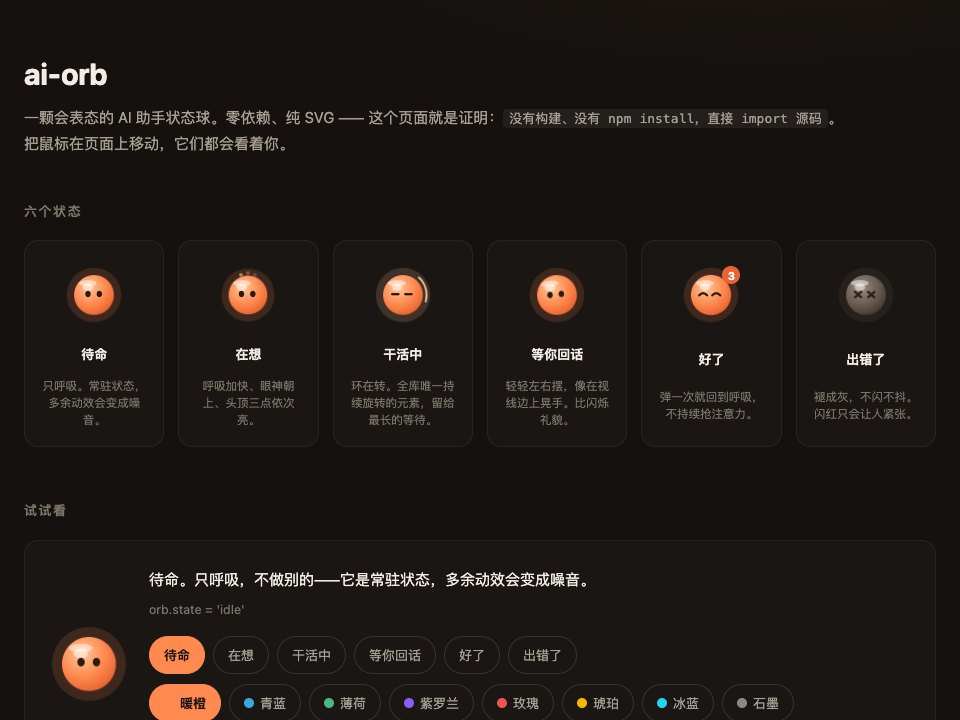
| 状态 | 什么时候亮 | 表现 |
|---|---|---|
idle |
默认 | 缓慢呼吸,常驻 |
thinking |
请求发了,还没吐字 | 呼吸加快,眼神朝上,头顶三点闪 |
working |
长任务(出图、工具调用) | 一条环在转,唯一持续旋转的元素 |
asking |
助手问了话,卡在你这儿 | 轻轻左右摆,像在你视线边上晃手 |
done |
结果出来了 | 弹一下、笑眼、角标 |
error |
请求失败 | 褪成灰,不闪红 |
八色主题
new AgentOrb(el, { theme: 'blue' })  // 创建时选
orb.theme = 'violet'                  // 运行时秒切
| 🟠 orange | 🔵 blue | 🟢 green | 🟣 violet | 🔴 rose | 🟡 gold | 🩵 cyan | ⚫ graphite |
|---|---|---|---|---|---|---|---|
| 默认 | #3aa8d8 |
#4cb782 |
#8b5cf6 |
#ef5350 |
#f5b800 |
#22d3ee |
#8a8a8a |
30 秒上手
npm i ai-orb
import { AgentOrb } from 'ai-orb'

const orb = new AgentOrb(document.querySelector('#orb'), { theme: 'blue' })

orb.state = 'thinking'   // 模型在想
orb.state = 'working'    // 长任务跑着,环在转
orb.theme = 'violet'     // 运行时换色
orb.set('done', 3)       // 好了,角标 3
orb.destroy()            // 卸载时记得清理
Vue 3:
<script setup>
import { AgentOrb } from 'ai-orb/vue'
</script>

<template>
  <AgentOrb :state="state" :unseen="n" :theme="theme" @click="openChat" />
</template>
API 就这些。
🎨 换肤
主题底层是 CSS 变量,要细调的话在元素上覆盖:
.agent-orb {
  --ao-size: 64px;
  --ao-hi:   #a5e9ff;   /* 内高光 */
  --ao-mid:  #3aa8d8;   /* 球身   */
  --ao-lo:   #1c6a94;   /* 外缘   */
  --ao-glow: #3aa8d8;   /* 光晕   */
  --ao-ink:  #0d2733;   /* 眼睛   */
}
| 变量 | 默认值 | 作用 |
|---|---|---|
--ao-size |
56px |
整体尺寸 |
--ao-hi / --ao-mid / --ao-lo |
暖橙 | 径向渐变,由内到外 |
--ao-glow |
#ff8a50 |
光晕色(各状态会覆盖) |
--ao-ink |
#2a1a10 |
眼睛颜色 |
--ao-badge-bg / --ao-badge-fg / --ao-badge-ring |
— | 未读角标 |
📖 API
new AgentOrb(host, options?)
host 是挂载点 —— 球会追加进去,不会替换掉它本身。
host 为空时直接抛错(静默失败会被当成样式问题查半天)。
| 参数 | 类型 | 默认 | 说明 |
|---|---|---|---|
state |
OrbState |
'idle' |
未知值回落到 idle |
unseen |
number |
0 |
仅 state === 'done' 且 > 0 时显示角标 |
size |
number | string |
— | 数字按 px 处理 |
follow |
boolean |
true |
眼睛跟随光标 |
blink |
boolean |
true |
眨眼 |
theme |
string | null |
null |
内置主题名(见上表) |
labels |
object |
英文 | 覆盖 aria-label 文案,做多语言用 |
onClick |
function |
— | 点击回调 |
实例: orb.state、orb.unseen、orb.theme(都可写)、orb.set(state, unseen?)、
orb.destroy()、orb.el(那个 button,用它设 CSS 变量)。
另外导出: STATES、DEFAULT_LABELS、THEMES、css、injectStyle(doc?)。
样式每页自动注入一次。要自己管样式(SSR、严格 CSP、自定义主题流水线)就
改成引入 css 字符串。
设计上的三条克制
都是有意为之,不是还没做完:
- 只有六个状态。 56px 下分不清的状态再多也没用,不如少而清楚。
- 只有一样东西在转。 环只留给
working——最长的那段等待。 什么都在动,就等于什么都不紧急。 - 不做卡通脸。 它得能待在正经产品的角落里,而不是变成屏幕上最吵的东西。
同页多颗球共用一个 mousemove 监听和一个 requestAnimationFrame 循环,
最后一个 destroy() 时一起摘掉。渐变 id 按实例区分——共用 id 的话,
销毁第一颗会让其余的全变成空心圈。
本地开发
git clone https://github.com/webkubor/ai-orb
cd ai-orb
npm install
npm test

npx serve .   # 然后开 http://localhost:3000/demo/
demo 直接 import 源码,没有构建步骤。但必须经 http 打开:
ES module 在 file:// 下会被 CORS 拦掉,表现是「页面出来了但一颗球都没有」。
谁在用
- MUSE AV —— AI 出图工作台。这颗球是它创作助手的收起态, 那里出一张图经常要 30–90 秒。
你也在用?欢迎提 PR 加上。
License
MIT © webkubor
Related Packages
Rekhu Assistant for Node.js: a custom AI assistant inside your app, for your own...
UiGuide Agent for web applications: an AI help agent that guides your users thro...
Version History
| Version | Released | Vue | License |
|---|---|---|---|
| 0.2.0 | ^3.3.0 | MIT | |
| 0.1.0 | ^3.3.0 | MIT |