agentation-vue
agentation-vue


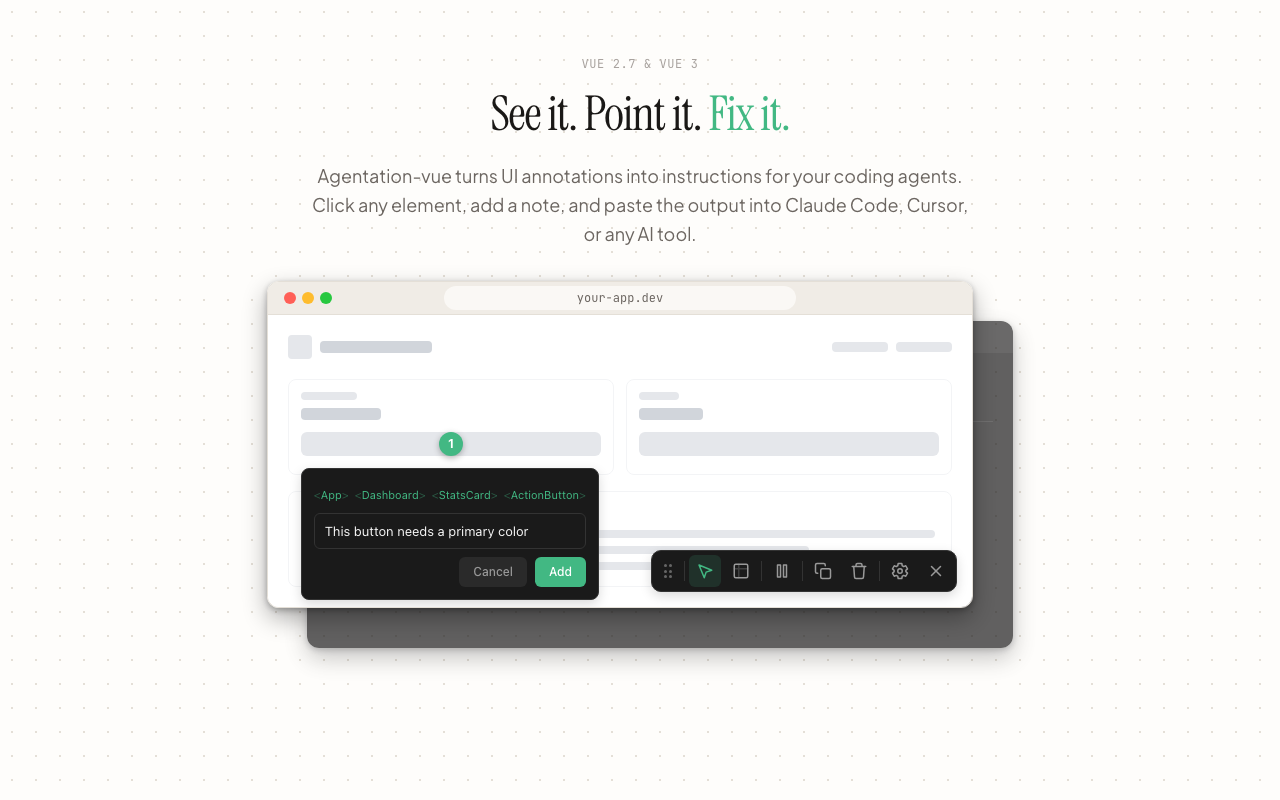
Visual feedback tool for AI coding agents. Drop a single component into your Vue app and let your AI agent see and annotate UI elements.
Compatible with Vue 3.3+ and Vue 2.7.
Note: This is an unofficial, community-maintained Vue adaptation of Agentation. It is not affiliated with or endorsed by the original project.
Installation
npm install agentation-vue
Setup — Vue 3
import { AgentationVuePlugin } from 'agentation-vue'
// main.ts
import { createApp } from 'vue'
import App from './App.vue'
import 'agentation-vue/style.css'

createApp(App)
  .use(AgentationVuePlugin)
  .mount('#app')
Then place the component once in your root App.vue:
<template>
  <router-view />
  <agentation-vue />
</template>
Setup — Vue 2.7
import { AgentationVuePlugin } from 'agentation-vue'
// main.ts
import Vue from 'vue'
import App from './App.vue'
import 'agentation-vue/style.css'

Vue.use(AgentationVuePlugin)

new Vue({
  render: h => h(App),
}).$mount('#app')
Then place the component once in your root App.vue:
<template>
  <div>
    <router-view />
    <agentation-vue />
  </div>
</template>
Vue 2 templates require a single root element — wrap your content in a
<div>.
Chrome extension
Install from the Chrome Web Store →
This repo also contains a Chrome extension for injecting Agentation without modifying the target app code.
Features
- Click-to-annotate — click any element to pin a numbered marker and leave a comment
- Multi-select —
Shift+dragto rubber-band select multiple elements at once - Area select —
Alt+dragto annotate a screen region - Text selection — highlight text to annotate it
- Vue component tree — automatically detects and reports the Vue component hierarchy for each annotated element
- Markdown output — copies all annotations as structured Markdown, ready to paste into an AI chat
- Forensic mode — captures bounding boxes, computed styles, CSS classes, and accessibility attributes
- Themes — light, dark, or auto (follows system preference)
- Auto-hide launcher — optionally tucks the collapsed floating button near screen edges and reveals it on approach
- Session persistence — annotations survive refreshes and are scoped per page URL via
sessionStorage - Custom tooltip directive —
v-va-tooltipwith optional keyboard shortcut badge
Acknowledgments
This project is inspired by and based on Agentation by Ben Taylor. Thank you for the original concept and implementation.
License
PolyForm Shield 1.0.0 — Copyright (c) 2026 Dorian Becker
Related Packages
Point at any UI element, leave a comment, and hand the feedback to an AI coding...
Click a UI element in your dev server, leave a comment, let your coding agent im...
Vite plugin for CodeAtlas — real-time annotation parsing and live MCP HTTP serve...
Version History
| Version | Released | License |
|---|---|---|
| 0.3.0 | PolyForm-Shield-1.0.0 | |
| 0.2.14 | PolyForm-Shield-1.0.0 | |
| 0.2.13 | PolyForm-Shield-1.0.0 | |
| 0.2.12 | PolyForm-Shield-1.0.0 | |
| 0.2.10 | PolyForm-Shield-1.0.0 | |
| 0.2.6 | PolyForm-Shield-1.0.0 | |
| 0.2.5 | PolyForm-Shield-1.0.0 | |
| 0.2.4 | PolyForm-Shield-1.0.0 | |
| 0.2.3 | PolyForm-Shield-1.0.0 | |
| 0.2.2 | PolyForm-Shield-1.0.0 | |
| 0.2.1 | PolyForm-Shield-1.0.0 | |
| 0.2.0 | PolyForm-Shield-1.0.0 |