@yamakox/vue3-plotly
@yamakox/vue3-plotly
A Vue 3 wrapper component for Plotly.js charts


Features
- Lightweight Vue 3 wrapper for Plotly.js (Documentation)
- Full TypeScript support with type definitions
- NEW: Compatible with Plotly.js v4+
- Supports Plotly.js methods and events
- Reactive data binding with Vue 3's Composition API
- Easy integration with existing Vue 3 projects
- Zero additional dependencies (Plotly.js is peer dependency)
- Supports Astro's SSG pages (with
client:onlydirective)
Installation
npm install --save @yamakox/vue3-plotly plotly.js-dist-min
plotly.js-dist-min is required as a peer dependency.
For TypeScript users, you can install type definitions for plotly.js-dist-min:
npm install --save-dev @types/plotly.js-dist-min
Usage
Basic Example
App.vue:
<script setup>
import Plot from '@yamakox/vue3-plotly'
import { ref } from 'vue'

const plot1 = ref()

const data = [
  { x: [1, 2, 3], y: [10, 20, 30], type: 'scatter', mode: 'lines+markers', name: 'Sample' }
]

const layout = {
  title: { text: 'My First Plotly Chart', font: { size: 20 } }, width: 600, height: 400
}

function onHover(event) {
  console.log('Hovered:', event)
}
</script>

<template>
  <plot ref="plot1" :data="data" :layout="layout" @hover="onHover" />
</template>
TypeScript Example
App.vue:
<script setup lang="ts">
import Plot from '@yamakox/vue3-plotly'
import Plotly from 'plotly.js-dist-min'
import { useTemplateRef, onMounted } from 'vue'

// NOTE: npm install --save-dev vue-component-type-helpers
import type { ComponentExposed } from 'vue-component-type-helpers'
const plot1 = useTemplateRef<ComponentExposed<typeof Plot>|null>('plot1')

const x = Array.from({ length: 21 }, (_, i) => 2 * Math.PI * i / 20)
const y = x.map(x => Math.sin(x))

const data: Plotly.Data[] = [
  { x: x, y: y, type: 'scatter', mode: 'lines+markers', name: 'Sine Curve' }
]

const layout: Partial<Plotly.Layout> = {
  title: { text: 'My First Plotly Chart', font: { size: 20 } },
  width: 600, height: 400, showlegend: false,
}

function onHover(event: Plotly.PlotMouseEvent) {
  console.log('Hovered:', event)
}

onMounted(async () => {
  setTimeout(async () => {
    try {
      const y2 = x.map(x => Math.cos(x))
      const data2: Plotly.Data[] = [
        { x: x, y: y2, type: 'scatter', mode: 'lines+markers', name: 'Cosine Curve' }
      ]
      await plot1.value?.addTraces(data2)
    } catch(error) {console.log(error)}
  }, 1000)
})
</script>

<template>
  <plot ref="plot1" :data="data" :layout="layout" @hover="onHover" />
</template>
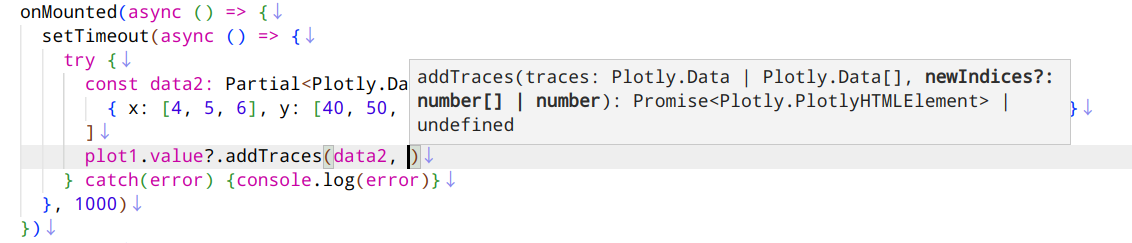
IDE shows the signature help of the plot component.
Astro Example
Plot now supports embedding in Astro SSG pages using the client:only="vue" directive (since v0.3.0).
---
import Plot from '@yamakox/vue3-plotly'

const x = Array.from({ length: 21 }, (_, i) => 2 * Math.PI * i / 20);
const y1 = x.map(x => Math.sin(x));
const y2 = x.map(x => Math.cos(x));
const data = [
  { x: x, y: y1, type: 'scatter', mode: 'lines+markers', name: 'Sine Curve' },
  { x: x, y: y2, type: 'scatter', mode: 'lines+markers', name: 'Cosine Curve' }
];
const layout = {
  title: { text: 'Plotly Demo on Astro', font: { size: 20 } },
  width: 600, height: 300, showlegend: true,
  margin: { t: 80, r: 30, b: 30, l: 50 },
}
---

<Plot client:only="vue" data={data} layout={layout} />
Props
| Prop | Type | Required | Description |
|---|---|---|---|
data |
Plotly.Data[] |
Yes | The trace data to plot |
layout |
Partial<Layout> |
No | Plotly layout config |
config |
Partial<Config> |
No | Plotly config options |
Events
These events can be used with kebab-case Vue bindings such as @hover, @click, etc.
| Event | Plotly.js event |
|---|---|
| click | plotly_click |
| unhover | plotly_unhover |
| hover | plotly_hover |
| selecting | plotly_selecting |
| selected | plotly_selected |
| restyle | plotly_restyle |
| relayout | plotly_relayout |
| relayouting | plotly_relayouting |
| click-annotation | plotly_clickannotation |
| animating-frame | plotly_animatingframe |
| legend-click | plotly_legendclick |
| legend-double-click | plotly_legenddoubleclick |
| slider-change | plotly_sliderchange |
| slider-end | plotly_sliderend |
| slider-start | plotly_sliderstart |
| sunburst-click | plotly_sunburstclick |
| before-plot | plotly_beforeplot |
| after-export | plotly_afterexport |
| after-plot | plotly_afterplot |
| animated | plotly_animated |
| animation-interrupted | plotly_animationinterrupted |
| autosize | plotly_autosize |
| before-export | plotly_beforeexport |
| deselect | plotly_deselect |
| double-click | plotly_doubleclick |
| framework | plotly_framework |
| redraw | plotly_redraw |
| transitioning | plotly_transitioning |
| transition-interrupted | plotly_transitioninterrupted |
Exposed
These method types are available via useTemplateRef and ComponentExposed:
declare function relayout(layout: Partial<Plotly.Layout>): Promise<Plotly.PlotlyHTMLElement>;
declare function redraw(): Promise<Plotly.PlotlyHTMLElement>;
declare function purge(): void;
declare function restyle(aobj: Plotly.Data, traces?: number[] | number): Promise<Plotly.PlotlyHTMLElement>;
declare function update(traceUpdate: Plotly.Data, layoutUpdate: Partial<Plotly.Layout>, traces?: number[] | number): Promise<Plotly.PlotlyHTMLElement>;
declare function addTraces(traces: Plotly.Data | Plotly.Data[], newIndices?: number[] | number): Promise<Plotly.PlotlyHTMLElement>;
declare function deleteTraces(indices: number[] | number): Promise<Plotly.PlotlyHTMLElement>;
declare function moveTraces(currentIndices: number[] | number, newIndices?: number[] | number): Promise<Plotly.PlotlyHTMLElement>;
declare function extendTraces(update: Plotly.Data | Plotly.Data[], indices: number | number[], maxPoints?: number): Promise<Plotly.PlotlyHTMLElement>;
declare function prependTraces(update: Plotly.Data | Plotly.Data[], indices: number | number[]): Promise<Plotly.PlotlyHTMLElement>;
declare function toImage(opts?: Plotly.ToImgopts): Promise<string>;
declare function downloadImage(opts: Plotly.DownloadImgopts): Promise<string>;
declare function addFrames(frames: Array<Partial<Plotly.Frame>>): Promise<Plotly.PlotlyHTMLElement>;
declare function deleteFrames(frames: number[]): Promise<Plotly.PlotlyHTMLElement>;
declare function animate(frameOrGroupNameOrFrameList?: string | string[] | Partial<Plotly.Frame> | Array<Partial<Plotly.Frame>>, opts?: Partial<Plotly.AnimationOpts>): Promise<void>;
Development
npm install
npm run build        # Build with declaration files
npm run build:types  # Only generate declaration files
npm publish --access public
License
MIT © 2025 @yamakox
Related Packages
@memotux/nuxt-vue-plot
Nuxt module for @memotux/vue-plot — declarative data visualization with Observab...
376
2
Version History
| Version | Released | Vue | License |
|---|---|---|---|
| 0.4.1 | ^3.5.0 | MIT | |
| 0.4.0 | ^3.5.0 | MIT | |
| 0.3.0 | ^3.5.0 | MIT | |
| 0.2.9 | ^3.5.0 | MIT | |
| 0.2.8 | ^3.5.0 | MIT | |
| 0.2.7 | ^3.5.0 | MIT | |
| 0.2.6 | ^3.5.0 | MIT | |
| 0.2.5 | ^3.5.0 | MIT | |
| 0.2.4 | ^3.5.0 | MIT | |
| 0.2.3 | ^3.5.0 | MIT | |
| 0.2.2 | ^3.5.0 | MIT | |
| 0.2.1 | ^3.5.0 | MIT | |
| 0.2.0 | ^3.5.0 | MIT | |
| 0.1.2 | ^3.5.0 | MIT | |
| 0.1.1 | ^3.5.0 | MIT |