@wbc-ui/core

UI as Data. Vue 2. Unlimited.
Define components as JSON. Let the engine render. Ship complex UIs in minutes, not weeks.


📘 Docs · 🐙 GitHub · ▶️ Playground · 💎 Pro
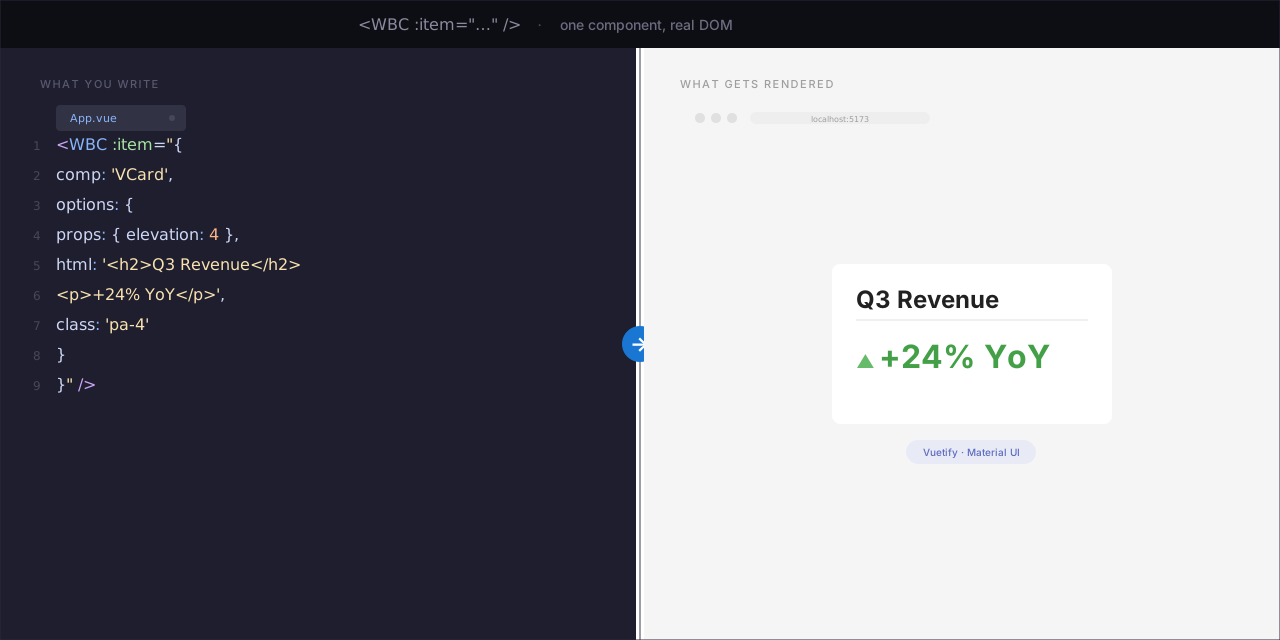
Why?
@wbc-ui2/core replaces the entire HTML/CSS/JS template stack with a single <WBC> tag driven by data.
Write 10× less code
// Before: 80 lines of <template>, <script>, methods, computed, v-if, v-for
// After: one line. One component.
<WBC :item="dynamicUIConfig" />
The engine understands files, URLs, Markdown, code, and rich media natively — no wrapper components, no special handling. Pipe | syntax gives you styling, linking, and type-override in a single string.
Markdown becomes interactive
<WBC :item="'./landing.md'" />
<!-- Renders a full markdown page with TOC, syntax-highlighted code blocks,
     anchor links, and copy buttons. The markdown IS the UI. -->
Files and URLs as first-class citizens
<WBC :item="'./chart-data.json'" />          // JSON → rendered
<WBC :item="'./hero.png|rounded elevation-4'" /> // image with Vuetify classes
<WBC :item="'./code-sample.py'" />           // Python → syntax-colored block
<WBC :item="'https://api.example.com/data'" /> // fetch → parse → render
<WBC :item="'./slides.pdf'" />               // PDF viewer
<WBC :item="'https://youtu.be/dQw4w9WgXcQ'" />// YouTube embed
Replace HTML · CSS · JS with JSON
// No <div>. No class="" strings. No event handlers in templates.
// Everything is an object. Everything is reactive.
{
  comp: 'VCard',
  options: {
    html: (ctx) => ctx.data.intro,              // dynamic HTML
    class: (ctx) => ctx.dark ? 'dark-card' : null, // conditional CSS
    on: { click: (ctx) => ctx.toggle('expanded') }, // reactive events
    props: { elevation: 4 }
  },
  items: [
    './logo.png|ma-auto',                        // file with Vuetify classes
    { comp: 'VBtn', options: { html: '[[ CTA ]]' } } // WBHtml markup inside
  ]
}
One language. One component. One
<WBC>tag. No template files. No CSS files. No<style scoped>. Everything is data.
What is @wbc-ui2/core?
A Vue 2.7+ plugin that implements the "UI as Data" paradigm. You feed it a JSON object — it recursively builds a live, reactive Vuetify/Bootstrap UI.
| Component | Role |
|---|---|
<WBC :item="..."> |
Polymorphic rendering engine — dispatches to 6 renderers based on item type |
renderString |
Inline strings with pipe ` |
renderObject |
Component descriptors: { comp: 'VBtn', options: { ... } } |
renderArray |
Lists/grids with inheritance, disposition, and virtual scrolling |
renderFile |
Images, videos, PDFs, code files |
renderFunction |
Lazy-evaluated render functions |
renderPrimitive |
Numbers, booleans, dates |
Who's it for? Solutions architects, full-stack devs, low-code platform builders — anyone who needs to ship complex, data-driven UIs without drowning in templates.
Usage Examples
Level 1 — Hello World
<WBC :item="'Welcome to @wbc-ui2/core|text-h3 primary--text'" />
→ Renders <h3 class="primary--text">Welcome to @wbc-ui2/core</h3>. The pipe | separates content from styling — ½ second of typing.
Level 2 — A full card
<WBC :item="{
  comp: 'VCard',
  options: {
    props: { elevation: 4, outlined: true },
    html: '<h2>{{ title }}</h2><p>{{ body }}</p><v-btn @click=\"doAction\">Go</v-btn>',
    class: 'ma-4',
    on: { click: (ctx) => ctx.emit('selected', ctx.data) }
  }
}" />
Level 3 — Reactive, data-driven, multilingual
// This object could come from an API, a CMS, or a user-built form
const pageDefinition = {
  dive: true,                              // enable reactive mode
  comp: (ctx) => ctx.lg === 'ar'           // component changes by language
    ? 'VSheet' : 'VContainer',
  options: {
    html: (ctx) => ctx.data.intro[ctx.lg], // pick localized content
    class: (ctx) => ctx.wbcTier === 'pro'  // tier-gated styling
      ? 'gradient-hero' : 'flat-hero'
  },
  items: [
    { comp: 'VAvatar', options: { props: { src: '/logo.png', size: 64 } } },
    { comp: 'VBtn', options: { html: '{{ CTA }}', on: { click: 'goPricing' } } }
  ]
};
// One <WBC :item="pageDefinition" /> renders the entire page.
🚀 Try it in 30 seconds
# Starter template (coming soon — repo in development)
npx degit wbc-ui2/starter my-app && cd my-app && npm install && npm run dev
While the starter template is being finalized, the easiest way to explore the engine is the live demo: demo.wbc-ui.com — a multi-page app built from JSON, with live source visible alongside each example.
Installation
Prerequisites
- Node.js ≥ 18 (the engine declares this; older versions may work but are not tested)
- Vue 2.7.x (the library targets Vue 2 specifically; Vue 3 support tracked separately as
@wbc-ui3/core) - A bundler that understands ESM exports: Vite (recommended), Webpack 5, or Vue CLI 5
npm (recommended)
npm install @wbc-ui2/core

# Peer dependencies — install once per project
npm install vue@^2.7.16 vuetify@^2.7.2 vuex@^3.6.2 vue-router@^3
Yarn / pnpm
# Yarn
yarn add @wbc-ui2/core
yarn add vue@^2.7.16 vuetify@^2.7.2 vuex@^3.6.2 vue-router@^3

# pnpm
pnpm add @wbc-ui2/core
pnpm add vue@^2.7.16 vuetify@^2.7.2 vuex@^3.6.2 vue-router@^3
The published tarball is currently tagged
next(seepublishConfig.taginpackage.json). To install the latest release explicitly:npm install @wbc-ui2/core@next.
Vite project setup
// vite.config.js
import { wbcVitePlugin } from '@wbc-ui2/core/vite-plugin';
export default defineConfig({
  plugins: [vue(), ...wbcVitePlugin()]  // ← auto-aliases, raw loaders, require.context
});
Webpack project setup
For Webpack 5 / Vue CLI 5 projects:
// webpack.config.js or vue.config.js
const wbcWebpack = require('@wbc-ui2/core/wbc.webpack.js');
// See the plugin's exports for the available configuration API.
Vue 2 plugin registration
// main.js
import Vue from 'vue';
import wbcCore from '@wbc-ui2/core';

Vue.use(wbcCore);
// That's it. Vuetify, Vuex, BootstrapVue, MarkdownIt are auto-installed.
// Use <WBC :item="..."> anywhere in your app.
Named imports
import { WBC, WBHtml, WBLink, getVuetifyInstance } from '@wbc-ui2/core';
Ecosystem extensions
The core engine is intentionally small. Optional functionality lives in sibling packages — each registers itself into the core after Vue.use(wbcCore):
import Vue from 'vue';
import wbcCore   from '@wbc-ui2/core';      // Always first — extensions depend on it
import wbCode    from '@wbc-ui2/code';      // Code editor + syntax highlighting
import wbLatex   from '@wbc-ui2/latex';     // LaTeX math rendering
import wbMermaid from '@wbc-ui2/mermaid';   // Mermaid diagrams
import wbChart   from '@wbc-ui2/chart';     // ECharts data visualization

Vue.use(wbcCore);
Vue.use(wbCode);
Vue.use(wbLatex);
Vue.use(wbMermaid);
Vue.use(wbChart);
Other available extensions: @wbc-ui2/alert, @wbc-ui2/cli, @wbc-ui2/dataviewer, @wbc-ui2/gis, @wbc-ui2/js, @wbc-ui2/office, @wbc-ui2/press. See the Ecosystem section below for what each one adds.
Troubleshooting common install errors
| Symptom | Cause | Fix |
|---|---|---|
Vue.use is not a function |
Two copies of Vue are loaded (typically: your app has Vue 2, but a dependency hoisted Vue 3) | Pin a single Vue version: add "resolutions": { "vue": "^2.7.16" } (yarn/pnpm) or use npm overrides. Then rm -rf node_modules && reinstall. |
Cannot find module '@wbc-ui2/core/vite-plugin' |
npm couldn't resolve the subpath export | Confirm @wbc-ui2/core ≥ 1.0.0-r01 is installed (the vite-plugin subpath was added then). Run npm ls @wbc-ui2/core. |
peer dep missing: vuetify@^2 |
Vuetify wasn't installed — it's a peer dep, not a hard one | npm install vuetify@^2.7.2 (and any other peer deps the warning names). |
| Components render but unstyled | Vuetify CSS isn't loaded | Import once in main.js: import 'vuetify/dist/vuetify.min.css'; |
Multiple instances of Vue detected warning |
The bundler resolved Vue from two locations | In Vite: add an alias in vite.config.js mapping vue to a single absolute path. The wbcVitePlugin() does this automatically for the default setup. |
For a longer walkthrough with worked examples, see the documentation hub at wbcore2.wbc-ui.com (content is being migrated to match the new @wbc-ui2 scope; some pages may still show the legacy wbc-ui2 name during the transition).
⚡ The Engine Under the Hood
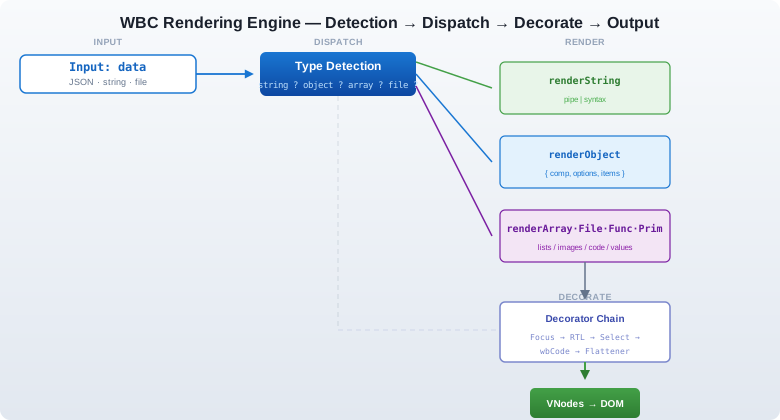
Mermaid diagram (interactive fallback)
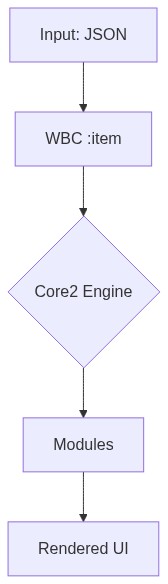
- 6 renderers dispatch based on JavaScript type
- Pipe syntax for inline styling:
Hello text-h4 primary--text /docs html dive: trueactivates reactive mode — every property becomes a function of(ctx)state- Post-processing decorators apply focus mode, RTL, selection overlays, and code rendering
🧭 Routing — UI as Routes
WBC doesn't only render content — any rendered block or link can become a real, deep-linkable route, registered on the fly and persisted across refresh. No edits to router/index.js.
Self-registering routes — options.route
Give any item options.route and rendering it registers a permanent route on mount:
<WBC :item="{
  comp: 'VCard',
  options: {
    route: 'Pricing',                          // string → /wbc/Pricing
    // or: route: { name: 'Pricing', path: '/pricing', meta: { section: 'marketing' } }
    html: ['h1__Plans', 'p__Pick a tier'],
  }
}" />
// After mount, /wbc/Pricing exists, renders this exact descriptor, and survives a refresh:
this.$router.push({ name: 'Pricing' });
The route name is the unique key — re-registering it with new content overrides the stored route (persisted to localStorage through a host-provided sink). (The earlier options.name / options.path still work but are deprecated.)
Named routes from a plain string — name__[path__]<payload>
The 3rd pipe field of a string (or [[ … ]]) item is its link. Prefix it with a route name (and an optional path) and WBC registers a persisted route that renders the payload through WBC. The payload is any WBC item — a URL string, or an object/array descriptor (parsed with strToObj):
<!-- payload = URL → rendered as <img> -->
<WBC item="open gallery | pa-2 | gallery__https://cdn.example.com/photo.jpg" />
<!--                              └ name ─┘  └────────── URL ──────────┘ -->

<!-- custom path -->
<WBC item="hero | pa-2 | hero__/media/hero__https://cdn.example.com/hero.jpg" />
<!--                     └name┘ └ custom path ┘ -->

<!-- payload = a WBC descriptor object → rendered as the page -->
<WBC item="open dashboard | pa-2 | dash__/dashboard__{ comp:'VCard', options:{ html:['h1__Dashboard'] } }" />

<!-- payload = an array (bracketed, or a bracket-less comma list) → rendered via renderArray -->
<WBC item="open list | pa-2 | items__['<ul>','a','b','c']" />
<WBC item="open list | pa-2 | items__'<ul>','a','b','c'" />
gallery → /wbc/gallery; the optional middle segment sets a custom path (/media/hero, /dashboard). Since it's just text, a grid of media becomes a few plain strings — each tile a routable, refresh-safe WBC page:
<WBC :item="['<~div,d-flex flex-wrap>',
  'shot 1 | pa-1 | pic1__https://cdn.example.com/1.jpg',
  'shot 2 | pa-1 | pic2__https://cdn.example.com/2.jpg',
  'demo   | pa-1 | clip__https://cdn.example.com/demo.mp4',
]" />
For richer routes (guards, meta, a descriptor payload instead of a bare URL) use the object form options.route. Full reference: Links & Dynamic Routes.
Every form at a glance
The <link> is the 3rd | field of a string/[[ … ]] item. Each row is a complete, runnable example:
<link> you write |
Route | Renders |
|---|---|---|
gallery__https://…/p.jpg |
/wbc/gallery |
the URL as <img> (video / iframe / YouTube by type) |
hero__/media/hero__https://…/h.mp4 |
/media/hero |
URL with a custom path (middle segment) |
card__{ comp:'VCard', options:{ html:['h1__Hi'] } } |
/wbc/card |
the object descriptor as the page |
dash__/dash__{ comp:'VCard', options:{…} } |
/dash |
object + custom path |
items__['<ul>','a','b'] |
/wbc/items |
a bracketed array via renderArray |
items__'<ul>','a','b' |
/wbc/items |
a bracket-less comma list (same result) |
grid__[ '<~VRow>', [ 'u','u' ], [ 'u','u' ] ] |
/wbc/grid |
nested — space the adjacent ] ] / [ [ (or escape \]\]) so WBHtml's [[ ]] tokenizer doesn't eat them |
Pricing (via options.route on a rendered item) |
/wbc/Pricing |
the item registers itself on mount (object form above) |
Gotchas: the payload can't contain a raw
|(escape\|or useh2__Textshorthand); a single-key object{a:1}doesn't round-trip (add a 2nd key); names are a global key, so use unique names in loops.
💎 Free vs Pro

"Free users can bind states. Pro users can command them." "3 hooks for builders, 7 hooks for architects."
Open core. The renderer (everything you see) is free. The orchestrator + extractor (everything that makes it programmable at scale) is Pro.
| Capability bucket | Free | Pro |
|---|---|---|
Core rendering (6 renderers, pipe |, dive: true) |
✅ Full | ✅ Full |
| Lifecycle hooks | 3 (init0 · init · updater) | 7 (+ setup · tracker · logic · output) |
that API surface |
data, update, emit, toggle* (binary) |
+ vm, data0, val, get/set, ref, el, watch + precision toggles |
| Framework access | — | store, router, routes, routeParams |
| Services | dayjs (±14d), basic storage / cookies | Full dayjs, AES-256, markdown bi-directional, queryData, trigger() |
| Headless extraction (HTML · MD · VNodes) | — | ✅ |
| Max depth per item | 10 | ∞ |
| Max items per collection | 10 | ∞ |
Full Pro surface — click to expand
Identity & Data
| Property | Free | Pro |
|---|---|---|
userTier · nameEl · props · data |
✅ | ✅ |
license · data0 · vm |
❌ | ✅ |
State Management
| Method | Free | Pro |
|---|---|---|
update(v) · emit(ev,val) |
✅ | ✅ |
get(key) · set(val,key) · val(v) |
❌ | ✅ |
Tiered Toggles (binary in Free, precision in Pro)
| Toggle | Free | Pro |
|---|---|---|
toggleLoad · toggleProtected · toggleFloat · toggleClose · toggleDrag · toggleHide |
🔄 | 🎯 |
Framework Access
| Property | Free | Pro |
|---|---|---|
root · store · router · routes · routeParams · ref(name) · el · watch(p,cb) |
❌ | ✅ |
Logic & Services
| Property | Free | Pro |
|---|---|---|
dayjs |
±14d | Full |
storage · cookies |
Basic | Full |
markdown · aes · queryData · trigger(method) |
❌ | ✅ |
Logic Injection Hooks
| Hook | Free | Pro |
|---|---|---|
init0 · init · updater |
✅ | ✅ |
setup · tracker · logic · @wbc-logic · output |
❌ | ✅ |
Utility Functions
| Type | Free | Pro |
|---|---|---|
Daily helpers (randomKey, capitalize, isDate, isEmpty, …) |
✅ | ✅ |
Time-savers (mergeObjects, getObjectDepth, clone) |
❌ | ✅ |
Enterprise security (aesEnc, aesDec — physically stripped from free builds) |
❌ | ✅ |
👉 Compare in detail → · Buy Pro →
🌐 Ecosystem
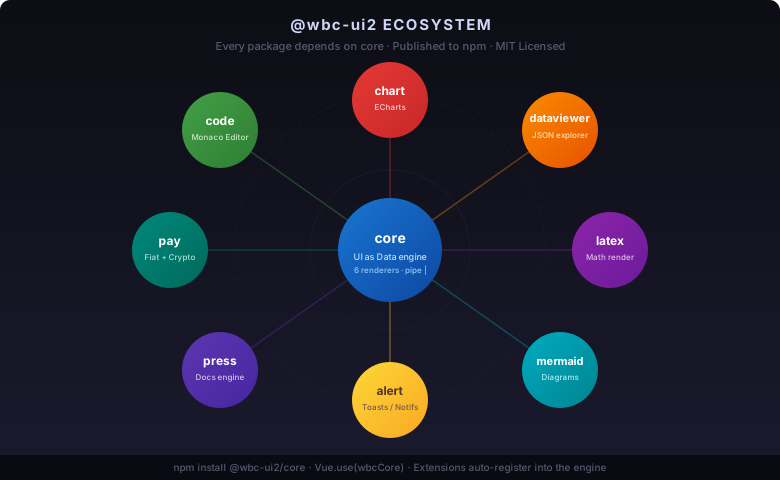
@wbc-ui2/core is the foundation of the @wbc-ui2 monorepo. Every package below is published to npm and depends on core2:
| Package | What it adds | Status |
|---|---|---|
@wbc-ui2/code |
Monaco-powered code editor | 🟢 GA |
@wbc-ui2/chart |
ECharts integration | 🟢 GA |
@wbc-ui2/dataviewer |
JSON / data-table explorer | 🟢 GA |
@wbc-ui2/latex |
LaTeX math rendering | 🟢 GA |
@wbc-ui2/mermaid |
Diagram-as-code rendering | 🟢 GA |
@wbc-ui2/gis |
Leaflet map integration | 🟢 GA |
@wbc-ui2/alert |
Notification / toast system | 🟢 GA |
@wbc-ui2/press |
Markdown-driven docs engine | 🟢 GA |
📄 License
MIT © Wissem Boughamoura · wi-bg.com · wbc-ui.com
Related Packages
This package is a supplement UI's to the FirebaseUI-web for the Vuetify2 app. Th...
A TypeScript-ready, UI-framework-independent data table for Vue 2.6+ with server...
Version History
| Version | Released | Vue | License |
|---|---|---|---|
| 2.0.0 | ^2.7.16 | MIT |
Pre-releases (1)
| Version | Released | Vue | License |
|---|---|---|---|
| 3.0.0-rc.1 | ^3.5.0 | MIT |