@wafertools/wafermap
| Install | |
|---|---|
npm install @wafertools/wafermap |
|
| Latest Version: | 0.37.1 |
| License: | MIT |
| Last Updated: | Oct 22, 2026 |
| Links: | GitHub · npm |
wafermap






Browser-first wafer map visualization for semiconductor test data.
Zero runtime dependencies. Pure ES modules with TypeScript types — works in React, Svelte, Vue, plain HTML, or a Web Worker. The DOM-free data-and-stats layer is ~81 kB min+gz; the interactive renderer is larger, and its chart suite and in-app guide are loaded on demand rather than shipped up front — measured sizes.
Project Portal: Docs & Interactive Demos →
Community
Questions, ideas, or want to show off a wafer map you built? Use GitHub Discussions.
Overview
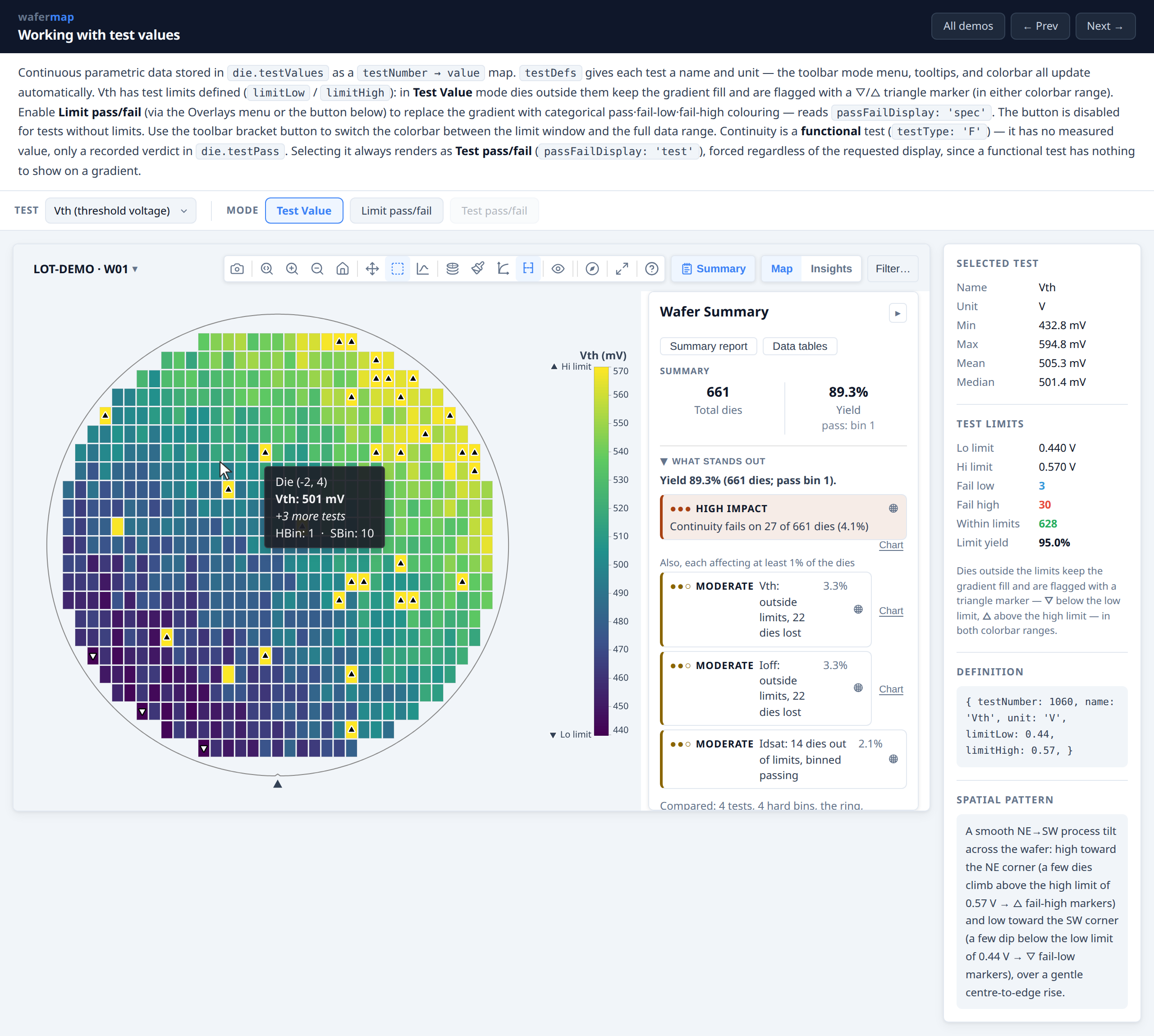
wafermap renders interactive wafer maps from semiconductor prober output. Hard bins, soft bins, test values, retest runs, edge exclusion, and spec and validity limits are native inputs.
- Geometry inference — pass full physical dimensions or raw prober step positions; die pitch, wafer diameter, and coordinate origin are resolved automatically
renderWaferMap— interactive canvas map with toolbar, zoom/pan, tooltips, die selection, and summary panelrenderWaferGallery— lot-level card grid with shared controls and click-to-expand- Insights tab — a chart suite behind the Maps | Insights switch, on by default (
insights: { enabled: false }removes it) (yield, per-test pass rate, bin pareto, capability, boxplot, histogram, wafer-to-wafer trend, correlation, scatter) computed from the same wafer/lot data, for one wafer or the whole gallery - Derived tests (
derivedTests) — tests computed per die from other tests (abs(t[1020] - t[1010])), which then work everywhere a measured test does, marked † as not measured - Parametric sweeps (plots with
chart: 'sweep', edited on the My plots tab) — an ordered run of tests read as a response curve, with the crossing and widths between two curves measured; x values given directly or read from the test names, on a linear or log axis - Drilldown — right-click selected dies, a finding, a legend bin, a wafer card or a wafer's bar to chart and tabulate just that population, with the population stated on the chart; in a gallery, select the same dies on every wafer to read one region across the lot
- My plots tab and Data tab — a chart builder (scatter, histogram, box, bar, line, sweep over any test, die field or wafer attribute) whose saved plots your app keeps with
insights.plotsandonPlotsChange, and the lot as sortable tables (statistics, dies, wafers) with CSV export - Validity limits (
TestDef.validLow/validHigh,valueFilter) — tester clamps and open-circuit readings are kept out of the map, statistics and charts, and counted wherever a population is shown - Reticle and multi-project wafers — stepper-field overlay, reticle cell and shot as die fields to colour, split and chart by, reticle-position findings, and a compact layout for sparse multi-project reticles
analyzeWaferMap/analyzeWaferLot— spatial analysis across rings, quadrants, sectors, and reticle positions; failure cluster detection; lot trend series- Pure ES modules, no server, no runtime dependencies — works in React, Svelte, Vue, plain HTML, or a Web Worker
Before you build: you may not need to
tsmap is a finished, free, MIT-licensed
application built on this library. It opens STDF, ATDF, CSV, JSON and Parquet (plus
.gz and .zip), runs on Linux, macOS and Windows, and also runs
in the browser with no install — files are
parsed locally and never uploaded. Plot modes, findings, the Insights charts, lot
galleries, splits and reports, without writing any code.
Build on wafermap instead when you need wafer maps inside your own application, a data source tsmap doesn't read, or behaviour it doesn't offer. Otherwise try tsmap first — integrating later is always open to you.
Quick start
npm install @wafertools/wafermap
import { buildWaferMap } from '@wafertools/wafermap';
import { renderWaferMap } from '@wafertools/wafermap/render';

const result = buildWaferMap({
  results: rows.map(r => ({ x: +r.x, y: +r.y, hbin: +r.hbin })),
});

renderWaferMap(document.getElementById('map'), result);
That is the whole integration. No options are passed, and the map still renders
with its full toolbar — plot modes, colour schemes, zoom and pan, die tooltips, PNG
export. Add analyzeWaferMap for the findings and summary panel, swap in
renderWaferGallery for a lot, and you have covered what most projects need.
The API reference is long because it documents every option, not because you need them: tsmap, a complete cross-platform desktop application built on this library, imports 22 of its ~100 exports. Read the Quick Start first and treat the API reference as something to search, not to read.
Note the two import paths. The renderers (renderWaferMap,
renderWaferGallery) live only at @wafertools/wafermap/render, so importing them from the
root package will fail. That keeps the root entry DOM-free — usable in Node for a
build-and-analyse pipeline, and tree-shakeable when you only need the geometry, data
and stats layers.
Docs
Building an app with wafermap (developers):
- Quick start
- Developer Guide
- SvelteKit · React · Vue 3 integration guides
- API Reference
- Using wafermap with an AI coding agent — rules to paste into Claude Code / Codex / Copilot / Cursor, also shipped as
AGENTS.mdin this package - Architecture · Performance · Troubleshooting
- Live examples — or download them to run and edit locally, offline, with the library bundled in
Using an app built with wafermap (test / device / yield engineers):
- Application User Guide — also embedded in apps via the toolbar help button
- Glossary
Built with wafermap
- tsmap — desktop and browser app for loading STDF, ATDF, CSV, JSON, and Parquet wafer data
Local preview
npm install
npm run dev
Serves the documentation site locally from docs/, including the
example pages under docs/examples/.
Author and licence
Written by Paul Robins, after nearly four decades in semiconductor test — most of it building test data analysis tools: wafer map and chart viewers, and the platforms they were built on.
That work leaned on free software throughout — zlib, Tcl/Tk, SQLite, GCC — and it was a good deal. wafermap is some of it going back the other way, prompted by finding out that engineers doing this job today still have no decent free option for wafer map analysis.
MIT: free to use, modify and redistribute, including in commercial and closed-source products. The only condition is that the copyright notice travels with it.
Related Packages
A framework-neutral web toy that lets visitors smash, burn, cut, and physically...
Provides access to native geocoding APIs for NativeScript apps (android.location...
Version History
| Version | Released | License |
|---|---|---|
| 0.37.1 | MIT | |
| 0.37.0 | MIT | |
| 0.36.0 | MIT | |
| 0.35.1 | MIT | |
| 0.35.0 | MIT | |
| 0.34.0 | MIT | |
| 0.33.0 | MIT | |
| 0.32.0 | MIT | |
| 0.31.0 | MIT | |
| 0.30.4 | MIT | |
| 0.30.3 | MIT | |
| 0.30.2 | MIT | |
| 0.30.1 | MIT | |
| 0.30.0 | MIT | |
| 0.29.0 | MIT | |
| 0.28.0 | MIT | |
| 0.27.0 | MIT | |
| 0.26.1 | MIT | |
| 0.26.0 | MIT | |
| 0.25.0 | MIT | |
| 0.24.3 | MIT | |
| 0.24.2 | MIT | |
| 0.24.1 | MIT | |
| 0.24.0 | MIT | |
| 0.23.1 | MIT | |
| 0.23.0 | MIT | |
| 0.22.0 | MIT | |
| 0.21.1 | MIT |