@translocale/vue
@translocale/vue
Developer tooling for Vue 3 and Nuxt apps using Vue I18n. This MIT-licensed package connects local JSON catalogs to the TransLocale cloud service. The service remains proprietary and cloud-only.
Use Vue 3.5.42 or compatible Vue 3 releases, Vue I18n 11.4.x, and Node.js 22.16 or later. The parser is pinned to 11.4.10. The adapter contract describes supported syntax. Custom plural rules, message compilers, and catalogs inside single-file components are not supported yet.
Before you start
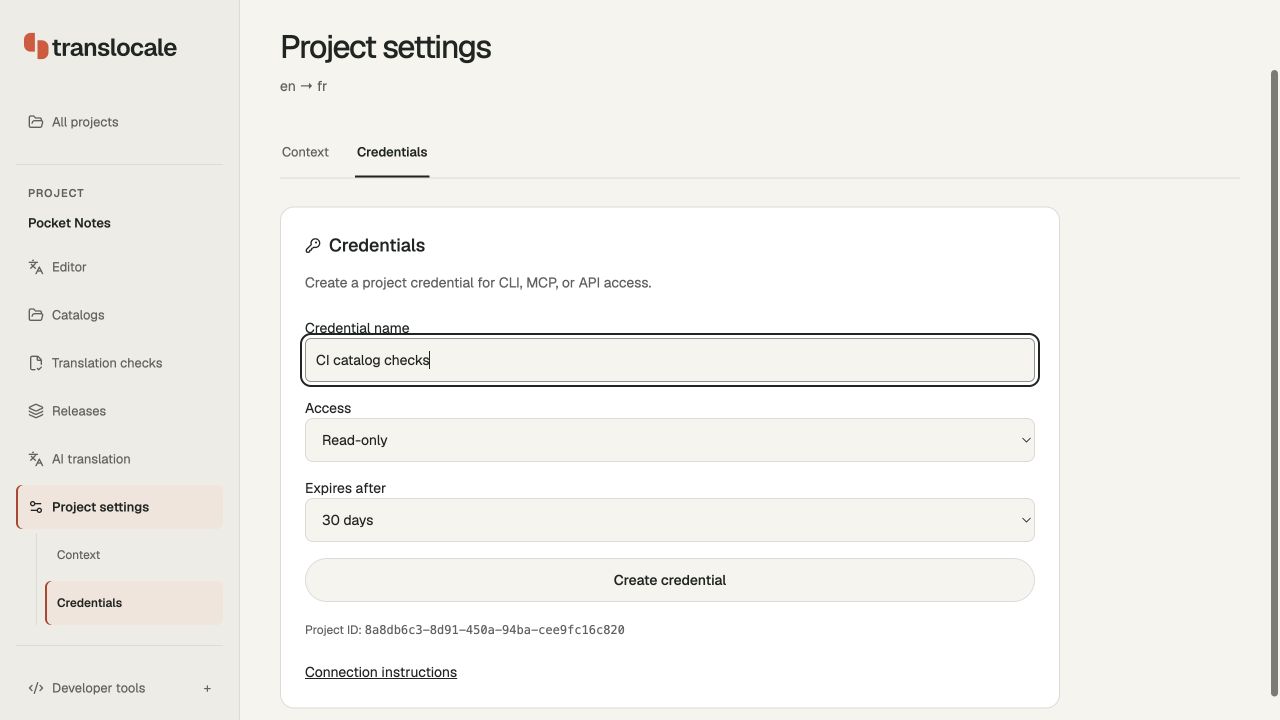
Open Projects, choose New project, and select the source and target languages used by your app. Find the project UUID under Project settings → Credentials; use it wherever the commands below say PROJECT_UUID. The UUID identifies the project and is not an access token.
The illustrated first-project guide walks through account setup, catalog imports, adding keys, translation review, and releases. Use the message format for your framework when importing files. Source and target files must share the same catalog identity. You can write or import translations yourself; hosted AI translation is optional and requires an explicit character cap.
This package uses Vue I18n JSON (vue-i18n). Run the commands below from your existing app directory.
- Replace
JOB_UUIDwith the ID returned bytranslate. - A revision is a saved version of one language's translation. Revision
0is the original output; use the number shown after saving your review in the dashboard. PLAN_HASHis the exact hash returned by a sync preview. Run a fresh preview after changing files or conflict choices.
The examples include the source language in --locales. Match this list to the cloud project. Install and setup run locally; login, project planning, translation, downloads, and sync contact the cloud. Translation starts only when you explicitly run translate with a character cap.
Install and connect
Install the integration and Vue I18n:
npm install @translocale/vue vue-i18n
npx translocale-vue init --api https://translocale.io --project PROJECT_UUID --source en --locales en,fr,ja
npx translocale-vue login --scope translate
init requires Vue and Vue I18n in the app's dependencies. It creates translocale.config.json, a source catalog if missing, and src/translocale-i18n.ts. Existing files are preserved. Configure another catalog path with --files 'messages/{locale}.json' or another generated module path with --runtime-module.
Sign-in uses the same project-specific credential store as the main CLI. TRANSLOCALE_TOKEN overrides saved sign-in for CI. logout revokes the configured project's saved credential. Credentials belong in development tooling or CI, never in the generated module or frontend environment variables.
Where credentials belong
Use the browser login command in this README to approve project access without manually copying a token. It stores authoring credentials outside your app. Local catalog checks and builds do not need a token.
For CI, open Project settings → Credentials, enter a name, choose the required access and an expiry, then select Create credential. Copy the token while it is shown and save it as TRANSLOCALE_TOKEN in your CI secret store. Read access is enough for inspection; editing and translation need their corresponding permissions. Keep this authoring token out of app bundles and public environment variables.
translocale.config.json records the app's catalog setup; it does not contain credentials. translocale-delivery.json is a separate download for app runtimes that fetch published releases. You do not need that delivery file to build with bundled translations.
Use existing catalogs
Run npx translocale-vue discover --source en from your app, or narrow the scan with --directory. Review a candidate, then add --from-discovery CANDIDATE_ID to init with the same source and directory. Setup uses the detected paths and locales, preserves existing catalogs, and rejects stale selections. Add --locales to include languages without files yet. Nuxt uses the same discovery command and keeps its --framework nuxt setup option. See the discovery guide for supported layouts and checks.
Translate and download
npx translocale-vue plan
npx translocale-vue translate --max-characters 5000 --wait
npx translocale-vue pull --job JOB_UUID --locale fr --revision 1
npx translocale-vue pull --job JOB_UUID --locale ja --revision 1
npx translocale-vue check
Review and approve translations in the dashboard or through the SDK before selecting an approved revision. Downloads default to revision 0, the original generated output. Specify --revision for a saved revision. Existing files are never overwritten; use --out candidates/fr.json to review a new file before merging changes yourself. A download is rejected if local source content differs from the job's source snapshot or changes during download.
Use --base-job JOB_UUID --reuse-approved with plan or translate to reuse approved wording. translate requires an explicit character cap and prints its idempotency key and expected project version to stderr before submission. Preserve those values when retrying the same request. A reused base also requires the original expected reuse version.
Connect the app
Import the generated factory in your entry point:
import { createApp } from "vue";
import App from "./App.vue";
import { createTransLocaleI18n } from "./translocale-i18n";

createApp(App).use(createTransLocaleI18n("fr")).mount("#app");
Use useI18n() in components. The generated factory creates a fresh Vue I18n instance and catalog copy on every call. It imports only Vue I18n and local JSON files. Create one instance per app or server request. Locale routing and server rendering are the application's responsibility.
Add translocale-vue check before the app build to reject missing translations and syntax drift. A normal build uses local catalogs and never starts paid translation. Generated imports expect every configured locale file to exist, so pull translations before building.
The package root exports defineConfig, initialize, loadConfig, inspectCatalog, checkCatalogs, runtimeModule, and createCatalogClient for build scripts. Import the generated module from browser code; the package root contains Node.js authoring tools.
Nuxt
Install @nuxtjs/i18n alongside Nuxt, then initialize the same catalogs with:
npx translocale-vue init --framework nuxt --api https://translocale.io --project PROJECT_UUID --source en --locales en,fr,ja
This creates the project configuration and a source catalog if missing. It preserves nuxt.config.ts and leaves instance creation to Nuxt's i18n module. Use the same login, plan, translate, pull, and check commands described above.
In nuxt.config.ts:
import { fileURLToPath } from "node:url";
import { createNuxtI18nOptions } from "@translocale/vue/nuxt";

export default defineNuxtConfig({
  modules: ["@nuxtjs/i18n"],
  i18n: createNuxtI18nOptions({
    root: fileURLToPath(new URL(".", import.meta.url)),
  }),
});
The helper validates every configured catalog before returning Nuxt's locale options. Missing targets, malformed messages, and changed placeholders stop the build. Download the target catalogs before running Nuxt. Builds never contact TransLocale or start translations.
By default, prefix_except_default leaves the source locale unprefixed and adds target locale prefixes. Pass strategy: "prefix" to prefix every locale. Browser-language redirection is disabled; override the returned options if your app needs it. Use Nuxt's useI18n(), useLocalePath(), and language-switching APIs in components.
Catalog paths are relative to the Nuxt project root. Set root to that same directory when calling the helper from another working directory. The helper sets restructureDir and langDir to . so the configured file pattern is preserved. If you have a Vue I18n runtime configuration, set vueI18n explicitly and continue using the default plural rules. Nuxt layers, domain-based locale routing, custom plural rules, and runtime catalog mutation need separate compatibility verification.
Import @translocale/vue/nuxt only in build configuration. Deployed apps load their saved catalogs through @nuxtjs/i18n; they need no TransLocale credential. See the Vue and Nuxt setup guide.
Update existing catalogs
Configured pulls and applied syncs record their exact cloud revision. The next sync uses that baseline automatically to compare incoming wording with your local edits:
npx translocale-vue sync --job NEW_JOB --revision 1 --locale fr
For existing files without a record, add --base-job PREVIOUS_JOB --base-revision 1. Candidate downloads leave the recorded baseline unchanged.
Review the proposed content, then repeat the command with --apply PLAN_HASH. Competing edits require --keep-local CONFLICT_ID or --take-incoming CONFLICT_ID, followed by a new preview and hash. Sync validates the merged catalog, detects stale files, and retains recovery copies. See the sync workflow and recovery contract before applying updates.
Before your first build
Pull every configured target language, then run the package's check command. Setup creates source files; it does not invent target translations. Review each language in the dashboard and substitute its own saved revision number in the pull commands. Revision numbers can differ between languages. If a target file already exists, use a candidate download or the sync workflow below.
CI and troubleshooting
Commit translocale.config.json, generated integration files, and the catalogs your app builds with. Supply TRANSLOCALE_TOKEN only to CI steps that contact TransLocale. Local validation and app builds need no cloud credential.
npx translocale-vue check
npx translocale-vue --help
npx translocale-vue sync --help
| Problem | What to do |
|---|---|
| Setup says a file already exists | Inspect the existing configuration. Use it if it belongs to this app; setup deliberately preserves it. Use discovery before initializing an existing catalog layout. |
| A language file is missing at build time | Pull that language or supply a valid local catalog, then run check again. |
| Sign-in works but a command is denied | Check the configured API origin and project. Use translate scope for translation; a CI environment token overrides saved login. |
| Download refuses to overwrite | Download to a candidate path or use sync to preview an update. |
| Source or project version changed | Plan again using current files. If a submission's outcome is uncertain, first inspect the original job and retain its retry fields. |
| A sync hash is stale | Preview again after the latest file edits or conflict choices; apply the new hash. |
--wait times out |
The job may still be running. Check it in the dashboard before starting another job. |
| A placeholder or plural is invalid | Keep the source parameters and the target language's required plural forms. Correct the message and rerun check. |
See the included command reference for every CLI option and default. The sync guide covers conflict choices and crash recovery; the discovery guide lists supported folder layouts.
License
MIT. The license covers this package. Cloud access requires a TransLocale account and follows the service terms.
Related Packages
Localization for vue 3 applications that use vuex. Can be used as plugin or comp...
Version History
| Version | Released | Vue | License |
|---|---|---|---|
| 0.1.9 | ^3.5.42 | MIT | |
| 0.1.8 | ^3.5.42 | MIT | |
| 0.1.7 | ^3.5.42 | MIT | |
| 0.1.6 | ^3.5.42 | MIT | |
| 0.1.5 | ^3.5.42 | MIT | |
| 0.1.4 | ^3.5.42 | MIT | |
| 0.1.3 | ^3.5.42 | MIT |