@tencentcloud/ai-desk-customer-uniapp
介绍
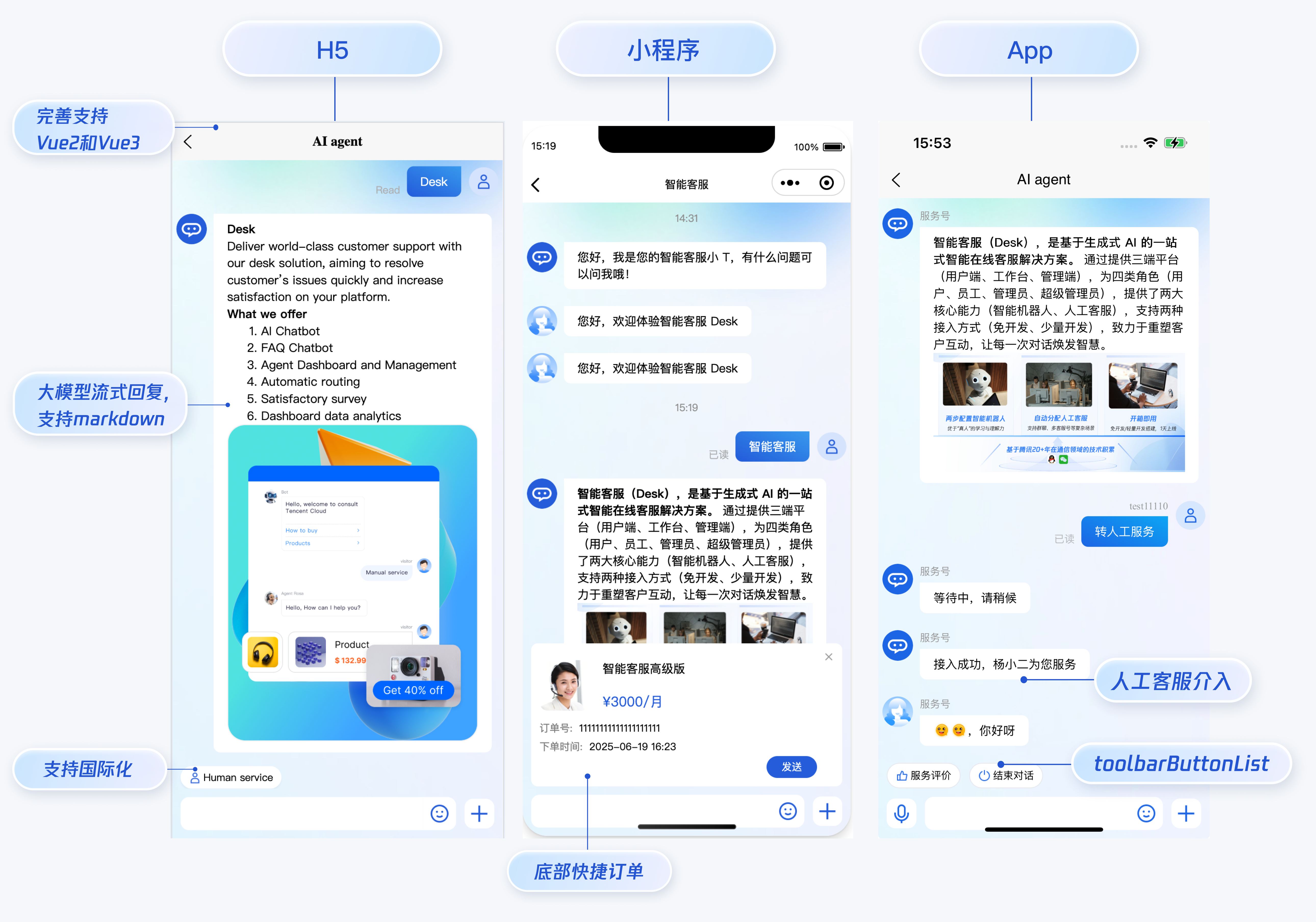
智能客服用户端 uni-app UIKit。使用此 UIKit,您可以在一天内将智能客服的能力集成到您的 H5、小程序、App 项目。极简接入,一套代码多端运行且体验一致,用智能客服为您的产品增收提效,提升用户满意度和付费转化。
效果展示
开发环境要求
-
HBuilderX 升级到最新版本
-
TypeScript / JavaScript (UIKit 使用 ts 语言开发,支持在 js 或者 ts 项目中集成)
-
Vue2 / Vue3
-
sass(sass-loader 版本 ≤ 10.1.1)
-
node(12.13.0 ≤ node 版本 ≤ 17.0.0, 推荐使用 Node.js 官方 LTS 版本 16.17.0)
-
npm(版本请与 node 版本匹配)
UIKit 源码集成
步骤1:创建项目(已有项目可忽略)
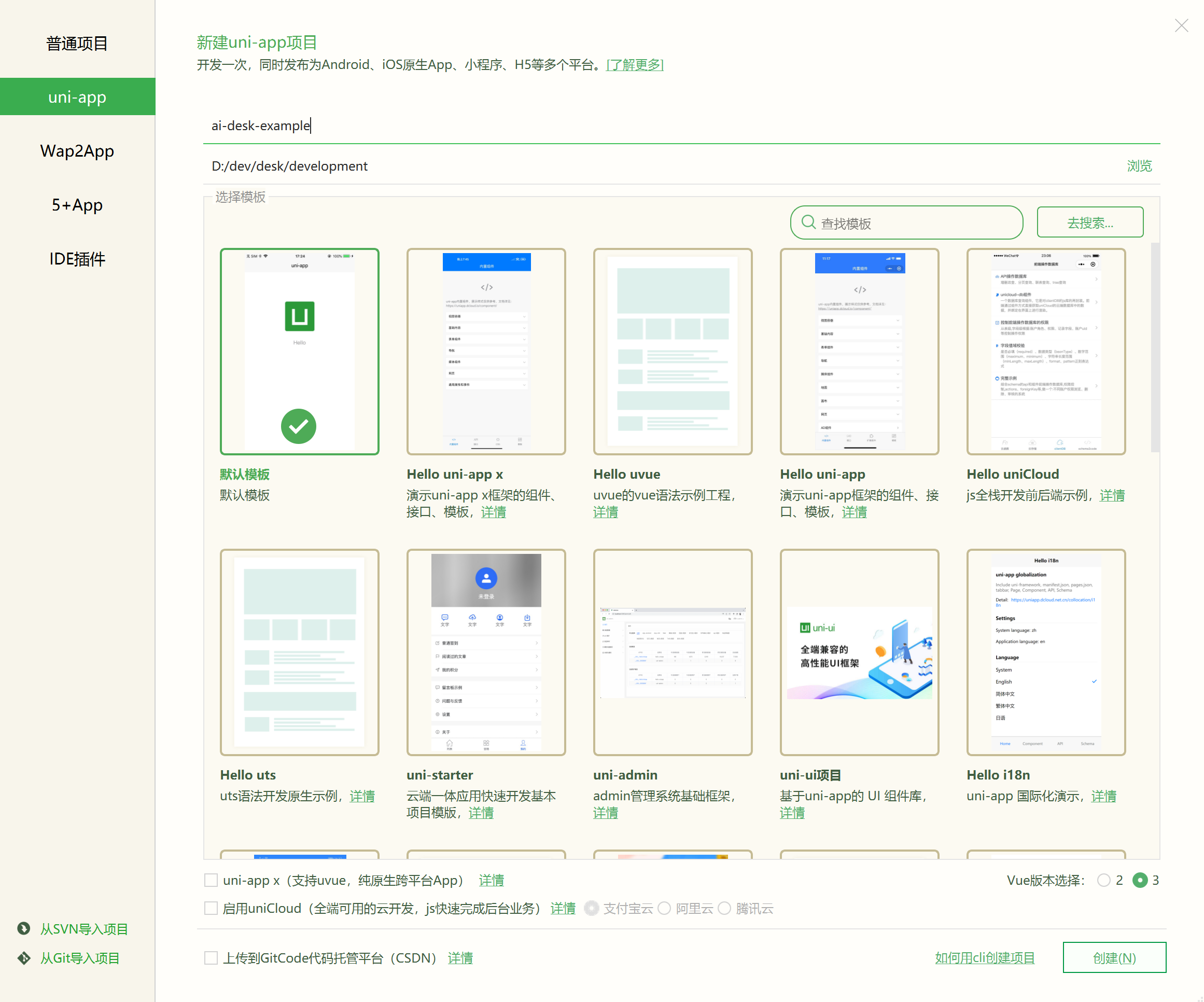
打开 HbuilderX,在菜单栏中选择 “文件-新建-项目”,创建一个名为 ai-desk-example 的 uni-app 项目。Vue 版本选择推荐 3。
步骤2:下载 UIKit
-
HBuilderX 创建项目时默认不会创建
package.json文件,请在项目根目录下执行以下命令创建package.json文件:npm init -y -
通过 NPM 方式下载 UIKit。
npm i @tencentcloud/ai-desk-customer-uniapp@latest unplugin-vue2-script-setup -
为了方便您对 UI 进行扩展,请在项目的根目录下执行以下命令,将 UIKit 源码复制到项目中。
【macOS 端】
mkdir -p ./pages-ai-desk/ai-desk-customer-uniapp &&
rsync -av --exclude={'node_modules','excluded-list.txt'} ./node_modules/@tencentcloud/ai-desk-customer-uniapp/ ./pages-ai-desk/ai-desk-customer-uniapp/
【Windows 端】
xcopy .\node_modules\@tencentcloud\ai-desk-customer-uniapp .\pages-ai-desk\ai-desk-customer-uniapp /i /e /exclude:.\node_modules\@tencentcloud\ai-desk-customer-uniapp\excluded-list.txt
步骤3:引入 UIKit
1. 工程配置
【manifest.json 文件】
在 manifest.json文件的源码视图中开启小程序分包 subPackages 和关闭 H5 treeShaking 选项。
// weixin miniProgram
"mp-weixin" : {
    "appid" : "",
    "optimization" : {
        "subPackages" : true
    }
},
// H5: close treeshaking to solve the problem of uni[methond]() is not a function
"h5" : {
    "optimization" : {
        "treeShaking" : {
            "enable" : false
        }
    }
},
注意:
小程序默认使用分包集成,打包小程序时
manifest.json不要配置 lazyCodeLoading 选项。
【vue.config.js(Vue2 项目请修改;Vue3 项目无需修改)】
Vue2 项目必须在根目录下创建或修改 vue.config.js 。
const ScriptSetup = require('unplugin-vue2-script-setup/webpack').default;

module.exports = {
  parallel: false,
  configureWebpack: {
    plugins: [
      ScriptSetup({
        /* options */
      }),
    ],
  },
  chainWebpack(config) {
    // disable type check and let `vue-tsc` handles it
    config.plugins.delete('fork-ts-checker');
  },
};
2. 分包集成 UIKit
为了规避小程序主包体积超限问题,我们建议您将客服 UIKit 放入分包。假设您的主包页面是 pages/index/index.vue,分包页面是 pages-ai-desk/index/index.vue,主包页面有一个咨询客服的入口,用户点击后跳转至分包的智能客服页面。项目的目录结构如下所示:
----YOUR-UNI-APP-PROJECT
----pages
--------index
------------index.vue
----pages-ai-desk
--------ai-desk-customer-uniapp
--------index
------------index.vue
----App.vue
----manifest.json
----pages.json
请将以下内容复制到项目对应的文件中。
【App.vue 文件】
<script>
export default {
	onLaunch: function() {
		console.log('App Launch')
	},
	onShow: function() {
		console.log('App Show')
	},
	onHide: function() {
		console.log('App Hide')
	}
}
</script>
<style>
uni-page-body,
html,
body,
page {
  width: 100% !important;
  height: 100% !important;
  overflow: hidden;
}
#app {
  height: 100% !important;
}
</style>
【pages.json 文件】
{
	"pages": [
		{
			"path": "pages/index/index",
			"style": {
				"navigationBarTitleText": "uni-app"
			}
		}
	],
	"subPackages": [{
		"root": "pages-ai-desk",
		"pages": [{
			"path": "index/index",
			"style": {
				"navigationBarTitleText": "智能客服",
				"navigationStyle": "default"
			}
		}]
	}],
	"globalStyle": {
		"navigationBarTextStyle": "black",
		"navigationBarTitleText": "uni-app",
		"navigationBarBackgroundColor": "#F8F8F8",
		"backgroundColor": "#F8F8F8"
	},
	"uniIdRouter": {},
	"condition": { //模式配置,仅开发期间生效
		"current": 0, //当前激活的模式(list 的索引项)
		"list": [{
			"name": "", //模式名称
			"path": "", //启动页面,必选
			"query": "" //启动参数,在页面的onLoad函数里面得到
		}]
	}
}
【main.js(Vue2 项目请修改;Vue3 项目无需修改)】
如果您是 Vue2 项目,请在 main.js 中引入组合式API,防止环境变量 isPC 等无法使用。
// #ifndef VUE3
import VueCompositionAPI from '@vue/composition-api';
Vue.use(VueCompositionAPI);
// #endif
3. 在项目中配置智能客服聊天的入口
【主包 pages/index/index.vue】
<template>
  <div class="chat">
    <button @click="getSupport">咨询客服</button>
  </div>
</template>
<script>
export default {
  methods: {
    getSupport() {
      uni.navigateTo({
        url: "/pages-ai-desk/index/index"
      })
    }
  }
}
</script>
<style lang="scss" scoped>
.chat {
  height: 100%;
  overflow: hidden;
  display: flex;
  align-items: center;
  justify-content: center;
}
</style>
【分包 pages-ai-desk/index/index.vue】
<template>
  <CustomerServiceChat style="height: 100%;"
  />
</template>
<script>
import TUICustomerServer from '../ai-desk-customer-uniapp';
import CustomerServiceChat from '../ai-desk-customer-uniapp/components/CustomerServiceChat/index-uniapp.vue';

export default {
  components: {
    CustomerServiceChat
  },
  data() {
  },
  onLoad() {
    this.$nextTick(() => {
      // SDKAppID/userID/userSig 的获取请参考步骤4
      const SDKAppID = 0; // Your SDKAppID,即开通了智能客服 Desk 的应用 ID
      const userID = ''; // Your userID,可复用您 app 的账号体系,或随机生成
      const userSig = ''; // Your userSig,接入阶段可控制台生成,生产阶段请务必由服务端生成
      // 带昵称和头像登录
      TUICustomerServer.initWithProfile({
        SDKAppID,
        userID,
        userSig,
        nickName: '张三 1852010****',
        avatar: 'https://im.sdk.qcloud.com/download/tuikit-resource/avatar/avatar_3.png'
      });
    });
  }
}
</script>
<style scoped lang="scss">
</style>
步骤4:获取 SDKAppID 、userID 、 userSig
设置pages-ai-desk/index/index.vue中的 SDKAppID、userID、userSig 。
-
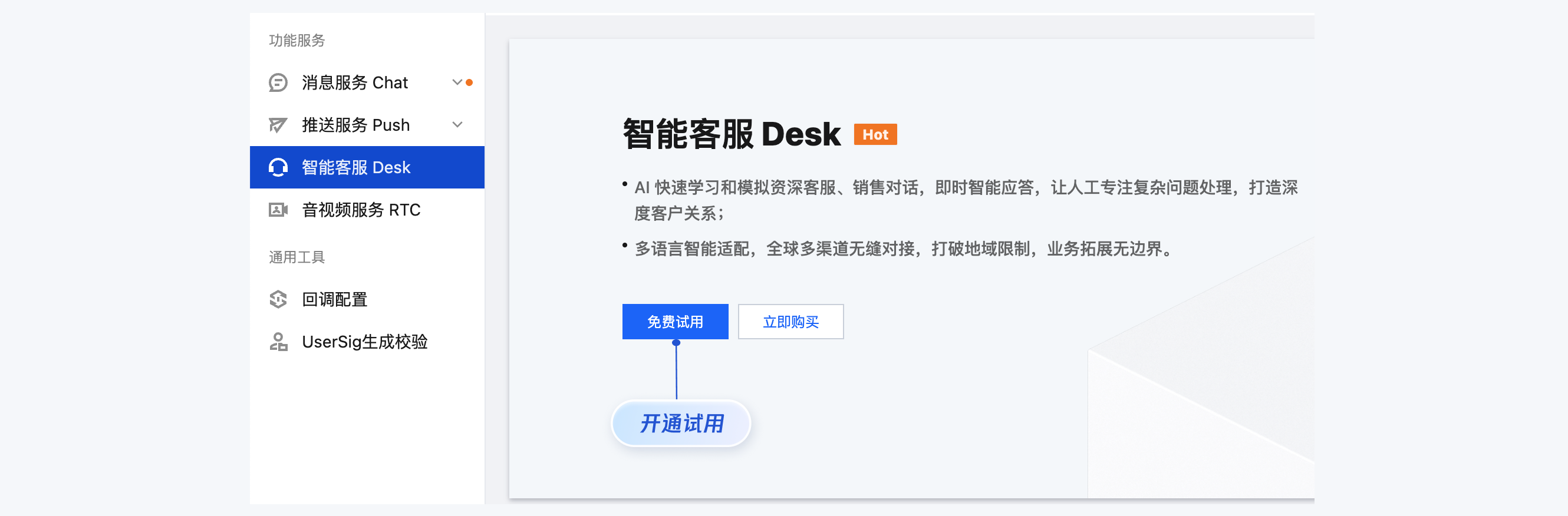
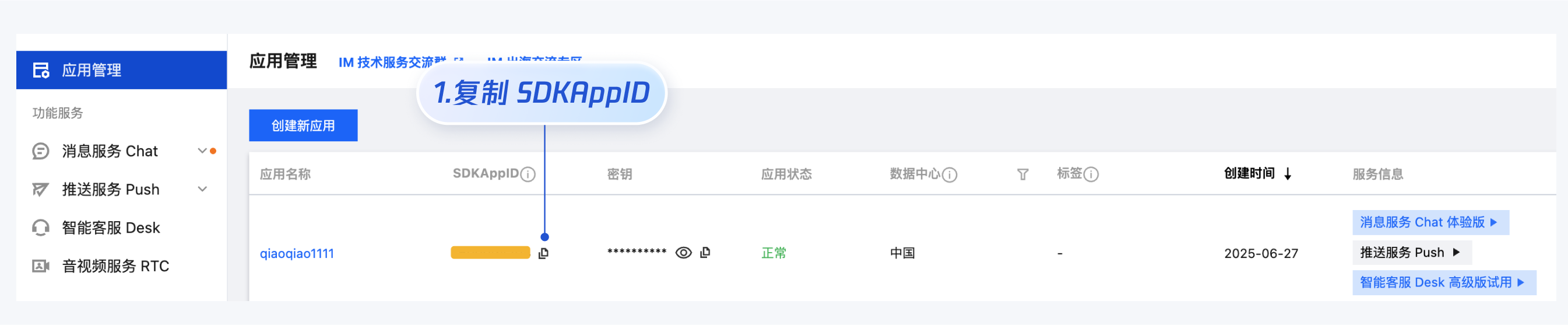
SDKAppID 信息:在 即时通信 IM 控制台 单击应用管理 > 创建新应用,并选择智能客服 Desk, 开通智能客服 后获取。
-
userID 信息,可本地生成一个随机的字符串,例如 test-1234。
-
userSig 信息,可单击 即时通信 IM 控制台 > UserSig生成校验,填写创建的 userID,即可生成 userSig。

步骤5:启动项目,并发起您的第一条客服咨询
-
使用 HBuilderX 启动该项目,单击运行,可选择运行到浏览器,或者手机,或者小程序模拟器。
-
如果您选择了运行到微信开发者工具,但 HBuilderX 没有自动拉起微信开发者工具,请使用微信开发者工具手动打开编译后的项目,目录地址:
unpackage/dist/dev/mp-weixin。 -
小程序开发环境,请选择 详情 > **本地设置 **中勾选 不校验合法域名、web-view(业务域名)、TLS版本以及 HTTPS 证书。上线前请在微信公众平台 > 开发 > 开发管理 > 开发设置 > 服务器域名中进行域名配置,域名配置详见:小程序合法域名。
高级特性
国际化界面语言
UIKit 支持以下界面语言:
| 语言代码(userLang) | 语言 |
| zh_cn | 简体中文 |
| en | 英文 |
| zh_tw | 繁体中文 |
| ja | 日语 |
| id | 印尼语 |
| ms | 马来语 |
| vi | 越南语 |
| th | 泰语 |
| fil | 菲律宾语 |
| ru | 俄语 |
如果您的业务需要出海,且用户语言以英语为主,可在引入智能客服时设置userLang="en"。如果您不指定userLang, UIKit 会使用浏览器或 App 设置的语言。
<template>
  <CustomerServiceChat style="height: 100%;"
    userLang="en"
  />
</template>
如果您需要支持动态切换用户语言,可使用TUICustomerServer.changeLanguage接口,并通过切换 页面/组件 key 的方式,实现语言动态修改与展示。
<template>
  <CustomerServiceChat style="height: 100%;"
    :key="locale"
    :userLang="locale"
  />
</template>
<script>
import TUICustomerServer  from '../ai-desk-customer-uniapp';
import CustomerServiceChat from '../ai-desk-customer-uniapp/components/CustomerServiceChat/index-uniapp.vue';

export default {
  components: {
    CustomerServiceChat,
  },
  data() {
    let locale = 'en';
    return {
      locale
    }
  },
  methods: {
    changeLanguage(language) {
       TUICustomerServer.changeLanguage(language).then(() => {
         this.locale = language;
       });
    }
  }
}
</script>
<style scoped lang="scss">
</style>
用户端带昵称和头像登录
如果您希望人工客服在工作台接待用户咨询时,能看到用户的昵称、头像等信息以提升沟通效率,效果如下所示:

请使用initWithProfile接口初始化,传入昵称和头像即可。
TUICustomerServer.initWithProfile({
  SDKAppID,
  userID,
  userSig,
  nickName: '张三 1852010****',
  avatar: 'https://im.sdk.qcloud.com/download/tuikit-resource/avatar/avatar_3.png'
})
工具栏快捷按钮
如果您想实现输入框上方增加快捷按钮,方便用户使用,例如增加“人工客服”,“发送订单消息”等,可在引入智能客服时设置 toolbarButtonList。效果如下所示:
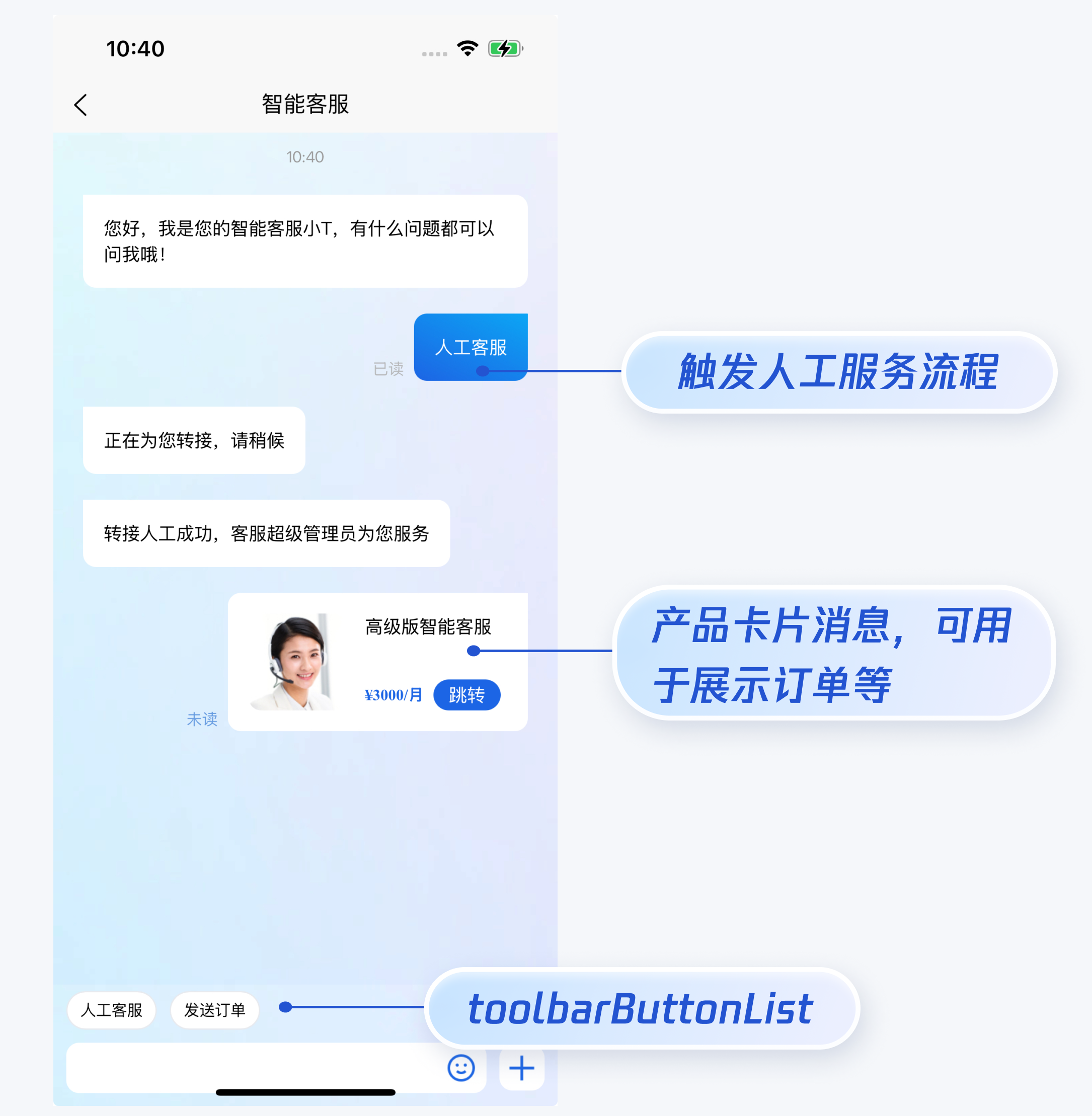
toolbarButtonList 是一个包含了一个或多个配置的数组,配置的描述如下:
| 参数 | 类型 | 是否必填 | 说明 |
| title | String | Yes | button 标题。 |
| icon | String | No | button 图标 url。 |
| isPreset | Number | Yes | - 1:客服组件内置功能。 - 0:非内置功能。 |
| presetId | String | No | 当 isPreset 为 1 时,可选值如下: - humanService:人工服务。 - serviceRating:服务评价。 - endHumanService:结束对话。 |
| isEnabled | Number | Yes | - 1:渲染。 - 0:不渲染。 |
| content | String | No | 当 isPreset 为 0 时,填入文本内容或者 url。 |
| type | Number | Yes | - 1:点击 button 后客服组件发送 content 对应的文本。 - 2:点击 button 后客服组件打开 content 对应的 url(小程序打开 url 可能会受限,请提前参考相关文档解决)。 |
<template>
  <CustomerServiceChat style="height: 100%;"
    :toolbarButtonList="toolbarButtonList"
  />
</template>
<script>
import TUICustomerServer  from '../ai-desk-customer-uniapp';
import CustomerServiceChat from '../ai-desk-customer-uniapp/components/CustomerServiceChat/index-uniapp.vue';

export default {
  components: {
    CustomerServiceChat,
  },
  data() {
    const toolbarButtonList = [
      {"title":"人工服务","icon":"https://tccc-im-agent-avatar-1258344699.cos.ap-nanjing.myqcloud.com/toolbar_button_1.png","type":1,"content":"","isPreset":1,"presetId":"humanService","isEnabled":1},
      {"title":"服务评价","icon":"https://tccc-im-agent-avatar-sg-1258344699.cos.ap-singapore.myqcloud.com/toolbar_button_2.png","type":1,"content":"","isPreset":1,"presetId":"serviceRating","isEnabled":1},
      {"title":"结束对话","icon":"https://tccc-im-agent-avatar-sg-1258344699.cos.ap-singapore.myqcloud.com/toolbar_button_3.png","type":1,"content":"","isPreset":1,"presetId":"endHumanService","isEnabled":1},
      {"type":1,"title":"智能客服","content":"智能客服","isPreset":0,"isEnabled":1}
    ];
    return {
      toolbarButtonList,
    }
  }
}
</script>
<style scoped lang="scss">
</style>
底部快捷订单
说明:
请升级 ai-desk-customer-uniapp 到 v1.5.2 或更高版本。
如果您想实现打开客服会话时在聊天区域底部展示快捷订单,可以配置 bottomQuickOrder,效果如下所示:
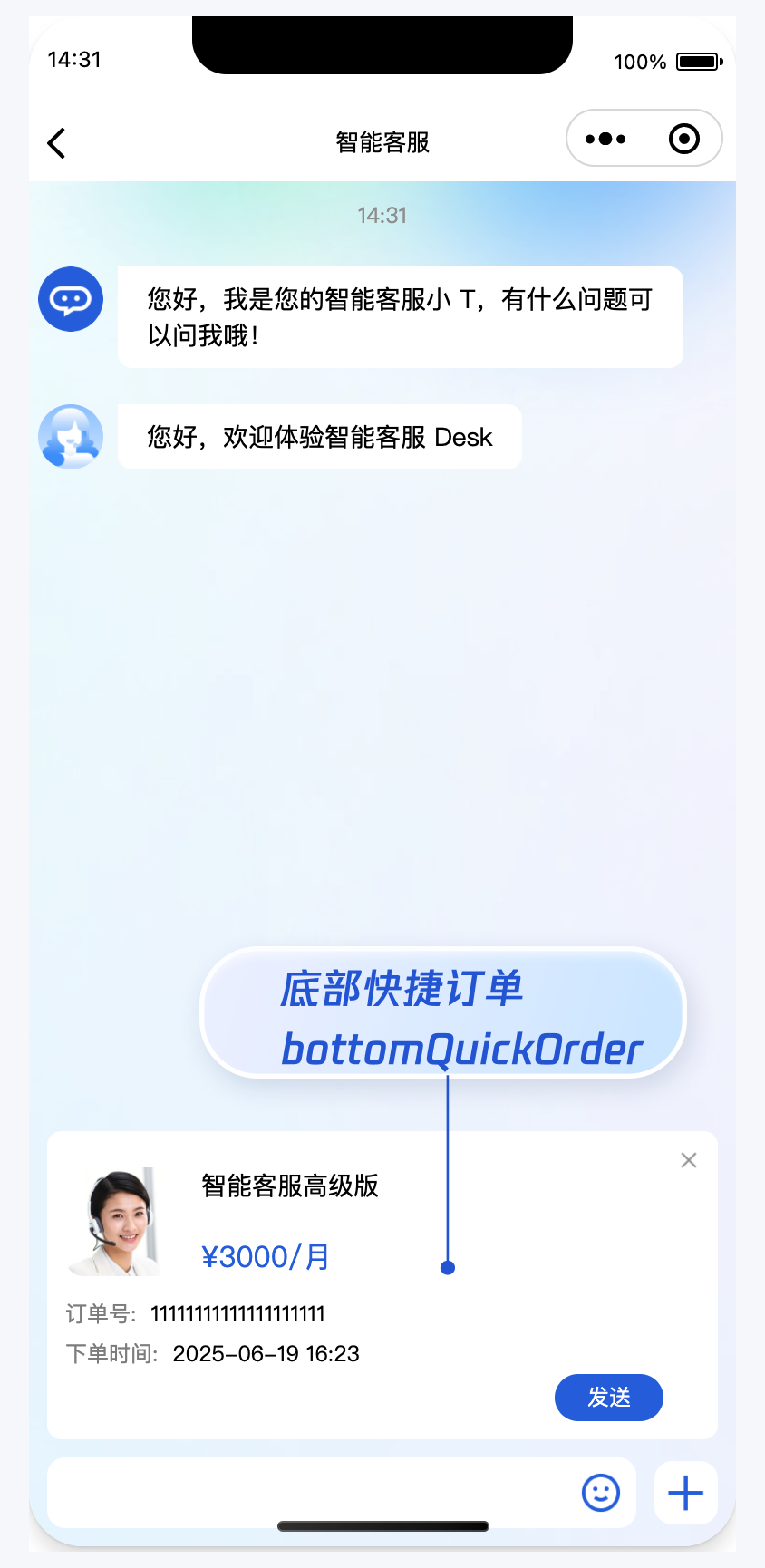
bottomQuickOrder 的参数描述如下:
| 参数 | 类型 | 是否必填 | 说明 |
| header | String | Yes | 订单标题,对应上图的“智能客服高级版”。 |
| desc | String | Yes | 订单描述,对应上图的“3000/月”。 |
| pic | String | No | 订单图片 url。 |
| url | String | Yes | 当客服坐席收到订单消息时,点击可打开此 url 对应的页面。 |
| customField | Array | No | 自定义配置,例如“订单号”,“订单时间”等信息。。 |
<template>
  <CustomerServiceChat style="height: 100%;"
    :bottomQuickOrder="bottomQuickOrder"
  />
</template>
<script>
import TUICustomerServer  from '../ai-desk-customer-uniapp';
import CustomerServiceChat from '../ai-desk-customer-uniapp/components/CustomerServiceChat/index-uniapp.vue';

export default {
  components: {
    CustomerServiceChat,
  },
  data() {
    const bottomQuickOrder = {
      header: "高级版智能客服(包含3个客服许可)",
      desc: "¥3000/月",
      pic: "https://cloudcache.tencent-cloud.com/qcloud/portal/kit/images/presale.a4955999.jpeg",
      url: 'https://cloud.tencent.com/document/product/269/97537',
      customField: [
        {
          name: '订单号',
          value: '11111111111111111111'
        },
        {
          name: '下单时间',
          value: '2025-07-02 16:23'
        }
      ]
    };

    return {
      bottomQuickOrder,
    }
  }
}
</script>
<style scoped lang="scss">
</style>
多客服号
说明:
请升级 ai-desk-customer-uniapp 到 v1.5.3 或更高版本。
如果您的应用内需要多个客服号,为用户提供专属客服功能,以提高服务质量和响应速度,可用 UIKit 提供的多客服号功能实现。效果如下所示:
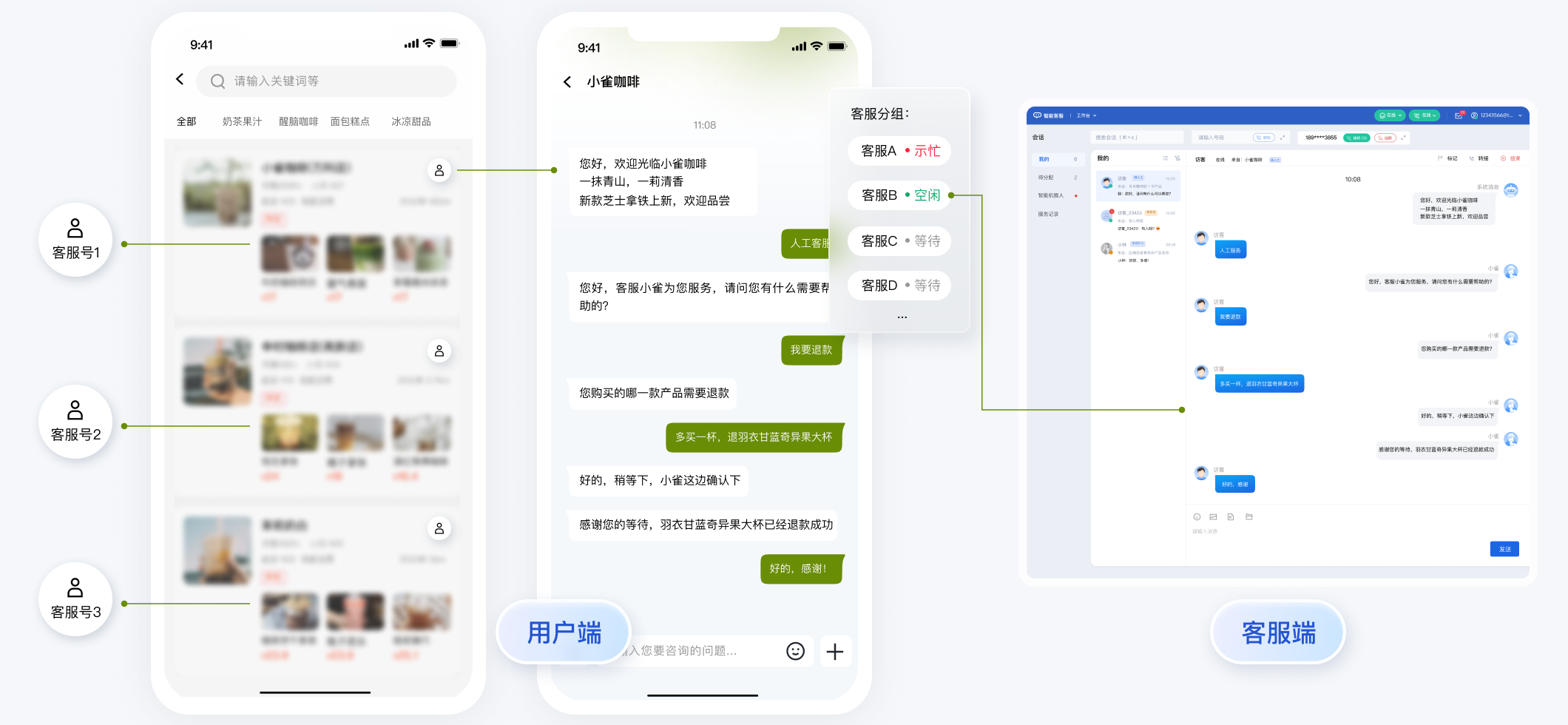
// 1. 初始化前将业务侧自定义的客服号 ID 传递给 UIKit
// 自定义客服号请使用 restapi - https://cloud.tencent.com/document/product/269/111798
TUICustomerServer.setCustomerServiceIDList(['customerServiceID_001', 'customerServiceID_002', 'customerServiceID_003']);
// 2. 初始化时,带上要发起会话的客服号 ID,比如 'customerServiceID_002'
// 如果不带上要发起会话的客服号 ID,则 UIKit 默认使用多客服号列表的第 1 个元素
TUICustomerServer.initWithProfile({
  SDKAppID,
  userID,
  userSig,
  nickName: '张三 1562010****',
  avatar: 'your avatar url',
  customerServiceID: 'customerServiceID_002',
});
用户端主动结束人工会话
说明:
用户端可以通过发送自定义消息的方式实现主动结束会话,适用于以下 3 种情况:
- 用户转人工触发排队,发送此消息可以结束排队。
- 客服接待方式为手动接待,用户转人工分配客服成功后等待客服确认接待,发送此消息可以结束等待。
- 用户转人工且成功接入人工客服,发送此消息可以结束本次会话。
TUICustomerServer.sendCustomMessage({
  to: '@customer_service_account',
  conversationType: 'C2C',
  payload: {
    data: JSON.stringify({
      src: '27',
      customerServicePlugin: 0,
    }),
  },
}, { onlineUserOnly: true });
通过 vue-cli 命令行集成
除了HBuilderX可视化界面,您也可以使用 cli 脚手架,通过 vue-cli 创建 uni-app 项目。这两种方式在集成过程上有所区别,请您参考下面的步骤进行。
【uni-app vue2 默认模板】
- 创建 vue2 项目,使用默认模板。
vue create -p dcloudio/uni-preset-vue my-project
- 在项目目录 my-project 内下载 UIKit。
npm i @tencentcloud/ai-desk-customer-uniapp@latest unplugin-vue2-script-setup
- 下载 sass/sass-loader/ts-loader 等。
npm i sass sass-loader@10.1.1 ts-loader typescript @vue/cli-plugin-typescript --legacy-peer-deps
- 将 UIKit 源码复制到项目中。请注意,复制到工程的 src 目录下。
【macOS 端】
mkdir -p ./src/pages-ai-desk/ai-desk-customer-uniapp &&
rsync -av --exclude={'node_modules','excluded-list.txt'} ./node_modules/@tencentcloud/ai-desk-customer-uniapp/ ./src/pages-ai-desk/ai-desk-customer-uniapp/
【Windows 端】
xcopy .\node_modules\@tencentcloud\ai-desk-customer-uniapp .\src\pages-ai-desk\ai-desk-customer-uniapp /i /e /exclude:.\node_modules\@tencentcloud\ai-desk-customer-uniapp\excluded-list.txt
- 在工程目录下新建 vue.config.js 文件。
const ScriptSetup = require('unplugin-vue2-script-setup/webpack').default;

module.exports = {
  parallel: false,
  configureWebpack: {
    plugins: [
      ScriptSetup({
        /* options */
      }),
    ],
  },
  chainWebpack(config) {
    // disable type check and let `vue-tsc` handles it
    config.plugins.delete('fork-ts-checker');
    config.module.rule('ts').test(/\.ts$/).use('ts-loader').loader('ts-loader').end();
  },
};
- 在工程目录下新建 tsconfig.json 文件。
{
  "compilerOptions": {
    "target": "esnext",
    "module": "esnext",
    "strict": true,
    "jsx": "preserve",
    "importHelpers": true,
    "moduleResolution": "node",
    "esModuleInterop": true,
    "allowSyntheticDefaultImports": true,
    "experimentalDecorators":true,
    "sourceMap": true,
    "skipLibCheck": true,
    "baseUrl": ".",
    "types": [
      "webpack-env",
      "@dcloudio/types"
    ],
    "paths": {
      "@/*": [
        "./src/*"
      ]
    },
    "lib": [
      "esnext",
      "dom",
      "dom.iterable",
      "scripthost"
    ]
  },
  "exclude": [
    "node_modules",
    "unpackage",
    "dist",
    "src/**/*.nvue",
    "src/pages-ai-desk/ai-desk-customer-uniapp"
  ]
}
- 其它步骤同 HBuilderX 可视化界面创建的项目一致,不再赘述。
【uni-app vue2 TypeScript 模板】 8. 创建 vue2 项目,使用默认模板(TypeScript)。
vue create -p dcloudio/uni-preset-vue my-project
- 在项目目录 my-project 内下载 UIKit。
npm i @tencentcloud/ai-desk-customer-uniapp@latest unplugin-vue2-script-setup
- 下载 sass/sass-loader 等。
npm i sass sass-loader@10.1.1 --legacy-peer-deps
- 将 UIKit 源码复制到项目中。请注意,复制到工程的 src 目录下。
【macOS 端】
mkdir -p ./src/pages-ai-desk/ai-desk-customer-uniapp &&
rsync -av --exclude={'node_modules','excluded-list.txt'} ./node_modules/@tencentcloud/ai-desk-customer-uniapp/ ./src/pages-ai-desk/ai-desk-customer-uniapp/
【Windows 端】
xcopy .\node_modules\@tencentcloud\ai-desk-customer-uniapp .\src\pages-ai-desk\ai-desk-customer-uniapp /i /e /exclude:.\node_modules\@tencentcloud\ai-desk-customer-uniapp\excluded-list.txt
- 在工程目录下新建 vue.config.js 文件。
const ScriptSetup = require('unplugin-vue2-script-setup/webpack').default;

module.exports = {
  parallel: false,
  configureWebpack: {
    plugins: [
      ScriptSetup({
        /* options */
      }),
    ],
  },
  chainWebpack(config) {
    // disable type check and let `vue-tsc` handles it
    config.plugins.delete('fork-ts-checker');
  },
};
- 编辑 tsconfig.json 文件,exclude UIKit 代码。
"exclude": [
    ...
    "src/pages-ai-desk/ai-desk-customer-uniapp"
]
- 其它步骤同 HBuilderX 可视化界面创建的项目一致,不再赘述。
【uni-app vue3】 15. 创建 vue3 项目,用 javascript 开发。
npx degit dcloudio/uni-preset-vue#vite my-project
或创建 vue3 项目,用 typescript 开发。
npx degit dcloudio/uni-preset-vue#vite-ts my-project
- 在项目目录 my-project 内下载 UIKit。
npm i @tencentcloud/ai-desk-customer-uniapp@latest
- 下载 sass/sass-loader 等。
npm i sass sass-loader@10.1.1 --legacy-peer-deps
- 将 UIKit 源码复制到项目中。请注意,复制到工程的 src 目录下。
【macOS 端】
mkdir -p ./src/pages-ai-desk/ai-desk-customer-uniapp &&
rsync -av --exclude={'node_modules','excluded-list.txt'} ./node_modules/@tencentcloud/ai-desk-customer-uniapp/ ./src/pages-ai-desk/ai-desk-customer-uniapp/
【Windows 端】
xcopy .\node_modules\@tencentcloud\ai-desk-customer-uniapp .\src\pages-ai-desk\ai-desk-customer-uniapp /i /e /exclude:.\node_modules\@tencentcloud\ai-desk-customer-uniapp\excluded-list.txt
- 其它步骤同 HBuilderX 可视化界面创建的项目一致,不再赘述。
消息推送
说明:
UIKit 中默认没有集成 TencentCloud-TIMPush 推送插件。TencentCloud-TIMPush 是腾讯云即时通信 IM Push 插件。目前推送支持小米、华为、荣耀、OPPO、vivo、魅族、APNs、一加、realme、iQOO 和 苹果等厂商通道。
如果您需要在 App 中集成离线推送能力,请参见 uni-app 推送 实现。

常见问题
什么是 UserSig?如何生成 UserSig?
UserSig 是用户登录即时通信 IM 的密码,其本质是对 UserID 等信息加密后得到的密文。
UserSig 签发方式是将 UserSig 的计算代码集成到您的服务端,并提供面向项目的接口,在需要 UserSig 时由您的项目向业务服务器发起请求获取动态 UserSig。更多详情请参见 服务端生成 UserSig。
集成 UIKit 在 page.json 中默认没有配置 tabBar,项目中如何实现 tabBar 功能?
如果您打包 App / H5,需要在 pages.json 中配置 tabBar。请参考 uni-app 官网 tabBar 配置 自实现。
如果您打包小程序,因为主包体积限制,小程序默认是分包集成,如果您的 tabBar 需要自定义实现。请参考 uni-app 官网 自定义 tabBar。
小程序如果需要上线或者部署正式环境怎么办?
请在 微信公众平台 > 开发 > 开发管理 > 开发设置 > 服务器域名 中进行域名配置。域名配置详见:小程序合法域名。
交流与反馈
点此进入 IM 社群,享有专业工程师的支持,解决您的难题。
Related Packages
Version History
| Version | Released | License |
|---|---|---|
| 1.6.9 | ISC | |
| 1.6.8 | ISC | |
| 1.6.7 | ISC | |
| 1.6.6 | ISC | |
| 1.6.5 | ISC | |
| 1.6.4 | ISC | |
| 1.6.3 | ISC | |
| 1.6.2 | ISC | |
| 1.6.1 | ISC | |
| 1.6.0 | ISC | |
| 1.5.11 | ISC | |
| 1.5.10 | ISC | |
| 1.5.9 | ISC | |
| 1.5.8 | ISC | |
| 1.5.7 | ISC | |
| 1.5.6 | ISC | |
| 1.5.5 | ISC | |
| 1.5.4 | ISC | |
| 1.5.3 | ISC | |
| 1.5.2 | ISC | |
| 1.5.1 | ISC | |
| 1.5.0 | ISC | |
| 1.4.0 | ISC | |
| 1.3.0 | ISC | |
| 1.2.0 | ISC | |
| 1.1.0 | ISC | |
| 1.0.0 | ISC | |
| 0.7.0 | ISC | |
| 0.3.0 | ISC | |
| 0.2.3 | ISC |
Showing the latest 30 of 39. See every release on npm