@sfxcode/nuxt-ui-formkit
| Install | |
|---|---|
npm install @sfxcode/nuxt-ui-formkit |
|
| Latest Version: | 1.4.1 |
| Vue: | 3 |
| License: | MIT |
| Last Updated: | Oct 17, 2026 |
| Links: | GitHub · npm |
Nuxt UI FormKit




Seamless integration between FormKit form handling and Nuxt UI components for Nuxt 4
FormKit Nuxt UI bridges the gap between FormKit's powerful form management and Nuxt UI's beautiful component library, providing a complete solution for building forms in Nuxt applications.
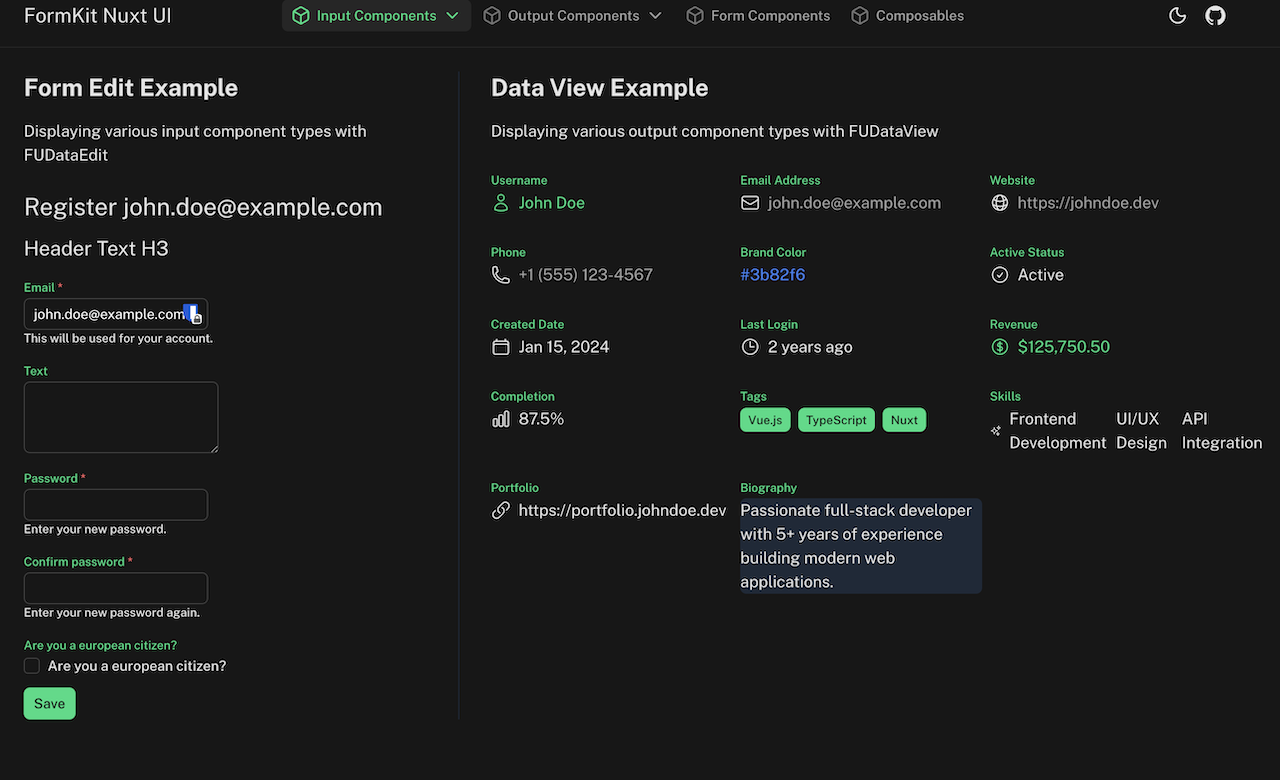
Features
✨ 22 Input Components - Complete set of FormKit-wrapped Nuxt UI input components
nuxtUICalendar- Bare date-grid picker with range/multiple selectionnuxtUICheckbox- Single checkbox with label and descriptionnuxtUICheckboxGroup- Multiple checkbox selectionnuxtUIColorPicker- Color selection with multiple formatsnuxtUIEditor- Tiptap-based rich text editornuxtUIFileUpload- Drag/drop and click-to-browse file inputnuxtUIInput- Text input with various types (text, email, password, etc.)nuxtUIInputDate- Date and time picker with range supportnuxtUIInputMenu- Dropdown menu with searchable optionsnuxtUIInputNumber- Number input with increment/decrement buttonsnuxtUIInputRating- Star-based rating input for numeric valuesnuxtUIInputTags- Tag input with custom delimitersnuxtUIInputTime- Time picker with 12/24-hour formatnuxtUIListbox- Listbox for single/multiple selection with filtering (for use with transfer mode lucide icons must be installed additionally)nuxtUIPinInput- PIN/OTP entry componentnuxtUIRadioGroup- Radio button group for single selectionnuxtUISelect- Select dropdown with searchnuxtUISelectMenu- Advanced select with groupingnuxtUISlider- Range slider for numeric valuesnuxtUISwitch- Toggle switch for boolean statesnuxtUITextarea- Multi-line text input with autoresizenuxtUITree- Hierarchical selection input (categories, org charts, file trees)
🔁 Repeater Component - Dynamic repeatable form sections
nuxtUIRepeater- Create dynamic lists with add, remove, clone, and reorder functionality
🧭 Multi-Step Forms - Wizard-style forms with tab navigation and validation gating
nuxtUIMultiStep- Tab-strip wizard container built on@formkit/addons'createMultiStepPluginnuxtUIStep- A single step's content, with Nuxt UI-styled previous/next actions
📊 6 Output Components - Display-only components for read-only data
nuxtUIOutputBoolean- Boolean display with custom iconsnuxtUIOutputDate- Formatted date/time displaynuxtUIOutputLink- URL display with navigationnuxtUIOutputList- List display with separators and badge stylesnuxtUIOutputNumber- Formatted number display (currency, percentage)nuxtUIOutputText- Styled text display with icons
🎯 Form Management - Powerful form utilities
FUDataEdit- Edit forms with schema-based configurationFUDataView- Read-only data display with schema supportFUDataDebug- Development tool for form debuggingFUAutoForm- Schema-free forms: inputs inferred from your data's value shapes, or a Valibot/Zod schema, with an override map for fine-tuning
🛡️ Standard Schema Validation - Validate against Zod/Valibot/ArkType instead of hand-written validation strings
FUDataEdit'sstandardSchemaprop, oruseFormKitForm'sstandardSchemaoption - errors land on the exact field (including inside a repeater row), respecting each field's own validation-visibility timing
⚙️ Config Helper - One-line formkit.config.ts setup
createNuxtUiFormkitConfig- Assembles allnuxtUIXxxinputs/outputs and this module's plugins into{ inputs, plugins }you spread into your own config
🔧 Composables & Utilities - Reusable form logic
useFormKitSchema- Schema-based form generation with element buildersuseFormKitInput- Input component utilities and prop handlinguseFormKitOutput- Output component utilities and prop handlinguseFormKitRepeater- Repeater insert/remove/clone/move/drag handlersuseFormKitMultiStep- Multi-step tab-item mapping and navigation bridginguseFormKitForm- Submit/reset/error-management wrapper for a form's imperative APIs, callable from outside the formuseFormKitAutoForm- Schema inference from data value shapes, Valibot, or Zod schemas (inferFormSchema/inferFormSchemaFromValibot/inferFormSchemaFromZod)useFormKitOverlay- Promise-based modal/slideover forms:await overlay.edit({ data, schema, title })(or.auto(...)for a schema-free version), resolving to the saved data ornullon cancelcolorConverter- Color format conversion utilitiesdurationConverter- Duration format conversion utilities
🎨 Full Nuxt UI Integration - All components respect Nuxt UI theming
- Color modes (light/dark)
- Design tokens
- Accessibility features
- Responsive design
✅ TypeScript Support - Full type safety with IntelliSense ⚡ SSR Compatible - Works seamlessly with Nuxt's server-side rendering 🔄 Auto-imports - Components and composables auto-imported 📝 Validation - Built-in FormKit validation support
Quick Setup
Install the module to your Nuxt application:
# Using pnpm (recommended)
pnpm add @sfxcode/nuxt-ui-formkit

# Using npm
npm install @sfxcode/nuxt-ui-formkit

# Using yarn
yarn add @sfxcode/nuxt-ui-formkit
Add the module to your nuxt.config.ts:
export default defineNuxtConfig({
  modules: [
    '@nuxt/ui',
    '@sfxcode/nuxt-ui-formkit'
  ]
})
That's it! You can now use FormKit Nuxt UI components in your Nuxt app ✨
Usage
Basic Form Example
<template>
  <FormKit
    type="form"
    @submit="handleSubmit"
  >
    <FormKit
      type="nuxtUIInput"
      name="email"
      label="Email Address"
      placeholder="your.email@example.com"
      validation="required|email"
    />

    <FormKit
      type="nuxtUIInput"
      name="password"
      input-type="password"
      label="Password"
      validation="required|length:8"
    />

    <FormKit
      type="nuxtUICheckbox"
      name="terms"
      label="I agree to the terms and conditions"
      validation="accepted"
    />

    <UButton type="submit">
      Sign Up
    </UButton>
  </FormKit>
</template>

<script setup lang="ts">
const handleSubmit = (data: any) => {
  console.log('Form submitted:', data)
}
</script>
Schema-Based Form
<template>
  <FUDataEdit
    :data="formData"
    :schema="userSchema"
    @submit="handleSubmit"
  />
</template>

<script setup lang="ts">
const formData = ref({
  name: '',
  email: '',
  age: 0,
  subscribe: false
})

const userSchema = [
  {
    $formkit: 'nuxtUIInput',
    name: 'name',
    label: 'Full Name',
    validation: 'required'
  },
  {
    $formkit: 'nuxtUIInput',
    name: 'email',
    inputType: 'email',
    label: 'Email',
    validation: 'required|email'
  },
  {
    $formkit: 'nuxtUIInputNumber',
    name: 'age',
    label: 'Age',
    min: 0,
    max: 120
  },
  {
    $formkit: 'nuxtUISwitch',
    name: 'subscribe',
    label: 'Subscribe to newsletter'
  }
]

const handleSubmit = (data: any) => {
  console.log('Form submitted:', data)
}
</script>
Advanced Number Input with Formatting
<FormKit
  type="nuxtUIInputNumber"
  name="price"
  label="Product Price"
  :min="0"
  :step="0.01"
  :format-options="{
    style: 'currency',
    currency: 'USD'
  }"
  validation="required|min:0"
/>
Output Components for Display
<template>
  <FUDataView
    :data="userData"
    :schema="displaySchema"
  />
</template>

<script setup lang="ts">
const userData = ref({
  name: 'John Doe',
  email: 'john@example.com',
  price: 1234.56,
  tags: ['Vue', 'Nuxt', 'TypeScript'],
  isActive: true
})

const displaySchema = [
  {
    $formkit: 'nuxtUIOutputText',
    name: 'name',
    label: 'Name',
    leadingIcon: 'i-heroicons-user'
  },
  {
    $formkit: 'nuxtUIOutputLink',
    name: 'email',
    label: 'Email',
    leadingIcon: 'i-heroicons-envelope'
  },
  {
    $formkit: 'nuxtUIOutputNumber',
    name: 'price',
    label: 'Price',
    formatOptions: {
      style: 'currency',
      currency: 'USD'
    }
  },
  {
    $formkit: 'nuxtUIOutputList',
    name: 'tags',
    label: 'Technologies',
    listType: 'badge',
    color: 'primary'
  },
  {
    $formkit: 'nuxtUIOutputBoolean',
    name: 'isActive',
    label: 'Status',
    trueValue: 'Active',
    falseValue: 'Inactive'
  }
]
</script>
Component Props
All components support their respective Nuxt UI component props plus FormKit-specific props like name, label, help, validation, etc.
Refer to the Nuxt UI documentation for component-specific props and the FormKit documentation for validation and form handling.
Examples
The playground includes comprehensive examples for all components:
Input Components
- Calendar
- Checkbox
- CheckboxGroup
- ColorPicker
- Editor
- FileUpload
- Input
- InputDate
- InputMenu
- InputNumber
- InputRating
- InputTags
- InputTime
- Listbox
- PinInput
- RadioGroup
- Select
- SelectMenu
- Slider
- Switch
- Textarea
Output Components
Repeater
Multi-Step
Form Composable
Standard Schema Validation
Development
Local development setup
# Clone the repository
git clone https://github.com/sfxcode/nuxt-ui-formkit.git
cd nuxt-ui-formkit

# Install dependencies (using pnpm)
pnpm install

# Generate type stubs
pnpm dev:prepare

# Start development server with playground
pnpm dev

# Build the playground
pnpm dev:build

# Run ESLint
pnpm lint

# Run tests
pnpm test
pnpm test:watch

# Build the module
pnpm build

# Release new version
pnpm release
Requirements
- Nuxt 4.x (
>=4.0.0) - Vue 3.5+
- @nuxt/ui 4.12+ (some features need newer releases:
PinInputslot types 4.9+,ProgressGroup4.11+) - @formkit/nuxt 2.x, added to your
modules(this module does not install it for you - see Installation)
See Known limitations for behaviors worth knowing before you build on it.
External Module Usage
External Nuxt modules and applications can import FormKit definitions programmatically.
Import All Definitions
import { nuxtUIInputs, nuxtUIOutputs } from '@sfxcode/nuxt-ui-formkit/formkit'

// Use in FormKit config
export default defineFormKitConfig({
  inputs: {
    ...nuxtUIInputs,
    ...nuxtUIOutputs,
  },
})
Import Individual Definitions
import {
  nuxtUICheckboxDefinition,
  nuxtUIInputDefinition,
  nuxtUIListboxDefinition,
  nuxtUISelectDefinition
} from '@sfxcode/nuxt-ui-formkit/definitions'

export default defineFormKitConfig({
  inputs: {
    nuxtUICheckbox: nuxtUICheckboxDefinition,
    nuxtUIInput: nuxtUIInputDefinition,
    nuxtUIListbox: nuxtUIListboxDefinition,
    nuxtUISelect: nuxtUISelectDefinition,
  },
})
Available Import Paths
@sfxcode/nuxt-ui-formkit/formkit- All definitions + type augmentation@sfxcode/nuxt-ui-formkit/definitions- Definition objects only
For detailed usage examples, see EXTERNAL_USAGE.md.
Contributing
Contributions are welcome! Please feel free to submit a Pull Request.
- Fork the repository
- Create your feature branch (
git checkout -b feature/amazing-feature) - Commit your changes using Conventional Commits (
git commit -m 'feat: add amazing feature') - Push to the branch (
git push origin feature/amazing-feature) - Open a Pull Request
License
MIT License © 2024-present sfxcode
Credits
Related Packages
Formwerk-powered form components for Nuxt UI: schema validation, field-level sta...
Composable form fields for Nuxt: the model, the types and the validation all com...
Google Identity Services integration for Nuxt 3 & 4 with a simple composable and...
* Load PrimeVue Components * Add PrimeVue Services (usePrimeDataTable) * Formkit...
Version History
| Version | Released | Vue | License |
|---|---|---|---|
| 1.4.1 | ^3.5.44 | MIT | |
| 1.4.0 | ^3.5.44 | MIT | |
| 1.3.10 | ^3.5.44 | MIT | |
| 1.3.9 | ^3.5.44 | MIT | |
| 1.3.8 | ^3.5.44 | MIT | |
| 1.3.7 | ^3.5.44 | MIT | |
| 1.3.6 | ^3.5.43 | MIT | |
| 1.3.5 | ^3.5.43 | MIT | |
| 1.3.4 | ^3.5.43 | MIT | |
| 1.3.3 | ^3.5.42 | MIT | |
| 1.3.2 | ^3.5.42 | MIT | |
| 1.3.0 | ^3.5.41 | MIT | |
| 1.2.12 | ^3.5.41 | MIT | |
| 1.2.11 | ^3.5.40 | MIT | |
| 1.2.10 | ^3.5.40 | MIT | |
| 1.2.9 | ^3.5.40 | MIT | |
| 1.2.8 | ^3.5.40 | MIT | |
| 1.2.7 | ^3.0 | MIT | |
| 1.2.6 | ^3.0 | MIT | |
| 1.2.5 | ^3.0 | MIT | |
| 1.2.4 | ^3.0 | MIT | |
| 1.2.3 | ^3.0 | MIT | |
| 1.2.2 | ^3.0 | MIT | |
| 1.2.1 | ^3.0 | MIT | |
| 1.2.0 | ^3.0 | MIT | |
| 1.1.1 | ^3.0 | MIT | |
| 1.1.0 | ^3.0 | MIT | |
| 1.0.7 | ^3.0 | MIT | |
| 1.0.6 | ^3.0 | MIT | |
| 1.0.5 | ^3.0 | MIT |
Showing the latest 30 of 44. See every release on npm