@querri-inc/embed
@querri-inc/embed
Embed Querri analytics in your app. Zero dependencies. Works everywhere.
React | Vue | Svelte | Angular | Vanilla JS | CDN
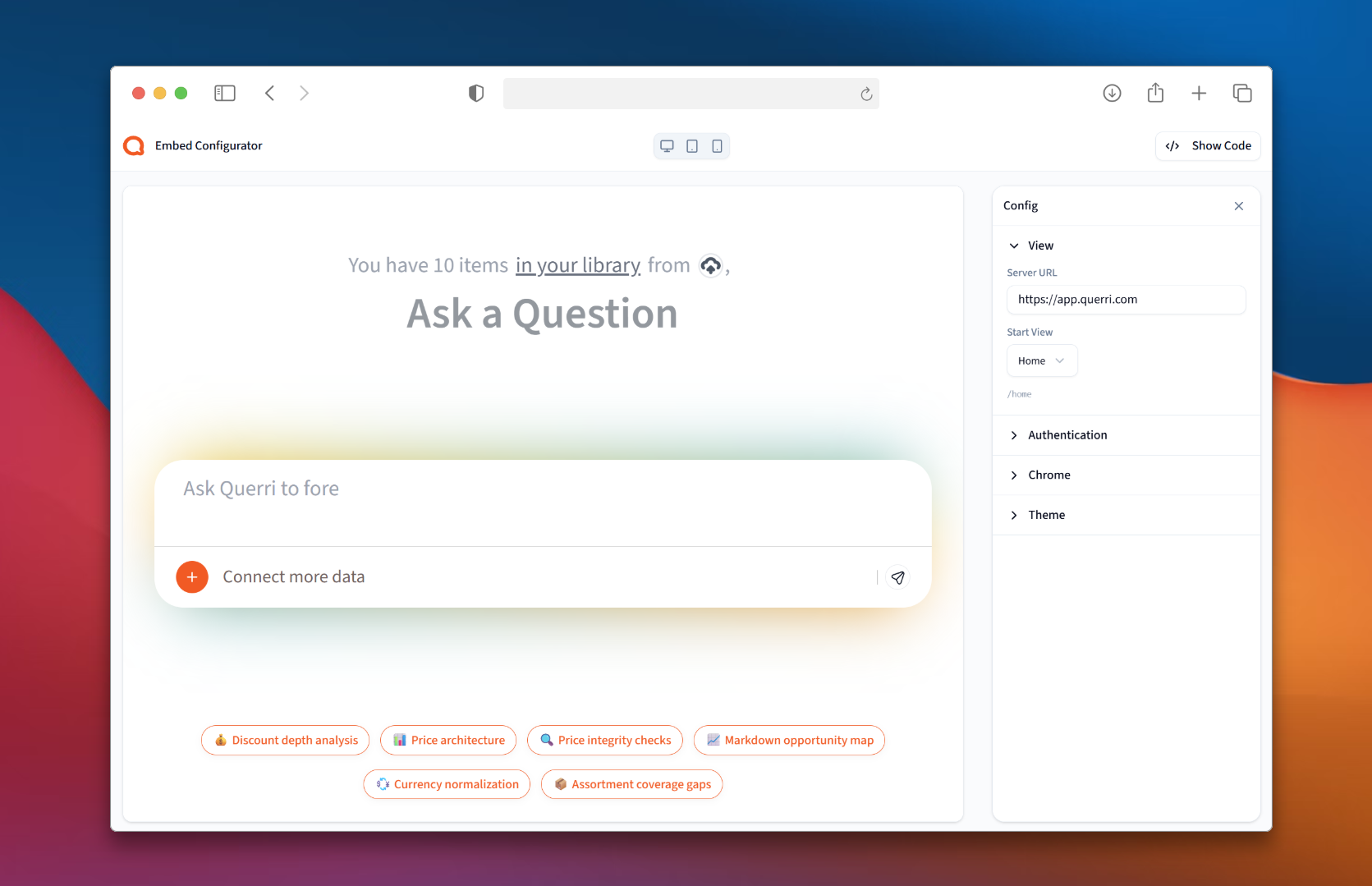
Querri Embed drops a full analytics experience into your app — dashboards, reports, and data exploration — with built-in authentication, per-user access control, UI customization, and theming. One component, one server endpoint, zero dependencies.
Get Started in 60 Seconds
1. Install
npm install @querri-inc/embed
2. Add the embed
import { QuerriEmbed } from '@querri-inc/embed/react';

<QuerriEmbed
  style={{ width: '100%', height: '600px' }}
  serverUrl="https://app.querri.com"
  auth={{ sessionEndpoint: '/api/querri-session' }}
/>
Using Vue, Svelte, Angular, or Vanilla JS? See Framework Examples below.
The
authprop supports multiple modes: server tokens, share keys, and popup login. See Authentication Modes for all options.
3. Create a session endpoint
Only needed for server-token auth (
sessionEndpointorfetchSessionToken). Skip this step if using Share Key or Popup Login.
// app/api/querri-session/route.ts
import { createSessionHandler } from '@querri-inc/embed/server/nextjs';

export const POST = createSessionHandler();
Set QUERRI_API_KEY and QUERRI_ORG_ID environment variables.
createSessionHandler()creates an anonymous session. To map sessions to your authenticated users, useresolveParamsin the Server SDK section.
Using a different framework? See the Server SDK section for all framework handlers.
4. Done.
The embed handles auth, token caching, and cleanup automatically.
sequenceDiagram
    participant Browser
    participant Your Server
    participant Querri API

    Browser->>Your Server: POST /api/querri-session
    Your Server->>Querri API: getOrCreate user + create session
    Querri API-->>Your Server: { session_token }
    Your Server-->>Browser: { session_token }
    Browser->>Querri API: Load embed with token
Framework Examples
React
import { QuerriEmbed } from '@querri-inc/embed/react';

<QuerriEmbed
  style={{ width: '100%', height: '600px' }}
  serverUrl="https://app.querri.com"
  auth={auth}
  startView="/dashboard/uuid"
/>
Vue
<template>
  <div style="width: 100%; height: 600px">
    <QuerriEmbed server-url="https://app.querri.com" :auth="auth" start-view="/dashboard/uuid" />
  </div>
</template>
<script setup>
import { QuerriEmbed } from '@querri-inc/embed/vue';
const auth = { shareKey: 'your-share-key', org: 'your-org-id' };
</script>
Svelte
<script>
  import QuerriEmbed from '@querri-inc/embed/svelte';
  const auth = { shareKey: 'your-share-key', org: 'your-org-id' };
</script>
<div style="width: 100%; height: 600px">
  <QuerriEmbed serverUrl="https://app.querri.com" {auth} startView="/dashboard/uuid" />
</div>
Angular
import { Component } from '@angular/core';
import { QuerriEmbedComponent } from '@querri-inc/embed/angular';

@Component({
  standalone: true,
  imports: [QuerriEmbedComponent],
  template: `<div style="width: 100%; height: 600px">
    <querri-embed [serverUrl]="'https://app.querri.com'" [auth]="auth" [startView]="'/dashboard/uuid'" />
  </div>`,
})
export class DashboardComponent {
  auth = { shareKey: 'your-share-key', org: 'your-org-id' };
}
Vanilla JS
import { QuerriEmbed } from '@querri-inc/embed';

QuerriEmbed.create('#container', {
  serverUrl: 'https://app.querri.com',
  auth: { shareKey: 'your-share-key', org: 'your-org-id' },
  startView: '/dashboard/uuid',
});
CDN
<!-- The canonical script tag: served by YOUR Querri deployment, so it can never
     version-skew against the product. (This same file is the build of this
     package's core.) -->
<script src="https://app.querri.com/sdk/querri-embed.js"></script>
<script>
  QuerriEmbed.create('#container', {
    serverUrl: 'https://app.querri.com',
    auth: { shareKey: 'your-share-key', org: 'your-org-id' },
  });
</script>
Authentication Modes
Share Key (Public Embeds)
For publicly shared dashboards. No user login required.
auth: {
  shareKey: 'abc123',  // From your dashboard's share link
  org: 'org_456',      // Your organization ID
}
Server Token (Enterprise)
Your backend exchanges an API key for a session token. Point the embed at your session endpoint:
auth: {
  sessionEndpoint: '/api/querri-session',
}
The SDK POSTs to this URL and extracts session_token from the JSON response automatically (with retry).
For full control over the request, use a callback instead:
auth: {
  fetchSessionToken: async () => {
    const res = await fetch('/api/querri-session');
    const { session_token } = await res.json();
    return session_token;
  },
}
Popup Login (User Accounts)
Users authenticate via a popup window. Session tokens are cached in localStorage.
auth: 'login'
Options
| Option | Type | Required | Description |
|---|---|---|---|
serverUrl |
string |
Yes | Querri server URL, e.g. 'https://app.querri.com'. (The old '…/builder' suffix is obsolete — one URL serves everything.) |
auth |
QuerriAuth |
Yes | Authentication mode (see above) |
startView |
string |
No | Initial view path (e.g. '/dashboard/uuid', '/inbox'). Unset opens the runtime's default view (the chat launcher). |
chrome |
QuerriChromeConfig |
No | UI chrome config — the v2 vocabulary (rail, header, chat, global, library, projects, dashboard, xls, print, settings), ~180 keys, typed from the runtime's own schema. See {serverUrl}/sdk/README.md for the full per-key table, or {serverUrl}/sdk/chrome-schema.json for the machine-readable schema. Legacy v1 keys (sidebar.*, chat.connectData, …) are still accepted — the runtime translates them one-way; unknown keys are dropped and reported via the config event. |
theme |
QuerriThemeConfig |
No | { name?: '' | 'querri' | 'querri-dark' | 'night', colors?, radius?, fontFamily? }. colors keys must be --ui-* tokens (allow-listed by the runtime). The old scheme key is dead — use name. |
privacy |
QuerriPrivacyConfig |
No | { sessionReplay?, identify?, errorReporting? } — analytics consent for your end-users (replay and identify default off). |
locale |
string |
No | Language override, e.g. 'en', 'es'. |
autoHeight |
boolean |
No | Grow the iframe to the embed's reported height (resize events). |
readyTimeout |
number |
No | Ms to wait for the iframe before warning (default 30000, 0 disables). The warning is recoverable: true and is retracted via the recovered event if the embed arrives late. timeout is a deprecated alias. |
Gotchas worth knowing:
- Legacy
chrome.chat.connectDatamaps to a rail item now — it does nothing unless the rail is shown (chrome: { rail: { show: true } }or legacysidebar.show: true). - Legacy
chrome.header.{viewModeToggle,share,print,automate,settings,menu}default false in v2 (the old docs said true) and only reach share-key embeds' legacy chat page. - Legacy
chat.skillsandtheme.schemeare dropped — the runtime reports the former in theconfigevent'schanges.dropped; usetheme.namefor the latter. updateConfig()replaces the config (not a merge): send the whole object each time so keys returned to defaults actually reset.
Listen to the config event to see what the runtime did with your config:
querri.on('config', function (report) {
  // report.changes.dropped — keys the runtime doesn't know
  // report.changes.coupled — keys it turned off because a parent is off
  // report.changes.upgraded — legacy keys translated to v2
  console.log('applied at schema v' + report.schemaVersion, report.changes);
});
Events
| Event | Payload | Description |
|---|---|---|
ready |
{} |
Embed authenticated and ready |
error |
{ code, message } |
An error occurred |
session-expired |
{} |
Session token expired |
navigation |
{ type, path?, ... } |
User navigated within the embed |
// Example: handling events
instance.on('error', ({ code, message }) => {
  console.error(`Querri error [${code}]: ${message}`);
});

instance.on('navigation', ({ type, path }) => {
  console.log('Navigated to:', path);
});
Error Codes
| Code | Meaning |
|---|---|
invalid_auth |
Auth config is invalid |
token_fetch_failed |
fetchSessionToken callback failed after 3 automatic retries |
popup_blocked |
Browser blocked the login popup |
auth_failed |
Authentication failed after popup login |
auth_required |
Auth required but no login mode configured |
timeout |
Iframe didn't respond within timeout period (default: 15s, configurable via timeout option) |
send_prompt_failed |
sendPrompt() failed — embed not ready, text empty, or current view has no prompt input |
Instance API
const querri = QuerriEmbed.create('#container', options);

querri.on('ready', callback);     // Subscribe to event (chainable)
querri.off('ready', callback);    // Unsubscribe (chainable)
querri.sendPrompt(text, options); // Set or submit text in the chat prompt
querri.destroy();                 // Clean up iframe and listeners

querri.ready;    // boolean -- true when authenticated
querri.iframe;   // HTMLIFrameElement | null

QuerriEmbed.version;  // SDK version string (e.g. '0.1.0')
sendPrompt(text, options?)
Programmatically set text in the embedded chat prompt, or submit it directly.
// Place text in the prompt panel for the user to review and send
querri.sendPrompt('What were my sales last quarter?');

// Submit immediately without displaying in the prompt panel
querri.sendPrompt('What were my sales last quarter?', { autoSubmit: true });
| Option | Type | Default | Description |
|---|---|---|---|
autoSubmit |
boolean |
false |
If true, submit the prompt immediately without showing it in the input |
Requires ready to be true. Emits an error event with code send_prompt_failed if the embed is not ready, the text is empty, or the current view has no prompt input.
Framework Component API
React
The React component accepts all SDK options as props, plus:
| Prop | Type | Description |
|---|---|---|
className |
string |
CSS class for the container div |
style |
CSSProperties |
Inline styles for the container div |
onReady |
() => void |
Ready callback |
onError |
(err) => void |
Error callback |
onSessionExpired |
() => void |
Session expired callback |
onNavigation |
(data) => void |
Navigation callback |
Access the underlying instance via ref:
import { useRef } from 'react';
import { QuerriEmbed, type QuerriEmbedRef } from '@querri-inc/embed/react';

const ref = useRef<QuerriEmbedRef>(null);
// ref.current.instance -- SDK instance
// ref.current.iframe -- iframe element
<QuerriEmbed ref={ref} ... />
Vue
Events: @ready, @error, @session-expired, @navigation
Access the underlying instance via template ref:
<QuerriEmbed ref="embedRef" ... />
<!-- embedRef.instance / embedRef.iframe -->
Svelte
Events: on:ready, on:error, on:session-expired, on:navigation
Access the underlying instance via bind:this:
<QuerriEmbed bind:this={embed} ... />
<!-- embed.getInstance() / embed.getIframe() -->
Angular
Inputs: serverUrl, auth, startView, chrome, theme
Events: (ready), (error), (sessionExpired), (navigation)
Access the underlying instance via a template ref or ViewChild:
@ViewChild(QuerriEmbedComponent) embed!: QuerriEmbedComponent;
// embed.sdkInstance -- SDK instance
// embed.iframe -- iframe element
Server SDK
The server SDK is included in @querri-inc/embed -- no extra package required. Use it to create embed session tokens, manage users, enforce access policies, and interact with the full Querri API from your backend. Most apps only need a one-liner session handler.
Quick Start
Import createSessionHandler from your framework's sub-path and export a route handler:
// Next.js -- app/api/querri-session/route.ts
import { createSessionHandler } from '@querri-inc/embed/server/nextjs';
export const POST = createSessionHandler();

// SvelteKit -- src/routes/api/querri-session/+server.ts
import { createSessionHandler } from '@querri-inc/embed/server/sveltekit';
export const POST = createSessionHandler();

// React Router v7 -- app/routes/api.querri-session.ts
import { createSessionHandler } from '@querri-inc/embed/server/react-router';
export const action = createSessionHandler();

// Nuxt -- server/api/querri-session.post.ts
import { createSessionHandler } from '@querri-inc/embed/server/nuxt';
export default createSessionHandler();

// Express -- server.ts
import { createSessionHandler } from '@querri-inc/embed/server/express';
app.post('/api/querri-session', createSessionHandler());
Pass a resolveParams callback to extract user identity from your auth system instead of reading the request body directly:
// Next.js -- app/api/querri-session/route.ts
import { createSessionHandler } from '@querri-inc/embed/server/nextjs';
import { getServerSession } from 'next-auth';

export const POST = createSessionHandler({
  resolveParams: async (req) => {
    const session = await getServerSession();
    return {
      user: { external_id: session!.user!.id, email: session!.user!.email! },
      access: { sources: ['src_sales'], filters: { tenant_id: session!.user!.orgId } },
    };
  },
});
If you omit resolveParams, the handler creates an anonymous session.
Security: Always derive user identity and access from your server-side auth system. Never read
useroraccessfrom the request body — a malicious client can impersonate any user or escalate access.
Environment Variables
| Variable | Description | Default |
|---|---|---|
QUERRI_API_KEY |
API key (qk_* format) |
-- |
QUERRI_ORG_ID |
Organization / tenant ID | -- |
QUERRI_URL |
API host URL | https://app.querri.com |
Manual Setup
For custom servers or advanced use cases where you need the full Querri client API:
import { Querri } from '@querri-inc/embed/server';

const client = new Querri('qk_your_api_key');

const { session_token, expires_in } = await client.getSession({
  user: {
    external_id: 'usr_alice',
    email: 'alice@example.com',
  },
  access: {
    sources: ['src_sales'],
    filters: { tenant_id: 'acme' },
  },
  ttl: 3600,
  origin: 'https://myapp.com',
});
Per-User Filtering
Pass user_id to get FGA-filtered results for a specific user:
// List only projects the user has access to
const projects = await client.projects.list({ user_id: 'ext_alice' });
For a full user-scoped client (multiple operations with session auth), use asUser():
const session = await client.getSession({ user: 'ext_alice' });
const userClient = client.asUser(session);

const projects = await userClient.projects.list(); // FGA-filtered
Available Resources
The client exposes these resource namespaces: users, embed, policies, projects, chats, dashboards, data, files, sources, keys, sharing, audit, usage.
Full Reference
See docs/server-sdk.md for complete API documentation, including every method signature, pagination, streaming, error handling, and detailed framework integration guides.
For raw HTTP integration without the SDK, see docs/api-guide.md.
Troubleshooting
Embed is blank or has zero height
Your container needs explicit dimensions. Add style="width: 100%; height: 600px" to the container element.
"Missing API key" error
Set the QUERRI_API_KEY environment variable. Find your API key at https://app.querri.com/settings/api-keys.
timeout -- iframe didn't respond
Check that serverUrl is correct and the Querri server is reachable. The default budget is 30
seconds (measured: ~25s on Fast 3G — the whole app boots inside that window), the error carries
recoverable: true, and if the embed arrives late the SDK emits recovered — so treat timeout
as a warning, not a terminal failure:
querri.on('error', function (e) {
  if (e.code === 'timeout' && e.recoverable) showSpinnerNote('Still loading…');
});
querri.on('recovered', function () { clearSpinnerNote(); });
readyTimeout: 0 disables the warning entirely.
popup_blocked
The login popup requires a user gesture (e.g., a button click). Browsers block popups triggered without user interaction.
token_fetch_failed
Your fetchSessionToken callback (or sessionEndpoint fetch) failed after 3 automatic retries (1s, 2s backoff). Verify that your server endpoint returns { session_token: "..." } as JSON and is reachable.
send_prompt_failed
sendPrompt() could not deliver the text. Common causes:
- The embed is not yet
ready(wait for thereadyevent before callingsendPrompt). - The
textargument is empty or not a string. - The current view has no chat prompt input (e.g., the user is viewing a dashboard instead of the chat).
TypeScript
All types are exported from every entry point:
import type {
  QuerriAuth,
  QuerriShareKeyAuth,
  QuerriTokenAuth,
  QuerriSessionEndpointAuth,
  QuerriChromeConfig,
  QuerriEmbedOptions,
  QuerriInstance,
  QuerriEventType,
  QuerriEventCallback,
  QuerriErrorEvent,
  QuerriNavigationEvent,
  SendPromptOptions,
} from '@querri-inc/embed';

// Framework wrappers re-export all core types, plus their own:
import type { QuerriEmbedProps, QuerriEmbedRef } from '@querri-inc/embed/react';
Requirements
The core SDK has zero dependencies and works in any modern browser.
Framework wrappers require:
| Framework | Minimum Version |
|---|---|
| React | >= 17 |
| Vue | >= 3.2 |
| Svelte | >= 4 |
| Angular | >= 17 |
All framework dependencies are optional -- install only what you use.
Important Notes
- React/Vue/Angular: Memoize the
authprop if it's an object. A new object reference on every render/change detection cycle will cause the iframe to be destroyed and recreated. - All framework wrappers automatically clean up the iframe on unmount.
License
MIT
Support policy
Versions below 1.0.0 receive security fixes only, for 6 months from the 1.0.0 release (2026-08-31). They speak the pre-v2 embed protocol; migrate with docs/MIGRATION.md.
Related Packages
New Schools SDK - Multi-framework components and modules for integrating New Sch...
Official ChatUI host SDK. Drop an assistant onto existing Vue, React, or vanilla...
Version History
| Version | Released | Vue | License |
|---|---|---|---|
| 1.0.0 | >=3.2 | MIT | |
| 0.2.1 | >=3.2 | MIT | |
| 0.2.0 | >=3.2 | MIT | |
| 0.1.24 | >=3.2 | MIT | |
| 0.1.23 | >=3.2 | MIT | |
| 0.1.22 | >=3.2 | MIT | |
| 0.1.21 | >=3.2 | MIT | |
| 0.1.20 | >=3.2 | MIT | |
| 0.1.19 | >=3.2 | MIT | |
| 0.1.18 | >=3.2 | MIT | |
| 0.1.17 | >=3.2 | MIT | |
| 0.1.16 | >=3.2 | MIT | |
| 0.1.15 | >=3.2 | MIT | |
| 0.1.14 | >=3.2 | MIT | |
| 0.1.13 | >=3.2 | MIT | |
| 0.1.12 | >=3.2 | MIT | |
| 0.1.11 | >=3.2 | MIT | |
| 0.1.10 | >=3.2 | MIT | |
| 0.1.9 | >=3.2 | MIT | |
| 0.1.7 | >=3.2 | MIT |