@qodalis/vue-cli
| Install | |
|---|---|
npm install @qodalis/vue-cli |
|
| Latest Version: | 2.0.0-rc.2 |
| Vue: | 3 |
| License: | MIT |
| Last Updated: | Oct 27, 2026 |
| Links: | GitHub · npm |
Qodalis CLI
A web terminal for Angular, React, Vue and plain TypeScript, extended through command modules.






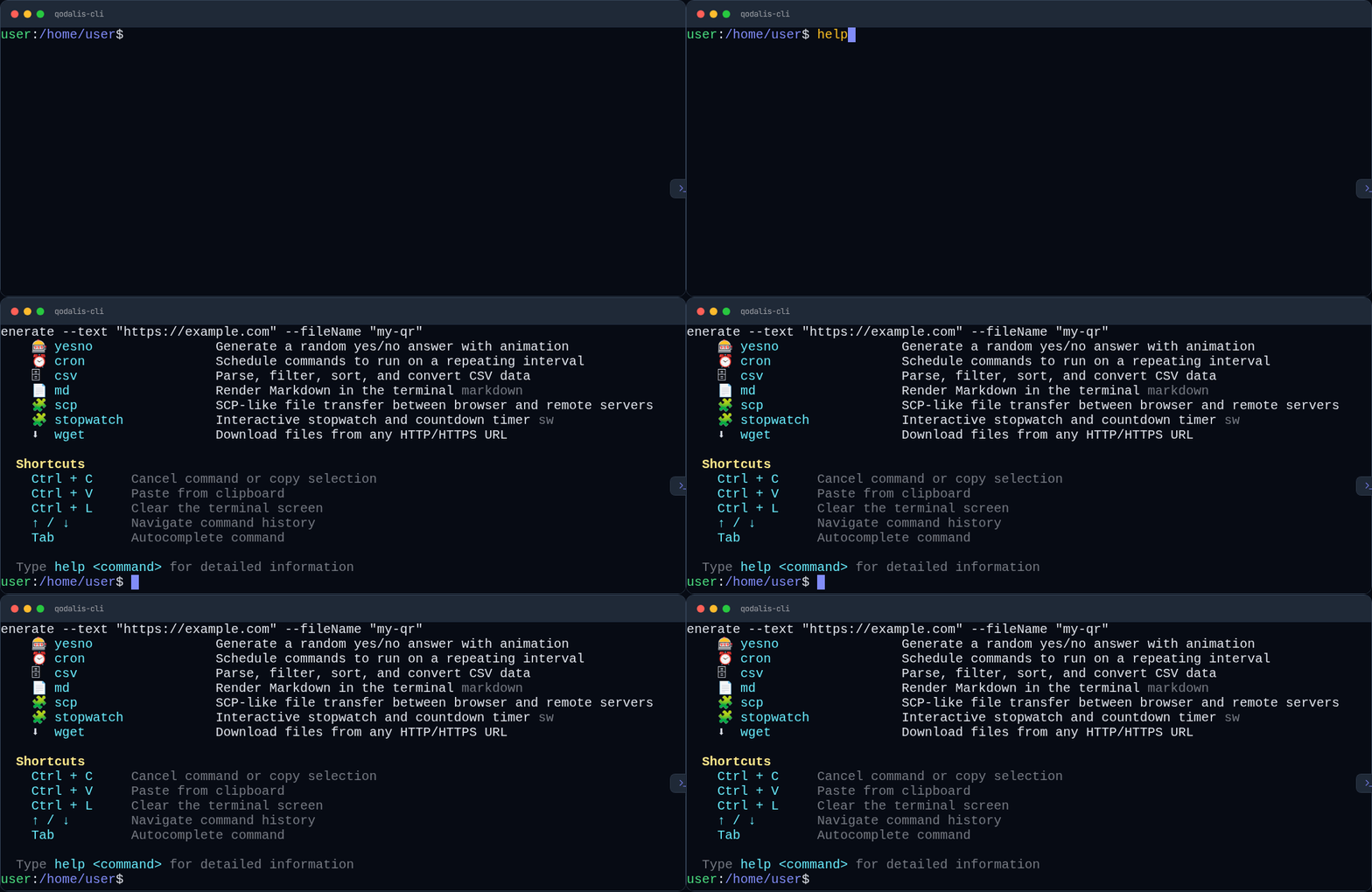
Qodalis CLI renders an xterm.js terminal in your app with a shell-like command line, built-in commands, themes and a runtime package manager. You add commands as modules (ICliModule): the 40 official plugins, your own commands, or packages installed at runtime with pkg add. It can also connect to a Node.js, .NET or Python backend to run server-side commands.
Try it online
Starter projects for each framework, using the published npm packages:
| Framework | StackBlitz | CodeSandbox | Gitpod | Repository |
|---|---|---|---|---|
| Angular |  |
 |
 |
source |
| React | |
|
|
source |
| Vue | |
|
|
source |
| Vanilla TypeScript | |
|
|
source |
Or try the terminal and write your own commands in the docs playground.
Install
| Framework | Package | Install |
|---|---|---|
| Angular | @qodalis/angular-cli |
npm install @qodalis/angular-cli |
| React | @qodalis/react-cli |
npm install @qodalis/react-cli |
| Vue 3 | @qodalis/vue-cli |
npm install @qodalis/vue-cli |
| Vanilla TS | @qodalis/cli |
npm install @qodalis/cli @qodalis/cli-core |
| Electron | @qodalis/electron-cli |
npm install @qodalis/electron-cli (with a wrapper above) |
Plugins are separate packages, for example npm install @qodalis/cli-guid.
Quick start
Each example shows a terminal with the guid plugin. Pass any number of modules.
Angular
Angular 22 or later. Add the stylesheet to angular.json:
"styles": ["node_modules/@qodalis/angular-cli/src/assets/styles.css"]
import { Component } from '@angular/core';
import { CliModule } from '@qodalis/angular-cli';
import { ICliModule } from '@qodalis/cli-core';
import { guidModule } from '@qodalis/cli-guid';

@Component({
    selector: 'app-root',
    imports: [CliModule],
    template: `<cli [modules]="modules" height="100vh" />`,
})
export class AppComponent {
    modules: ICliModule[] = [guidModule];
}
<cli-panel> is a collapsible panel docked to the page. To register modules app-wide through DI instead of the modules input, add resolveCliModuleProvider(guidModule) to your providers.
React
React 18 or 19.
import '@qodalis/react-cli/styles.css';
import { Cli } from '@qodalis/react-cli';
import { guidModule } from '@qodalis/cli-guid';

export function App() {
    return <Cli modules={[guidModule]} style={{ height: '100vh' }} />;
}
Vue
<script setup lang="ts">
import '@qodalis/vue-cli/styles.css';
import { Cli } from '@qodalis/vue-cli';
import { guidModule } from '@qodalis/cli-guid';
</script>

<template>
    <Cli :modules="[guidModule]" :style="{ height: '100vh' }" />
</template>
React and Vue also export CliPanel, and CliConfigProvider to share modules and options with every terminal below it.
Vanilla TypeScript
import '@qodalis/cli/assets/styles.css';
import { CliEngine } from '@qodalis/cli';
import { guidModule } from '@qodalis/cli-guid';

const engine = new CliEngine(document.getElementById('terminal')!);
engine.registerModule(guidModule);
await engine.start();
Your own commands
A command is an ICliCommandProcessor; a module groups processors (and optional services, translations and lifecycle hooks):
import {
    API_VERSION,
    CliProcessCommand,
    ICliCommandProcessor,
    ICliExecutionContext,
    ICliModule,
} from '@qodalis/cli-core';

class GreetCommandProcessor implements ICliCommandProcessor {
    command = 'greet';
    description = 'Greet someone by name';
    valueRequired = true;

    async processCommand(command: CliProcessCommand, context: ICliExecutionContext): Promise<void> {
        context.writer.writeSuccess(`Hello, ${command.value}!`);
    }
}

export const greetModule: ICliModule = {
    apiVersion: API_VERSION,
    name: 'my-app-commands',
    processors: [new GreetCommandProcessor()],
};
Register it like any plugin: the modules input/prop, resolveCliModuleProvider(greetModule) in Angular, or engine.registerModule(greetModule). To publish a reusable plugin, scaffold it with npx @qodalis/create-cli-plugin. See Core concepts and Create a plugin.
Configuration
Options go to the options input/prop or the CliEngine constructor:
import { CliEngineOptions } from '@qodalis/cli';

const options: CliEngineOptions = {
    welcome: { message: 'Welcome to My App', show: 'daily' }, // or false
    servers: [{ name: 'node', url: 'http://localhost:8047' }],
    terminalOptions: { fontSize: 14 },
};
All options are listed in Configuration.
Features
- Shell-like command line:
&&,||,;, pipes,>/>>redirects, aliases, history search, tab completion and readline shortcuts (hotkeyslists them). - Built-in commands:
help,theme,pkg,history,alias,json,diff,random,timestamp,convert,color,clipboard,ps/kill,htopand more. See Built-in commands. - Runtime packages:
pkg add guidinstalls a plugin from npm (unpkg or jsdelivr) without rebuilding the app. - Interactive input: line, password, confirm, select, multi-select and number prompts, progress bars, spinners and a full-screen mode for editors and games.
- Themes: 29 built-in themes, custom colors and fonts.
- Panel: a dockable panel with tabs, split panes, resizing and maximize.
- Users and permissions (users plugin): login,
su, groups, permissions and per-user history. - Server integration: run commands on a backend, stream output, open a remote shell, browse the server filesystem, query databases with the data explorer.
- i18n: 10 language packs.
Plugins
Install from npm and pass the module, or run pkg add <name> in the terminal.
| Package | Module | Commands |
|---|---|---|
@qodalis/cli-browser-storage |
browserStorageModule |
local-storage, cookies |
@qodalis/cli-chart |
chartModule |
chart |
@qodalis/cli-cron |
cronModule |
cron |
@qodalis/cli-csv |
csvModule |
csv |
@qodalis/cli-curl |
curlModule |
curl |
@qodalis/cli-data-explorer |
dataExplorerModule |
data-explorer (SQL, MongoDB, Redis, Elasticsearch via a server) |
@qodalis/cli-encode |
encodeModule |
base64, hex, url, jwt, hash, rot, morse, binary |
@qodalis/cli-files |
filesModule |
ls, cd, cat, nano, mkdir, touch, rm, cp, grep, tree |
@qodalis/cli-guid |
guidModule |
guid |
@qodalis/cli-markdown |
markdownModule |
md |
@qodalis/cli-password-generator |
passwordGeneratorModule |
generate-password |
@qodalis/cli-qr |
qrModule |
qr |
@qodalis/cli-regex |
regexModule |
regex |
@qodalis/cli-scp |
scpModule |
scp |
@qodalis/cli-server-jobs |
jobsModule |
server jobs |
@qodalis/cli-server-logs |
serverLogsModule |
server logs |
@qodalis/cli-speed-test |
speedTestModule |
speed-test |
@qodalis/cli-stopwatch |
stopwatchModule |
stopwatch |
@qodalis/cli-string |
stringModule |
string |
@qodalis/cli-text-to-image |
textToImageModule |
text-to-image |
@qodalis/cli-todo |
todoModule |
todo |
@qodalis/cli-users |
usersModule |
login, su, whoami, adduser, perms, sessions, ... |
@qodalis/cli-wget |
wgetModule |
wget |
@qodalis/cli-yesno |
yesnoModule |
yesno |
Games: @qodalis/cli-2048 (game2048Module), @qodalis/cli-minesweeper, @qodalis/cli-snake, @qodalis/cli-sudoku, @qodalis/cli-tetris, @qodalis/cli-wordle.
Language packs: @qodalis/cli-lang-<code> for de, es, fr, it, ja, ko, pt, ro, ru, zh (langDeModule, ...).
Details and examples for each plugin: Plugins.
Ecosystem
| Repository | What it is |
|---|---|
| cli-server-node | Node.js server (@qodalis/cli-server-node): server commands, shell, filesystem, data explorer, jobs, MCP |
| cli-server-dotnet | The same server for ASP.NET Core (NuGet Qodalis.Cli) |
| cli-server-python | The same server for FastAPI (PyPI qodalis-cli-server) |
| cli-server-dashboard | Admin dashboard the servers serve at /qcli/admin |
| mcp-cli | @qodalis/mcp-cli: MCP server for Claude Code and other AI clients |
| pwa-cli | The terminal as an installable PWA and an Android app |
| Angular, React, Vue and vanilla examples | Starter apps using the npm packages (try them online) |
Connecting a server: Server integration.
AI-assisted development
-
@qodalis/mcp-cligives Claude Code (or any MCP client) the docs, the published API declarations and the plugin scaffolder, with no server needed:claude mcp add qcli -- npx -y @qodalis/mcp-cliSet
QCLI_URL(andQCLI_TOKEN) to also expose a running server's commands, filesystem and data sources as MCP tools. -
llms.txt and llms-full.txt: the plugin API guide for language models.
Development
This repository is a pnpm 12 + Nx 24 monorepo (Node 22):
pnpm install
pnpm run build                # all packages, in dependency order
pnpm exec nx test <project>   # Jasmine + Karma (ChromeHeadless), e.g. nx test guid
pnpm run lint
pnpm run serve:docs           # docs site on http://localhost:4300
pnpm run serve:angular-demo   # also serve:react-demo, serve:vue-demo, serve:vanilla-demo
pnpm run create-plugin -- --name <name> --description "<desc>" --processor-name <Name>
| Path | Contents |
|---|---|
packages/core |
@qodalis/cli-core: interfaces, models, themes, utilities |
packages/cli |
@qodalis/cli: the engine and built-in commands |
packages/angular-cli, react-cli, vue-cli, electron-cli |
Framework wrappers |
packages/create-cli-plugin |
Plugin scaffolder |
packages/plugins/* |
The 40 plugins |
apps/ |
Docs site and demo apps |
CONTRIBUTING.md covers branches and pull requests, DEVELOPER.md the architecture and build details.
License
Related Packages
Extensible web-based terminal/CLI framework with Vue 3, TypeScript, and virtual...
Version History
Pre-releases (23)
| Version | Released | Vue | License |
|---|---|---|---|
| 2.0.0-rc.2 | ^3.3.0 | MIT | |
| 2.0.0-rc.1 | ^3.3.0 | MIT | |
| 2.0.0-beta.21 | ^3.3.0 | MIT | |
| 2.0.0-beta.20 | ^3.3.0 | MIT | |
| 2.0.0-beta.19 | ^3.3.0 | MIT | |
| 2.0.0-beta.18 | ^3.3.0 | MIT | |
| 2.0.0-beta.17 | ^3.3.0 | MIT | |
| 2.0.0-beta.16 | ^3.3.0 | MIT | |
| 2.0.0-beta.15 | ^3.3.0 | MIT | |
| 2.0.0-beta.14 | ^3.3.0 | MIT | |
| 2.0.0-beta.13 | ^3.3.0 | MIT | |
| 2.0.0-beta.12 | ^3.3.0 | MIT | |
| 2.0.0-beta.11 | ^3.3.0 | MIT | |
| 2.0.0-beta.10 | ^3.3.0 | MIT | |
| 2.0.0-beta.9 | ^3.3.0 | MIT | |
| 2.0.0-beta.8 | ^3.3.0 | MIT | |
| 2.0.0-beta.7 | ^3.3.0 | MIT | |
| 2.0.0-beta.6 | ^3.3.0 | MIT | |
| 2.0.0-beta.5 | ^3.3.0 | MIT | |
| 2.0.0-beta.4 | ^3.3.0 | MIT | |
| 2.0.0-beta.3 | ^3.3.0 | MIT | |
| 2.0.0-beta.2 | ^3.3.0 | MIT | |
| 2.0.0-beta.1 | ^3.3.0 | MIT |