@progen-labs/spectra
| Install | |
|---|---|
npm install @progen-labs/spectra |
|
| Latest Version: | 0.4.1 |
| License: | MIT |
| Last Updated: | Oct 17, 2026 |
| Links: | GitHub · npm |
Spectra
Make your web app faster. Ask your AI agent, or run one command.
React · Next.js · Vue · Angular · Svelte · any web frontend | Claude Code · Cursor · Copilot · Codex · Gemini · VS Code · CI


Documentation · 2½-minute demo · Get started · Measure only · Project health
Spectra runs your app in Chrome, measures it, and finds the problems in your own code: the exact file, function, line and component, with a suggested fix. Then it has each problem fixed, measures the change, and keeps only what measurably helped. It works with the AI coding agent you already use, or on its own. Everything runs on your machine: no account, no telemetry, no uploads. A Progen Labs project, free and open source.
Get started
1. Install. Node.js 22.12 or newer and a local Chrome, Chromium or Edge (Spectra drives the browser you have).
npm install --save-dev @progen-labs/spectra
npx spectra
npx spectra sets things up: it teaches your AI coding agent what Spectra does, in the file the agent reads for
your project (AGENTS.md, a Claude Code skill, Copilot instructions, a Cursor rule…). Nothing happens at install time.
2. Ask your agent. In Claude Code, Cursor, GitHub Copilot, Codex, Gemini CLI, Windsurf or any other coding agent, in plain words:
improve the performance
The agent runs Spectra's loop. Spectra measures the app and names the first problem: file, line, cost, suggested fix. The agent makes that one change. Spectra runs your checks, measures again, and says keep or undo. Repeat. Then the agent tells you what got faster, with the before → after numbers, and what it tried that didn't help.
Or let Spectra do the whole thing unattended, with a coding agent installed on your machine:
npx spectra improve
It finds the agent (Claude Code, Codex, Gemini CLI, Copilot CLI, Cursor, OpenCode or Amp; --agent to choose),
works in a copy of your last commit, and puts the kept fixes on a branch, one commit each, with the measurements in
the commit messages. Your own files are never touched.
3. Review. The changes are in your working tree (git diff) or on the branch (git log -p HEAD..spectra/improve-…).
Commit, or merge, and you're done.
What a session looks like
The guided loop on Spectra's React demo app. Each step is one short command, so any agent can drive it:
$ npx spectra improve next
spectra: measuring the baseline (3 page loads) …
Problem 1 of 5: Row is slow to render: 1442ms total, 0.2ms per render (7200×)
  Where: src/Row.jsx:3
  Cost: about 1.44 s, seen in 3 runs
  Where the time went:
    Row() in src/Row.jsx:3: 1.44 s (slow render)
  Suggested fix: Move expensive calculations into useMemo, virtualise long lists, …

Make ONE focused change in src/Row.jsx that removes or reduces this cost, keeping the behaviour exactly the same …
Then run:  npx spectra improve check

$ npx spectra improve check            # after the agent's change
spectra: running the checks (npm test) …
spectra: measuring the change …
✓ Kept: JavaScript CPU time: 1.55 s → 162 ms (−90%)
  also Row (src/Row.jsx) — render time: 1.44 s → 35.4 ms (−98%)
  Checks passed: npm test.
  Keep this change.

Problem 2 of 4: App rendered 60× (19/s)
  Where: src/main.jsx:15
  …

$ npx spectra improve check            # after a change that did nothing
✗ Undo this change: no measurable improvement: every change was within run-to-run noise.
  Revert the files you changed for this problem (and only those), then continue.

$ npx spectra improve report
Spectra improve — 1 of 2 problems fixed
  ✓ fixed       Row is slow to render … (src/Row.jsx:3): JavaScript CPU time: 1.55 s → 162 ms (−90%)
  ✗ undone      App rendered 60× (19/s) (src/main.jsx:15) — no measurable improvement
Overall, before → after: IMPROVED (confidence: medium)
  ✓ JavaScript CPU time: 1.55 s → 162 ms (−90%)
  ✓ Row (src/Row.jsx) — render time: 1.44 s → 35.4 ms (−98%)
How it decides
Spectra makes every decision; the agent only edits.
- Measured, not guessed. Three page loads before and after each change, reduced to medians. A change counts only when it is bigger than the run-to-run noise, so a lucky run never decides.
- Your checks first. Your
test, type-check andbuildscripts (or--check "<cmd>") must pass after every change. A faster page that breaks is undone. - Your code only. Problems in
node_modulesare reported, not fixed. A new critical problem in your own code undoes a change; a vendor chunk renamed between builds does not. - One change at a time, in order of cost. A fix that also clears other problems skips them.
- Unattended, in isolation. A git worktree of your last commit with its own dev server; changes to
package.json, lockfiles, configuration, tests or CI, deletions, or more than 150 lines are refused; nothing is pushed or merged.
The rules are Spectra's code, checked by a test bench in CI: a real fix must be kept, a "faster" page that renders nothing must be caught, a cosmetic change must not count. See How improve decides.
What it works with
| Frameworks | Component names, render counts and timings for React, Next.js, Vue and Angular; source-mapped files and functions for Svelte, SolidJS and any other build. Detected in the page itself. |
| AI agents | Any agent that reads AGENTS.md (Codex, Copilot's coding agent, Cursor, Windsurf, Zed, Jules, Amp…), plus Claude Code (a skill), GitHub Copilot (instructions), Cursor, Windsurf, Cline, Roo Code and Gemini CLI, each in its own file. MCP clients get the loop as tools (improve_next, improve_check, improve_report); there is a Claude Code plugin. |
| Unattended | Claude Code, Codex CLI, Gemini CLI, GitHub Copilot CLI, Cursor CLI, OpenCode, Amp, or any command of yours. |
| Editors | The VS Code extension shows each finding at its line and render counts above components. |
| CI | The GitHub Action profiles every pull request against its base commit and enforces your budgets. |
| Apps behind a login | Spectra signs in first: a login form (one or two steps, single sign-on, authenticator codes), you in the browser window, the browser prompt, a token or cookie, or a sign-in link. Secrets stay in memory. |
Measure without changing anything
npx spectra performance                  # starts your dev server, finds the page's buttons, links and
                                         # forms, runs safe user journeys through them, reports each one
npx spectra performance --quick --runs 3 # one page, three loads, medians: the fast loop
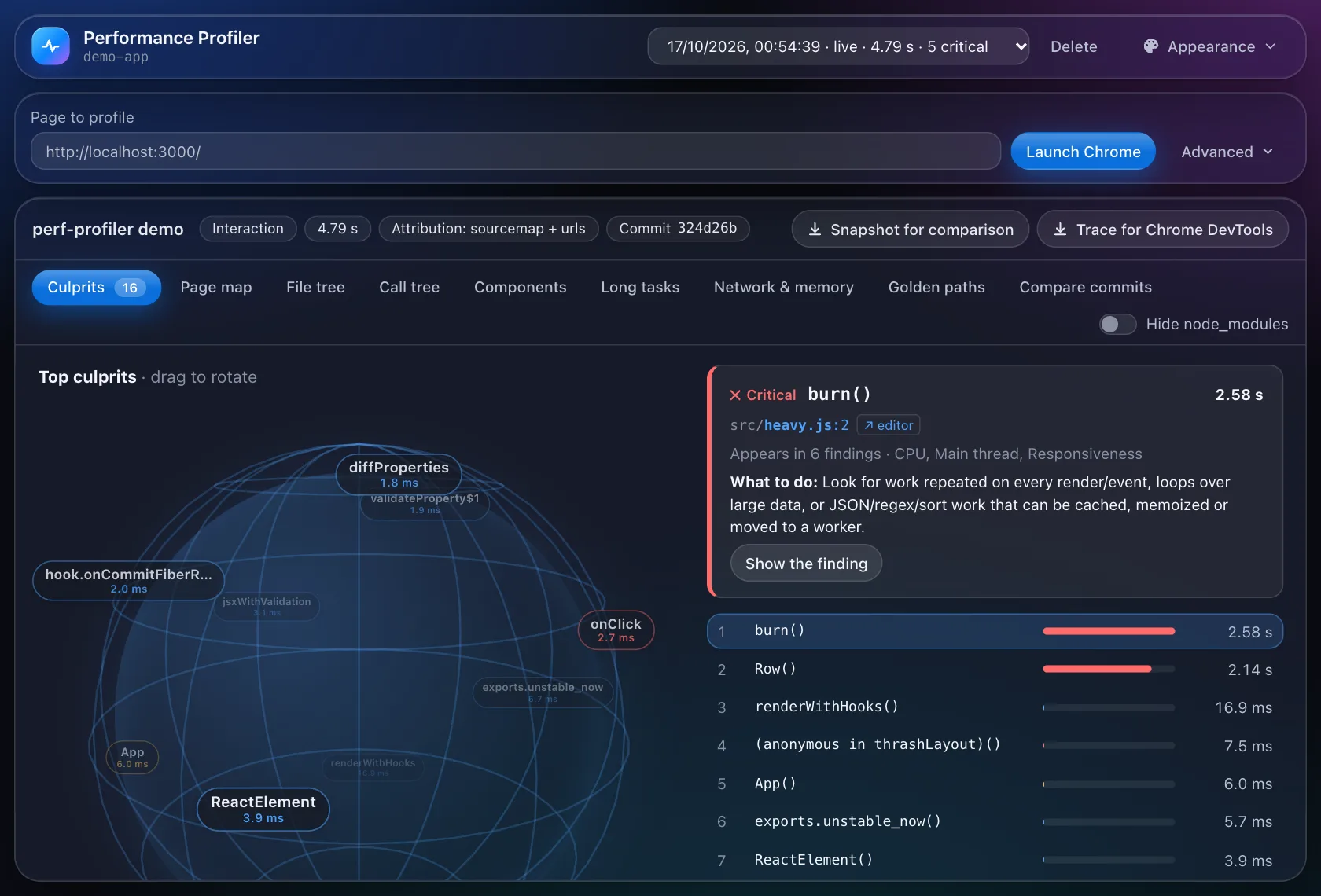
npx spectra dashboard --open             # the visual dashboard: culprits, page map, call trees, PDFs
#  Golden path            Result    TBT    LCP  LongT  Top finding
—  Initial page load      PASS      0ms  128ms      0  [warning] main chunk served uncompressed
1  Click "Pricing"        PASS      0ms      —      0  [warning] Large DOM: 2,139 nodes
2  Click "Folders"        PASS      0ms      —      0  [critical] TreeNode re-rendered 1100× (96% wasted)
Automation: 8/8 golden paths passed.
Prove a change yourself with npx spectra performance --quick --runs 5 --out before.json, the same with after.json,
then npx spectra compare before.json after.json. Put limits in spectra.config.json and every run becomes a CI gate
(exit code 2 when over budget). --json prints a versioned result for scripts and editors. See
Measure a page,
Compare,
Budgets and CI and
JSON output.
Commands
spectra improve [options]               Make the app faster, unattended (spectra improve --help)
spectra improve next|check|report|stop  The same, step by step, for your AI agent or you
spectra performance [options]           Measure only: golden-path journeys, or --quick
spectra compare <before> <after>        Did it get faster? Beyond run-to-run noise
spectra reports                         List saved reports
spectra dashboard [--open]              The dashboard UI
spectra mcp [--project <dir>]           MCP server for AI tools (stdio)
spectra agents [--remove]               Teach your AI agents what Spectra does
spectra --help                          Every option
Everything Spectra does runs on your machine, in a separate Chrome profile, on a development build (production
builds hide component timings). Reports go to .spectra/ in your project; keep it out of git. Automatic exploration
never clicks delete, pay or log out, and never submits a form that changes data.
Project health





Every pull request and push to main runs the same checks, and spectra-bot reports them in one comment on each
pull request: the tests on Node 22, 24 and 26 across Linux, macOS and Windows with a coverage floor, lint, npm audit
and Snyk, Socket's supply-chain score, size budgets, the links in the docs, the improve bench, the GitHub Action on the
demo app, CodeQL and the OpenSSF Scorecard. Every action is pinned to a commit, and CI installs from the committed
lockfile. Releases carry a changelog, the package, its SBOM and signed build attestations. See
CONTRIBUTING.md, CHANGELOG.md and, for security issues, SECURITY.md.
Documentation
- The guide: start with Improve the performance and Your AI agent; then Measure a page, Budgets and CI, MCP server, How improve decides, the Findings reference and Troubleshooting.
- DOCS.md: the in-repo manual, the technical deep dive, and how to contribute.
License
MIT © 2026 Sourav Debnath (Progen Labs)

Spectra is a Progen Labs project: independent, open source, always free.
Related Packages
Visual element inspector for Claude Code - select elements in your browser and s...
Vite plugin for CodeAtlas — real-time annotation parsing and live MCP HTTP serve...
Model Context Protocol server for intelligent, context-aware documentation looku...
Version History
| Version | Released | License |
|---|---|---|
| 0.4.1 | MIT | |
| 0.4.0 | MIT | |
| 0.3.0 | MIT | |
| 0.2.0 | MIT | |
| 0.1.3 | MIT | |
| 0.1.2 | MIT | |
| 0.1.1 | MIT | |
| 0.1.0 | MIT |
Pre-releases (1)
| Version | Released | License |
|---|---|---|
| 0.0.0-stage |