@nivashr/vue-hotel-datepicker
| Install | |
|---|---|
npm install @nivashr/vue-hotel-datepicker |
|
| Latest Version: | 3.1.0 |
| Vue: | 3 |
| Older releases: | 2 |
| License: | MIT |
| Last Updated: | Oct 23, 2026 |
| Links: | GitHub · npm |
vue-hotel-datepicker


A pure Vue 3 date range picker component without any other dependencies, for hotel date range selection and multi-purpose. It provides date range selecting, minimum and maximum night limitation, disabled dates with selectable check-out days, custom date formatting and localization support. It ships as an inline picker (VueHotelDatepicker) and as a modal (VueHotelDatepickerModal).
| Package version | Vue | Branch | Install |
|---|---|---|---|
| 3.x | Vue 3 | master |
npm install @nivashr/vue-hotel-datepicker |
| 2.x | Vue 2 | v2 |
npm install @nivashr/vue-hotel-datepicker@2 |
The props, events and CSS selectors of 2.3.x are all kept in 3.x, so moving a Vue 2 project to Vue 3 does not require template or CSS changes for this component. 3.1 adds day prices, a legend and half days, and changes two defaults: clicking a free day behind a disabled date and the look of message. See the changelog.
Made and maintained by NIVAS, the digital agency behind the booking sites this datepicker runs on. It started as a fork of northwalker/vue-hotel-datepicker (archived, Vue 2 only).
Live demo
https://nivas.github.io/vue-hotel-datepicker/
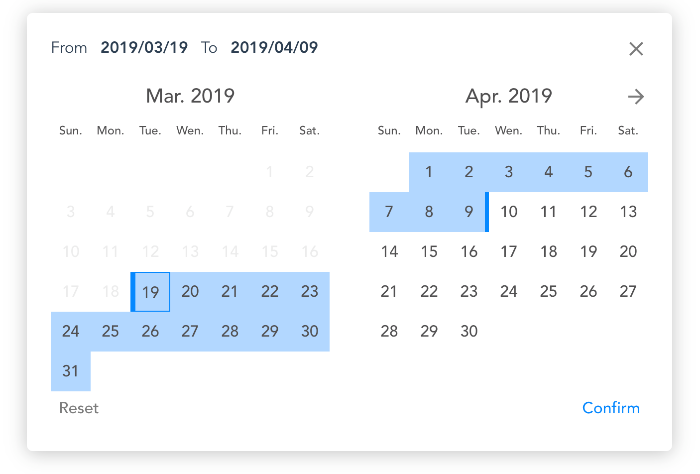
Desktop capture preview
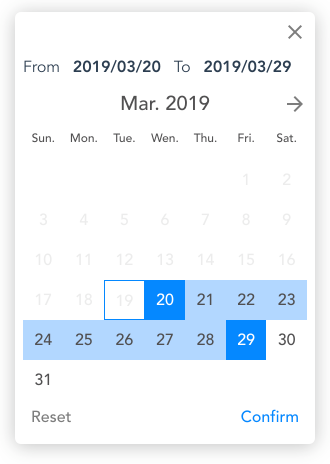
Mobile capture preview
Installation
$ npm install @nivashr/vue-hotel-datepicker
Styles are injected by the component itself, there is no separate CSS file to import.
Usage
Method 1: Import the component in a .vue file
<template>
  <VueHotelDatepicker @confirm="onConfirm" />
</template>

<script>
import VueHotelDatepicker from '@nivashr/vue-hotel-datepicker'
// or: import { VueHotelDatepicker, VueHotelDatepickerModal } from '@nivashr/vue-hotel-datepicker'

export default {
  name: 'App',
  components: {
    VueHotelDatepicker
  },
  methods: {
    onConfirm ({ start, end }) {
      // 'YYYY/MM/DD' strings (see `format`)
    }
  }
}
</script>
Method 2: Via script tags in an html file
<script src="https://unpkg.com/vue@3"></script>
<script src="https://unpkg.com/@nivashr/vue-hotel-datepicker@3"></script>
<script>
  const app = Vue.createApp({})
  app.component('VueHotelDatepicker', VueHotelDatepicker.VueHotelDatepicker)
  app.component('VueHotelDatepickerModal', VueHotelDatepicker.VueHotelDatepickerModal)
  app.mount('#app')
</script>
Modal:
<VueHotelDatepickerModal
  :active="showCalendar"
  :startDate="arrival"
  :endDate="departure"
  :disabledDates="unavailableDates"
  @apply="onApply"
  @cancel="showCalendar = false"
/>
The modal never closes itself. The parent owns active and switches it off in its apply / cancel handlers.
Props
Props shared by both components:
| Prop | Type | Default | Description |
|---|---|---|---|
format |
String |
'YYYY/MM/DD' |
Date format for displayed and emitted strings. Supports the tokens YYYY, MM and DD. |
separator |
String |
'~' |
Text between the start and the end date. |
startDate |
Date or String |
undefined |
Start of the preselected range. Watched: when two calendars share state, changing it updates the selection. |
endDate |
Date or String |
undefined |
End of the preselected range. Watched, like startDate. |
minDate |
Date or String |
today | All dates before it are disabled. |
maxDate |
Date, String or Boolean |
false |
All dates after it are disabled. |
minNight |
Number |
undefined |
Minimum number of nights. |
maxNight |
Number |
undefined |
Maximum number of nights. |
selectForward |
Boolean |
true |
If true, the calendar cannot be browsed to months before minDate. |
disabledDates |
Array |
[] |
Dates that cannot be selected, as Date objects or strings ('2026-01-25', '2026/01/25'); they do not follow format. A range cannot start on or span a disabled date, but it can end on the first disabled date after its start (check-out on the day the next guest arrives). While the end date is being picked, free days behind a disabled date are dimmed (selectable-restart) and a click on one starts a new selection there (since 3.1, always on). If a change of this prop makes the current selection invalid, the selection is reset and selection-invalidated is emitted. |
useDiagonalStartEnd |
Boolean |
false |
Draw start, end and selectable disabled days as diagonal halves (start-date-diagonal, end-date-diagonal, selectable-disabled-diagonal classes instead of start-date, end-date, selectable-disabled). |
resetMonthOnOpen |
Boolean |
false |
When opened, jump back to the month of the selection (or of minDate) instead of staying on the last browsed month. |
autoClose |
Boolean |
false |
Finish as soon as the second date is selected, without a click on the confirm / apply button. VueHotelDatepicker emits update, then confirm, and closes. VueHotelDatepickerModal emits update-selection, then apply; the parent closes it in its apply handler as usual. |
prices |
Object |
{} |
Content shown under the day number, keyed by ISO date: { '2026-01-25': 89, '2026-01-26': '95 €' }. Values are displayed as given (format them in the parent); days without an entry, or with null / '', show nothing. With prices the day cells get taller. A value wider than its cell is cut off with an ellipsis, so keep values short ('89 €', not '89,00 EUR'). |
legend |
Array |
[] |
Legend shown under the calendar, above message: [{ type: 'available', label: 'Available' }, …]. Each item is a swatch drawn like the day state it explains, plus your label. Types: available, arrival (start day), departure (end day), occupied (disabled day), checkout (check-out only half day), checkin (arrival only half day). Any other type becomes the class vhd-legend-<type> for your own styling. With useDiagonalStartEnd the arrival and departure swatches are drawn as half days. |
showHalfDays |
Boolean |
false |
Show, before any click, which days around an occupied block are only half usable. The first disabled day of a block is check-out only (half-day-checkout): a stay can end there but not start. The first free day after a block is arrival only (half-day-arrival): a stay can start there but not end. The other disabled days are filled (full-day-occupied). Works from disabledDates alone; looks best with useDiagonalStartEnd. |
weekList |
Array |
['Sun.', 'Mon.', 'Tue.', 'Wen.', 'Thu.', 'Fri.', 'Sat.'] |
Week day labels, Sunday first. |
monthList |
Array |
['Jan.', 'Feb.', 'Mar.', 'Apr.', 'May.', 'Jun.', 'Jul.', 'Aug.', 'Sep.', 'Oct', 'Nov.', 'Dec.'] |
Month labels. |
fromText |
String |
'From' |
Label of the start date. |
toText |
String |
'To' |
Label of the end date. |
resetText |
String |
'Reset' |
Text of the reset button. |
mobile |
String |
'' |
'mobile', 'desktop' or ''. Forces the mobile or desktop layout; by default it depends on the browser width. |
message |
String |
'' |
Note under the calendar and legend, in small grey text (.vhd-calendar-message), e.g. a footnote for prices. |
VueHotelDatepicker only:
| Prop | Type | Default | Description |
|---|---|---|---|
placeholder |
String |
'Select a date range' |
Placeholder of the input. |
confirmText |
String |
'Confirm' |
Text of the confirm button. |
VueHotelDatepickerModal only:
| Prop | Type | Default | Description |
|---|---|---|---|
active |
Boolean |
false |
Shows the modal. Each time it becomes true the selection is re-read from startDate / endDate. |
cancelText |
String |
'Cancel' |
Text of the cancel button. |
applyText |
String |
'Apply' |
Text of the apply button. |
closeOnOverlayClick |
Boolean |
true |
Emit cancel on a click outside the dialog. |
Date strings
Wherever a prop takes a date as a string (startDate, endDate, minDate, maxDate, disabledDates), a date-only ISO string such as '2026-01-25' means that calendar day in the visitor's timezone. Other strings are handed to the Date parser as they are.
Slots
Both components have a legend slot, which replaces the swatches of the legend prop with your own content, and a day slot, rendered under the day number of every day. It replaces the default price element and receives:
| Slot prop | Type | Description |
|---|---|---|
date |
Date |
The day. |
isoDate |
String |
The day as 'YYYY-MM-DD', the key format of prices. |
price |
any | The entry of prices for that day, undefined when there is none. |
<VueHotelDatepicker :prices="prices">
  <template #day="{ price }">
    <small v-if="price !== undefined" :class="{ cheap: price < 90 }">{{ price }} €</small>
  </template>
</VueHotelDatepicker>
The default price element has the class vhd-day-price. The picker gets the class vhd-has-day-content when prices is not empty or the day slot is used.
Events
VueHotelDatepicker:
| Event | Payload | When |
|---|---|---|
update |
{ start, end } formatted strings, end is null until the range is complete |
A day was selected. |
confirm |
{ start, end } formatted strings |
Confirm button, or the second date with autoClose; the picker closes. |
reset |
– | Reset button. |
beforeopen |
– | The input got focus, before the picker opens. |
open |
– | The picker opened. |
close |
– | The picker was closed with the close icon, the input or close(). |
error |
message String |
A click was rejected: it violates minNight / maxNight, or it is on an occupied day behind another disabled date. |
selection-invalidated |
{ start: null, end: null } |
New disabledDates collide with the current selection, which was reset. |
VueHotelDatepickerModal:
| Event | Payload | When |
|---|---|---|
update-selection |
{ start, end } Date objects, end is null until the range is complete |
A day was selected. |
apply |
{ start, end, startFormatted, endFormatted } |
Apply button with a complete range, or the second date with autoClose. |
cancel |
– | Cancel button, close icon or overlay click. |
reset-selection |
– | Reset button. |
error |
message String |
As above, and apply without a complete range. |
selection-invalidated |
{ start: null, end: null } |
As above. |
Methods
Available through a template ref:
| Method | Component | Description |
|---|---|---|
open() |
VueHotelDatepicker |
Opens the picker. |
close() |
VueHotelDatepicker |
Closes the picker. |
render() |
both | Re-reads minDate, maxDate, startDate and endDate and redraws the calendar. |
Development
Requires Node 20.19+ or 22.12+.
$ npm install
$ npm run dev         # demo app with hot reload
$ npm test            # unit tests (vitest)
$ npm run test:unit   # unit tests with coverage
$ npm run lint
$ npm run build:lib   # library -> ./lib
$ npm run build:demo  # demo app for GitHub pages -> ./docs
License
Copyright © 2026 NIVAS
Copyright © 2019 Northwalker
Related Packages
A responsive date range picker for Vue.js that displays the number of nights sel...
A responsive date range picker for Vue.js that displays the number of nights sel...
Version History
| Version | Released | Vue | License |
|---|---|---|---|
| 3.1.0 | ^3.3.0 | MIT | |
| 3.0.0 | ^3.3.0 | MIT | |
| 2.3.9 | ^2.6.10 | MIT | |
| 2.3.8 | ^2.6.10 | MIT | |
| 2.3.7 | ^2.6.10 | MIT | |
| 2.3.6 | ^2.6.10 | MIT | |
| 2.3.5 | ^2.6.10 | MIT | |
| 2.3.4 | ^2.6.10 | MIT | |
| 2.3.3 | ^2.6.10 | MIT | |
| 2.3.2 | ^2.6.10 | MIT | |
| 2.3.1 | ^2.6.10 | MIT | |
| 2.3.0 | ^2.6.10 | MIT |