@melmacaluso/vue-modal
3,442
29
| Install | |
|---|---|
npm install @melmacaluso/vue-modal |
|
| Latest Version: | 2.1.0 |
| Vue: | 2 |
| License: | MIT |
| Last Updated: | Mar 27, 2019 |
| Links: | GitHub · npm |
Maintainer: melmacaluso
Vue Modal 🖼





Intro
Reusable Modal component, supports own custom HTML, text and classes and/or passing a component. Featuring multiple modal content / buttons.
What this ISN'T
This component is not meant to be a bootstrap-ish already-styled-modal-replacer for Vue.
What this IS
Instead: it wants to take it a step further: it gives you a skeleton base structure where you are free to apply your own css styling according to your requirements/website and gives you freedom of formatting the content/arrows/buttons/events as you wish with little to no effort.
Features
- Animated modal transition
- Overlay on modal background
- Custom event triggering on
before-closeandbefore-open - Conditional: Next/prev arrows, close button, paging
- Next and prev arrow for switching between modal contents
- Modal contents navigation with custom paging
- CSS/HTML customisation of: prev/next arrows, modal content, modal navigation, modal trigger button/s
Demo
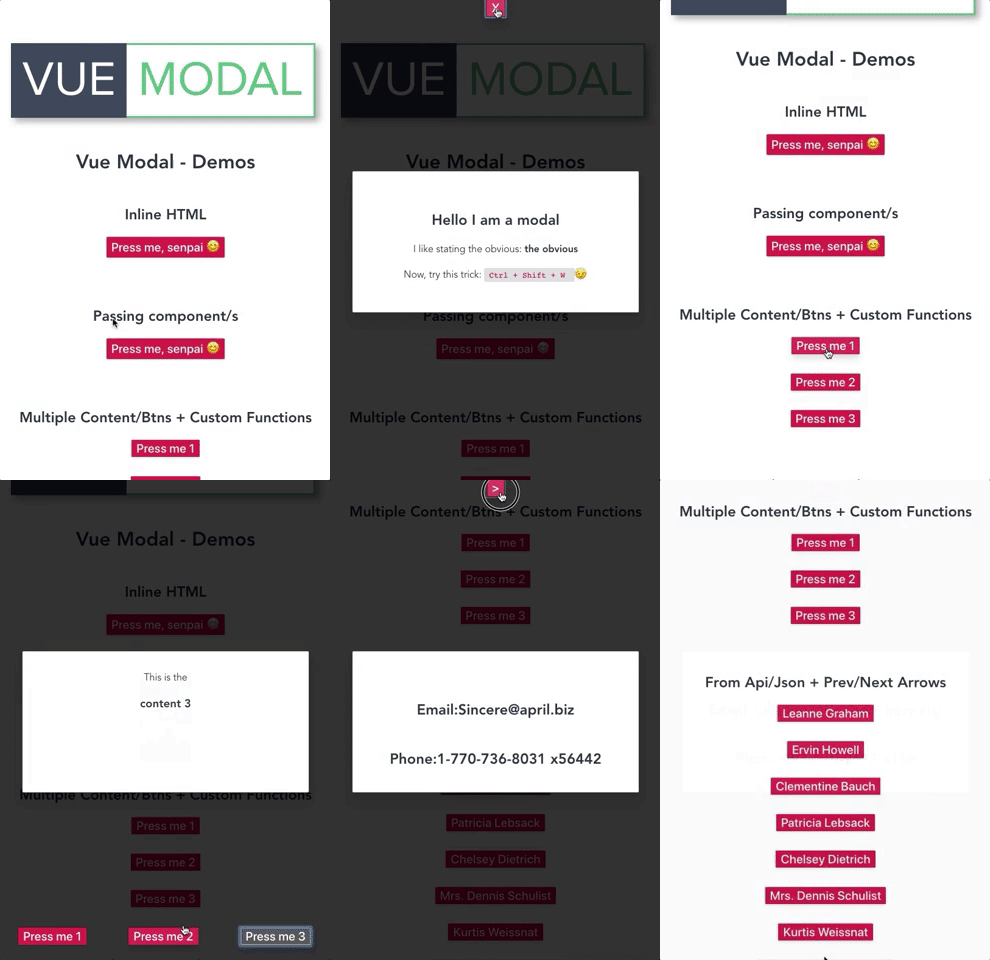
- Code editor - codesandobx
- Preview - codesandbox
Installation
npm i @melmacaluso/vue-modal
Usage
Simply import it in your desired vue component as follows:
import Modal from "@melmacaluso/vue-modal";
Props
| Prop | Type | Comment |
|---|---|---|
btnText |
String | Text label for modal button |
modalContent |
String | Pass here your html for the modal main modal |
closeBtn |
Boolean | Conditionally add a close button |
closeBtn-content |
String | Pass here your html for the close button |
multiple |
Boolean | Allow multiple buttons/content within the modal |
modals |
Array | Pass here an array of objects, they retain the same props within the array's scope ie. <scope>.btnText |
showNav |
Boolean | Conditionally show a navigation with each modal's btnText |
showArrows |
Boolean | Conditionally show an arrow based navigation |
showArrowsCloseBtn |
Boolean | Conditionally show an the close button between the prev/next arrows, it inherits closeBtn-content |
arrowNextContent |
String | Pass here your html for the next arrow |
arrowPrevContent |
String | Pass here your html for the previous arrow |
@before-open |
Function | Attach here your custom function, it will be invoked before the modal opens |
@before-close |
Function | Attach here your custom function, it will be invoked before the modal closes |
Examples
Inline HTML:
<Modal
  btnText="Press me, senpai 😊"
  modalContent="
        <div>
          <h2> Hello I am a modal</h2>
          <p>I like stating the obvious: <b>the obvious</b></p>
          <p>Now, try this trick: <code>Ctrl + Shift + W </code> 😉</p>
        </div>
        "
  :closeBtn="true"
  closeBtn-content="
        <span>X</span>
        "
/>
Passing component:
<Modal
  btnText="Press me, senpai 😊"
  :closeBtn="true"
  closeBtnHTML="<span>X</span>"
>
  <ExampleComponent/>
</Modal>
Multiple buttons & modal content + custom functions:
<Modal
  :multiple="true"
  @before-open="yourOpenFn()"
  @before-close="yourCloseFn()"
  :modals="[
    {
      btnText: 'Press me 1',
      modalContent: 'This is <strong>the</strong> content 1'
    },
    {
      btnText: 'Press me 2',
      modalContent:
        '<img src=\'https://media.giphy.com/media/5exwXWg9u7yow/giphy.gif\'>'
    },
    {
      btnText: 'Press me 3',
      modalContent: 'This is the <h3>content 3</h3>'
    }
  ]"
  :showNav="true"
/>
From Api/Json feed + Prev/Next Arrows:
<Modal
  :multiple="true"
  :modals="formattedUsers"
  :showArrows="true"
/>

export default {
  data: () => {
    return {
      users: []
    }
  },
  mounted(){
    fetch('https://jsonplaceholder.typicode.com/users')
      .then(res => res.json())
      .then(res => this.users = res)
      .catch(err => console.log(err))
  },
  computed: {
    formattedUsers: function() {
      return this.users.map(user => {
        return {
          btnText: `${user.name}`,
          modalContent: `
            <h2>Email:${user.email}</h2>
            <h2>Phone:${user.phone}</h2>
          `
        };
      });
    }
  }
}
Related Packages
Version History
| Version | Released | Vue | License |
|---|---|---|---|
| 2.1.0 | ^2.6.6 | MIT | |
| 2.0.0 | ^2.6.6 | MIT | |
| 1.10.1 | ^2.6.6 | MIT | |
| 1.10.0 | ^2.6.6 | MIT | |
| 1.9.0 | ^2.6.6 | MIT | |
| 1.8.4 | ^2.6.6 | MIT | |
| 1.8.3 | ^2.6.6 | MIT | |
| 1.8.2 | ^2.6.6 | MIT | |
| 1.8.1 | ^2.6.6 | MIT | |
| 1.8.0 | ^2.6.6 | MIT | |
| 1.7.0 | ^2.6.6 | MIT | |
| 1.6.0 | ^2.6.6 | MIT | |
| 1.5.0 | ^2.6.6 | MIT | |
| 1.4.0 | ^2.6.6 | MIT | |
| 1.3.2 | ^2.6.6 | MIT | |
| 1.3.1 | ^2.6.6 | MIT | |
| 1.3.0 | ^2.6.6 | MIT | |
| 1.2.1 | ^2.6.6 | MIT | |
| 1.1.1 | ^2.6.6 | MIT | |
| 1.1.0 | ^2.6.6 | MIT | |
| 1.0.2 | ^2.6.6 | MIT | |
| 1.0.1 | ^2.6.6 | MIT | |
| 0.1.9 | ^2.6.6 | MIT | |
| 0.1.8 | ^2.6.6 | MIT | |
| 0.1.7 | ^2.6.6 | ||
| 0.1.6 | ^2.6.6 | ||
| 0.1.5 | ^2.6.6 | ||
| 0.1.4 | ^2.6.6 | ||
| 0.1.3 | ^2.6.6 | ||
| 0.1.1 | ^2.6.6 |
Showing the latest 30 of 31. See every release on npm