@loicngr/kobo
Kōbō
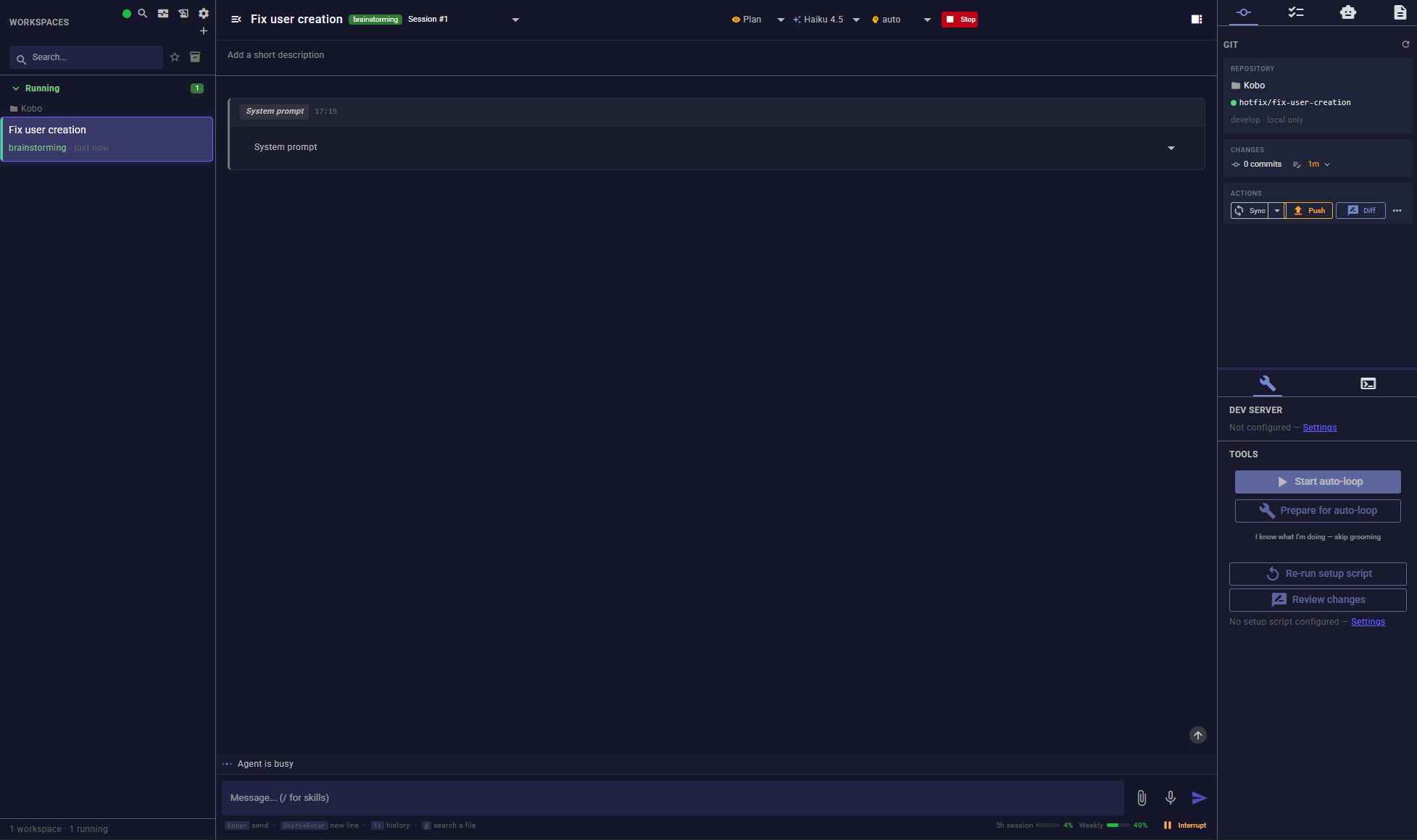
Run a fleet of Claude Code and Codex agents in parallel — each in its own git worktree, all from one dashboard.



Kōbō (工房, "workshop") turns one agent, one terminal into a real workflow. Spin up as many isolated workspaces as you need, watch every agent work live, review and merge their diffs from a Monaco-based Git panel, and let auto-loop or scheduled wakeups keep them going while you're away.
[!NOTE] Active development on
develop. Forward-only migrations and timestamped pre-migration backups keep upgrades safe.
Why Kōbō
| 🗂️ Isolated worktrees, two engines | Every workspace is its own git worktree and branch — parallel sessions never collide. Pick Claude Code or OpenAI Codex per workspace, and continue in a fresh session with the same LLM or a different model/engine, preserving the worktree and mission history. |
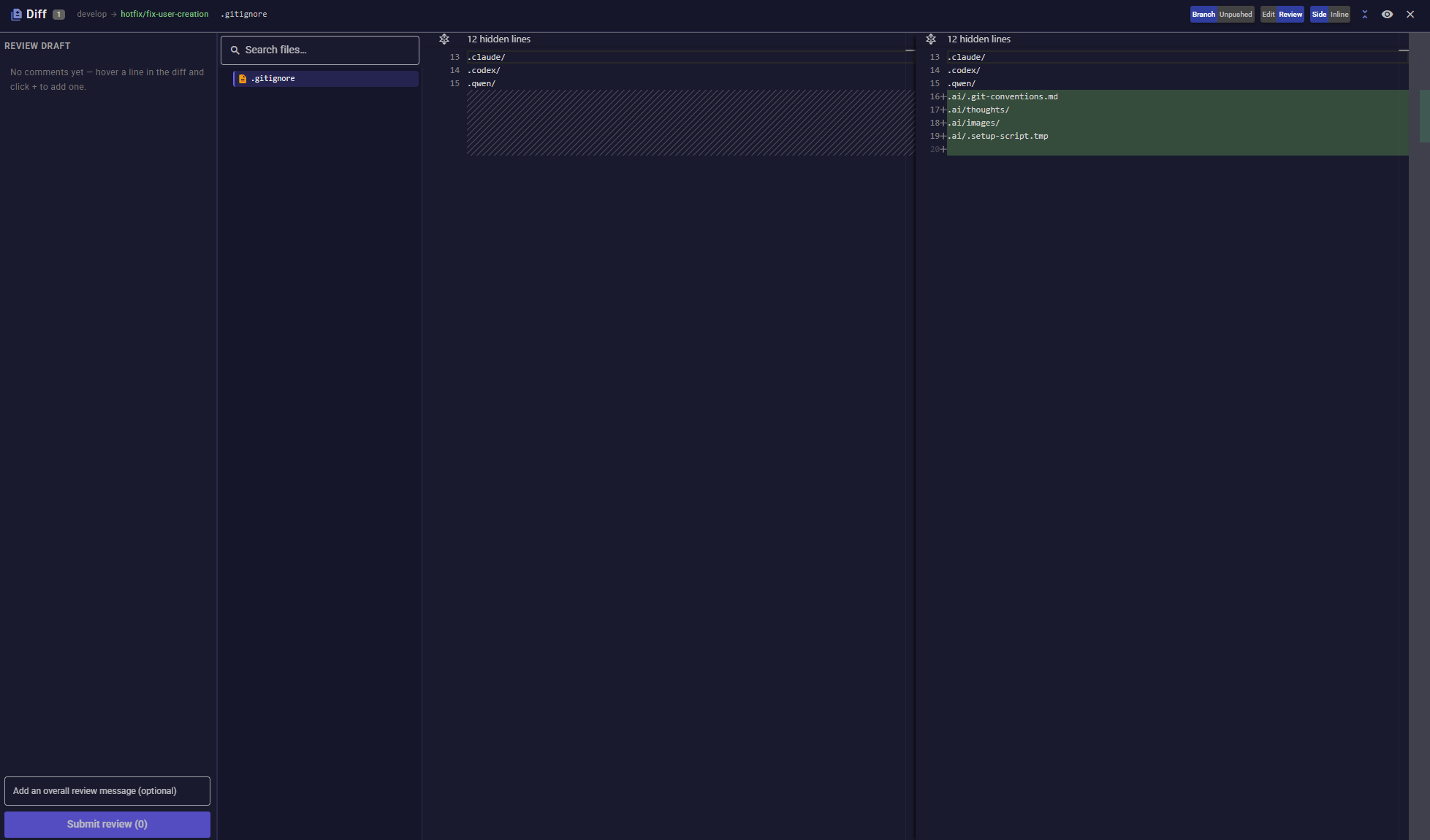
| 💬 Live chat, real diff review | Streaming responses, inline Edit/Write diffs, a reasoning panel, and a Monaco diff viewer with inline file editing, conflict resolution, and one-click Sync / Push / Open PR / Merge. |
| 🔁 Auto-loop, cron, wakeups | Turn an agent loose on the task list: it works through tasks, retries on rate limits, and stops itself when there's nothing left, progress stalls, or it needs you. An optional independent final review returns findings to the original session for automatic correction and repeats until none remain, with durable recovery after restart. Cron schedules and one-shot wakeups keep workspaces moving on their own timeline. |
| 🔀 Create from a PR/MR, or from a ticket | Pick an open pull/merge request from GitHub, GitLab, or Bitbucket and Kōbō resolves every local conflict for you before spinning up the workspace. Or start straight from a Notion page or a Sentry issue URL. |
Use group messages to send one instruction to selected workspaces, filtered by tags and status, from the interface or MCP. Auto-loops receive it on their next iteration; each recipient has a durable delivery result.
Session progress bars show labelled long-running activities above the message input, including work delegated to subagents. Agents report progress through internal or external MCP; you can dismiss an individual bar without stopping its work.
Quick start
Requires Node.js ≥ 24.15, Git, Bash and your own Claude Code or Codex authentication. No skill plugin or ticket integration is required. Kōbō is a local, single-user tool; each user installs their own instance.
npx @loicngr/kobo@latest
Open http://localhost:3000 and follow the first-run check. Use Choose a folder beside the project field to select a local Git repository; completing setup opens the mission form without launching an agent. New installs use the plugin-free Standard suite, Plan permissions, manual commit/push/publication preferences, and disabled optional integrations/audio. Existing preferences are preserved on upgrade.
Follow your first mission, troubleshooting, or the security and privacy model.
Data is persisted under ~/.config/kobo/ (override via KOBO_HOME).
Default port is 3000; if it's taken, SERVER_PORT (checked first) or PORT picks another:
SERVER_PORT=9997 PORT=9998 npx @loicngr/kobo@latest
Kōbō's production build is an installable PWA — use your browser's Install app action. Want to run from source or contribute instead? See CONTRIBUTING.md. Prefer Docker? Jump to Docker deployment.
Everything else Kōbō does
-
Attachments from the first prompt: paste, drop or attach screenshots, Markdown, text files or PDFs to the creation description or workspace chat. Kōbō copies them into the worktree for the agent. See creation attachments and chat attachments.
-
Command palette & search:
/autocompletes skills and commands,@fuzzy-completes worktree file paths,Ctrl+Fsearches readable messages,Ctrl+Kopens a command palette. The global search page deep-links to the same spot. -
MCP toolset (
kobo-tasks): task/acceptance-criteria CRUD, dev server control, a unifiedget_ticket(Notion or Sentry), cross-workspace conversation search, per-session usage, and a.ai/thoughtsdecision log — see the MCP guide. Internal and external MCP clients can create fully configured workspaces, including final auto-loop review, attachments and checkout of an existing PR. HTTP and stdio clients can also archive, purge, delete or restore workspaces, read conversations, send messages, and answer questions.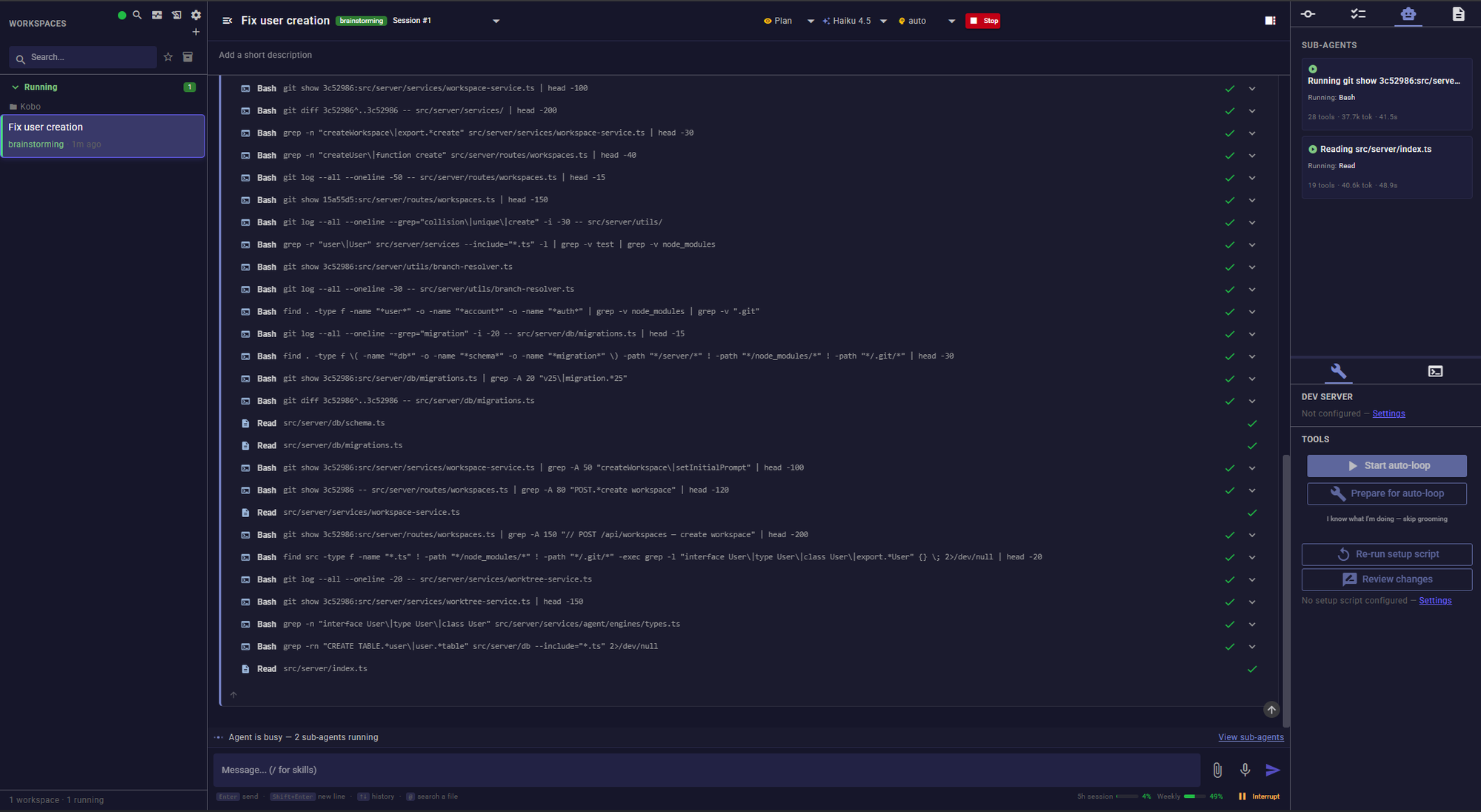
-
Multi-forge Git panel: GitHub (
gh), GitLab (glab), or Bitbucket Community (bkt), auto-detected from the remote —Open PR,Merge ready PR,Change PR base,Change source branch, all from the UI. -
Dev server panel: start, stop, and tail a workspace's dev server (Docker or npm) from the Tools panel.
-
Attention indicators: CI failures, review-requested changes, and a conflict-aware ready-to-merge badge on every workspace card, plus a one-click Fix CI button.
-
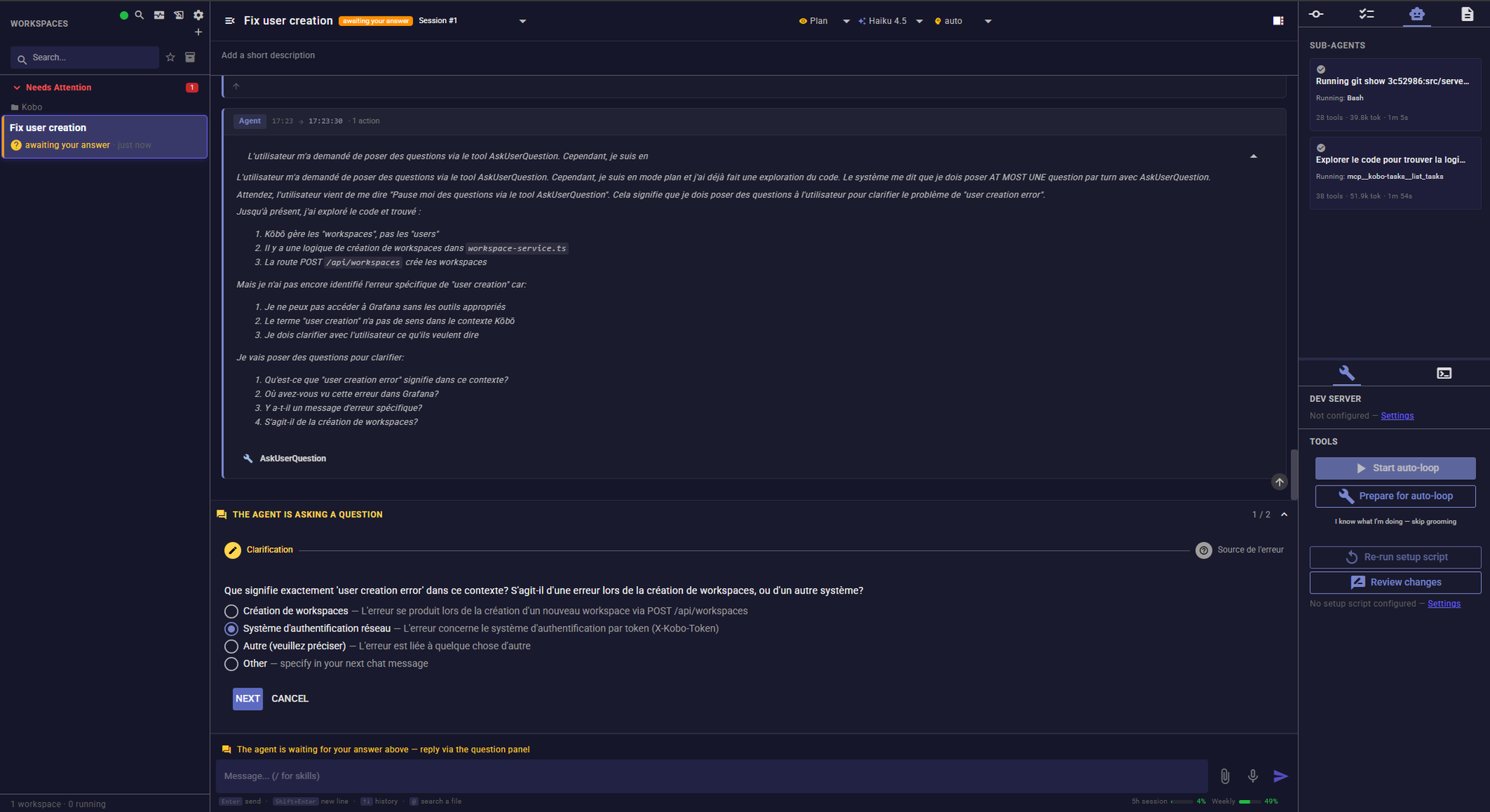
Interactive Q&A: an agent can pause mid-session to ask you a question through the UI instead of guessing.
-
Quota-aware: 5-hour / 7-day Claude usage is shown in the footer; engine-reported rate limits guide quota waits; auto-loops can resume after a reset. Explicit cron/wakeup schedules can also resume work; a manual workspace does not restart solely because its quota resets.
-
Account switching: with optional ccswap, view and switch the active Claude Code or Codex account from the usage popover. Credentials are shared across workspaces using that engine; setup and session behavior.
-
Disk-space purge: reclaim a merged workspace's
node_modules/vendorweight without losing its chat history — seeCONFIGURATION.md. -
Lifecycle scripts: shell scripts run on setup, cleanup, archive, session end, PR merge, or auto-loop stop, with output streamed into the chat.
-
Observability: a per-session timeline (duration, tools, tokens, errors) and a downloadable redacted diagnostic JSON.
-
Optional integrations: Notion (import missions) and Sentry (fix from issue URL), usable by both agent engines through saved connections, each independently toggled with a Test connection action; local voice transcription via
whisper.cpp.
Persistent memory across engines
Kōbō offers Manual, Hybrid (the default), and Automatic memory behavior in Settings → Memory. Global, project, and workspace scopes are shared by Claude Code and Codex but remain independently manageable. Hybrid applies workspace notes while asking for human approval before shared project/global changes. The workspace's right-hand Memory tab shows the current conversation's delivered context, pending proposals, and a provenance-aware operation journal. Memory has conservative per-response and per-conversation budgets; it cannot retract facts already transmitted into an agent or provider conversation. See the persistent memory guide and MCP memory tools.
Fresh sessions and LLM handoffs
Long conversation getting crowded? Use Continue in a fresh session at the bottom of the right-hand Tools panel. Change LLM uses the same transfer flow and also lets you select another model within the current engine.
- Choose the destination model, reasoning effort and permission mode. A fresh session starts with the workspace's current configuration selected.
- Leave Generate a handoff with the current agent enabled to have the current conversation summarize the objective, constraints, decisions, verified progress, failed approaches and next action. Disable it when the old provider has no quota left: Kōbō builds context from the mission, tasks, Git state and source history without calling that LLM.
- Start the transfer. Kōbō interrupts the current work immediately, waits for confirmed shutdown, prepares the handoff and opens a fresh native conversation that continues the mission automatically.
The workspace, worktree, task list and conversation history remain available. The transfer links to its source session and a Markdown report in Documents (.ai/handoffs/, ignored by Git). Auto-loop keeps its intent and diagnostic budget; queued instructions retain their delivery state. Pending wakeups from the source conversation follow the fresh session once its startup is confirmed.
If generation fails, choose Retry, Continue without an LLM summary, or Cancel transfer. Cancel and Stop leave the work stopped and restore the source conversation and LLM configuration, including when the destination failed to start. Failed attempts remain in history without being resumed automatically. If there was no source conversation, the next message starts a fresh one. A server restart preserves the transfer and report for an explicit recovery decision; it never automatically replays a potentially delivered prompt. Transfers are manual—conversation size does not trigger them automatically.
Configuration
The most common knobs:
| Env var | Default | Purpose |
|---|---|---|
PORT / SERVER_PORT |
3000 |
HTTP / WebSocket server port (SERVER_PORT takes precedence) |
KOBO_HOME |
~/.config/kobo |
Data directory (SQLite, settings, voice models) |
NOTION_API_TOKEN |
none | Notion integration token |
ANTHROPIC_API_KEY |
none | Claude Code engine credential (alternative to claude /login) |
OPENAI_API_KEY |
none | Codex engine credential (alternative to codex login) |
Everything else — worktree paths, dev server commands, prompt templates, git conventions, lifecycle scripts, forge selection, permission modes — lives in Settings, with per-project values inheriting from global ones. The full reference (every env var, every setting key, MCP server registration, forge/Notion/Sentry/voice setup) is in CONFIGURATION.md.
Workflow and integration settings
Settings → Git groups manual/automatic commit, push and publication preferences, Git conventions and branch prefixes. Prompts contains post-PR/MR, review, CI-fix and finalization instructions. New workspaces snapshot the workflow preferences; changing global defaults does not alter existing workspaces. These preferences guide agents, while engine permissions remain a separate control.
Notion and Sentry are optional. Save a Direct connection in the integration tab,
enable it, save Settings, then use Test connection. Saved direct connections take
priority over the Claude MCP selector, which is disabled while one exists. Enabled
connections also reach Claude Code and Codex agents through kobo-notion-* and
kobo-sentry-* MCP servers. Stop and resume a running agent to apply a connection
change. See managed integration MCPs
for credential priority and native-configuration scope.
Docker
An official Dockerfile and four Compose examples ship in this repository: a local test stack, a local Traefik rehearsal, a deployment including Traefik, and a fresh VPS instance behind an existing Traefik.
Working remotely on your own VPS? The VPS deployment guide includes a guided kobo-install installer, optional renewable GitHub App authentication, persistent agent logins and Docker updates. Your browser runs on your PC; repositories and agents run on the VPS. See CONFIGURATION.md for the Compose comparison and shared settings.
Network access
Kōbō binds to 127.0.0.1 only by default. Enabling Settings → General → Network access re-binds to the LAN behind a shared token (a QR code makes pairing a phone easy). Plain HTTP — keep it to trusted networks, or front it with HTTPS/a VPN for anything further. Details in CONFIGURATION.md.
Agent runtimes
- Claude Code: authenticate once with
claude /login. Kōbō calls the embedded SDK directly — no separately installed Claude CLI is required at runtime; the SDK supplies its runtime. - OpenAI Codex: run
codex loginor exportOPENAI_API_KEY. Kōbō spawns a long-livedcodex app-serversubprocess per workspace.
Both engines share task tracking, permission modes, the sub-agent panel, and the quota footer. The mapping of Kōbō's four permission modes (plan / bypass / strict / interactive) to each engine's native sandbox semantics is in CONFIGURATION.md.
Skill suites
Standard is the default and works without a skill extension. Settings → Skills also offers Superpowers, gstack, ECC, Superpowers + gstack, Superpowers + gstack + ECC, and Custom instructions. These choices adapt the review, grooming, QA and brainstorming instructions; selecting one does not install a suite or change permissions. External skills must already be available to the selected Claude Code or Codex engine.
The Settings guided tour includes a dedicated skill-suite explanation; replay it from the help icon or Help menu. See the skill-suite reference for the available choices and custom instructions.
Architecture
Hono backend, Vue 3 + Quasar PWA, SQLite (WAL) for persistence, WebSocket for live updates. Each workspace spawns its own agent engine and a dedicated MCP server (kobo-tasks) that the agent uses to query and mutate workspace state.
src/
├── server/         # Hono backend (routes, services, db, agent orchestrator)
│   ├── services/agent/engines/  # claude-code/ + codex/ engines
│   └── ...
├── client/         # Vue 3 + Quasar PWA
├── mcp-server/     # kobo-tasks MCP server, spawned per workspace
├── shared/         # types shared backend ↔ frontend
└── __tests__/      # backend Vitest suite; client tests live in client/src/__tests__/
AGENTS.md covers the data model, WebSocket protocol, engine contracts, MCP tool surface, migration discipline, i18n rules, and contribution guidelines.
Contributing
PRs welcome. See CONTRIBUTING.md for the from-source setup, scripts, and release process, and AGENTS.md for code conventions and the database-migration discipline.
License
GPL-3.0-or-later. See LICENSE.
Community and support
Report reproducible bugs and feature requests in GitHub Issues. Read Contributing and the Code of conduct before participating. Vulnerabilities belong in the private channel described in Security, not public issues. Support is maintained on a best-effort basis; no response-time commitment is implied.
Linux is locally exercised; macOS CI, WSL and real-provider beta sessions require their own evidence. See third-party notices for redistributed assets.
Related Packages
MCP server for AI agents: the Quasar documentation and component API, served fro...
MCP server that gives Claude Code persistent memory across sessions. Index your...
Claude Code setup for product teams — skills, commands, and onboarding interview...
Model Context Protocol (MCP) server that exposes the jQWidgets API (80+ widgets...
Version History
| Version | Released | License |
|---|---|---|
| 2.1.28 | GPL-3.0-or-later | |
| 2.1.26 | GPL-3.0-or-later | |
| 2.1.25 | GPL-3.0-or-later | |
| 2.1.24 | GPL-3.0-or-later | |
| 2.1.23 | GPL-3.0-or-later | |
| 2.1.22 | GPL-3.0-or-later | |
| 2.1.21 | GPL-3.0-or-later | |
| 2.1.20 | GPL-3.0-or-later | |
| 2.1.19 | GPL-3.0-or-later | |
| 2.1.18 | GPL-3.0-or-later | |
| 2.1.16 | GPL-3.0-or-later | |
| 2.1.15 | GPL-3.0-or-later | |
| 2.1.13 | GPL-3.0-or-later | |
| 2.1.12 | GPL-3.0-or-later | |
| 2.1.11 | GPL-3.0-or-later | |
| 2.1.10 | GPL-3.0-or-later | |
| 2.1.9 | GPL-3.0-or-later | |
| 2.1.7 | GPL-3.0-or-later | |
| 2.1.6 | GPL-3.0-or-later | |
| 2.1.5 | GPL-3.0-or-later | |
| 2.1.4 | GPL-3.0-or-later | |
| 2.1.2 | GPL-3.0-or-later | |
| 2.1.1 | GPL-3.0-or-later | |
| 2.1.0 | GPL-3.0-or-later | |
| 1.11.45 | GPL-3.0-or-later | |
| 1.11.44 | GPL-3.0-or-later | |
| 1.11.43 | GPL-3.0-or-later | |
| 1.11.42 | GPL-3.0-or-later | |
| 1.11.41 | GPL-3.0-or-later | |
| 1.11.40 | GPL-3.0-or-later |
Showing the latest 30 of 167. See every release on npm