@lirl-cn/v2c
v2c
基于 Vue2 与 Element UI 的高级表格和表单组件库
如果之前你用过 React 及 antd-pro-table,那么这个 Vue 组件对你来说会很简单
✨ 特性
- 🎨 主题定制 - 支持通过 SCSS 变量自定义主题色
- 📦 按需加载 - 优化的包体积,支持 Tree Shaking
- 🔧 TypeScript - 完整的类型定义支持
- 🌍 国际化 - 内置中文支持
- 💪 功能丰富 - 基于 Element UI 的强大组件生态
📦 安装
npm install vue@2.7.14 element-ui@2.15.7 @lirl-cn/v2c
# 或
yarn add vue@2.7.14 element-ui@2.15.7 @lirl-cn/v2c
注意: v2.0.0 开始,
vue和element-ui是 peer dependencies,需要单独安装
🚀 快速开始
基础用法
// main.js
import Vue from 'vue';
import ElementUI from 'element-ui';
import 'element-ui/lib/theme-chalk/index.css';
import V2C from '@lirl-cn/v2c';

// 安装 Element UI
Vue.use(ElementUI);

// 安装 V2C 组件
Vue.use(V2C, {
  table: {
    // 全局配置(可选)
    request: async (url, options) => {
      const response = await fetch(url, options);
      return {
        data: response.data,
        total: response.total,
        success: true,
      };
    },
    current: {
      key: 'page',
      format: (current) => current - 1,
    },
    pageSize: {
      key: 'size',
    },
  },
});
🎨 主题定制
v2c 支持通过 SCSS 变量自定义主题,与 Element UI 主题保持一致。
方式一:自定义主题(推荐)
// styles/theme.scss

// 自定义主题色
$--color-primary: #1890ff;
$--color-success: #71C64A;
$--color-warning: #EB9E05;
$--color-danger: #FA5555;

// 导入 Element UI 主题
@import "~element-ui/packages/theme-chalk/src/index.scss";

// 导入 V2C 组件样式(会继承上面的主题色)
@import "~@lirl-cn/v2c/packages/styles/index.scss";
// main.js
import Vue from 'vue';
import ElementUI from 'element-ui';
import V2C from '@lirl-cn/v2c';
import './styles/theme.scss'; // 导入自定义主题

Vue.use(ElementUI);
Vue.use(V2C);
方式二:使用默认主题
// main.js
import Vue from 'vue';
import ElementUI from 'element-ui';
import 'element-ui/lib/theme-chalk/index.css';
import V2C from '@lirl-cn/v2c';
import '@lirl-cn/v2c/packages/styles/index.scss';

Vue.use(ElementUI);
Vue.use(V2C);
方式三:一体化导入
// main.scss
// 一次性导入 Element UI + V2C(使用默认主题)
@import "~@lirl-cn/v2c/packages/styles/with-element-ui.scss";
可用的 SCSS 变量
查看 packages/styles/variables.scss 了解所有可自定义的变量,或参考 Element UI 变量列表
主要变量包括:
$--color-primary- 主题色$--color-success- 成功色$--color-warning- 警告色$--color-danger- 危险色$--color-info- 信息色- 以及所有 Element UI 支持的变量
🔧 TypeScript 支持
v2c 提供完整的 TypeScript 类型定义,所有组件的 props、方法、事件都有类型提示。
基础使用
import { CnTable, CnForm, LTable } from '@lirl-cn/v2c'

// 组件会自动获得类型提示
导入类型定义
cn-table 类型
import type {
  ColumnType,        // 列配置类型
  ParamsType,        // 请求参数类型
  ResponseDataType,  // 响应数据类型
  RowSelectionType,  // 行选择配置类型
  ActionRefType,     // 方法引用类型
} from '@lirl-cn/v2c'

// 使用类型
const columns: ColumnType[] = [
  {
    title: '姓名',
    dataIndex: 'name',
    valueType: 'input',  // ✅ 自动提示可用值
    hideInSearch: false,
    width: 120,
  }
]

// Request 方法类型
const fetchData = async (params: ParamsType): Promise<ResponseDataType> => {
  const response = await fetch('/api/data', { params })
  return {
    success: true,
    data: response.data,
    total: response.total,
  }
}

// ActionRef 类型
const actionRef = (ref: ActionRefType) => {
  ref.reload()
  ref.getSearchParams()
  ref.setSearchFieldsValue({ name: 'test' })
}
cn-form 类型
import type {
  DataType as FormDataType,  // 表单数据类型
  FormItemType,              // 表单项类型
} from '@lirl-cn/v2c'

const formData: FormDataType[] = [
  {
    name: 'username',
    title: '用户名',
    type: 'input',  // ✅ 自动提示: input, select, date, etc.
    rules: [{ required: true, message: '请输入用户名' }],
  }
]
l-table 类型
import type {
  ColumnsType  // L-Table 列类型
} from '@lirl-cn/v2c'

const columns: ColumnsType[] = [
  {
    title: '姓名',
    dataIndex: 'name',
    valueType: 'date',  // ✅ 类型提示
    width: 120,
  }
]
完整的类型支持
所有组件都提供:
- ✅ Props 类型提示 - 输入属性时自动提示
- ✅ 方法签名 - ref 方法调用时有类型检查
- ✅ 事件回调 - 事件参数有完整类型
- ✅ 类型导出 - 可复用的类型定义
类型定义路径
所有类型定义均可直接从包根目录导入:
import type { ColumnType, FormDataType } from '@lirl-cn/v2c'
📖 核心组件
cn-form
表单生成组件,支持多种表单类型和布局方式。
属性
| 参数 | 说明 | 类型 | 默认值 |
|---|---|---|---|
| data | 表单数据源 | FormDataType[] |
- |
| layout | 表单布局 | 'grid' | 'inline' | 'block' |
'grid' |
| columns | 表单布局为'grid'时生效,列数 |
number |
3 |
| disabled | 是否禁用该表单内的所有组件。若设置为 true,则表单内组件上的 disabled 属性不再生效 | boolean |
- |
| hideRequiredAsterisk | 是否隐藏必填字段的标签旁边的红色星号 | boolean |
false |
| labelSuffix | 表单域标签的后缀 | string |
- |
| labelWidth | 表单域标签的宽度 | number |
120 |
FormDataType
| 参数 | 说明 | 类型 | 默认值 |
|---|---|---|---|
| name | 表单唯一值,亦是返回数据的 key | string |
- |
| title | 显示文案 | string |
- |
| type | 表单类型 | FormItemType |
- |
| placeholder | placeholder | string |
- |
| formItemProps | 透传给表单域的 attrs | HTMLAttributes & any |
- |
| fieldItemProps | 透传给表单组件的 attrs | HTMLAttributes & any |
- |
| options | 选择性组件的数据源,如select、radio等 |
{ label: string, value: string, [k: string]: any }[] |
- |
| rules | 表单验证规则, element ui form rules |
object |
- |
FormItemType 内置的 form 组件类型
type FormItemType =
  | "switch"
  | "slider"
  | "datetime"
  | "datetimerange"
  | "date"
  | "dates"
  | "week"
  | "month"
  | "year"
  | "daterange"
  | "monthrange"
  | "tags-checkbox"
  | "tags-radio"
  | "select"
  | "radio"
  | "checkbox"
  | "cascader"
  | "transfer"
  | "color"
  | "rate"
  | "input"
  | "textarea"
  | "number"
  | "upload"
  | "custom";
// custom 为自定义form组件,需要传人slot `${name}CustomFormComponent`
方法
ref 获取
| 名称 | 说明 | 类型 |
|---|---|---|
| validateFields | 检验并获取所有值 | <T=any>(fields:string[]):T |
| getFieldsValue | 获取所有值 | () => object |
| getFieldValue | 基于 key 获取单个值 | (key:string) => any |
| setFieldValue | 基于 key 设置单个值 | (key:string, value:any) => void |
| setFieldsValue | 设置表单的值 | (fields:{[k:string]: any}) => void |
| resetFields | 重置表单 | () => void |
插槽
如内置 form 组件不满足业务需求也可以自定义 form 组件,示例如下
<cn-form>
  <!-- `${name}CustomFormComponent` 格式必须是这样,自行绑定value值和change方法,不支持v-modal -->
  <template #customCustomFormComponent="{value, onChange}">
    <you-custom-component
      :value="value"
      @change="onChange"
    ></you-custom-component>
  </template>
  <template #customInputCustomFormComponent="{value, onChange}">
    <el-input :value="value" @input="onChange"></el-input>
  </template>
</cn-form>
额外的 FormItem 内容
<cn-form>
  <!-- `${name}FormExtra` 格式必须是这样 -->
  <template #selectFormExtra>
    <el-link to="/other-list">点击查看更多</el-link>
  </template>
</cn-form>
默认插槽
<cn-form>
  <!-- #default 可省略 -->
  <template #default>
    <div style="text-align: center;">
      <el-button @click="onCancel">取消</el-button>
      <el-button type="primary" @click="onSubmit">提交</el-button>
    </div>
  </template>
</cn-form>
cn-table
高级表格组件,支持搜索、分页、行选择等功能。
属性
import type { HTMLAttributes, StyleValue } from "vue/types/jsx";
import type { FormItemType } from "./cn-form";
import { ElementUIComponent } from "./component";

type ParamsType = {
  current: number; // 当前页
  pageSize: number; // 一页显示多少条
  [k: string]: https://github.com/lirl-cn/v2c/blob/HEAD/any;
};
type ResponseDataType = {
  success?: boolean; // 是否成功
  data: any[]; // 数据源
  total: number; // 一共多少数据
};
type SearchType = {
  type?: "inline" | "grid" | "block"; // 搜索排列样式
  columns?: number; // 几列
  resetText?: string | false; // 重置文案
  searchText?: string | false; // 搜索文案
  rangeExtra?: [string, string]; // 区间选择额外增加的字段
  rangeExtraPlacement?: "start" | "end"; // 区间选择额外增加字段的位置
};
type StatusType = "success" | "error" | "default" | "processing" | "warning";
type ValueEnumType = {
  [k: string]: https://github.com/lirl-cn/v2c/blob/HEAD/{
    text: string; // 文案
    status?: StatusType; // 状态
  };
};
type ColumnType = {
  dataIndex: string; // 表单唯一值,该列基于哪个字段显示,支持a.b.c但不建议
  title: string; // 单元格名称文案
  searchTitle?: string; // 搜索框显示的文案。若为空默认显示title
  searchStyle?: StyleValue; // 搜索框样式
  name?: string;
  key?: string;
  searchName?: string; // 搜索时传参名称,若为空默认显示dataIndex
  status?: StatusType; // 状态
  valueType?: FormItemType; // 搜索框类型
  valueEnum?: ValueEnumType; // 枚举
  valueOptions?: { label?: string; value?: string; [k: string]: any }[]; // 选择性组件数据源
  fetchOptions?():
    | ValueEnumType
    | { label?: string; value?: string; [k: string]: any }[]
    | Promise<{ label?: string; value?: string; [k: string]: any }[]>
    | Promise<ValueEnumType>; // 方法的方式获取valueEnum | valueOptions
  formItemProps?: HTMLAttributes & any; // object 绑定给el-form-item的attrs
  fieldItemProps?: HTMLAttributes & any; // object 绑定给 表单组件 的attrs
  hideInTable?: boolean; // 在表格中隐藏
  hideInSearch?: boolean; // 在搜索中隐藏
  ellipsis?: boolean; // 超出隐藏
  width?: number; // 宽度
  scopedSlots?: { customRender?: string; [k: string]: any };
};
type PaginationType = {
  defaultPageSize?: number;
  pageSizeOptions?: number[];
};
type SelectedRowsResponse = {
  selectedRows: any[];
};
type ActionRefType = {
  onSearch: () => void; // 搜索
  onReset: () => void; // 重置
  onReload: () => void; // 重新加载
  getSearchParams<T = ParamsType>(): T; // 获取所以搜索参数
  setSearchFieldsValue<T = any>(fieldsValue: T): void; // 设置搜索参数
  getSelectedRows: () => SelectedRowsResponse; // 获取选择的数据
};

type RowSelectionType = {
  selectText?: string; // 已选中 文案
  itemText?: string; // 项 文案
  cancelSelectText?: string; // 取消选择 文案
  batchDeleteText?: string; // 批量删除文案
  batchDownloadText?: string; // 批量导出文案
  onBatchDelete?: (selectedRows: SelectedRowsResponse["selectedRows"]) => void; // 批量删除调用的方法
  onBatchDownload?: (
    selectedRows: SelectedRowsResponse["selectedRows"]
  ) => void; // 批量导出调用的方法
  onChange?: (selectedRows: SelectedRowsResponse["selectedRows"]) => void; // 当选择行变化时调用
};

type SettingType = "reload" | "fullScreen";
type othersTextEnumKeys = 'setting-reload' | 'setting-fullScreen' | 'table-index'

class CnTable extends ElementUIComponent {
  columns: ColumnType[]; // 表格列数据
  title?: string; // 表格标题
  resetText?: string;
  searchText?: string;
  openText?: string;
  closeText?: string;
  othersTextEnum?: {[k:string]: string};
  rowKey?: string; // 行唯一,需要选择时必传
  searchType?: SearchType["type"];
  searchColumns?: number;
  scroll?: { y?: string | number };
  action?: string; // 若在main.js中传人了request方式,内部会将action地址传入方法中获取数据,当前组件request权重高
  request?: (params: ParamsType) => ResponseDataType; // 获取数据的方法
  onloadAutoRequest?: boolean; // 是否自动加载
  showIndex?:
    | boolean
    | ((params: {
        index: number;
        current: number;
        pageSize: number;
        text: string | number;
      }) => string); // 显示序号
  method?: "GET" | "POST"; // action存在时有效,获取数据时调用方式
  pagination?: false | PaginationType; // 是否显示分页信息
  search?: false | SearchType;
  data?: any; // 调用接口额外的参数
  actionRef?: (node: ActionRefType) => void; // 获取表格的方法
  beforeSearchSubmit?<T = ParamsType>(params: ParamsType): T; // 获取数据前调用
  formatResponse?<T = any>(response: T): ResponseDataType; // 拿到数据后格式化调用
  catchFetchDataError?: (error: Error) => ResponseDataType | void; // 监听action方式的报错
  watchReset?: () => void; // 监听重置方法的调用
  loading?: boolean; // 是否加载中
  autoCalcWidth?: false | number; // 自动计算宽度
  rowSelection?: RowSelectionType;
  setting?: false | SettingType[];
}
📝 示例
cn-form
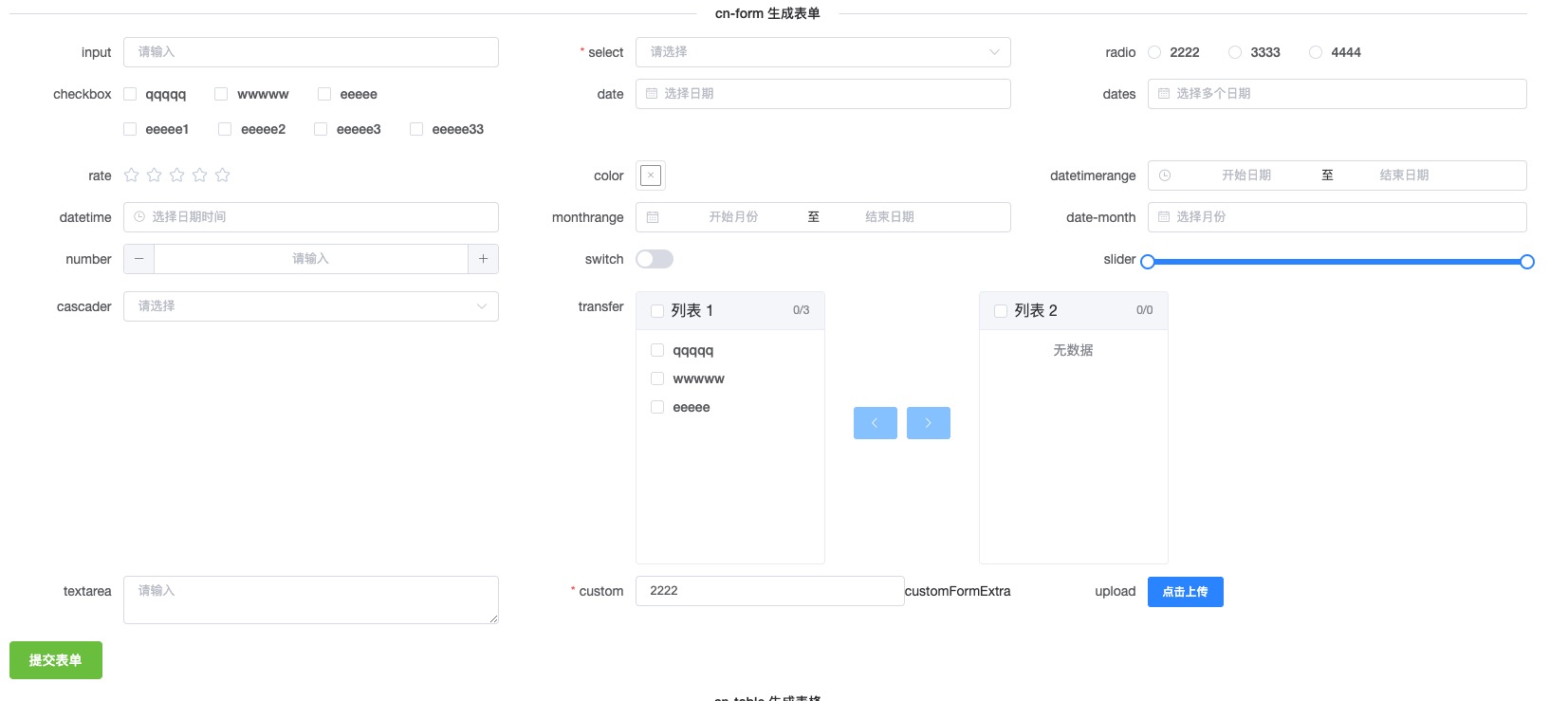
import { defineComponent, ref } from "vue";

export default defineComponent({
  setup() {
    const formRef = ref();
    const formDataSource = [
      // 输入框
      {
        title: "input",
        type: "input",
        name: "input",
      },
      // 下拉选
      {
        title: "select",
        type: "select",
        name: "select",
        options: [
          {
            label: "2222",
            value: 2222,
          },
          {
            label: "3333",
            value: 3333,
          },
          {
            label: "4444",
            value: 4444,
          },
        ],
        rules: [{ required: true, message: "请输入邮箱地址" }],
      },
      // 单选
      {
        title: "radio",
        type: "radio",
        name: "radio",
        options: [
          {
            label: "2222",
            value: 2222,
          },
          {
            label: "3333",
            value: 3333,
          },
          {
            label: "4444",
            value: 4444,
          },
        ],
      },
      // 多选
      {
        title: "checkbox",
        type: "checkbox",
        name: "checkbox",
        options: [
          {
            label: "qqqqq",
            value: 2222,
          },
          {
            label: "wwwww",
            value: 3333,
          },
          {
            label: "eeeee",
            value: 4444,
          },
        ],
      },
      // 日期
      {
        title: "date",
        type: "date",
        name: "date",
      },
      // 评分
      {
        title: "rate",
        type: "rate",
        name: "rate",
      },
      // 颜色
      {
        title: "color",
        type: "color",
        name: "color",
      },
      // 数字
      {
        title: "number",
        type: "number",
        name: "number",
        fieldItemProps: {
          step: 2,
          "step-strictly": true,
        },
      },
      // 开关
      {
        title: "switch",
        type: "switch",
        name: "switch",
      },
      // 文本域
      {
        title: "textarea",
        type: "textarea",
        name: "textarea",
      },
      // 自定义
      {
        title: "custom",
        type: "custom",
        name: "custom",
        initialValue: "2222",
        rules: [{ required: true, message: "请输入邮箱地址" }],
      },
    ];
    const onSubmit = async () => {
      // validateFields 检验表单并返回所有数据
      console.log(await formRef.value.validateFields());
    };
    return () => {
      return (
        <div>
          <el-divider>cn-form 生成表单</el-divider>
          <cn-form
            ref={formRef}
            columns={3}
            data={formDataSource}
            scopedSlots={{
              customCustomFormComponent: ({ onChange, value }: any) => {
                return <el-input value={value} onInput={onChange}></el-input>;
              },
              customFormExtra: () => {
                return "customFormExtra";
              },
            }}
          ></cn-form>
          <el-button onClick={onSubmit}>提交</el-button>
        </div>
      );
    };
  },
});
cn-table
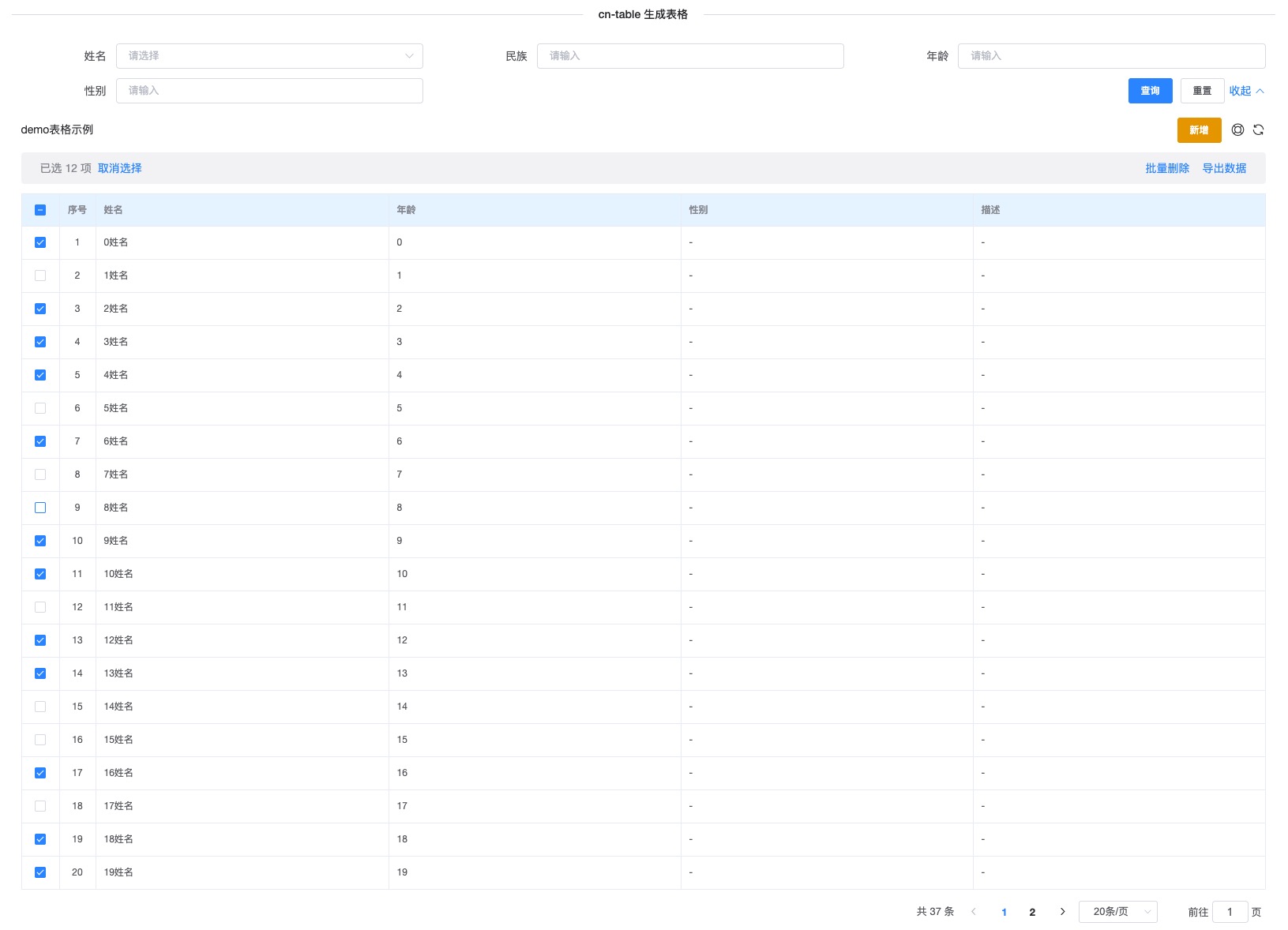
import { defineComponent, ref } from "vue";

export default defineComponent({
  setup() {
    const tableColumns = [
      {
        title: "姓名",
        dataIndex: "name",
        valueType: "select",
        valueOptions: [
          {
            label: "海洋",
            value: "海洋",
          },
          {
            label: "大陆",
            value: "大陆",
          },
        ],
      },
      {
        title: "民族",
        dataIndex: "id",
        hideInTable: true, // 在表格中隐藏
      },
      {
        title: "年龄",
        dataIndex: "id",
      },
      {
        title: "性别",
        dataIndex: "jump",
      },
      {
        title: "描述",
        dataIndex: "description",
        hideInSearch: true, // 在搜索条件中隐藏
      },
    ];
    // request 方法,必须返回 data和total success可选,为false代表失败
    const fetchData = async (data: {
      current: number;
      pageSize: number;
      [k: string]: any;
    }) => {
      console.log(data);
      if (data.current === 1) {
        return {
          success: true,
          data: Array(20)
            .fill({})
            .map((item, index) => ({
              ...item,
              name: index + "姓名",
              id: index,
            })),
          total: 37,
        };
      } else {
        return {
          success: true,
          data: Array(17)
            .fill({})
            .map((item, index) => ({
              ...item,
              name: index + "姓名",
              id: index + data.pageSize,
            })),
          total: 37,
        };
      }
    };
    return () => {
      return (
        <div>
          <el-divider>cn-table 生成表格</el-divider>
          <cn-table
            request={fetchData}
            columns={tableColumns}
            showIndex
            scopedSlots={{
              headOperation: () => (
                <el-button size="small" type="warning">
                  新增
                </el-button>
              ),
            }}
            searchType="grid"
            rowSelection={{
              onBatchDelete: (rows: any) => {
                console.log("onBatchDelete", rows);
              },
              onBatchDownload: (rows: any) => {
                console.log("onBatchDownload", rows);
              },
            }}
          ></cn-table>
        </div>
      );
    };
  },
});
🔄 从 v1.x 迁移
主要变更
v2.0.0 引入了一些破坏性变更以优化包体积和性能:
-
Element UI 和 Vue 现在是 peer dependencies
- 需要手动安装
vue和element-ui - 避免了重复安装和版本冲突
- 需要手动安装
-
不再自动安装 Element UI
- 需要在应用中手动调用
Vue.use(ElementUI) - 提供更好的控制和灵活性
- 需要在应用中手动调用
-
CSS 导入方式变更
- 不再提供预编译的 CSS 文件
- 使用 SCSS 源文件以支持主题定制
迁移步骤
v1.x 用法:
import V2C from '@lirl-cn/v2c';
import '@lirl-cn/v2c/es/style.css';

Vue.use(V2C);
v2.0.0 用法:
import Vue from 'vue';
import ElementUI from 'element-ui';
import 'element-ui/lib/theme-chalk/index.css';
import V2C from '@lirl-cn/v2c';
import '@lirl-cn/v2c/packages/styles/index.scss';

Vue.use(ElementUI);
Vue.use(V2C);
性能提升
- 📦 CSS 体积减少 99% (1.4MB → 17KB)
- 📦 总包体积减少 85% (1.9MB → 276KB)
- ⚡ 更快的安装和构建速度
- 🎯 更好的 Tree Shaking 支持
📄 License
MIT
🙏 特别鸣谢
- Element UI - 优秀的 Vue 2 组件库
- Ant Design ProTable - 设计灵感来源
Related Packages
@dullar/mercury
Advanced and highly reusable Mobile UI Components built on Vue2 & You can define...
8,553
6
Version History
| Version | Released | Vue | License |
|---|---|---|---|
| 2.0.1 | ^2.6.0 || | MIT | |
| 2.0.0 | ^2.6.0 || | MIT | |
| 1.1.0 | 2.7.14 | MIT | |
| 1.0.9 | 2.7.14 | MIT | |
| 1.0.8 | 2.7.14 | MIT | |
| 1.0.7 | 2.7.14 | MIT | |
| 1.0.6 | 2.7.14 | MIT | |
| 1.0.5 | 2.7.14 | MIT | |
| 1.0.4 | 2.7.14 | MIT | |
| 1.0.3 | 2.7.14 | MIT | |
| 1.0.2 | 2.7.14 | MIT | |
| 1.0.0 | 2.7.14 | MIT | |
| 0.1.5 | 2.7.8 | MIT | |
| 0.1.4 | 2.7.8 | MIT | |
| 0.1.3 | 2.7.8 | MIT | |
| 0.1.2 | 2.7.8 | MIT | |
| 0.1.1 | 2.7.8 | MIT | |
| 0.1.0 | 2.7.8 | MIT | |
| 0.0.47 | 2.7.8 | MIT | |
| 0.0.46 | 2.7.8 | MIT | |
| 0.0.45 | 2.7.8 | MIT | |
| 0.0.44 | 2.7.8 | MIT | |
| 0.0.43 | 2.7.8 | MIT | |
| 0.0.42 | 2.7.8 | MIT | |
| 0.0.41 | 2.7.8 | MIT | |
| 0.0.40 | 2.7.8 | MIT | |
| 0.0.39 | 2.7.8 | MIT | |
| 0.0.38 | 2.7.8 | MIT | |
| 0.0.37 | 2.7.8 | MIT | |
| 0.0.36 | 2.7.8 | MIT |
Showing the latest 30 of 58. See every release on npm