@lionad/use-scrollbar



@lionad/use-scrollbar
use-scrollbar replaces a component's native scrollbar with a fully customizable one —
ideal for styling third-party widgets like tables. Not to be confused with virtual scrolling;
this is purely a scrollbar overlay.
Features
- Powerful API, able to deal with complex components[^1], such as vxe-table、ant-vue-table
- Customizable, so that you can create your own scrollbar style, animation and user interaction
- Theme, integrated with these style configurations: ElementPlus, Steam, CSS-Tricks ...
- Full Typed, with the power of typescript
- SSR Safe, DOM access is guarded and silently skipped on the server
[^1]: https://github.com/Lionad-Morotar/use-scrollbar/blob/HEAD/which is not possible with other libraries
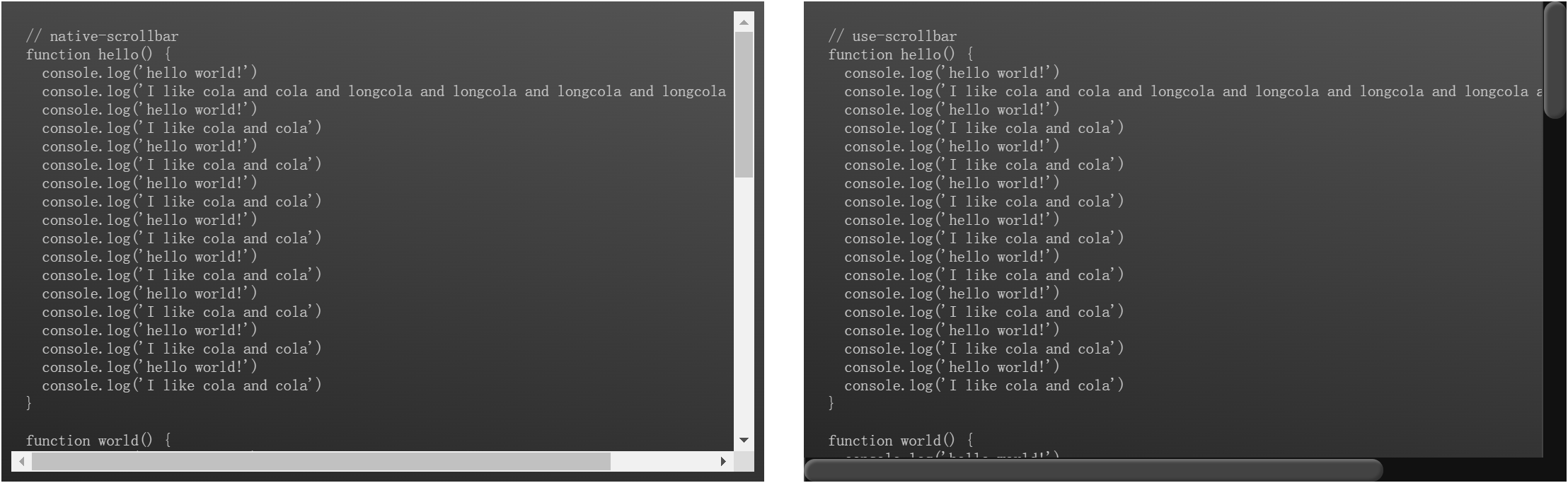
Preview
Native Scrollbar VS Customized Scrollbar (theme: css-tricks)
Install
pnpm add @lionad/use-scrollbar
Using Nuxt? Try the companion module @lionad/use-scrollbar-nuxt for auto-imports and style injection.
Usage
import { useScrollbar } from '@lionad/use-scrollbar'
import { ref } from 'vue'

// dont forget to import style.css
// in your main.ts (or entry.ts anyway)
import '@lionad/use-scrollbar/dist/style.css'

const componentOrElementRef = ref(null)
const barStates = useScrollbar(componentOrElementRef, {
  // override default options
})
Live demos (vxe-table, antd-vue-table, AG Grid, Tabulator, CodeMirror 6, Element Plus Table): playground
Document
States
barStates.theme
改变滚动条样式。
const theme = 'normal' // 'normal' | 'steam' | 'css-tricks'
barStates.theme = theme
barStates.offset
改变滚动条相对挂载元素的偏移量。
barStates.offset.y.top = 10 // px
barStates.offset.y.right = 10 // px
barStates.offset.x.left = 5 // px
barStates.offset.x.bottom = 5 // px
几何契约:thumb 的位置与长度由 offset 驱动的内联样式决定,而轨道(.c-scrollbar-track)的 CSS 是 inset: 0; width: 100%; height: 100% 过约束布局(
LTR 下 right/bottom 被忽略,恒铺满容器)。想给滚动条贴边留白时直接改 offset;覆写轨道的 right/bottom 无效,覆写 thumb 内联样式需要 !important,两者都不推荐。
barStates.scrollTop / barStates.scrollLeft
如果传入多个 wrapper,那么 scrollTop 属性等同于这几个 wrapper 对应 DOM 元素的最大的哪个 scrollTop 属性。
scrollTop / scrollLeft 是只读镜像(由内部滚动位置同步写出)。程序化滚动请使用 barStates.scrollTo(x, y);给 scrollTop 赋值不会驱动内容滚动。
scrollLeft 同理。
barStates.isDragging
判断当前滚动条是否处于拖动状态。
console.log(barStates.isDragging.y)
barStates.isScrolling
获取当前滚动区域的滚动状态。
console.log(barStates.isScrolling.x)
Actions
barStates.init
如果不是通过显式初始化(即 useScrollbar(elem))的方式自动初始化滚动条,那么需要使用 init 方法手动初始化。init 方法提供了对控制滚动区(甚至多个滚动区)所需要的更细致的参数。
const $parent = cmptRef.value.$el.parentElement
const $wrapper = $parent.querySelector('.content-wrapper')
const $content = $parent.querySelector('.content')

// 详细 API 见类型文档
barStates.init({
  mount: cmptRef.value,
  content: [$content],
  // 可以不传,默认为 content 的上一级父元素
  wrapper: [$wrapper],
  // 可以不传,默认为 wrapper 或 wrapper 的第一个元素
  viewport: $wrapper,
})
barStates.visibleOnHover
监听传入元素的鼠标事件,mouseenter 时显示滚动条,mouseleave 时隐藏滚动条。
barStates.setOffset
根据传入元素的尺寸自动设置滚动条的偏移量。典型场景:弹窗内容区填充了 position:sticky 头部,y 轴滚动条的上方偏移量应为头部高度——传入头部元素即可动态跟踪。
const cmptOrElemRef = ref(null)

barStates.setOffset({
  y: {
    top: cmptOrElemRef,
  },
})
Hooks
useScrollbar
等同于 useScrollbars,用于将一个已有的滚动系统的原生滚动条替换为虚拟滚动条,也是这个库最主要的功能。
useNativeScrollbar
获取原生滚动条相关的一些信息,如宽度。
const nativeBar = useNativeScrollbar()

console.log(nativeBar.thick) // usually 17px in Windows
License
MIT License
Related Packages
Vue directive for custom scrollbar that uses native scroll behavior. Lightweight...
Nuxt module for @lionad/use-scrollbar: auto-imports composables and injects scro...
Version History
| Version | Released | Vue | License |
|---|---|---|---|
| 0.5.0 | ^3.5.0 | MIT |
Pre-releases (4)
| Version | Released | Vue | License |
|---|---|---|---|
| 0.5.0-alpha.3 | ^3.5.0 | MIT | |
| 0.5.0-alpha.2 | ^3.5.0 | MIT | |
| 0.5.0-alpha.1 | ^3.5.0 | MIT | |
| 0.5.0-alpha.0 | ^3.5.0 | MIT |