@linto-ai/transcript-ui-plugin-audio
| Install | |
|---|---|
npm install @linto-ai/transcript-ui-plugin-audio@0.9.23 |
|
| Latest Version: | 0.9.23 |
| Vue: | 3 |
| License: | AGPL-3.0 |
| Last Updated: | Oct 22, 2026 |
| Links: | GitHub · npm |
LinTO Studio
Open source transcription, live subtitling and meeting summarization
Hosted version •
linto.ai •
All LinTO repositories
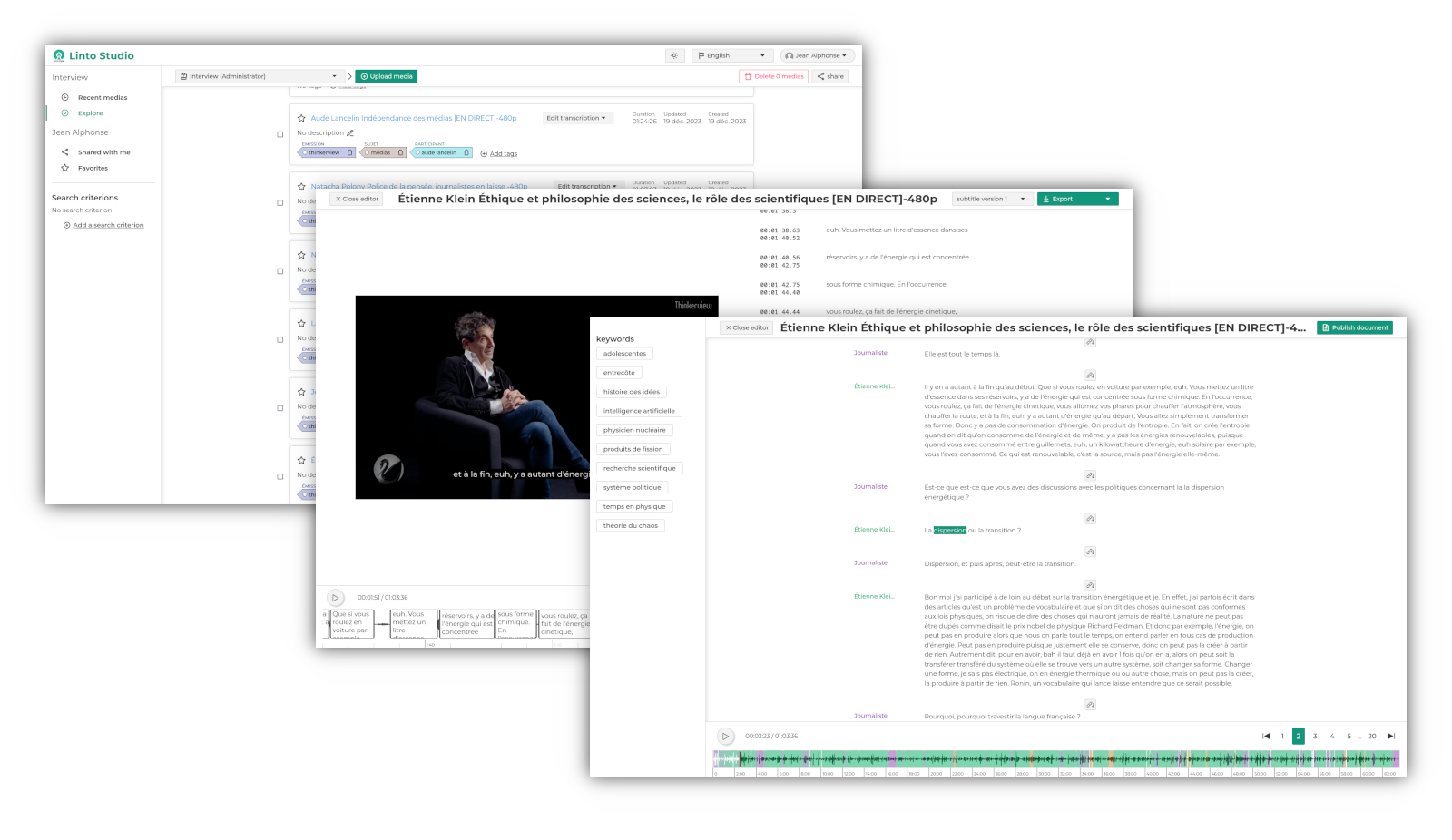
LinTO Studio is the web application of the LinTO platform. Upload or record media, get a transcript with speaker separation and word-level timestamps, edit it with your team, generate minutes and summaries, and export to your own document templates. It also runs live sessions: subtitles and translation for meetings and events, from a microphone, a meeting bot or a broadcast stream.
Features
- Transcription of audio and video files with speaker separation and word-level timestamps
- Speaker identification across recordings from voice signatures, managed per organization
- Collaborative transcript editor with real-time sync, undo, and audio following
- Summaries, minutes and chat over the transcript, with the LLM of your choice through llm-gateway
- Exports in several formats and your own DOCX templates
- Subtitle editing and export for videos
- Live sessions: microphone recording from the browser, meeting bots (Teams, Jitsi, BigBlueButton, Visio), SRT/RTMP streams through linto-studio-plugins
- Organizations, roles, sharing, tags and search
- REST API with JavaScript and Python SDKs, OAuth and OIDC login
Repository layout
| Directory | What it is |
|---|---|
studio-api/ |
REST API (Express, MongoDB), authentication, organizations, media, transcription jobs |
studio-frontend/ |
Web application (Vue) |
studio-websocket/ |
Real-time collaboration server (Socket.io, Yjs) |
studio-sdk/ |
JavaScript and Python client libraries, and the transcript editor as a standalone component |
doc/ |
Screenshots and API documentation |
Development happens on next. master holds releases. Release notes are in RELEASE.md.
Installation
LinTO Studio depends on other LinTO services (speech-to-text, speaker separation, LLM gateway, live plugins). To install the whole stack on a Kubernetes cluster, use the deployment tool:
https://github.com/linto-ai/linto-deploy
To run only the web application and its API locally, for development:
docker compose up -d
Then open http://localhost:8003. The API listens on port 8001 and the websocket server on 8002. Transcription, summarization and live features need the corresponding services to be configured (see below).
Each package also has its own README for native development with npm run dev.
Configuration
Configuration is done through environment variables. Copy studio-api/.envdefault to studio-api/.env and adjust it. The main settings:
SMTP
Used for account verification, invitations and sharing.
SMTP_HOST=mail.example.com
SMTP_PORT=465
SMTP_SECURE=true
SMTP_REQUIRE_TLS=true
SMTP_AUTH=username
SMTP_PSWD=password
NO_REPLY_EMAIL=noreply@mail.example.com
Transcription services
Studio talks to the LinTO API gateway, which exposes the transcription, speaker separation and speaker identification services:
GATEWAY_SERVICES=https://<your-gateway-domain>
LLM gateway
Summaries, minutes and chat go through llm-gateway:
LLM_GATEWAY_SERVICES=https://<your-llm-gateway-domain>
See studio-api/.envdefault for the full list, including authentication providers, live sessions and speaker identification.
Contributing
Read CONTRIBUTING.md before opening a pull request, and SECURITY.md to report a vulnerability.
License
Related Packages
Collaborative editing plugin for @linto-ai/transcript-ui — rename, split, merge...
LLM-generated documents plugin for @linto-ai/transcript-ui — summaries and repor...
Subtitle display plugin for @linto-ai/transcript-ui — fullscreen/banner captions...
Chat panel plugin for @linto-ai/transcript-ui — talk with an LLM assistant about...
Version History
| Version | Released | License |
|---|---|---|
| 0.9.23 | AGPL-3.0 | |
| 0.9.22 | AGPL-3.0 | |
| 0.9.21 | AGPL-3.0 | |
| 0.9.20 | AGPL-3.0 | |
| 0.9.19 | AGPL-3.0 | |
| 0.9.18 | AGPL-3.0 | |
| 0.9.17 | AGPL-3.0 | |
| 0.9.16 | AGPL-3.0 | |
| 0.9.15 | AGPL-3.0 | |
| 0.9.14 | AGPL-3.0 | |
| 0.9.13 | AGPL-3.0 | |
| 0.9.12 | AGPL-3.0 | |
| 0.9.11 | AGPL-3.0 | |
| 0.9.10 | AGPL-3.0 | |
| 0.9.9 | AGPL-3.0 | |
| 0.9.8 | AGPL-3.0 | |
| 0.9.7 | AGPL-3.0 | |
| 0.9.6 | AGPL-3.0 | |
| 0.9.5 | AGPL-3.0 | |
| 0.9.3 | AGPL-3.0 | |
| 0.9.2 | AGPL-3.0 | |
| 0.9.1 | AGPL-3.0 | |
| 0.9.0 | AGPL-3.0 |
Pre-releases (22)
| Version | Released | License |
|---|---|---|
| 0.9.24-unstable.202610191607 | AGPL-3.0 | |
| 0.9.24-unstable.202610191410 | AGPL-3.0 | |
| 0.9.24-unstable.202610151359 | AGPL-3.0 | |
| 0.9.23-unstable.2026101402-unstable.202610150805 | AGPL-3.0 | |
| 0.9.23-unstable.2026101402-unstable.202610141549 | AGPL-3.0 | |
| 0.9.23-unstable.2026101402 | AGPL-3.0 | |
| 0.9.23-unstable.2026101401 | AGPL-3.0 | |
| 0.9.23-unstable.2026101302 | AGPL-3.0 | |
| 0.9.23-unstable.2026101301 | AGPL-3.0 | |
| 0.9.23-unstable.2026100201-unstable.202610021210 | AGPL-3.0 | |
| 0.9.23-unstable.2026100201 | AGPL-3.0 | |
| 0.9.23-unstable.202609221604 | AGPL-3.0 | |
| 0.9.23-unstable.202609221547 | AGPL-3.0 | |
| 0.9.23-unstable.202609221301 | AGPL-3.0 | |
| 0.9.23-unstable.202609211917 | AGPL-3.0 | |
| 0.9.23-unstable.202609211915 | AGPL-3.0 | |
| 0.9.23-unstable.202609211352 | AGPL-3.0 | |
| 0.9.23-unstable.202609211255 | AGPL-3.0 | |
| 0.9.23-unstable.202609181642 | AGPL-3.0 | |
| 0.9.23-unstable.202609181617 | AGPL-3.0 | |
| 0.9.22-unstable.202609181425 | AGPL-3.0 | |
| 0.9.22-unstable.202609181254 | AGPL-3.0 |