@kananon/thai-datepicker
Thai DatePicker
Vue 3 DatePicker component with Thai Buddhist calendar support.
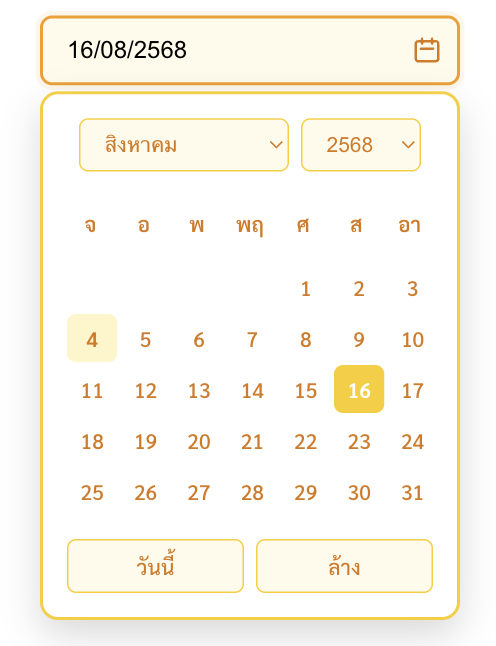
Image Example
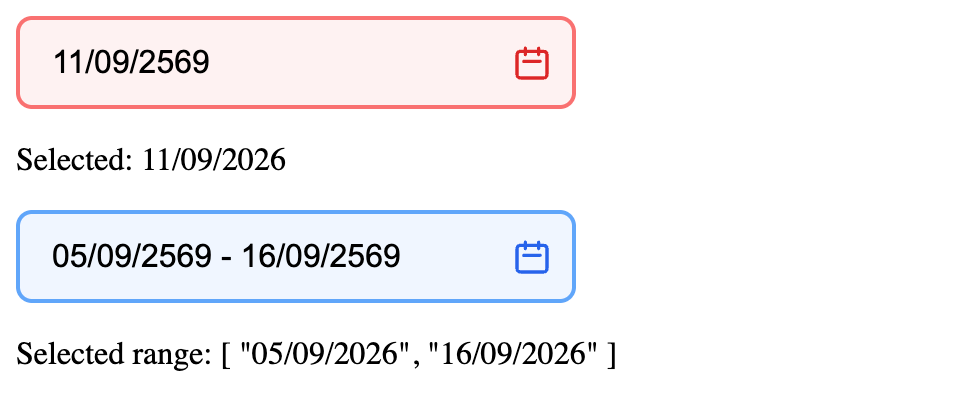
Themes + range mode:
Features
- 🗓️ Thai Buddhist calendar (พ.ศ.)
- 🎨 4 built-in themes: yellow (default), blue, green, red
- 📱 Mobile responsive
- ♿ Accessible with ARIA labels
- 🔧 Customizable props
- 💪 TypeScript support
- 🌐 Returns Gregorian dates (ค.ศ.)
- ⚛️ Usable outside Vue via Web Component (React, plain HTML, ...)
Installation
npm i @kananon/thai-datepicker
Usage
ES Module (Recommended)
<script setup>
import { ThaiDatePicker } from '@kananon/thai-datepicker'
import '@kananon/thai-datepicker/dist/thai-datepicker.css'
import { ref } from 'vue'

const selectedDate = ref('')
const selectedRange = ref([]) // ['DD/MM/YYYY', 'DD/MM/YYYY'] เมื่อใช้ range
</script>

<template>
  <ThaiDatePicker
    v-model="selectedDate"
    placeholder="เลือกวันที่"
    theme="blue"
  />
  <input type="hidden" v-model="selectedDate"> <!-- ค่าที่ส่งไปยัง server -->

  <!-- เลือกช่วงวันที่ -->
  <ThaiDatePicker v-model="selectedRange" range theme="green" />
</template>
CDN Usage
<!DOCTYPE html>
<html>
<head>
  <meta charset="UTF-8"> <!-- ขาดไม่ได้ ไม่งั้นข้อความไทยจะเพี้ยน (mojibake) -->
  <script src="https://unpkg.com/vue@3/dist/vue.global.js"></script>
  <script src="https://unpkg.com/thai-datepicker@latest/dist/thai-datepicker.iife.js"></script>
  <link rel="stylesheet" href="https://unpkg.com/thai-datepicker@latest/dist/thai-datepicker.css">
</head>
<body>
  <div id="app">
    <thai-date-picker v-model="date" theme="red"></thai-date-picker>
    <p>Selected: {{ date }}</p>

    <thai-date-picker v-model="dateRange" range theme="blue"></thai-date-picker>
    <p>Selected range: {{ dateRange }}</p>
  </div>

  <script>
    const { createApp, ref } = Vue

    createApp({
      setup() {
        const date = ref('')
        const dateRange = ref([])
        return { date, dateRange }
      }
    }).use(ThaiDatePicker.default).mount('#app')
  </script>
</body>
</html>
Web Component (React / non-Vue)
Vue is not required in the consuming app — the component is also shipped as a native custom element.
import '@kananon/thai-datepicker/dist/thai-datepicker.css'
import { registerThaiDatePickerElement } from '@kananon/thai-datepicker'

registerThaiDatePickerElement() // call once, e.g. at app start

function MyForm() {
  const ref = useRef(null)
  const [date, setDate] = useState('')

  useEffect(() => {
    const el = ref.current
    const onChange = (e) => setDate(e.detail[0])
    el.addEventListener('change', onChange)
    return () => el.removeEventListener('change', onChange)
  }, [])

  useEffect(() => { if (ref.current) ref.current.modelValue = date }, [date])

  return <thai-date-picker ref={ref} theme="blue" />
}
Range mode ใช้ attribute range เหมือนกัน — modelValue ที่ set/อ่านจาก change event จะเป็น Array ['DD/MM/YYYY', 'DD/MM/YYYY'] แทน string เดี่ยว:
return <thai-date-picker ref={ref} range theme="green" />
Props
| Prop | Type | Default | Description |
|---|---|---|---|
modelValue |
String | Array |
'' |
Selected date (v-model). String 'DD/MM/YYYY' normally, Array ['DD/MM/YYYY', 'DD/MM/YYYY'] when range is true |
placeholder |
String |
'เลือกวันที่' |
Input placeholder text |
minYear |
Number |
currentYear - 50 |
Minimum selectable year |
maxYear |
Number |
currentYear + 10 |
Maximum selectable year |
theme |
String |
'yellow' |
Color theme: 'yellow', 'blue', 'green', 'red' |
range |
Boolean |
false |
Enable start-end date range selection |
Events
| Event | Payload | Description |
|---|---|---|
update:modelValue |
String | Array |
Emitted when date (or range) is selected |
change |
String | Array |
Emitted when date (or range) changes |
Date Format
- Display: Thai Buddhist year format (
DD/MM/YYYYin พ.ศ.) - Output: Gregorian year format (
DD/MM/YYYYin ค.ศ.)
Example:
- User sees:
15/08/2568 - v-model gets:
15/08/2025
Browser Support
- Chrome/Edge 88+
- Firefox 85+
- Safari 14+
Development
# Install dependencies
npm install

# Development server
npm run dev

# Build library
npm run build

# Preview build
npm run preview
License
MIT
Contributing
- Fork the repository
- Create your feature branch (
git checkout -b feature/amazing-feature) - Commit your changes (
git commit -m 'Add amazing feature') - Push to the branch (
git push origin feature/amazing-feature) - Open a Pull Request
Related Packages
Version History
| Version | Released | Vue | License |
|---|---|---|---|
| 1.1.1 | ^3.2.0 | MIT | |
| 1.1.0 | ^3.2.0 | MIT | |
| 1.0.4 | ^3.0.0 | MIT | |
| 1.0.2 | ^3.0.0 | MIT | |
| 1.0.1 | ^3.0.0 | MIT | |
| 1.0.0 | ^3.0.0 | MIT |