@inertia-vuetify/notifications
Inertia Vuetify Notifications
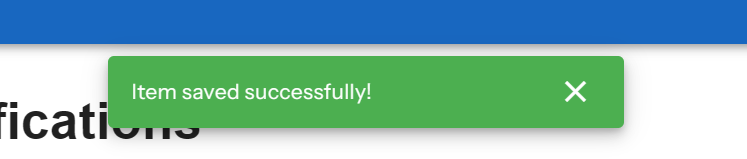
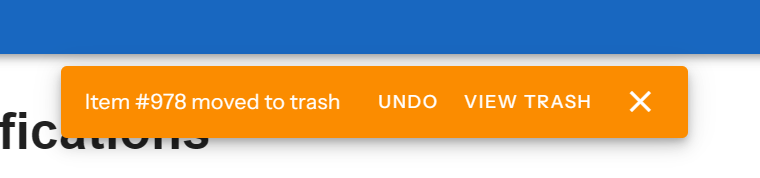
Display Inertia flash messages as Vuetify snackbar notifications with support for actions.
Installation
npm install @inertia-vuetify/notifications
Peer Dependencies
This package requires the following peer dependencies:
vue^3.5.0vuetify^4.0.0@inertiajs/vue3^2.3.3
Setup
1. Register the Plugin
// main.ts
import { createApp } from 'vue'
import { createVuetify } from 'vuetify'
import { inertiaVuetifyNotifications } from '@inertia-vuetify/notifications'
import App from './App.vue'

const app = createApp(App)
const vuetify = createVuetify()

app.use(vuetify)
app.use(inertiaVuetifyNotifications({
  // Optional configuration
  flashKeys: ['success', 'error', 'warning', 'info', 'notification'],
  defaults: {
    timeout: 5000,
    closable: true,
    location: 'top',
    totalVisible: 1,
    displayStrategy: 'hold',
    gap: 8,
  },
  colorMap: {
    success: 'success',
    error: 'error',
    warning: 'warning',
    info: 'info',
  },
}))

app.mount('#app')
2. Add the NotificationProvider Component
Place the NotificationProvider component in your root layout:
<!-- App.vue or Layout.vue -->
<script setup lang="ts">
import { NotificationProvider } from '@inertia-vuetify/notifications'
</script>

<template>
  <v-app>
    <NotificationProvider />
    <router-view />
  </v-app>
</template>
Usage
Backend (Laravel)
Simple Notifications
Flash a simple string message using a key that maps to a color:
// In your controller
Inertia::flash('success', 'Item saved successfully');
Inertia::flash('error', 'Something went wrong');
Inertia::flash('warning', 'Please review your input');
Inertia::flash('info', 'New features available');
Client-side router.flash() updates enqueue only changed notification keys, so retained
flash values do not replay when another key changes. Clearing a key allows its value
to be shown again. A new navigation resets deduplication for server flashes.
For more information, see the Inertia Flash Data documentation.
Structured Notifications
For more control, pass an object with additional options:
Inertia::flash('notification', [
    'message' => 'Item deleted',
    'type' => 'warning',        // Maps to snackbar color
    'timeout' => 8000,          // Custom timeout in ms
    'closable' => true,         // Show close button
]);
Notifications with Actions
Actions allow users to respond to notifications:
Inertia::flash('notification', [
    'message' => 'Item moved to trash',
    'type' => 'info',
    'actions' => [
        // Named action - calls a registered handler
        [
            'label' => 'Undo',
            'name' => 'undo-delete',
            'payload' => ['id' => 123],
        ],
        // URL action - makes an Inertia request
        [
            'label' => 'View Trash',
            'method' => 'get',
            'url' => '/trash',
        ],
    ],
]);
When an action button is clicked, the registered handler or URL action runs and the snackbar is dismissed through Vuetify's queue close handler.
Frontend
Registering Action Handlers
Register handlers at plugin initialization for app-wide actions:
app.use(inertiaVuetifyNotifications({
  actions: {
    'undo-delete': async (payload) => {
      await router.post('/items/restore', payload)
    },
  },
}))
Or register dynamically in components:
<script setup lang="ts">
import { onUnmounted } from 'vue'
import { useNotifications } from '@inertia-vuetify/notifications'
import { router } from '@inertiajs/vue3'

const { registerAction, unregisterAction } = useNotifications()

// Register a page-specific action
registerAction('undo-delete', async (payload) => {
  await router.post('/items/restore', payload)
})

// Clean up on unmount
onUnmounted(() => {
  unregisterAction('undo-delete')
})
</script>
Manual Notifications
Trigger client side notifications programmatically from any component:
<script setup lang="ts">
import { useNotifications } from '@inertia-vuetify/notifications'

const { notify } = useNotifications()

function showSuccess() {
  notify('Operation completed!', 'success')
}

function showStructured() {
  notify({
    message: 'Custom notification',
    type: 'info',
    timeout: 3000,
    actions: [
      { label: 'Dismiss', name: 'dismiss' },
    ],
  })
}
</script>
Configuration
Plugin Options
| Option | Type | Default | Description |
|---|---|---|---|
flashKeys |
string[] |
['success', 'error', 'warning', 'info', 'notification'] |
Flash keys to listen for |
defaults.timeout |
number |
5000 |
Default notification timeout in ms |
defaults.closable |
boolean |
true |
Show close button by default |
defaults.location |
SnackbarLocation |
'top' |
Snackbar position |
defaults.totalVisible |
number | string |
1 |
Number of visible snackbars |
defaults.displayStrategy |
'hold' | 'overflow' |
'hold' |
How new snackbars behave when the visible queue is full |
defaults.gap |
number | string |
8 |
Gap between visible queued snackbars |
colorMap |
Record<string, string> |
{ success, error, warning, info } |
Map flash keys to Vuetify colors |
actions |
Record<string, ActionHandler> |
{} |
Initial action handlers |
The provider renders Vuetify 4 VSnackbarQueue. defaults.location accepts Vuetify 4 snackbar anchor values, including top, bottom end, top center, left top, and center.
Action Types
Named Actions
Calls a registered handler with an optional payload:
interface NamedAction {
  label: string
  name: string
  payload?: Record<string, unknown>
}
URL Actions
Makes an Inertia request when clicked:
interface UrlAction {
  label: string
  method: 'get' | 'post' | 'put' | 'patch' | 'delete'
  url: string
  data?: Record<string, unknown>
}
API
@inertia-vuetify/notifications(options?)
Creates the Vue plugin. Returns a Plugin instance.
useNotifications()
Composable to access the notification context. Must be used within a component tree where the plugin is installed.
Returns:
| Property | Type | Description |
|---|---|---|
queue |
InternalSnackbarItem[] |
Reactive notification queue |
notify |
(notification, flashKey?) => void |
Add a notification |
registerAction |
(name, handler) => void |
Register an action handler |
unregisterAction |
(name) => void |
Remove an action handler |
executeAction |
(action) => Promise<void> |
Execute an action (internal) |
options |
NotificationPluginOptions |
Current plugin options |
NotificationProvider
Vue component that renders the VSnackbarQueue. Place once in your app layout.
License
MIT
Related Packages
Basic Vue toast service that uses Vuetify Snackbar component for Vuetify 2.3+
A front-end framework to complement the composer package "ianrothmann/inertia-la...
Version History
| Version | Released | Vue | License |
|---|---|---|---|
| 2.0.1 | ^3.5.0 | MIT | |
| 2.0.0 | ^3.4.0 | MIT | |
| 1.2.0 | ^3.4.0 | MIT | |
| 1.1.0 | ^3.4.0 | MIT | |
| 1.0.2 | ^3.4.0 | MIT |