@hmfw/tiptap-editor
@hmfw/tiptap-editor
基于 Tiptap + Vue 3 的富文本编辑器组件,支持 Feature Plugin 架构,消费方可按需引入功能模块实现 tree-shaking。
在线演示
🎮 点击体验在线演示
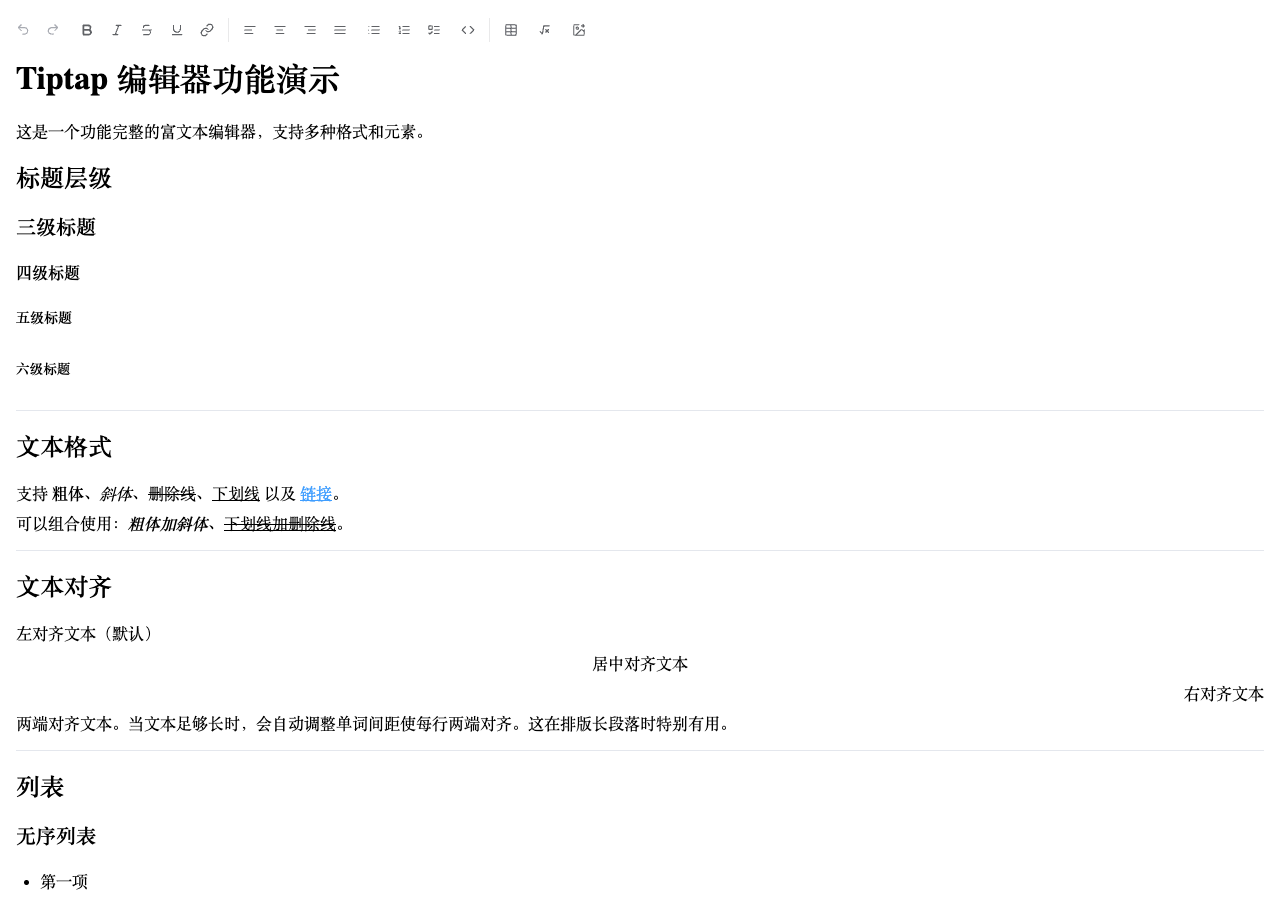
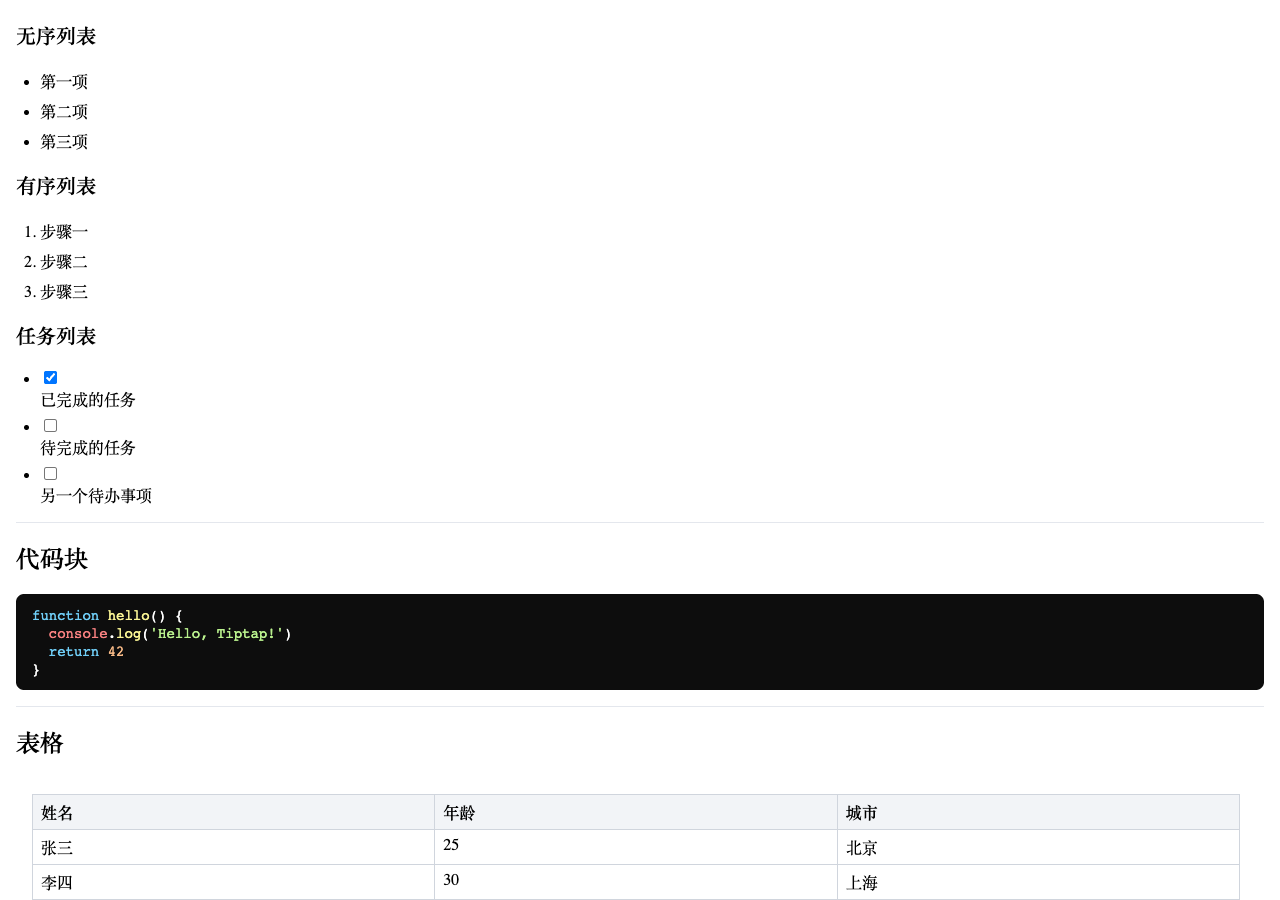
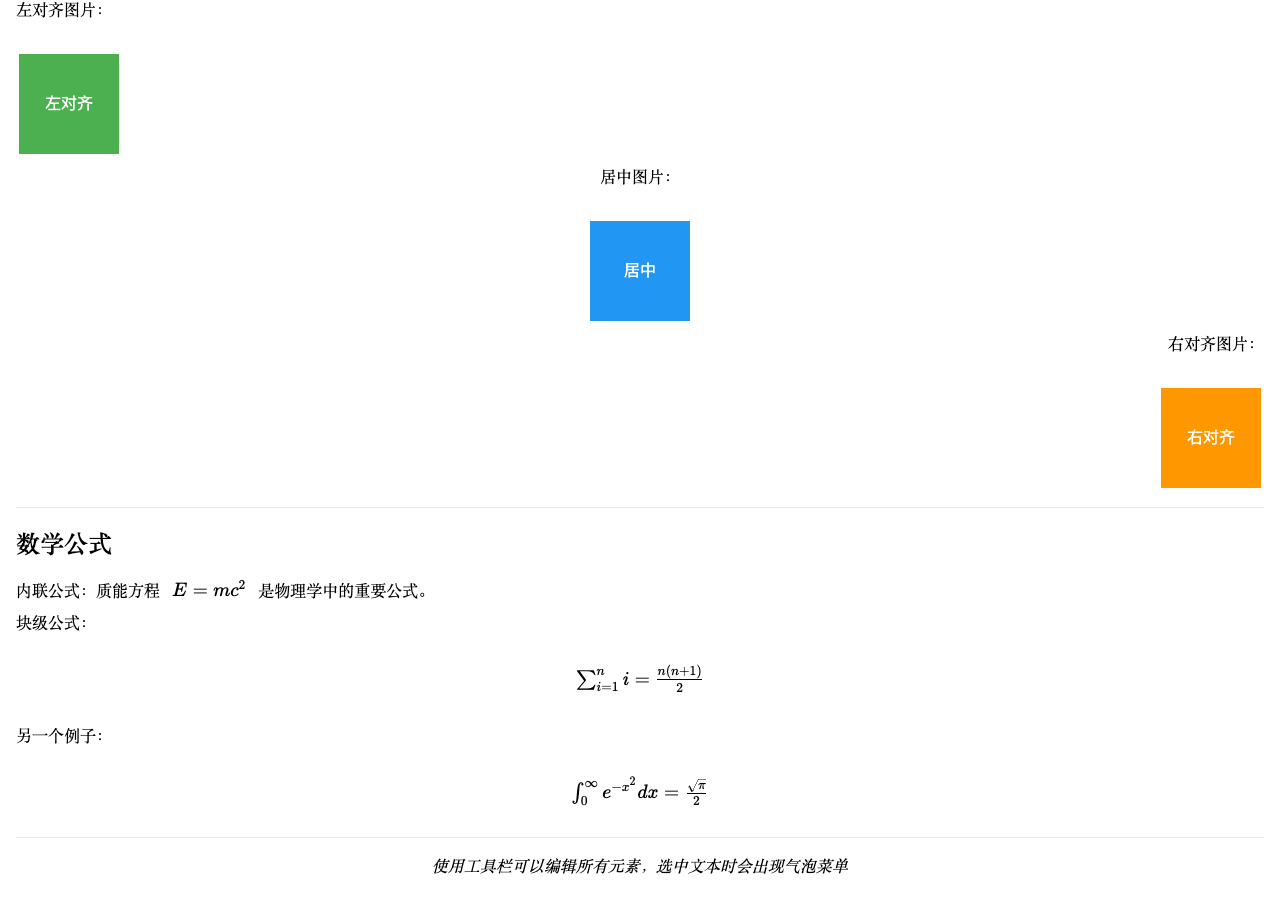
效果预览
安装
pnpm add @hmfw/tiptap-editor
快速开始
不传 features 时编辑器只有基础输入能力(无工具栏)。通过 :features 按需组合功能:
<script setup lang="ts">
import { ref } from 'vue'
import {
  TiptapEditor,
  UndoRedoFeature,
  TextStyleFeature,
  TextAlignFeature,
  ListFeature,
  CodeBlockFeature,
  TableFeature,
  MathFeature,
  ImageFeature,
  SeparatorFeature,
} from '@hmfw/tiptap-editor'
import '@hmfw/tiptap-editor/tiptap-editor.css'

const content = ref('')
</script>

<template>
  <TiptapEditor
    v-model="content"
    :features="[
      UndoRedoFeature,
      TextStyleFeature,
      SeparatorFeature,
      TextAlignFeature,
      ListFeature,
      CodeBlockFeature,
      SeparatorFeature,
      TableFeature,
      MathFeature,
      ImageFeature,
    ]"
  />
</template>
常见场景
最小化配置
只引入用到的 feature,未引入的模块不会进入消费方 bundle:
<TiptapEditor
  v-model="content"
  :features="[UndoRedoFeature, TextStyleFeature]"
/>

只读模式
<TiptapEditor v-model="content" :readonly="true" />
readonly 时工具栏隐藏,编辑器不可编辑,图片控件仅保留下载,数学公式不可点击编辑。
获取 / 设置内容
v-model 绑定的是 HTML 字符串,直接读写即可:
const content = ref('<p>初始内容</p>')

// 读取当前内容
console.log(content.value)

// 程序化设置内容
content.value = '<h1>新标题</h1><p>新内容</p>'
工具栏顺序
features 数组的顺序即工具栏按钮的顺序,用 SeparatorFeature 插入分隔符:
:features="[
  UndoRedoFeature,     // 撤销重做
  SeparatorFeature,    // ——
  TextStyleFeature,    // 粗体/斜体/下划线/删除线/链接
  TextAlignFeature,    // 对齐
  SeparatorFeature,    // ——
  TableFeature,        // 表格
  ImageFeature,        // 图片
]"
Props
| 属性 | 类型 | 默认值 | 说明 |
|---|---|---|---|
modelValue |
string |
'' |
编辑器内容(HTML 格式),支持 v-model 双向绑定 |
placeholder |
string |
'请输入内容...' |
编辑器占位符文本 |
upload |
(file: File) => Promise<string> |
undefined |
图片上传函数,传给 ImageFeature 使用,不传则默认转为 Base64 |
features |
FeaturePlugin[] |
[] |
功能插件列表,决定工具栏内容和注册的扩展 |
Feature Plugins
| 导出名 | 说明 | 用法 |
|---|---|---|
UndoRedoFeature |
撤销 / 重做 | UndoRedoFeature |
TextStyleFeature |
粗体、斜体、删除线、下划线、链接 | TextStyleFeature |
TextAlignFeature |
文本对齐(左 / 中 / 右 / 两端) | TextAlignFeature |
ListFeature |
有序、无序、任务列表 | ListFeature |
CodeBlockFeature |
代码块(含语法高亮) | CodeBlockFeature |
TableFeature |
表格(含行列增删、移动) | TableFeature |
MathFeature |
数学公式(内联 / 块级,基于 KaTeX) | MathFeature |
ImageFeature |
图片插入(支持自定义上传,默认 Base64) | ImageFeature |
SeparatorFeature |
工具栏分隔符 | SeparatorFeature |
upload 通过 TiptapEditor 的 upload prop 传入,ImageFeature 会自动从 context 中读取:
<TiptapEditor v-model="content" :upload="myUpload" :features="[..., ImageFeature]" />
import { type UploadFn } from '@hmfw/tiptap-editor'

const myUpload: UploadFn = async (file) => {
  const formData = new FormData()
  formData.append('file', file)
  const res = await fetch('/api/upload', { method: 'POST', body: formData })
  const data = await res.json()
  return data.url
}
不传 upload 时图片默认转为 Base64。
自定义 Feature Plugin
实现 FeaturePlugin 接口即可创建自定义功能插件。
基础示例
import type { FeaturePlugin } from '@hmfw/tiptap-editor'
import MyButton from './MyButton.vue'
import MyExtension from './MyExtension'

export const MyFeature: FeaturePlugin = {
  name: 'my-feature',
  install: () => ({
    extensions: [MyExtension],
  }),
  toolbarComponent: MyButton,
}
含浮层和状态共享的完整示例
如果 feature 需要一个持久渲染的浮层(如对话框),并且工具栏按钮需要触发它,使用 controlComponent + ctx.provide:
import { ref, defineComponent, h } from 'vue'
import type { FeaturePlugin } from '@hmfw/tiptap-editor'
import MyExtension from './MyExtension'
import MyToolbarButton from './MyToolbarButton.vue'
import MyControlPanel from './MyControlPanel.vue'

export const MyFeature: FeaturePlugin = {
  name: 'my-feature',

  install(ctx) {
    // per-instance 状态(多个编辑器实例互不干扰)
    const isOpen = ref(false)
    const openPanel = () => { isOpen.value = true }

    // 通过 provide 共享给工具栏按钮
    ctx.provide('openMyPanel', openPanel)

    // 闭包组件,捕获 per-instance 状态
    const ControlWrapper = defineComponent({
      setup: () => () => h(MyControlPanel, {
        visible: isOpen.value,
        'onUpdate:visible': (v: boolean) => { isOpen.value = v },
      }),
    })

    return {
      extensions: [MyExtension],
      controlComponent: ControlWrapper,  // 渲染在编辑器内容区之后
    }
  },

  toolbarComponent: MyToolbarButton,
}
工具栏按钮通过 inject 获取共享函数:
// MyToolbarButton.vue
import { inject } from 'vue'

const openMyPanel = inject<() => void>('openMyPanel')
install() 接收 PluginInstallContext(含 readonly、provide、upload),返回 { extensions, controlComponent? }。
内置功能(始终启用)
以下功能无需通过 features 配置,始终注册:
- 标题(H1–H6)
- 段落、水平线
- 任务列表(TaskList / TaskItem)
- 文本对齐扩展(TextAlign)
- 链接(StarterKit 内置)
- 气泡菜单(选中文本时浮现)
- Placeholder
数学公式(KaTeX 样式)
MathFeature 基于 KaTeX 渲染。KaTeX 样式由 MathFeature 自动引入(import 'katex/dist/katex.min.css' 作为副作用导入),无需手动引入。
为了让库的 CSS 保持精简,该样式在构建时被外部化(不打包进本库 CSS,否则 KaTeX 字体会被内联导致体积膨胀到 ~1.4MB)。消费方的打包器(Vite / webpack 等)会用其自身安装的 katex(peer dependency)解析并加载样式与字体,因此确保已安装 katex 即可。
若通过
<script>直接使用 UMD 构建(无打包器环境),则需自行在页面引入katex的样式。
代码高亮
CodeBlockFeature 使用 lowlight 提供语法高亮,默认支持以下常见语言:
Web 开发: JavaScript, TypeScript, HTML, CSS, SCSS, JSON, XML
后端: Python, Java, C, C++, C#, Go, Rust, PHP, Ruby, Swift, Kotlin
脚本/配置: Bash, Shell, YAML, TOML, Makefile, Dockerfile
数据库: SQL
其他: Markdown, Diff, Plaintext
技术栈
- vue 3.5.25
- @tiptap/core 3.31.0+
UI 组件(按钮、对话框、下拉、气泡卡片等)为内置自研实现,无外部 UI 框架依赖。
版本历史
v1.3.0 (当前版本)
- 🐛 修复 KaTeX 样式内联导致构建 CSS 体积膨胀(~1.4MB → ~21KB):外部化
katex/dist/katex.min.css,交由消费方打包器用其自身katex解析 - 🐛 补充任务列表(taskList)缺失的样式
- ✨ 导出
IconButtonProps类型(由运行时 props 定义推导) - 💄 构建产物 CSS 改为「每条规则一行」格式,并消除空选择器规则
- 🔧 引入 Prettier 做全项目统一格式化(
pnpm format/pnpm format:check) - 🔧 修复生成的
dist/index.d.ts:合并重复 import、规范缩进,并交由 Prettier 统一格式化
v1.2.0
- ✨ 移除 Element Plus 依赖,改用内置自研 UI 原语(Button / Dialog / Dropdown / Input / Popover / Radio / Tooltip)
- ⬆️ 升级 Tiptap peer 依赖到 3.31.0(从 3.27.0)、KaTeX 到 0.18
- ♻️
ImageWithAlign迁移到 Tiptap 3.31 的addDecorationsAPI - 🗂️
IconButton迁移至src/ui/ - 🧹 清理过时文档
v1.1.0
- ⬆️ 升级 Tiptap 到 3.27.0(从 3.22.5)
- 🐛 修复表格复制问题(上游修复)
- 🐛 修复 Markdown 快捷键问题(上游修复)
- ⚡ 性能优化(ProseMirror 底层升级)
v1.0.4
- 📸 添加效果预览截图
- ✨ 添加 playwright-cli skill
- 📖 补充常见场景示例
- 🔧 拆分 editor.scss 并统一 CSS 类名前缀
代码结构
src/
├── TiptapEditor.tsx          # 编辑器主组件(feature plugin 驱动)
├── editor.scss               # 工具栏和编辑器样式
├── features/                 # Feature plugin 实现
│   ├── UndoRedoFeature.ts
│   ├── TextStyleFeature.ts
│   ├── TextAlignFeature.ts
│   ├── ListFeature.ts
│   ├── CodeBlockFeature.ts
│   ├── TableFeature.ts
│   ├── MathFeature.ts        # 含对话框状态管理
│   ├── ImageFeature.ts       # 工厂函数,接受 upload 参数
│   └── SeparatorFeature.tsx
├── types/
│   └── plugin.ts             # FeaturePlugin 接口定义
├── ui/                       # 通用 UI 原语(自研,无外部 UI 框架依赖)
│   ├── Button.tsx / Dialog.tsx / Dropdown.tsx / Input.tsx / Popover.tsx / Radio.tsx / Tooltip.tsx
│   ├── floating.ts           # 定位 + 点击外部关闭工具
│   ├── ui.scss               # UI 原语样式
│   └── IconButton.tsx        # 基础按钮,包裹 ui Button + Tooltip
├── tiptap-ui/                # 工具栏按钮组件(TSX)
├── tiptap-icons/             # SVG 图标组件(TSX)
└── tiptap-extension/         # 自定义 Tiptap 扩展
    ├── ImageWithAlign.ts     # 带对齐属性的图片扩展
    └── ImageUpload.tsx       # 图片上传节点
Related Packages
Version History
| Version | Released | Vue | License |
|---|---|---|---|
| 1.3.0 | ^3.5.0 | MIT | |
| 1.2.0 | ^3.5.0 | MIT | |
| 1.1.3 | ^3.5.0 | MIT |