@hbilal_9/vue-select
Vue Select is a versatile dropdown component built for Vue.js applications. It offers a pre-built template for standard filterable select dropdowns, saving you development time. Key features include:
383
2
| Install | |
|---|---|
npm install @hbilal_9/vue-select |
|
| Latest Version: | 0.0.10 |
| Vue: | 3 |
| License: | MIT |
| Last Updated: | Jul 17, 2024 |
| Links: | GitHub · npm |
Maintainer: hbilal_9
Vue Select
Vue Select is a versatile dropdown component built for Vue.js applications. It offers a pre-built template for standard filterable select dropdowns, saving you development time. Key features include:
- Filtering: Easily search and filter through a list of options using a search bar.
- Multiple Selection: Allow users to pick multiple options from the dropdown.
- Customization: Tailor the dropdown's appearance and behavior to perfectly match your application's design and functionality.
- Accessibility: Vue Select prioritizes accessibility, ensuring all users can interact with the dropdown seamlessly.
- Lightweight: Despite its rich features, Vue Select maintains a small footprint, keeping your application performant.
Screenshots
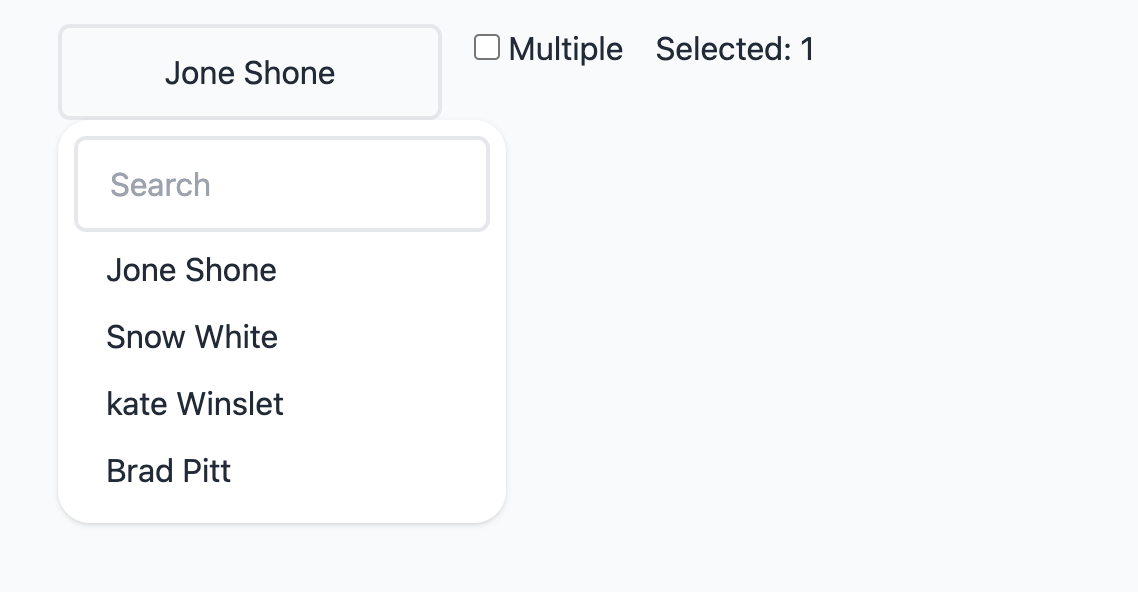
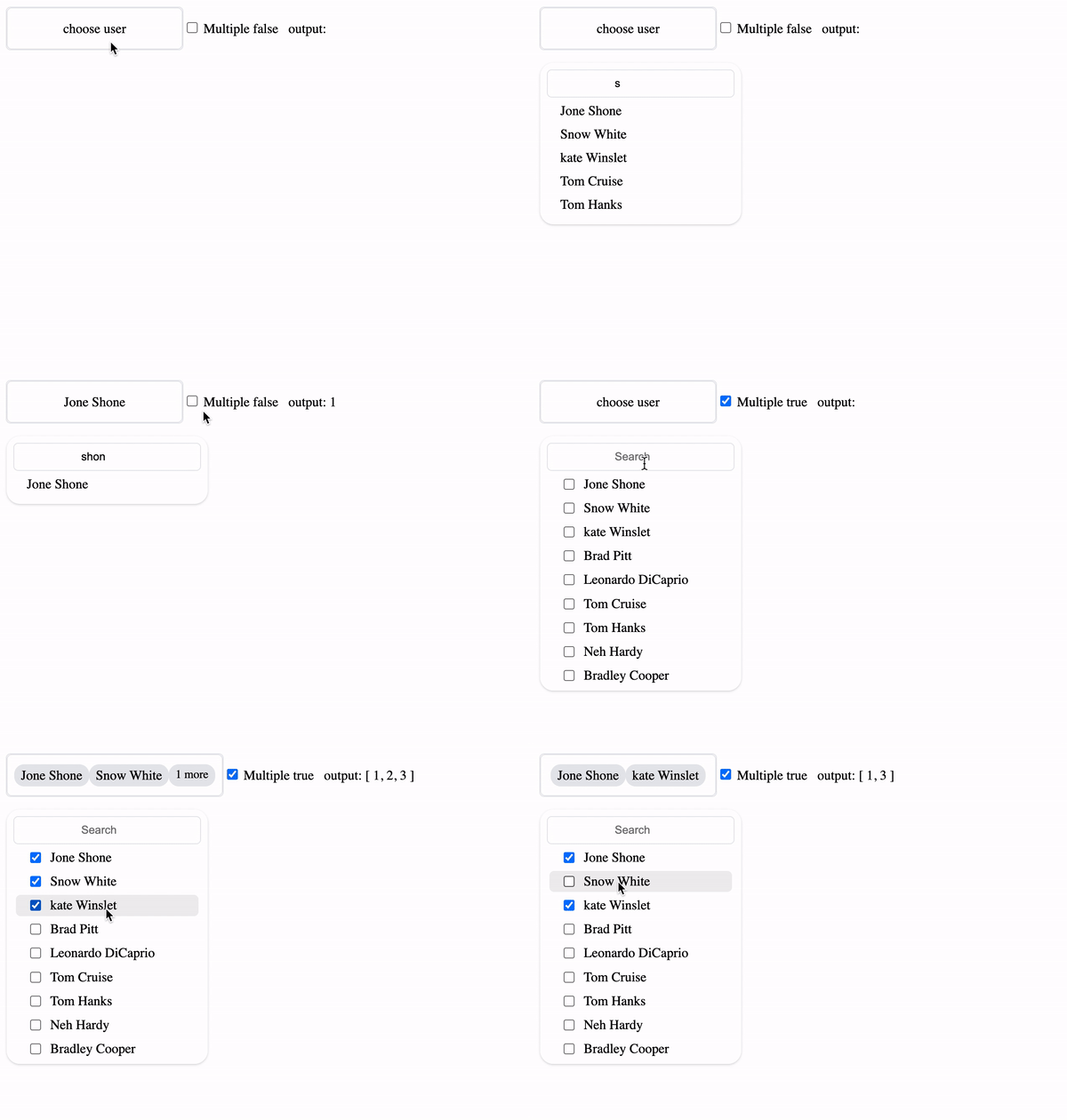
Installation
Install Vue Select with npm
npm i @hbilal_9/vue-select
Browser with CDN
<script src="https://unpkg.com/@hbilal_9/vue-select/dist/index.js"></script>
Setup
Import vSelect in main.ts
  import vSelect from '@hbilal_9/vue-select'
  import '@hbilal_9/vue-select/dist/style.css'
  app.use(vSelect)
Nuxt Setup
Create a plugin named vue-select.ts in plugins folder
plugins/vue-select.ts
Add the following code in vue-select.ts
  import vSelect from "@hbilal_9/vue-select";
  import "@hbilal_9/vue-select/dist/style.css";
  export default defineNuxtPlugin((nuxtApp) => {
    nuxtApp.vueApp.use(vSelect);
  });
Usage
with array of objects
<script setup lang="ts">
  import { ref } from 'vue';
  const data = ref("")

  const options = ref([
  {
	id: 1,
	name: "Jone Shone",
  },
  {
	id: 2,
	name: "Snow White",
  },
  {
	id: 3,
	name: "kate Winslet",
  },
])

</script>

<template>
  <v-select
	  v-model="data"
	  :options="options"
	  :reduce="(opt: any) => opt.id"
	  :label="(opt: any) => opt.name"
	  placeholder="choose user"
	  :multiple="true"
  />
</template>
with array of strings
<script setup lang="ts">
  import { ref } from 'vue';
  const data = ref("")

  const options = ref(['us', 'uk', 'pk', 'in', 'fr'])

</script>

<template>
  <v-select
	v-model="data"
	:options="options"
	:reduce="(name: any) => name"
	:label="(name: any) => name"
    placeholder="choose country"
  />
</template>
Emits
you can also pass change event
<v-select @change="getData"></v-select>
in script
function getData(e){
    console.log(e)
}
Props
| Prop | Description | Type | Default |
|---|---|---|---|
| placeholder | Select Placeholder | String | Choose option |
| options | array of strings or objects | Array | [] |
| label | callback method that return label | method | () => {} |
| reduce | callback method that data you wanna receive in that v-model | method | () => {} |
| filter-class | you can change filter input style, you can add any css property with !important | string | default style |
| class | you can also modify default style but make sure add !important with each property | string | default style |
License
Support Me
support me to publish more packages like this for free.

Related Packages
v-select-box
A vue.js component to provide a box with a list of items with search and paginat...
1,404
1
vue3-extended-multiselect
Extended multiselect dropdown component for Vue 3 with search, tagging, async op...
3,578
7
vue-extended-multiselect
Extended multiselect dropdown component for Vue 2 with search, tagging, async op...
1,593
1
Version History
| Version | Released | Vue | License |
|---|---|---|---|
| 0.0.10 | ^3.4.21 | MIT | |
| 0.0.9 | ^3.4.21 | MIT | |
| 0.0.8 | ^3.4.21 | MIT | |
| 0.0.7 | ^3.4.21 | MIT | |
| 0.0.6 | ^3.4.21 | MIT | |
| 0.0.5 | ^3.4.21 | MIT | |
| 0.0.4 | ^3.4.21 | MIT | |
| 0.0.3 | ^3.4.21 | MIT | |
| 0.0.2 | ^3.4.21 | MIT | |
| 0.0.1 | ^3.4.21 | MIT |