@gogospace/burn-in
Burn-In.js



Canvas fire-and-smoke reveal effects for real DOM text, images, canvas, and Vue components.
Live playground · npm · GitHub
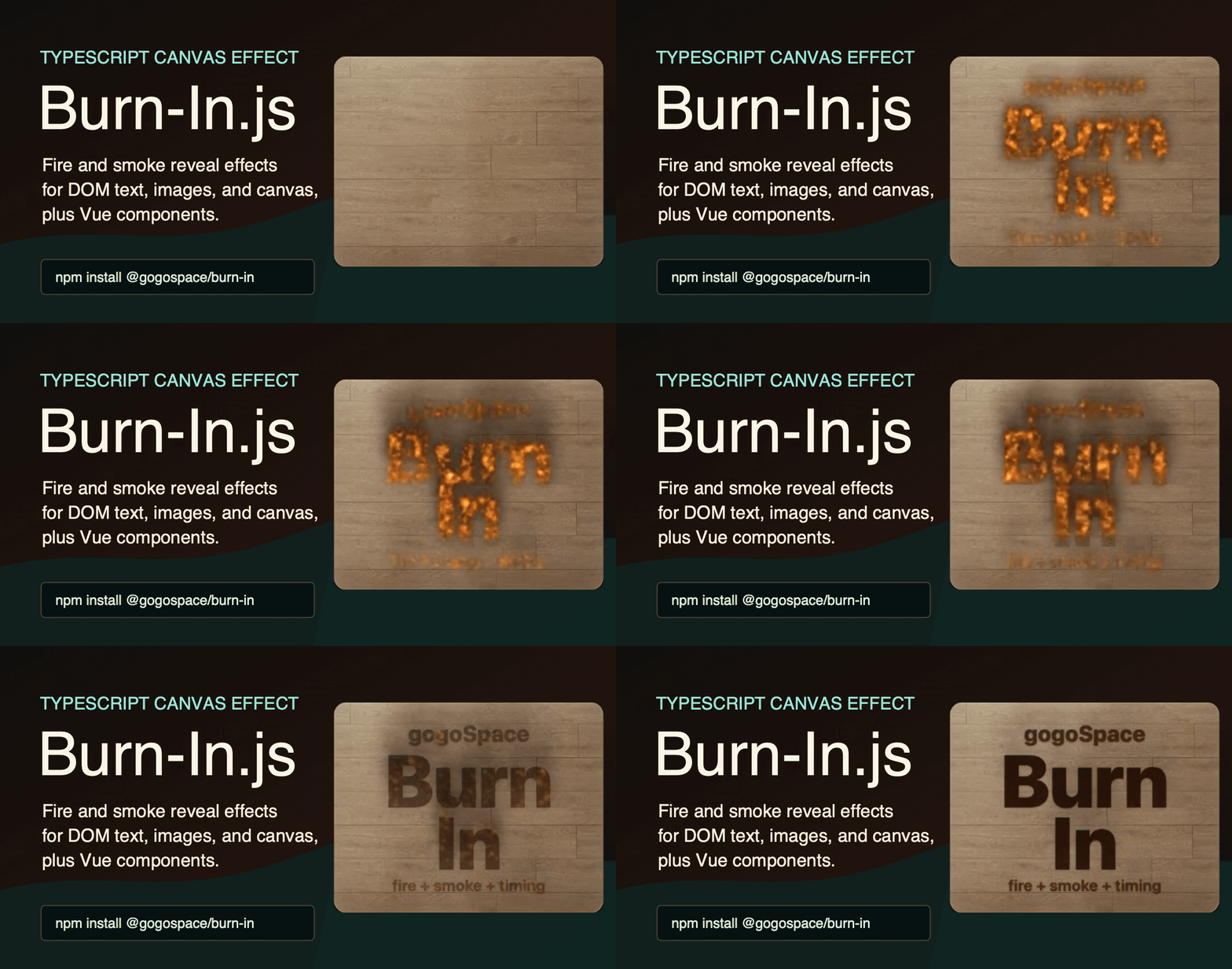
Burn-In.js adds a dramatic fire-and-smoke reveal to real web content. Point it at a DOM element, image, canvas, or Vue slot, then choose a preset or tune the masks, particles, timing, and seed. The original content stays in the document after the reveal, so text can remain selectable and accessible.
Features
- Burn real DOM text while keeping it selectable and accessible after reveal.
- Use alpha, luminance, text, or bounds masks for different source types.
- Pick from six presets:
soft,wildfire,smolder,flash,ritual, andpsycho. - Replay deterministic particle patterns with
seed. - Scale geometry with the target using
referenceSize, without increasing particle counts. - Use the framework-neutral TypeScript core or the optional Vue 3 component.
- Cancel effects and wait for completion with a typed controller.
Installation
npm install @gogospace/burn-in
pnpm add @gogospace/burn-in
yarn add @gogospace/burn-in
Vue is an optional peer dependency. Install Vue only when you use the @gogospace/burn-in/vue adapter.
Quick Start
import { burn } from "@gogospace/burn-in";

const logoElement = document.querySelector(".logo");

if (logoElement instanceof HTMLElement) {
  const controller = burn(logoElement, {
    preset: "ritual",
    fire: { intensity: 1.2 },
    smoke: { intensity: 0.8 },
    seed: "launch"
  });

  await controller.done;
}
Vue
<script setup lang="ts">
import { ref } from "vue";
import { BurnIn } from "@gogospace/burn-in/vue";

const replayKey = ref(0);
</script>

<template>
  <button type="button" @click="replayKey++">Replay</button>

  <BurnIn
    active
    :replay-key="replayKey"
    :options="{ preset: 'smolder', mask: { source: 'text' }, smoke: { intensity: 1.4 } }"
  >
    <strong>Burn me in</strong>
  </BurnIn>

  <BurnIn
    active
    target-selector="img"
    :replay-key="replayKey"
    :options="{ mask: { source: 'alpha' } }"
  >
    <img src="https://raw.githubusercontent.com/gogoSpace/burn-in.js/HEAD/logo.png" alt="Logo" />
  </BurnIn>
</template>
Vue Props and Events
| Prop | Description |
|---|---|
active |
Starts the effect when true and cancels it when false. |
options |
A BurnOptions object passed to burn(). |
as |
Host element tag name. Defaults to span. |
replayKey |
Change this value to replay the effect while active is true. |
contentClass |
Class applied to the wrapped slot target. |
targetSelector |
Selector for a concrete descendant to burn instead of the wrapper. |
| Event | Description |
|---|---|
start |
Emitted before a new effect starts. |
done |
Emitted when the effect finishes. |
cancel |
Emitted when a running effect is cancelled. |
The component also exposes play() and cancel() for imperative control.
Configuration
Burn-In.js keeps the easy path short and the expert path deep. Start with a preset and override only what you need.
import { burn } from "@gogospace/burn-in";

burn(headingElement, {
  preset: "wildfire",
  seed: "same-effect-every-time",
  timing: {
    delayMs: 420,
    igniteMs: 420,
    burnMs: 1000,
    fadeMs: 900,
    smokeMs: 2600
  },
  fire: {
    intensity: 1.4,
    lift: 0.014,
    spread: 0.56,
    turbulence: 0.04,
    particleSize: [10, 30],
    colors: [
      { at: 0, color: "rgba(255, 255, 230, 0.42)" },
      { at: 0.24, color: "rgba(255, 180, 50, 0.28)" },
      { at: 0.62, color: "rgba(255, 60, 10, 0.14)" },
      { at: 1, color: "rgba(0, 0, 0, 0)" }
    ]
  },
  smoke: {
    intensity: 0.9,
    drift: 0.6,
    expansion: 2,
    particleLife: [72, 140]
  },
  reveal: {
    startsAt: "burn",
    durationMs: 980
  }
});
seed controls the random particle pattern. Use a stable string or number when you want the same element and options to replay with the same fire and smoke behavior. Omit it when every burn should feel slightly different.
Target-relative Scaling
Set referenceSize to the measurement, in CSS pixels, at which your particle
settings are tuned. scaleBasis selects that measurement and defaults to the
shorter side of the target:
burn(targetElement, {
  referenceSize: 100,
  seed: "responsive-reveal",
  fire: { particleSize: [10, 28] },
  smoke: { particleSize: [28, 64] }
});
The uniform scale is Math.min(targetWidth, targetHeight) / referenceSize, using
the target's rendered bounding rectangle. A 300 × 100 target uses scale 1;
the same target at 150 × 50 uses 0.5, and at 600 × 200 uses 2. Both axes
use the same scale, so particles retain their shape. The shorter side is used
instead of area, diagonal, or width: adding characters to a wide, single-line
heading does not enlarge its flames while its height stays the same. Narrow or
multiline targets also follow that rule by default. For wrapping text, use the
font-size basis below so layout changes do not enlarge particles.
Select a different basis when layout dimensions do not represent content scale:
burn(headingElement, {
  referenceSize: 120,
  scaleBasis: "font-size"
});
Here the scale is the target's computed CSS font-size divided by 120. A 120 px
heading keeps the same particle sizes and motion when it wraps into two lines.
A change to 90 px scales them to 0.75. The mask still follows the actual lines.
scaleBasis |
Measurement in CSS pixels |
|---|---|
"short-side" (default) |
Smaller rendered bounding-rectangle dimension. |
"width" |
Rendered bounding-rectangle width. |
"height" |
Rendered bounding-rectangle height. |
"font-size" |
Computed font size of the target element. |
(target: HTMLElement) => number |
Custom synchronous measurement of the target. |
For example, a custom function can measure a representative child in a mixed
content container. Return a positive finite CSS-pixel length in the same units
as referenceSize; the result is a measurement, not the final scale multiplier.
The font-size basis reads the target itself, not differently styled descendants,
and does not include CSS transforms. Use a callback for those custom semantics.
This works with text, image, canvas, and generic element masks. Particle sizes,
initial velocities, lift, spread, turbulence, drift, mask offsets, and canvas
margins all scale together. Timing, lifetime, opacity, colors, expansion factors,
and the input/output shape of liftCurve remain unchanged. spriteSize still
sets the sprite texture resolution; its contribution to canvas margins scales.
Mask sampling and emission run in reference coordinates. mask.stepPx and
mask.offset are therefore measured at the reference size, and
particlesPerPixel applies to reference-mask coverage. Uniform enlargement keeps
the same emitter grid, emission schedule, and particle budget instead of adding
particles with the displayed area. Changing shape or aspect ratio can change
coverage, but existing maxParticles limits still apply. Text uses normalized
font metrics for rasterization. Browser rounding of DOM text ranges can still
shift a mask by roughly a reference pixel at some font sizes, changing edge
samples, emitter weights, and seeded birth positions. Motion and fading from
each particle's birth keep the same scale and lifetime rules.
The effect checks target dimensions and the selected measurement each animation frame and on viewport changes. A callback may therefore run each frame; keep it fast and free of side effects. Changes rebuild the mask and scale live particle geometry while preserving ages and velocities in reference coordinates. Font size or callback changes are detected even inside a fixed-size container. The animation does not restart. Content changes without a dimension or measurement change require replaying the effect.
Keep referenceSize fixed across responsive layouts and replays. Computing it
from the current target before every call would always select scale 1. To keep
a particular existing layout as your baseline, measure its selected basis once
and use that value as the reference. A smaller reference makes the effect larger
relative to the target; it also lowers normalized mask coverage and emission.
Omit referenceSize for the existing pixel-based behavior. Non-number,
non-finite, zero, or negative reference values also use scale 1. A zero,
negative, or non-finite target dimension uses scale 1, with invalid sampling
dimensions reduced to at least one pixel; a later valid resize is measured again.
An unknown basis, a non-number/non-finite/non-positive measurement, or an error
from a callback also uses legacy sizing for that layout check. Without a valid
referenceSize, the basis is not evaluated.
canvas.pixelRatio remains independent: it controls backing-store resolution,
not particle geometry. Its existing minimum of 1 is unchanged.
Custom Lift Curves
Both fire and smoke accept liftCurve?: (particleProgress: number) => number in their shared BurnParticleOptions. Use any synchronous function to control how lift changes over each particle's lifetime:
burn(headingElement, {
  fire: {
    lift: 0.1,
    liftCurve: (particleProgress) => 0.2 + 1.8 * particleProgress ** 2
  },
  smoke: {
    lift: 0.05,
    liftCurve: (particleProgress) => 1 - particleProgress
  }
});
particleProgress is the normalized age of that individual particle: 0 at birth and 1 at expiry, independent of the overall animation timing. The callback runs once per live particle per animation frame. Expired particles are removed before it runs, so callbacks receive values in [0, 1) and are not called at 1.
The returned number multiplies the configured lift for that step, before the existing velocity damping. Without a curve, the multiplier remains exactly 1 + particleProgress * 0.5. A custom curve replaces that multiplier. For example, () => 2 applies twice the base lift throughout the particle's life; it does not also apply the default ramp.
Zero disables lift acceleration for that step, while a negative multiplier reverses it. Neither resets the particle's existing velocity. NaN, positive or negative Infinity, non-number results from JavaScript callers, and thrown errors fall back to the default multiplier for that step. The callback is tried again on the next step, and the effect can still complete or be cancelled.
Keep curves fast and free of side effects: they run for every live particle, potentially thousands of times per frame. Seeded replays stay deterministic when the curve itself is deterministic. Particle counts, palettes, lifetimes, initial velocities, and rendering are unchanged.
Presets
| Preset | Best for |
|---|---|
soft |
Default profile with balanced timing and density. |
wildfire |
Stronger fire and dense smoke. |
smolder |
Slower reveal with long smoke. |
flash |
Short, bright ignition. |
ritual |
Warm theatrical fire with expressive smoke. |
psycho |
Saturated color, heavy turbulence, and long colored smoke. |
Masks
Images and canvas elements can use pixel data automatically. Text elements can use a generated alpha mask while staying real selectable DOM text. Generic DOM elements use their bounds, which means any element can be burned into view without extra dependencies.
burn(imageElement, {
  mask: {
    source: "alpha",
    alphaThreshold: 150,
    stepPx: 3
  }
});
burn(headingElement, {
  mask: {
    source: "text",
    offset: {
      y: 6
    }
  }
});
Text masks are useful for headings, spans, paragraphs, and other real DOM text. The effect uses an internal alpha mask for the fire and smoke, while the original text remains selectable and accessible after reveal.
Use mask.offset.x and mask.offset.y to fine-tune emitter alignment. Positive y moves the burn mask downward, which can make rising fire and smoke feel more natural over text.
Supported mask sources:
autoalphaluminanceboundstext
API
| Export | Description |
|---|---|
burn(target, options) |
Starts the effect and returns a BurnController. |
BurnInEffect |
Class API for direct construction when needed. |
BurnController |
{ cancel(): void; done: Promise<void> }. |
BurnOptions |
Typed configuration for presets, reference size, timing, particles, masks, reveal, canvas, and hooks. |
burnPresets |
Preset option map used by the resolver. |
resolveBurnOptions(options) |
Resolves partial options into complete internal options. |
Option Groups
| Group | Controls |
|---|---|
referenceSize |
Optional reference measurement in CSS pixels for uniform spatial scaling and normalized emission. |
scaleBasis |
"short-side", "width", "height", "font-size", or a target callback. Used only with a valid referenceSize. |
timing |
Delay, ignition, burn, fade, ember, smoke, and easing durations. |
fire |
Fire particle density, colors, lift and lift curve, spread, turbulence, size, lifetime, and blending. |
smoke |
Smoke particle density, colors, lift and lift curve, drift, expansion, size, lifetime, and blending. |
mask |
Source, thresholds, sampling step, padding, offset, and edge bias. |
reveal |
Target opacity, reveal phase, duration, and easing. |
canvas |
Overlay class, z-index, pixel ratio, and pointer events. |
hooks |
onStart, onIgnite, onReveal, onDone, and onCancel. |
Accessibility and Motion
Avoid autoplaying heavy effects when prefers-reduced-motion is active. Keep the underlying content meaningful without the animation, then start Burn-In.js only when motion is allowed or explicitly requested.
import { burn, type BurnOptions } from "@gogospace/burn-in";

const titleElement = document.querySelector(".title");
const prefersReducedMotion = window.matchMedia("(prefers-reduced-motion: reduce)").matches;

const burnOptions: BurnOptions = {
  preset: "ritual",
  seed: "launch",
  mask: { source: "text" }
};

if (titleElement instanceof HTMLElement && !prefersReducedMotion) {
  const controller = burn(titleElement, burnOptions);

  controller.done.then(() => {
    // Continue after the reveal finishes.
  });
}
Browser Notes
- The effect requires Canvas 2D and
requestAnimationFrame. - Reading pixels from cross-origin images needs valid CORS headers.
- Text masks are generated from DOM text and preserve the final real text in the page.
- Server-rendered apps should start the effect only after the target element exists in the browser.
Use Cases
- Dramatic logo, wordmark, or heading reveals on launch pages and product microsites.
- Game, horror, fantasy, metal, event, or campaign title cards.
- Image, badge, poster, or canvas artwork reveals using alpha or luminance masks.
- Vue component reveals with replay controls for onboarding, demos, easter eggs, or state transitions.
- Deterministic visual demos, Storybook examples, or recorded UI captures using
seed.
Local Development
npm install
npm run dev
npm test
npm run build
The demo runs through Vite on port 5177.
For release checks, run the build before npm run pack:dry so the generated dist files are present.
License
MIT
Related Packages
The Vue editor for dumbshow: ComposerApp and its panes over @dumbshow/core — mou...
Vue 3 port of the dotted thought-orb loading indicators for AI and agent UIs
Version History
| Version | Released | Vue | License |
|---|---|---|---|
| 0.3.0 | ^3.4.0 || | MIT | |
| 0.2.0 | ^3.4.0 || | MIT | |
| 0.1.2 | ^3.4.0 || | MIT | |
| 0.1.1 | ^3.4.0 || | MIT | |
| 0.1.0 | ^3.4.0 || | MIT |