@digitalwalletcorp/vue-svg-icons
| Install | |
|---|---|
npm install @digitalwalletcorp/vue-svg-icons |
|
| Latest Version: | 1.15.4 |
| Vue: | 3 |
| License: | MIT |
| Last Updated: | Oct 1, 2026 |
| Links: | GitHub · npm |
Vue SVG Icons



A set of original SVG icons shipped directly as Vue 3 components. Includes independent interpretations of Unicode emoji characters as well as common UI icons.
Built entirely from basic SVG primitives with no <text> elements, every icon renders consistently across operating systems and browsers. Each design is drawn from scratch without embedding fonts or tracing existing emoji glyphs, so there are no font licensing dependencies.
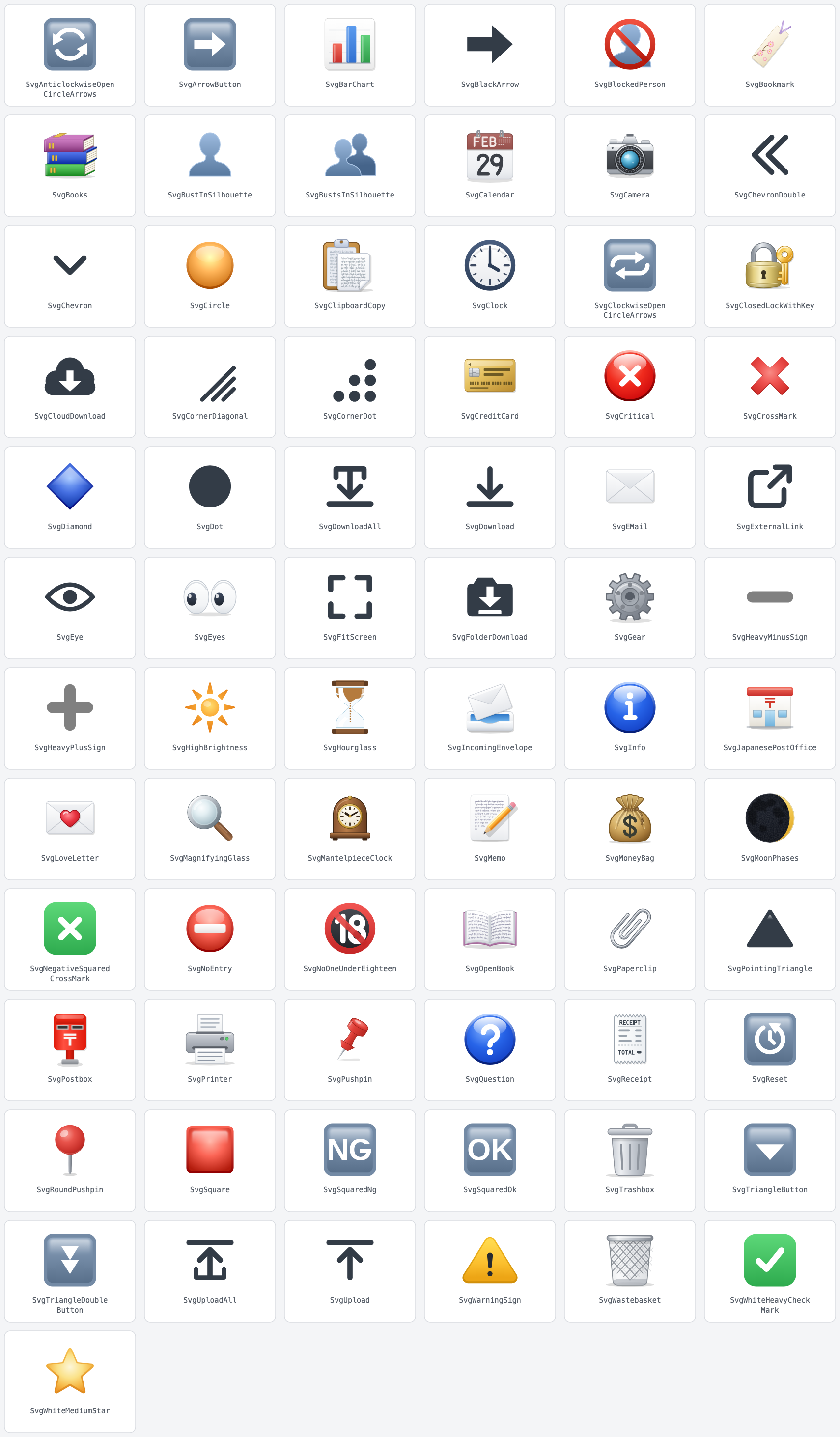
Open the interactive demo to browse every icon and edit its props to see how it renders.
✨ Features
- Tree-shaking: Only import what you use. Importing a single icon won't bundle the rest of the library.
- SSR-safe: Fully compatible with server-side rendering. Animations safely trigger after mounting.
- Scales with text: Defaults to
1.2emin size, naturally matching surrounding inline text without extra CSS. - Collision-free IDs: Components utilizing gradients or clipping paths use isolated element IDs, preventing display bugs when rendering multiple identical icons on the same page.
- Peer dependency: Requires Vue 3.5 or later.
📦 Installation
npm install @digitalwalletcorp/vue-svg-icons
# or
yarn add @digitalwalletcorp/vue-svg-icons
⚠️ Requirements
- Vue 3.5.0+: This library uses Vue's built-in
useId()helper to generate unique element IDs, requiring Vue 3.5.0 or later.
📖 Usage
There are three ways to use the icons. Choose the one that best fits your project.
| When to use | Bundled icons | |
|---|---|---|
| Import individually | When you want to minimize bundle size or prefer explicit imports | Only the icons you import |
| Register all icons globally (Vue) | When you want to use icons without importing them in each file | All icons |
| Register icons globally (Nuxt) | When you want to use icons globally in a Nuxt project | Only the icons you use |
Note: In Nuxt, icons are registered globally, but only the icons actually used in your templates are included in the bundle.
1. Import icons individually
Import the icons you need in each file and use them in your template.
<script setup lang="ts">
import {
  SvgWhiteHeavyCheckMark,
  SvgDownload,
  SvgChevron,
  SvgClock,
  SvgCalendar
} from '@digitalwalletcorp/vue-svg-icons';
</script>

<template>
  <p>Upload finished <SvgWhiteHeavyCheckMark /></p>
  <SvgDownload :size="20" color="#c0392b" />
  <SvgChevron direction="up" />
  <SvgClock :hour="9" :minute="41" :duration="60" />
  <SvgCalendar date="20260920" :duration="3" />
</template>
2. Register all icons globally (Vue)
Call registerIcons() once when you create the app. All icons then become available in any template without importing them.
// main.ts
import { createApp } from 'vue';
import { registerIcons } from '@digitalwalletcorp/vue-svg-icons/register';
import App from './App.vue';

const app = createApp(App);
registerIcons(app);
app.mount('#app');
<template>
  <!-- no import needed -->
  <SvgDownload :size="20" color="#c0392b" />
  <SvgChevron direction="up" />
</template>
This registers every icon, so all icons are included in the bundle. If bundle size matters, import icons individually instead.
3. Register icons globally (Nuxt)
Add the Nuxt module to nuxt.config.ts. Icons are automatically available in any template without imports, and no additional type setup is required.
// nuxt.config.ts
export default defineNuxtConfig({
  modules: ['@digitalwalletcorp/vue-svg-icons/nuxt']
});
<template>
  <!-- no import needed -->
  <SvgDownload :size="20" color="#c0392b" />
  <SvgChevron direction="up" />
</template>
📐 Stylesheet
Since v1.9.0, every icon renders its root <svg> with the svg-inline--vue-svg-icons class.
Importing the bundled stylesheet is recommended. Without it, icons default to sitting on the text baseline, causing them to appear awkwardly high relative to surrounding text.
- Vue: Import in your entry file.
// main.ts
import '@digitalwalletcorp/vue-svg-icons/style.css';
- Nuxt: Add to your config array.
// nuxt.config.ts
export default defineNuxtConfig({
  css: ['@digitalwalletcorp/vue-svg-icons/style.css']
});
- Consistent Positioning: The stylesheet dynamically applies vertical-align based on the icon's size, ensuring alignment stays consistent whenever you change sizes.
- CJK Text Alignment: Offsets are calculated using Latin font metrics. When paired with CJK (Chinese, Japanese, Korean) characters, icons may appear slightly low.
- Easy Overrides: Rules use zero specificity (:where()), making it effortless to override them with your custom CSS whenever needed.
💡 Recommended: Align via Flex Container
For UI components like buttons and badges where icons and text must line up precisely, setting the parent as an inline-flex container is the most reliable approach:
.label {
  display: inline-flex;
  align-items: center;
  gap: 0.25em;
}
Key Takeaways:
- Flexbox overrides baseline styles:
vertical-alignis ignored inside a flex context, so this won't conflict with the library's stylesheet. - Requires
gap: Flex containers ignore HTML white-space rules, so usegapto define spacing between the icon and text. - Stylesheet optional: If every icon in your application is rendered inside a flex container, importing the bundled CSS is not required.
When NOT to use Flexbox:
- When text wraps onto multiple lines and the icon must stay aligned with the first line.
- When inserting an icon directly inside a standard paragraph of inline text.
In these scenarios, rely on vertical-align and standard inline rendering instead.
🔧 Props
All icons accept the size and title props. See the Props table below for icon-specific properties.
Note: Default values vary per icon.
| Prop | Type | Description |
|---|---|---|
size |
number | string |
Icon size. Numbers are treated as pixels; strings accept any valid CSS length unit. Defaults to 1.2em to match surrounding font size. |
title |
string |
Accessible name. When given, the icon renders role="img" and an SVG <title>, which browsers also show as a native tooltip. When omitted, the icon is treated as decorative and rendered with aria-hidden="true". |
color |
string |
Stroke or fill color. Line-art icons inherit the surrounding text color by default (currentColor). |
strokeWidth |
number |
Line thickness relative to the icon's 64-unit coordinate grid. |
direction |
string literal | Orientation of the icon (e.g., 'up', 'down', 'left', 'right', etc.). |
orientation |
'horizontal' | 'vertical' |
Lays the icon out horizontally or vertically. |
variant |
'large' | 'medium' | 'small' |
Adjusts the relative scale of the drawn shape itself, independent of size. |
filled |
boolean |
Renders the icon with a solid fill instead of an outline. |
slashed |
boolean |
Overlays a slash over the icon to indicate a "hidden" or "disabled" state. |
bgColor / borderColor / arrowColor |
string |
For button-style icons: sets the background plate color, border color, and foreground symbol color. |
cornerRadius |
number |
For button-style icons: controls the corner radius of the background plate. |
duration |
number |
Animation duration in seconds. Lower values run faster; 0 stops the animation completely. On SvgCalendar it is the time one day takes to pass. |
flipSeconds |
number |
Seconds spent flipping a single sheet on SvgCalendar. Raising duration lengthens the pause between flips without slowing the flip itself. Defaults to 0.45. When duration is shorter than this, the flip takes the whole day instead. |
hour / minute |
number |
Sets the starting time displayed on clock icons. |
date |
string |
Start date for calendar icons, in yyyyMMdd format. The year is never displayed, but it decides whether February has 29 days. Defaults to 20280229, so the icon still reads FEB 29 when the prop is omitted. A calendar animates only when date is a day that really exists and duration is given: a malformed value falls back to the default date, and a date that does not exist in that year (20260229, 20260431) is still displayed as given, but neither one animates. |
moonAge |
number |
Moon age in days for SvgMoonPhases, driving the lit shape through the phases. 0 = new moon, ~7.4 = first quarter, ~14.8 = full moon, ~22.1 = last quarter (synodic period 29.53 days). Any value is accepted and wraps within the cycle. Defaults to 3. |
angle |
number |
Clockwise rotation angle in degrees. Negative values and values beyond 360 are accepted and wrapped within a 360-degree range (e.g., passing 400 is equivalent to 40). Defaults to 0 (no rotation). |
📚 Icon Catalog
Unicode Emoji Icons
| Component | Unicode Character | Accepted Props |
|---|---|---|
SvgAnticlockwiseOpenCircleArrows |
🔄 ANTICLOCKWISE DOWNWARDS AND UPWARDS OPEN CIRCLE ARROWS |
size, bgColor, borderColor, arrowColor, cornerRadius |
SvgArrowButton |
➡️ BLACK RIGHTWARDS ARROW |
direction, size, bgColor, borderColor, arrowColor, cornerRadius |
SvgBarChart |
📊 BAR CHART |
size, bgColor |
SvgBlackArrow |
➡ BLACK RIGHTWARDS ARROW (text presentation, without the button plate) |
direction, size, color, strokeWidth, filled. strokeWidth applies only when filled is false. The line thickens inward, so the outline never grows; large values end up looking filled. |
SvgBookmark |
🔖 BOOKMARK |
size |
SvgBooks |
📚 BOOKS |
size |
SvgBustInSilhouette |
👤 BUST IN SILHOUETTE |
size |
SvgBustsInSilhouette |
👥 BUSTS IN SILHOUETTE |
size |
SvgCalendar |
📅 CALENDAR |
date, duration, flipSeconds, size |
SvgCamera |
📷 CAMERA |
size |
SvgCircle |
🟠 LARGE ORANGE CIRCLE |
variant, size, color |
SvgClock |
🕓 CLOCK FACE FOUR OCLOCK |
hour, minute, duration, size |
SvgClockwiseOpenCircleArrows |
🔁 CLOCKWISE RIGHTWARDS AND LEFTWARDS OPEN CIRCLE ARROWS |
orientation, size, bgColor, borderColor, arrowColor, cornerRadius |
SvgClosedLockWithKey |
🔐 CLOSED LOCK WITH KEY |
size |
SvgCreditCard |
💳 CREDIT CARD |
size |
SvgCrossMark |
❌ CROSS MARK |
size |
SvgDiamond |
🔷 LARGE BLUE DIAMOND |
variant, size, color |
SvgEMail |
📧 E-MAIL SYMBOL |
size |
SvgEyes |
👀 EYES |
size |
SvgGear |
⚙️ GEAR |
size |
SvgHeavyMinusSign |
➖ HEAVY MINUS SIGN |
size, color |
SvgHeavyPlusSign |
➕ HEAVY PLUS SIGN |
size, color |
SvgHighBrightness |
🔆 HIGH BRIGHTNESS SYMBOL |
size |
SvgHourglass |
⏳ HOURGLASS WITH FLOWING SAND |
duration, size |
SvgIncomingEnvelope |
📨 INCOMING ENVELOPE |
size |
SvgJapanesePostOffice |
🏣 JAPANESE POST OFFICE |
size |
SvgLoveLetter |
💌 LOVE LETTER |
size |
SvgMagnifyingGlass |
🔍 LEFT-POINTING MAGNIFYING GLASS |
direction, size |
SvgMantelpieceClock |
🕰 MANTELPIECE CLOCK |
hour, minute, duration, size |
SvgMemo |
📝 MEMO |
size |
SvgMoneyBag |
💰 MONEY BAG |
size |
SvgMoonPhases |
🌑🌒🌓🌔🌕🌖🌗🌘 MOON PHASES |
moonAge, angle, size |
SvgNegativeSquaredCrossMark |
❎ NEGATIVE SQUARED CROSS MARK |
size |
SvgNoEntry |
⛔ NO ENTRY |
size |
SvgNoOneUnderEighteen |
🔞 NO ONE UNDER EIGHTEEN |
size |
SvgOpenBook |
📖 OPEN BOOK |
size |
SvgPaperclip |
📎 PAPERCLIP |
size |
SvgPostbox |
📮 POSTBOX |
size |
SvgPrinter |
🖨 PRINTER |
size |
SvgPushpin |
📌 PUSHPIN |
direction, size |
SvgReceipt |
🧾 RECEIPT |
size |
SvgRoundPushpin |
📍 ROUND PUSHPIN |
size |
SvgSquare |
🟥 LARGE RED SQUARE |
variant, size, color |
SvgSquaredNg |
🆖 SQUARED NG |
size, color, bgColor, borderColor, cornerRadius |
SvgSquaredOk |
🆗 SQUARED OK |
size, color, bgColor, borderColor, cornerRadius |
SvgTriangleButton |
🔽 DOWN-POINTING SMALL RED TRIANGLE |
direction, size, bgColor, borderColor, arrowColor, cornerRadius |
SvgTriangleDoubleButton |
⏬ BLACK DOWN-POINTING DOUBLE TRIANGLE |
direction, size, bgColor, borderColor, arrowColor, cornerRadius |
SvgWarningSign |
⚠️ WARNING SIGN |
size |
SvgWastebasket |
🗑 WASTEBASKET |
size |
SvgWhiteHeavyCheckMark |
✅ WHITE HEAVY CHECK MARK |
size |
SvgWhiteMediumStar |
⭐️ WHITE MEDIUM STAR |
size |
Original UI Icons
Standalone UI icons with no direct emoji counterparts.
| Component | Accepted Props |
|---|---|
SvgBlockedPerson |
size |
SvgChevronDouble |
direction, size, color, strokeWidth, filled |
SvgChevron |
direction, size, color, strokeWidth, filled |
SvgClipboardCopy |
size |
SvgCloudDownload |
size, color, arrowColor |
SvgCornerDiagonal |
direction, size, color, strokeWidth |
SvgCornerDot |
direction, size, color |
SvgCritical |
size |
SvgDot |
size, color |
SvgDownloadAll |
size, color, strokeWidth |
SvgDownload |
size, color, strokeWidth |
SvgExternalLink |
direction, size, color, strokeWidth |
SvgEye |
size, color, strokeWidth, slashed |
SvgFitScreen |
size, color |
SvgFolderDownload |
size, color, arrowColor |
SvgInfo |
size |
SvgPointingTriangle |
direction, size, color |
SvgQuestion |
size |
SvgReset |
size, bgColor, borderColor, arrowColor, cornerRadius |
SvgTrashbox |
size |
SvgUploadAll |
size, color, strokeWidth, bottomLineWidth |
SvgUpload |
size, color, strokeWidth |
🎨 Artwork & Copyright
- All icons in this package are original SVG artwork drawn from scratch with assistance from generative AI.
- The icons are independently drawn and do not trace or incorporate artwork from existing emoji fonts or icon sets.
- Contains no embedded
<text>elements or font outlines; all text-like elements are rendered strictly as SVG paths. - Component naming follows formal character names from the official Unicode Character Database.
- The package is released under the MIT License. No copyright is asserted over the icon artwork itself, and you are free to use, modify, and redistribute the artwork without attribution.
📜 License
Licensed under the MIT License.
Related Packages
Fluent UI Emoji as tree-shakeable typed Vue 3 components (flat, high-contrast, m...
Version History
| Version | Released | License |
|---|---|---|
| 1.15.4 | MIT | |
| 1.15.3 | MIT | |
| 1.15.2 | MIT | |
| 1.15.1 | MIT | |
| 1.15.0 | MIT | |
| 1.14.0 | MIT | |
| 1.13.5 | MIT | |
| 1.13.4 | MIT | |
| 1.13.3 | MIT | |
| 1.13.2 | MIT | |
| 1.13.1 | MIT | |
| 1.13.0 | MIT | |
| 1.12.0 | MIT | |
| 1.11.0 | MIT | |
| 1.10.0 | MIT | |
| 1.9.1 | MIT | |
| 1.9.0 | MIT | |
| 1.8.0 | MIT | |
| 1.7.0 | MIT | |
| 1.6.0 | MIT | |
| 1.5.0 | MIT | |
| 1.4.0 | MIT | |
| 1.3.1 | MIT | |
| 1.3.0 | MIT | |
| 1.2.1 | MIT | |
| 1.2.0 | MIT | |
| 1.1.0 | MIT | |
| 1.0.1 | MIT | |
| 1.0.0 | MIT |