@crestapps/ai-chat-ui
| Install | |
|---|---|
npm install @crestapps/ai-chat-ui |
|
| Latest Version: | 1.3.0 |
| License: | MIT |
| Last Updated: | Oct 19, 2026 |
| Links: | GitHub · npm |
CrestApps.Core

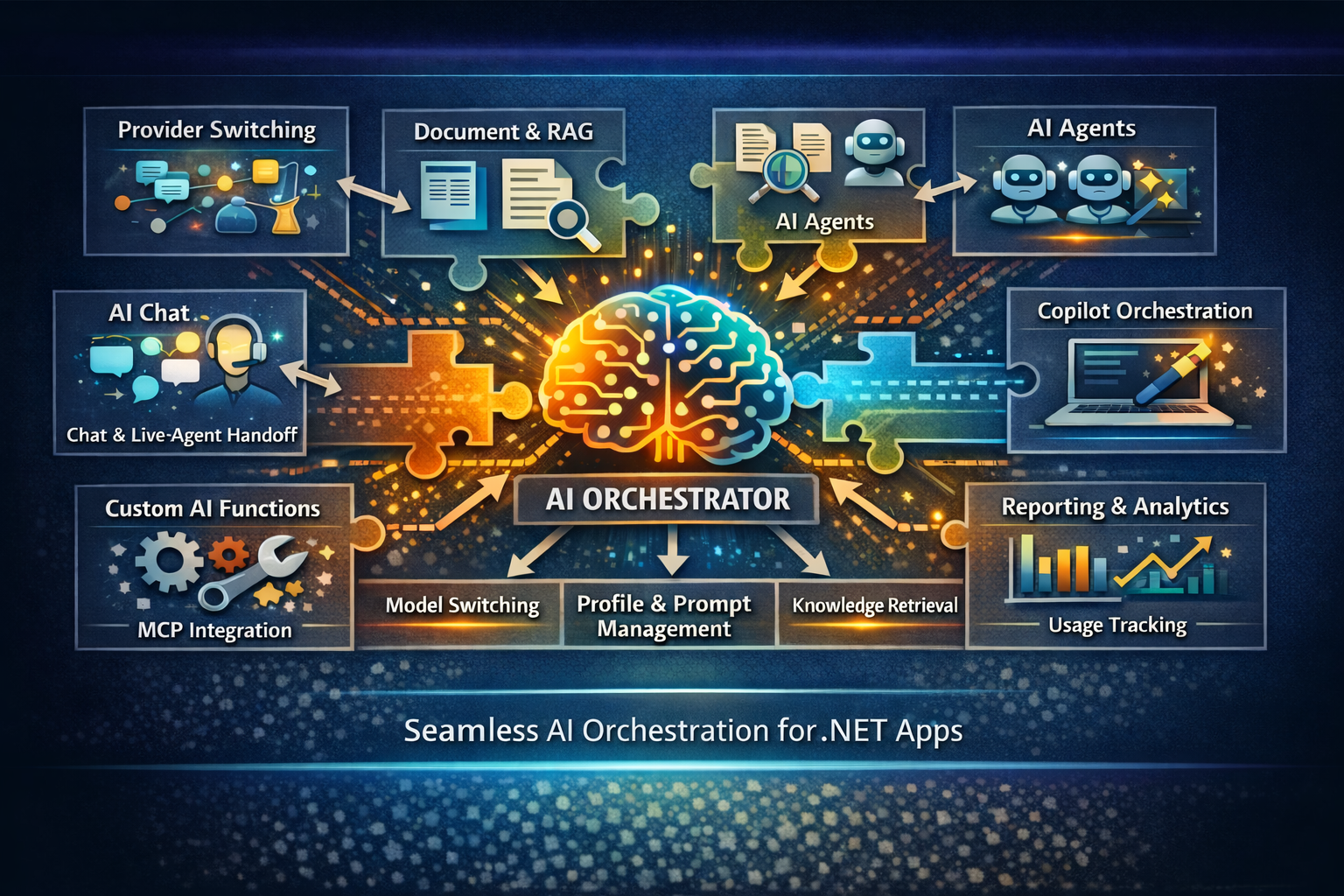
CrestApps.Core is a composable AI management and application framework for .NET. It gives you the building blocks to ship AI chat, agents, RAG, document workflows, MCP, A2A, reporting, and custom AI tooling without stitching together a pile of disconnected provider SDK samples.
Why it exists
Most teams start AI integration with a provider SDK, then quickly run into the real complexity:
- Model and provider switching
- Prompt and profile reuse
- Chat session management
- Document and knowledge retrieval
- Tool calling and custom functions
- Reporting, consumption tracking, and lead workflows
- Live-agent handoff and post-session automation
- Protocol integration like MCP and A2A
- Orchestrator integration like GitHub Copilot orchestration.
CrestApps.Core packages that complexity into reusable .NET services so you can move faster, keep control of behavior, and ship AI features with less custom plumbing.
What you get
- AI management for connections, deployments, agent profiles, data sources, templates, MCP resources, prompts, and external hosts
- Reusable AI agent profiles so every session can start with predefined behavior, settings, tools, prompts, and retrieval rules
- Chat interactions for provider-agnostic playground and production chat experiences
- Document upload and processing for summarization, Q&A, extraction, tabulation, and knowledge workflows
- RAG support across attached documents, search indexes, and user memory, including configurable preemptive RAG
- AI agents with agent-to-agent handoff through A2A
- MCP server and MCP client capabilities including resource, prompt, and external host management
- Custom AI functions for application-specific actions and tool calling
- Copilot orchestrator integration
- Claude orchestrator integration
- Template-driven prompts and profile definitions for cleaner code and reusable system behavior
- Chat widgets and business workflows including chat metrics, data extraction, goal conversion, post-session processing, and live-agent handoff
- Usage and lead reporting for AI consumption and customer engagement scenarios
- AI memory for more personal, user-aware experiences
- Full customization from code-level extension points to default runtime behavior
Common use cases
- Lead generation chat on a marketing site that qualifies visitors, captures contact details, and routes hot leads by email or workflow
- Knowledge-base assistants restricted to approved business content stored in documents, Elasticsearch, or Azure AI Search
- Support automation that starts with AI and escalates to a live agent on a third-party platform when needed
- Specialized agent teams where multiple AI agents handle different tasks and coordinate through A2A
- Document analysis workbenches for reports, contracts, internal documentation, or uploaded files
- Reusable internal copilots for operations, sales, research, and support teams
- Custom workflow automation driven by AI tool calls into your own services and APIs
See the full use-case guide at core.crestapps.com.
Fastest way to try it
git clone https://github.com/CrestApps/CrestApps.Core.git
cd CrestApps.Core
dotnet build .\CrestApps.Core.slnx -c Release /p:NuGetAudit=false
dotnet test .\tests\CrestApps.Core.Tests\CrestApps.Core.Tests.csproj -c Release /p:NuGetAudit=false
dotnet run --project .\src\Startup\CrestApps.Core.Mvc.Web\CrestApps.Core.Mvc.Web.csproj
The MVC sample is the quickest way to see the full stack working together: AI connections, deployments, agent profiles, Chat Interactions, document processing, MCP, A2A, storage, and SignalR.
Fastest way to consume it
Install the smallest useful package set for your app:
<ItemGroup>
  <PackageReference Include="CrestApps.Core" />
  <PackageReference Include="CrestApps.Core.AI" />
  <PackageReference Include="CrestApps.Core.AI.Chat" />
  <PackageReference Include="CrestApps.Core.AI.OpenAI" />
</ItemGroup>
Register the shared services plus one provider and the playground-style chat UI:
builder.Services.AddCrestAppsCore(crestApps => crestApps
    .AddAISuite(ai => ai
        .AddOpenAI()
        .AddChatInteractions()));
By default, provider connections are loaded from CrestApps:AI:Connections and standalone deployments are loaded from CrestApps:AI:Deployments:
{
  "CrestApps": {
    "AI": {
      "Connections": [
        {
          "Name": "primary-openai",
          "ClientName": "OpenAI",
          "ApiKey": "YOUR_API_KEY"
        }
      ],
      "Deployments": [
        {
          "Name": "gpt-4.1",
          "ClientName": "OpenAI",
          "ModelName": "gpt-4.1",
          "Type": "Chat"
        }
      ]
    }
  }
}
From there, create your first AI profile and use Chat Interactions as the easiest playground-style UI to chat against that profile while you tune prompts, providers, and deployments.
Learn more
- Documentation: https://core.crestapps.com
- Issues: https://github.com/CrestApps/CrestApps.Core/issues
- Preview feed: https://cloudsmith.io/~crestapps/repos/crestapps-core
- Preview source URL:
https://nuget.cloudsmith.io/crestapps/crestapps-core/v3/index.json
Repository layout
src/
├── Abstractions/
├── Primitives/
├── Resources/
├── Stores/
├── Utilities/
├── Startup/
│   ├── CrestApps.Core.Aspire.AppHost/
│   ├── CrestApps.Core.Mvc.Web/
│   ├── CrestApps.Core.Mvc.Samples.A2AClient/
│   └── CrestApps.Core.Mvc.Samples.McpClient/
└── CrestApps.Core.Docs/

tests/
└── CrestApps.Core.Tests/
The chat UI's JavaScript and CSS are built with Vite (Node.js 24): run npm install and npm run rebuild at the
repository root after changing a file under src/Resources/CrestApps.AI.Resources/Assets/. See
Building Front-End Assets.
Community
This project is actively evolving to help the .NET community adopt AI with strong architecture, extensibility, security-minded defaults, and support for modern protocols. If it helps you, please open issues, share feedback, report bugs, star the repository, or contribute code.
❤️ Sponsor
This project is free and open source, built and maintained alongside full-time work. If it saves you time or powers something you ship, please consider sponsoring on GitHub. Sponsorship funds new features, faster fixes, documentation and long-term maintenance, and companies using it in production are especially encouraged to sponsor.

License
MIT
Related Packages
Version History
| Version | Released | License |
|---|---|---|
| 1.3.0 | MIT | |
| 1.2.0 | MIT | |
| 1.1.0 | MIT | |
| 1.0.0 | MIT |
Pre-releases (57)
| Version | Released | License |
|---|---|---|
| 2.0.0-preview.225 | MIT | |
| 2.0.0-preview.226 | MIT | |
| 2.0.0-preview.224 | MIT | |
| 2.0.0-preview.223 | MIT | |
| 2.0.0-preview.215 | MIT | |
| 2.0.0-preview.203 | MIT | |
| 2.0.0-preview.199 | MIT | |
| 2.0.0-preview.197 | MIT | |
| 2.0.0-preview.193 | MIT | |
| 2.0.0-preview.191 | MIT | |
| 2.0.0-preview.190 | MIT | |
| 2.0.0-preview.187 | MIT | |
| 2.0.0-preview.186 | MIT | |
| 2.0.0-preview.5 | MIT | |
| 2.0.0-preview.175 | MIT | |
| 2.0.0-preview.173 | MIT | |
| 2.0.0-preview.172 | MIT | |
| 2.0.0-preview.170 | MIT | |
| 2.0.0-preview.168 | MIT | |
| 2.0.0-preview.163 | MIT | |
| 2.0.0-preview.162 | MIT | |
| 2.0.0-preview.157 | MIT | |
| 2.0.0-preview.154 | MIT | |
| 1.0.0-rc.8 | MIT | |
| 1.0.0-rc.7 | MIT | |
| 1.0.0-rc.3 | MIT | |
| 1.0.0-rc.2 | MIT | |
| 1.0.0-rc.1 | MIT | |
| 1.0.0-preview.153 | MIT | |
| 1.0.0-preview.109 | MIT |
Showing the latest 30 of 57. See every release on npm