@chamoux/diorama
| Install | |
|---|---|
npm install @chamoux/diorama |
|
| Latest Version: | 0.1.1 |
| Vue: | 3 |
| License: | MIT |
| Last Updated: | Oct 20, 2026 |
| Links: | GitHub · npm |
@chamoux/diorama
Persistent WebGL scenes for Inertia + Vue. One Three.js canvas that lives across Inertia page visits instead of being torn down on every navigation, with a declarative per-page scene lifecycle and a default crossfade between scenes.
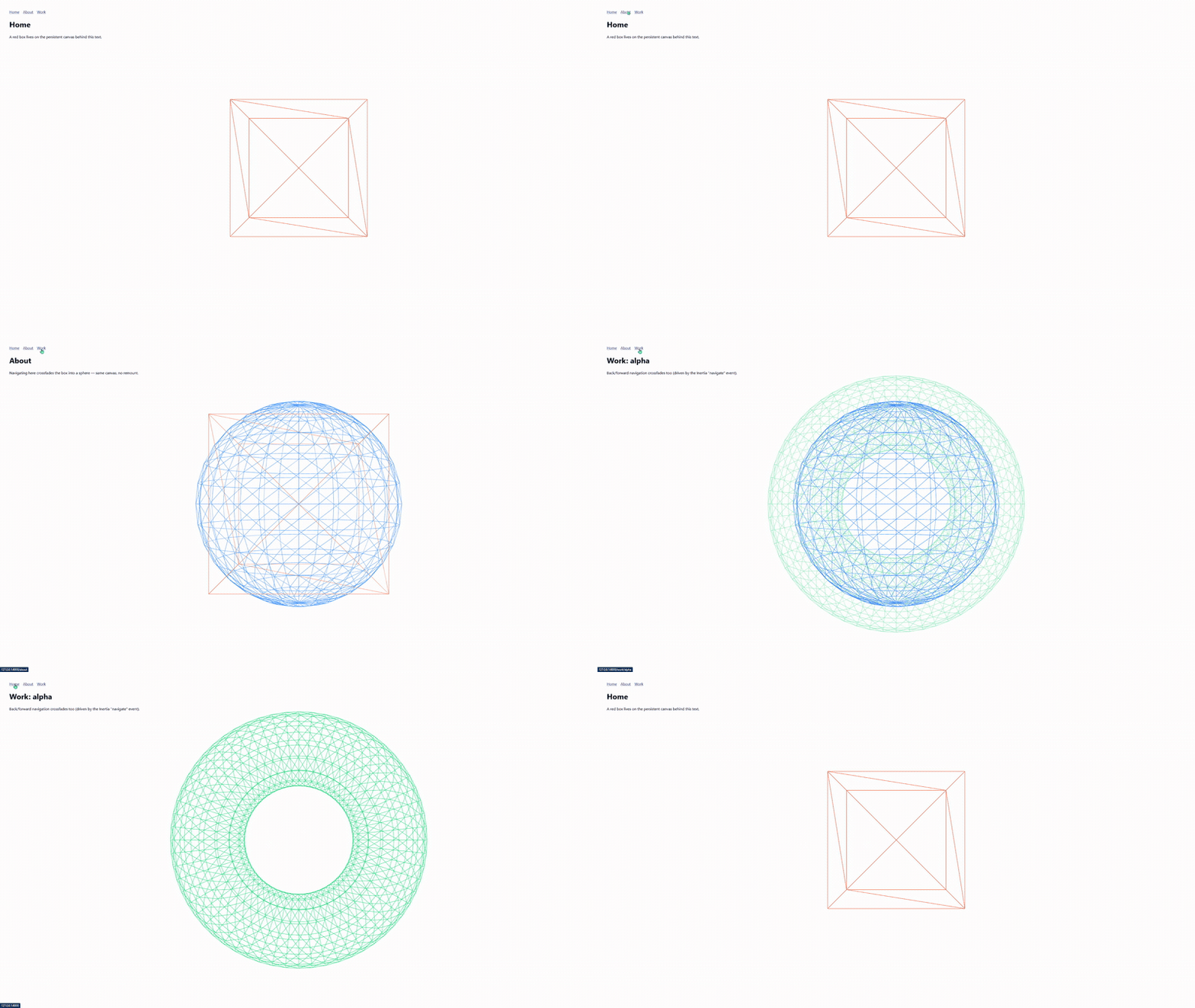
SSR-safe: the plugin builds only Three.js objects on the server; the WebGL
renderer and all DOM/router wiring are deferred to the client (onMounted), so it
renders and hydrates cleanly under Inertia SSR.
Why
Two problems show up the moment you put serious 3D into a Laravel/Inertia (or any Vue SPA) app:
- Inertia remounts your canvas on every navigation. Inertia swaps the page
component on each visit, so a
<canvas>that lives inside a page is unmounted and recreated — you lose the WebGL context, loaded geometry, and all continuity. What you want is one canvas that persists across page visits and morphs from one route's scene to the next. - Scroll choreography is hand-rolled every time. Binding a GSAP timeline to scroll and driving camera/object/material state by hand is the same glue on every project.
Diorama rides Inertia's persistent layouts to solve the first one: it mounts one
Three.js renderer once, keeps the WebGL context alive across navigation, and gives you a
declarative per-page scene lifecycle with automatic crossfades between scenes. For the
second, useScrollChoreography binds a scrubbed GSAP timeline to each page's scene, and
ctx.load lazy-loads models and textures into it.
Install
npm install @chamoux/diorama three gsap
Peer dependencies: vue ^3.4, three >=0.160, gsap ^3.12, and (optional)
@inertiajs/vue3 ^1 || ^2 || ^3.
Setup
Register the plugin in your Inertia entry (resources/js/app.ts):
import { createApp, h } from 'vue'
import { createInertiaApp } from '@inertiajs/vue3'
import { createDiorama } from '@chamoux/diorama'

createInertiaApp({
  resolve: (name) => {
    const pages = import.meta.glob('./Pages/**/*.vue', { eager: true })
    return pages[`./Pages/${name}.vue`]
  },
  setup({ el, App, props, plugin }) {
    createApp({ render: () => h(App, props) })
      .use(plugin)
      .use(createDiorama({ renderer: { antialias: true, alpha: true } }))
      .mount(el)
  },
})
Put the canvas in a persistent layout (this is what keeps the WebGL context alive):
<script setup>
import { DioramaCanvas } from '@chamoux/diorama'
</script>

<template>
  <DioramaCanvas class="fixed inset-0 -z-10" />
  <main class="relative z-10"><slot /></main>
</template>
Sizing: The <canvas> fills its positioning box. The common case is a
full-screen stage: give it position: fixed; inset: 0 (e.g. Tailwind
fixed inset-0) and it fills the viewport. For a non-fixed canvas, make sure its
parent has a definite height, otherwise the canvas resolves to zero height.
Register a scene per page:
<script setup>
import { useScene } from '@chamoux/diorama'
import { Mesh, BoxGeometry, MeshBasicMaterial } from 'three'

useScene('home', {
  enter(ctx) {
    ctx.register('box', new Mesh(new BoxGeometry(), new MeshBasicMaterial()))
    ctx.camera.position.set(0, 0, 5)
  },
})
</script>
On navigation, Diorama runs the outgoing scene's leave, the incoming scene's
enter, and crossfades between them — the canvas never remounts. leave runs once a
visit lands on a different page; reloads, polls, prefetches and cancelled visits don't
trigger it.
Pages may use other layouts without the canvas: it unmounts there, the scenes are kept, and it picks up again when you come back.
Scroll choreography
Bind a scrubbed GSAP timeline to the page's scene. The builder runs each time the scene
enters (after enter, so registered objects are there); scrolling then drives the
timeline's progress, and scrolling back rewinds it. The timeline and its ScrollTrigger
are killed when the page unmounts.
<script setup>
import { useScene, useScrollChoreography } from '@chamoux/diorama'

useScene('home', {
  enter(ctx) { /* ctx.register('box', ...) */ },
})

useScrollChoreography((tl, ctx) => {
  tl.to(ctx.get('box').rotation, { y: Math.PI * 2, ease: 'none' })
    .to(ctx.camera.position, { z: 3, ease: 'none' }, 0)
})
</script>
By default the whole page's scroll range drives the timeline. Options: trigger (an
element, template ref, or selector), start (default 'top top'), end (default
'bottom bottom'), and scrub (true, or seconds of smoothing). ScrollTrigger ships
with gsap and is registered for you. Leave material opacity alone in the timeline:
Diorama uses it for the crossfade.
Lazy assets
ctx.load(Loader, url) loads a model or texture when the scene enters, caches it for
the session, and only resolves while that scene is still active, so a slow download
never lands in a page you already left. Any three.js loader works (TextureLoader,
GLTFLoader, a configured loader instance, or anything with loadAsync(url)).
import { TextureLoader } from 'three'
import { GLTFLoader } from 'three/examples/jsm/loaders/GLTFLoader.js'

useScene('work', {
  enter(ctx) {
    ctx.load(GLTFLoader, '/models/robot.glb').then((gltf) => {
      ctx.register('robot', gltf.scene.clone()) // clone: the cached original is shared
      ctx.fadeIn('robot')
    })
  },
})
Warm the cache before the visit, for example when a link is hovered:
<Link href="/work" @mouseenter="preloadAsset(GLTFLoader, '/models/robot.glb')">Work</Link>
loadAsset(Loader, url) is the same cached load outside a scene, and
clearAssetCache(url?) drops one URL or everything. GPU memory is still freed when a
scene leaves; revisiting re-uploads from the cache without another download.
API
| Export | Purpose |
|---|---|
createDiorama(options) |
Vue plugin; creates the shared renderer/scene/camera |
DioramaCanvas |
the single persistent <canvas>; place it in a persistent layout |
useScene(name, hooks) |
register enter/leave for the current page (name is a display label; the scene is keyed by the Inertia page component) |
useScrollChoreography(build, options?) |
bind a scrubbed GSAP timeline to the current page's scene |
ctx.load(loader, url) |
lazy, cached asset load scoped to the scene (resolves only while it is active) |
loadAsset(loader, url) / preloadAsset(loader, url) |
cached load / fire-and-forget cache warm-up |
clearAssetCache(url?) |
drop one URL, or the whole asset cache |
Status & roadmap
Early days (0.0.x) — the API may still change.
Shipping now: persistent canvas across Inertia navigation · per-page useScene
lifecycle · automatic crossfade between scenes · SSR-safe render + hydrate ·
useScrollChoreography · lazy, cached asset loading.
Planned: a TresJS adapter for declarative scene content.
License
MIT
Related Packages
Version History
| Version | Released | Vue | License |
|---|---|---|---|
| 0.1.1 | ^3.4 | MIT | |
| 0.1.0 | ^3.4 | MIT | |
| 0.0.3 | ^3.4 | MIT | |
| 0.0.2 | ^3.4 | MIT | |
| 0.0.1 | ^3.4 | MIT |