@barkway.app/barkdown-editor
@barkway.app/barkdown-editor


Barkdown is a lightweight Vue 3 + TypeScript markdown editor for template-driven apps. It gives you a clean textarea editor, practical toolbar actions, merge tag insertion, and optional async live preview without coupling your app to backend-specific conventions.
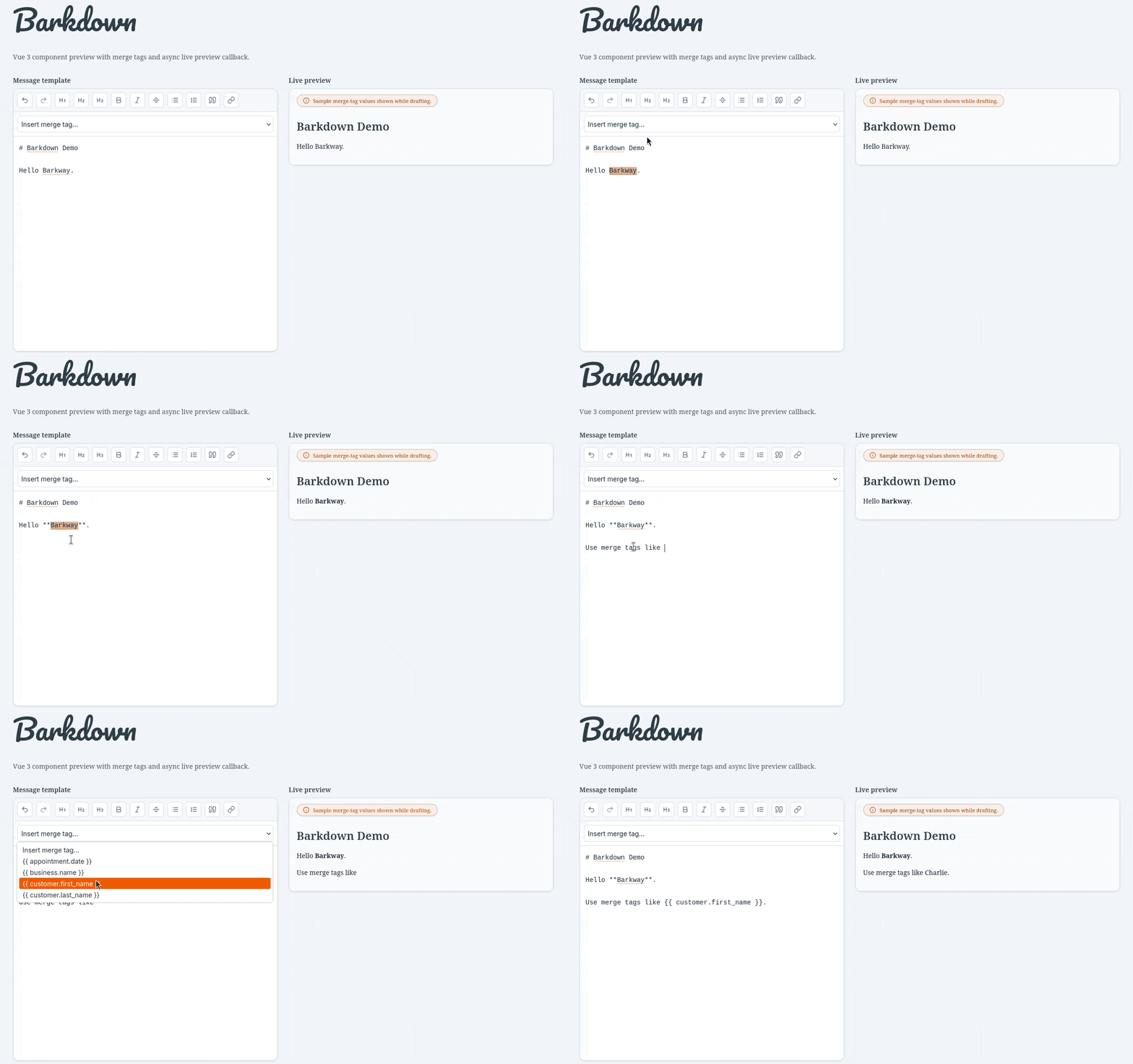
Why Barkdown
- Fast to integrate into existing Vue 3 apps
- Markdown-first editing with familiar toolbar actions
- Built-in merge tag insertion for message/template workflows
- Optional preview via your own async renderer callback
- Polished default UI with scoped Barkdown CSS (no global utility leakage)
Quick Start
Install:
npm install @barkway.app/barkdown-editor
Import styles once in your app entry:
import '@barkway.app/barkdown-editor/style.css';
CSS scoping note:
- The distributed stylesheet is scoped to Barkdown selectors (for example
.barkdown,.barkdown__*) and does not export bare global utility classes like.flexor.grid. - Host apps can customize visuals through
.barkdownand--bd-*CSS variables without requiring a host Tailwind setup.
Use the editor:
<script setup lang="ts">
import { ref } from 'vue';
import { BarkdownEditor } from '@barkway.app/barkdown-editor';

const markdown = ref('Hello Barkway');
</script>

<template>
  <BarkdownEditor
    v-model="markdown"
    name="message_body"
    label="Message body"
  />
</template>
Merge Tags Example
<script setup lang="ts">
import { ref } from 'vue';
import { BarkdownEditor } from '@barkway.app/barkdown-editor';

const markdown = ref('Hi {{ customer.first_name }}');
const mergeTags = ['customer.first_name', 'customer.last_name', 'business.name'];
</script>

<template>
  <BarkdownEditor
    v-model="markdown"
    name="message_template"
    :merge-tags="mergeTags"
    merge-tag-placeholder="Insert tag..."
  />
</template>
Theming
BarkdownEditor supports a theme prop:
'auto'(default): resolves fromprefers-color-schemeand updates live while mounted.'light''dark'
The resolved mode is written to the component root as data-theme="light" or data-theme="dark".
<BarkdownEditor
  v-model="markdown"
  name="message_body"
  theme="auto"
/>
CSS Variable Overrides
All package visual tokens are scoped to the root .barkdown wrapper and can be overridden by host apps:
--bd-bg--bd-surface--bd-border--bd-text--bd-muted--bd-accent--bd-preview-bg--bd-code-bg--bd-warning--bd-danger
Example host override:
.marketing-editor .barkdown {
  --bd-surface: #ffffff;
  --bd-border: #d1d5db;
  --bd-accent: #0f766e;
  --bd-preview-bg: #f9fafb;
}

.marketing-editor .barkdown[data-theme='dark'] {
  --bd-surface: #111827;
  --bd-border: #334155;
  --bd-accent: #2dd4bf;
  --bd-preview-bg: #0b1220;
}
Async Preview Renderer Example
<script setup lang="ts">
import { ref } from 'vue';
import { BarkdownEditor } from '@barkway.app/barkdown-editor';
import type { MarkdownPreviewRenderResult } from '@barkway.app/barkdown-editor';

const markdown = ref('# Hello');

async function previewRenderer(input: string): Promise<MarkdownPreviewRenderResult> {
  const html = input.replace(/^#\s+(.*)$/gm, '<h1>$1</h1>');

  return {
    html,
    unknownTags: [],
  };
}
</script>

<template>
  <BarkdownEditor
    v-model="markdown"
    name="markdown"
    :preview-renderer="previewRenderer"
    preview-label="Live preview"
  />
</template>
previewRenderer contract:
(markdown: string) => Promise<{ html: string; unknownTags?: string[] }>
Important: BarkdownEditor renders preview HTML via v-html. Your previewRenderer should return sanitized HTML (or HTML from a trusted sanitizer/renderer) before returning html.
API Notes
Primary export:
BarkdownEditor
Common props:
v-modeldisabledreadonlytoolbarActionsmergeTagsshowMergeTagSelectshowPreviewshowTitles(defaulttrue)previewRendererpreviewDebounceMsinitialPreviewHtmlinitialUnknownTagsenableHotkeys(defaulttrue)theme('light' | 'dark' | 'auto', default'auto')- label/text customization props (
label,previewLabel,previewEmptyText, etc.)
Toolbar behavior:
- Undo/redo buttons are automatically disabled when history cannot move backward/forward.
Keyboard Shortcuts
Shortcuts apply while the editor textarea is focused.
Set :enable-hotkeys="false" to disable all editor keyboard shortcuts, including undo/redo.
| Action | Windows / Linux | macOS |
|---|---|---|
| Undo | Ctrl+Z |
Cmd+Z |
| Redo | Ctrl+Shift+Z or Ctrl+Y |
Cmd+Shift+Z or Cmd+Y |
| Bold | Ctrl+B |
Cmd+B |
| Italic | Ctrl+I |
Cmd+I |
| Link | Ctrl+K |
Cmd+K |
| Heading 1 | Ctrl+Alt+1 |
Cmd+Alt+1 |
| Heading 2 | Ctrl+Alt+2 |
Cmd+Alt+2 |
| Heading 3 | Ctrl+Alt+3 |
Cmd+Alt+3 |
Also exported:
MarkdownFormatterDEFAULT_MARKDOWN_TOOLBAR_ACTIONS- core TypeScript types
useMarkdownEditorToolbaruseMarkdownPreview
Built by Barkway
Barkdown is built by the team at Barkway as part of our work on practical tools for modern, template-driven communication workflows.
Learn more about Barkway and our open-source work: https://www.barkway.app/open-source
Licensing
This package is licensed under GPL-3.0-only (GNU General Public License v3.0 only).
If you distribute this package, modifications, or derivative works, review the GPLv3 obligations first to make sure your usage and distribution model remain compliant.
See LICENSE for the full license text.
Development
Run the local demo:
npm install
npm run dev
Notes:
- Demo source:
demo/App.vue - Package source:
src/ - Demo utility styling loads from the Tailwind Play CDN in
index.html; the package build no longer depends on local Tailwind/PostCSS tooling.
Testing
Run the test suite:
npm run test
Watch mode during development:
npm run test:watch
Generate coverage reports:
npm run coverage
The test suite covers:
- core markdown formatting behavior (
MarkdownFormatter) - preview and toolbar composables
BarkdownEditorcomponent contract behavior (v-model, toolbar, merge tags, preview states)
Related Packages
Version History
| Version | Released | Vue | License |
|---|---|---|---|
| 0.1.5 | ^3.4.0 | GPL-3.0-only | |
| 0.1.4 | ^3.4.0 | GPL-3.0-only | |
| 0.1.3 | ^3.4.0 | GPL-3.0-only | |
| 0.1.2 | ^3.4.0 | GPL-3.0-only | |
| 0.1.1 | ^3.4.0 | GPL-3.0-only | |
| 0.1.0 | ^3.4.0 | GPL-3.0-only |