@authup/client-web

Authup
Self-hostable identity and access management for your applications and APIs.
Login pages, OAuth 2.0 and OpenID Connect, second factors, external logins and permissions,
in one process that any language can talk to.




Why Authup · Usage · Integrate · SDKs · Documentation
Why Authup?
Every application with users ends up building the same layer: login and password reset pages, sessions and tokens, a second factor, "Sign in with GitHub", an admin screen, and permission checks spread through every API. Authup is that layer, run as a service and spoken to over open standards.
| Concern | With Authup |
|---|---|
| Sign-in | Hosted login, consent, registration, password recovery and device verification pages, with TOTP, recovery codes, email codes and passkeys as a second factor |
| Protocols | OAuth 2.0 and OpenID Connect: authorization code with PKCE, client credentials, rotating refresh tokens, device authorization, discovery, userinfo, logout |
| External logins | Any OAuth2 or OpenID Connect provider (presets for GitHub, Google and others) and LDAP, linkable to existing accounts |
| Authorization | Permissions granted to roles, users and clients, each scoped to a realm and optionally guarded by policies (attributes, identity, time, ...) |
| Tenants | Realms, each with its own users, clients, roles and signing keys |
| Operations | Admin and account consoles, a security event log, Prometheus metrics, and one image that scales out into separate replicas |
What sets Authup apart
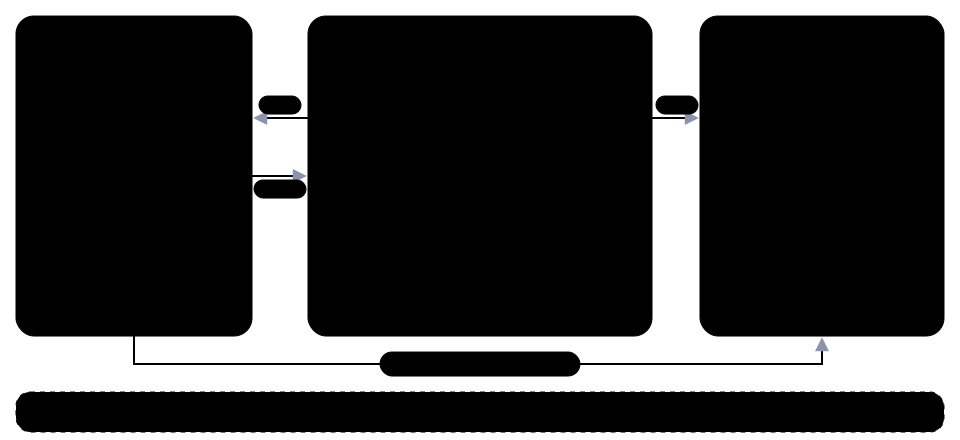
- Authorization is built in. Permissions are granted to roles, users and clients with a realm reach and optional policies, not just roles in a token.
- The same model runs in your services.
@authup/accessevaluates the permissions Authup reports for a token with the server's own rules. - One process. API, login pages and consoles start with
npx authup startand split into replicas when you need them.
Features
Sign-in
- 👤 Single sign-on: sign in once, use every application of a realm
- 🔐 Second factor: TOTP, recovery codes, email codes and passkeys
- 👍 Social login and identity brokering: any OAuth2 or OpenID Connect provider, with presets for GitHub, Google, Facebook, Instagram and PayPal
- 📁 LDAP: sign in with directory accounts, linked to local users
Protocols and authorization
- 📜 Standard protocols: OAuth 2.0 and OpenID Connect, with authorization code and PKCE, client credentials, rotating refresh tokens, device authorization and logout
- 🛡️ Permissions and policies: grant permissions to roles, users and clients, guarded by attribute, identity, time and realm policies
- 🧩 Isomorphic permissions: evaluate the same permissions in your UI, API and services
Running it
- 🏢 Realms: separate tenants, each with its own users, clients, roles and signing keys
- 🖥️ Consoles: an admin console for every entity and an account console for end users, themable without a rebuild
- 🗂️ Declarative provisioning: seed realms, clients, roles and users from YAML or JSON files
- 🕵️ Logging and monitoring: a security event log with a dashboard, and Prometheus metrics
- 🏭 Scaling: one image that splits into API, console and worker replicas, with a Helm chart
Building on it
- 📚 Client libraries: a typed HTTP client, server adapters, and Vue and Nuxt components
Usage
How to configure and set up Authup in detail is covered in the deployment guide.
Quick start
npx authup@latest start
With no database configured, Authup falls back to SQLite and writes db.sqlite into the current directory. That is for trying things out, not for production.
It serves:
- API:
http://localhost:3000/ - Auth console (login, consent, registration, password recovery):
http://localhost:3000/console/auth/ - Admin console:
http://localhost:3000/console/admin - Account console:
http://localhost:3000/console/account
Sign in to the admin console as admin with the password start123 in the master realm, and change it. The bare-metal setup is described in the bare-metal guide.
Production
The recommended way to run Authup is the Docker image. One container runs the whole deployment against a PostgreSQL or MySQL database you already have:
docker run \
  -p 3000:3000 \
  -e PUBLIC_URL=http://localhost:3000 \
  -e DB_TYPE=postgres \
  -e DB_HOST=postgres.example.com \
  -e DB_PORT=5432 \
  -e DB_USERNAME=authup \
  -e DB_PASSWORD=secret \
  -e DB_DATABASE=authup \
  authup/authup:latest start
The image runs in production mode, which does not support SQLite, so it does not start until a server database is configured, through DB_* or a db: block in authup.yml. It serves the same paths as the quick start.
Rather than writing the deployment files by hand, run npm create authup@latest: a few prompts write a compose project, Helm values, a docker run env file or a bare-metal project. The container targets pin the image tag and the bare-metal project pins the authup dependency to the release the wizard belongs to; the Helm values name no tag, since the chart's appVersion owns it.
Development
Install the workspace dependencies, build once, and start the development loop:
npm install
npm run build
npm run dev
This runs the experimental authup dev command: server-core and every console share http://localhost:3000/, the consoles use hot module replacement, and server-core runs directly from TypeScript source. npm run test and npm run lint run the test suite and the linter (after a build).
To work on the admin console against a standalone dev server instead, start it in a second terminal:
VITE_API_URL=http://localhost:3000 npm run dev --workspace=apps/client-admin-console
It listens on http://localhost:5173/console/admin/.
Use it from any language
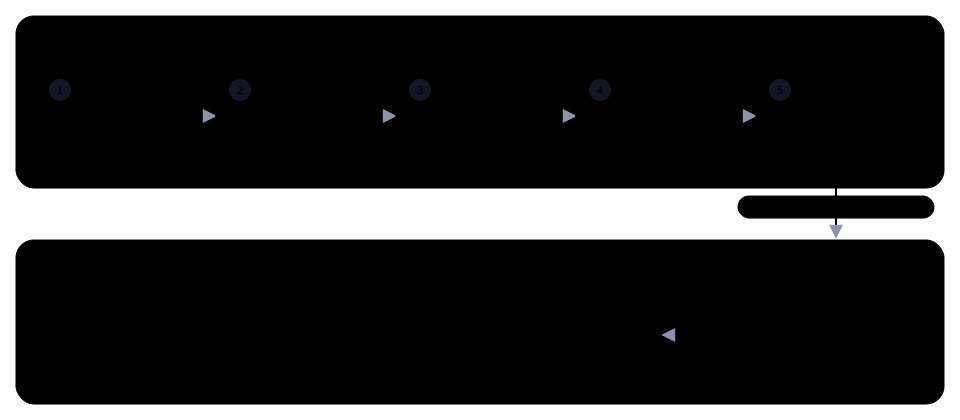
Authup speaks OAuth 2.0 and OpenID Connect, so the library you already use for "Sign in with ..." works with it, whatever your stack. Point it at the discovery document:
http://localhost:3000/realms/master/.well-known/openid-configuration
Protect your API
Verify the access token like any JWT, against the keys at the jwks_uri of the discovery document, or ask Authup about it with token introspection, which also returns the subject's permissions:
curl -d "token=$ACCESS_TOKEN" \
  -d "client_id=$CLIENT_ID" -d "client_secret=$CLIENT_SECRET" \
  http://localhost:3000/token/introspect
To introspect tokens issued to other clients, the calling client needs the token_introspect permission. Node, Socket.IO and Web Request servers can use a server adapter instead, which does both and caches the keys.
Call the management API
Everything the admin console does goes through a REST API. Get a token with client credentials and call it:
curl -d "grant_type=client_credentials" \
  -d "client_id=$CLIENT_ID" -d "client_secret=$CLIENT_SECRET" \
  http://localhost:3000/token

curl -g -H "Authorization: Bearer $ACCESS_TOKEN" \
  "http://localhost:3000/users?page[limit]=20"
The OpenAPI document is served at /docs/openapi.json. From a terminal, npx authup login and npx authup api user list do the same without curl.
SDKs
Optional packages for JavaScript and TypeScript, for when you want typed calls instead of raw HTTP:
| Package | For |
|---|---|
@authup/core-http-kit |
A typed client for every endpoint, with token refresh |
@authup/server-adapter-node, -socket-io, -web |
Token verification middleware for your APIs |
@authup/access |
Permission and policy evaluation in your own service |
@authup/client-web-kit, @authup/client-web-nuxt |
Vue components and a Nuxt module for sign-in and administration |
The other workspaces under apps/ and packages/ make up Authup itself; each has its own README.
Contributing
Before starting to work on a pull request, it is important to review the guidelines for contributing and the code of conduct. These guidelines will help to ensure that contributions are made effectively and are accepted.
Citation
If you use Authup in academic work, please cite it. Citation metadata is maintained in
CITATION.cff: GitHub renders a "Cite this repository" button from it.
Authup is archived on Zenodo, which mints a DOI for each release. The badge below resolves to the concept DOI: it always points to the latest version; to cite a specific release, use that version's DOI from the Zenodo record.

Example (BibTeX):
@software{placzek_authup,
  author    = {Placzek, Peter},
  title     = {Authup},
  url       = {https://github.com/authup/authup},
  doi       = {10.5281/zenodo.20836542},
  publisher = {Zenodo}
}
License
Made with 💚
Authup is dual-licensed:
- All applications under apps/ (the CLI, core and console services, and client bundles) are published under the AGPL-3.0. A commercial license is available for organizations that cannot meet the AGPL's conditions.
- All packages under packages/ (client libraries, SDKs, server adapters, shared kits) remain under the permissive Apache 2.0 License: integrating your own application with an Authup server never subjects it to the AGPL.
See LICENSING.md for details, or contact contact@tada5hi.net for commercial licensing.
Related Packages
The Authup admin console: a Vue single-page app for managing realms, users, clie...
The Authup account console: a Vue single-page app where users manage their own a...
Nuxt module that signs your app in with Authup and guards its routes by login st...
Vue 3 components, a Pinia session store and permission checks for apps that sign...
Authup's hosted login, consent, registration, password recovery and device pages...
Version History
Pre-releases (57)
| Version | Released | Vue | License |
|---|---|---|---|
| 1.0.1-beta.17 | ^3.4.29 | Apache-2.0 | |
| 1.0.1-beta.14 | ^3.4.27 | Apache-2.0 | |
| 1.0.1-beta.10 | ^3.4.27 | Apache-2.0 | |
| 1.0.0-beta.58 | ^3.5.40 | AGPL-3.0-only | |
| 1.0.0-beta.57 | ^3.5.40 | AGPL-3.0-only | |
| 1.0.0-beta.56 | ^3.5.40 | AGPL-3.0-only | |
| 1.0.0-beta.55 | ^3.5.40 | AGPL-3.0-only | |
| 1.0.0-beta.54 | ^3.5.38 | AGPL-3.0-only | |
| 1.0.0-beta.53 | ^3.5.38 | AGPL-3.0-only | |
| 1.0.0-beta.52 | ^3.5.38 | AGPL-3.0-only | |
| 1.0.0-beta.51 | ^3.5.38 | AGPL-3.0-only | |
| 1.0.0-beta.50 | ^3.5.38 | AGPL-3.0-only | |
| 1.0.0-beta.49 | ^3.5.34 | AGPL-3.0-only | |
| 1.0.0-beta.48 | ^3.5.34 | AGPL-3.0-only | |
| 1.0.0-beta.47 | ^3.5.34 | AGPL-3.0-only | |
| 1.0.0-beta.46 | ^3.5.34 | Apache-2.0 | |
| 1.0.0-beta.45 | ^3.5.34 | Apache-2.0 | |
| 1.0.0-beta.44 | ^3.5.34 | Apache-2.0 | |
| 1.0.0-beta.42 | ^3.5.34 | Apache-2.0 | |
| 1.0.0-beta.41 | ^3.5.32 | Apache-2.0 | |
| 1.0.0-beta.40 | ^3.5.32 | Apache-2.0 | |
| 1.0.0-beta.39 | ^3.5.32 | Apache-2.0 | |
| 1.0.0-beta.38 | ^3.5.32 | Apache-2.0 | |
| 1.0.0-beta.37 | ^3.5.32 | Apache-2.0 | |
| 1.0.0-beta.36 | ^3.5.32 | Apache-2.0 | |
| 1.0.0-beta.35 | ^3.5.32 | Apache-2.0 | |
| 1.0.0-beta.34 | ^3.5.32 | Apache-2.0 | |
| 1.0.0-beta.33 | ^3.5.32 | Apache-2.0 | |
| 1.0.0-beta.32 | ^3.5.31 | Apache-2.0 | |
| 1.0.0-beta.30 | ^3.5.29 | Apache-2.0 |
Showing the latest 30 of 57. See every release on npm