@anilkumarthakur/vue3-json-viewer
| Install | |
|---|---|
npm install @anilkumarthakur/vue3-json-viewer |
|
| Latest Version: | 0.6.0 |
| Vue: | 3 |
| License: | MIT |
| Last Updated: | Oct 3, 2026 |
| Links: | GitHub · npm |
Vue 3 JSON Viewer
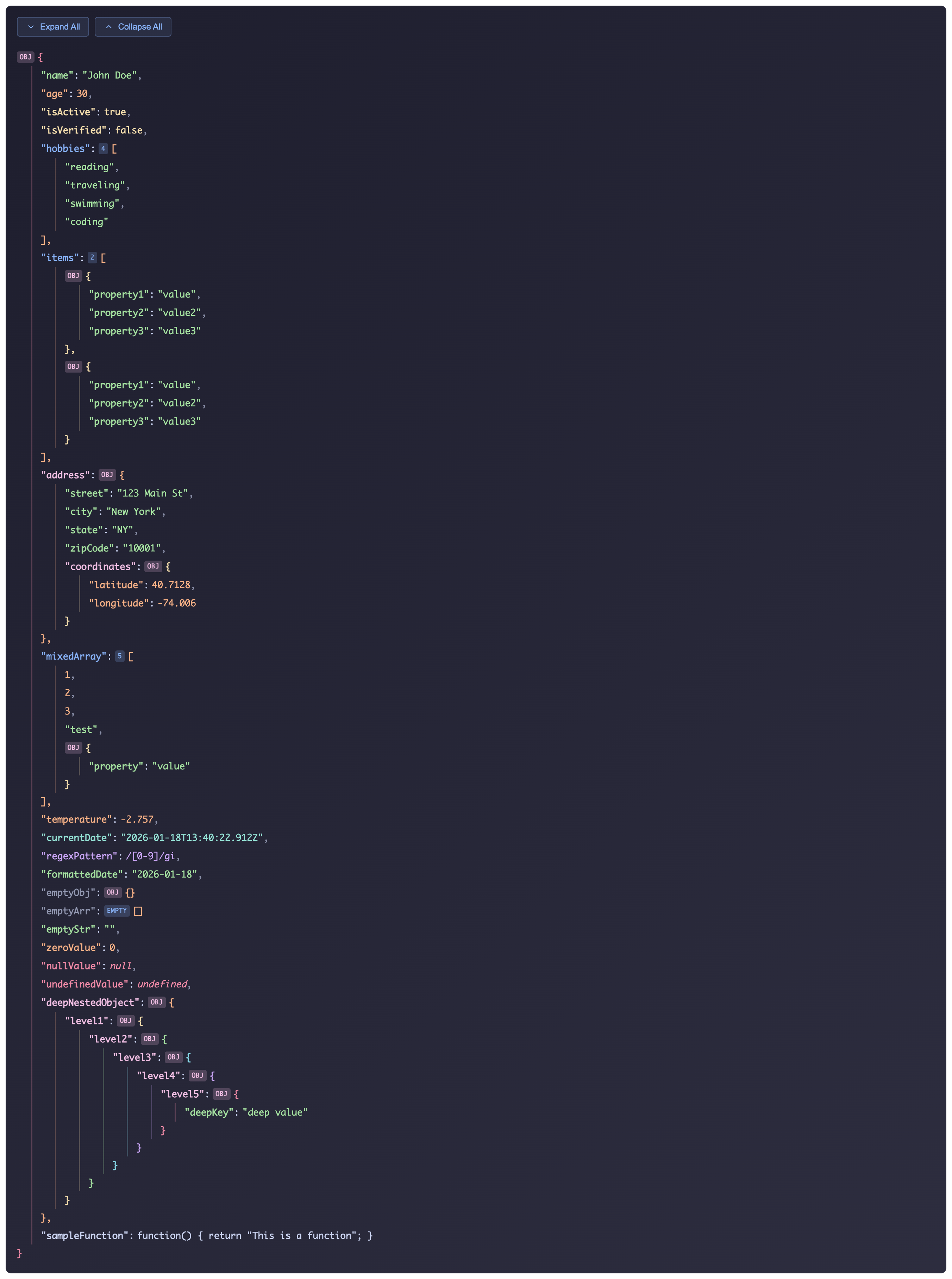
This plugin provides a Vue 3 component for rendering and interacting with JSON data in a structured and visually appealing way. It supports features like dark mode, expanding and collapsing nested objects, and more.
Features
- Dark Mode: Toggle between light and dark themes for better visibility.
- Expandable/Collapsible Objects: Easily manage the visibility of deeply nested data.
- Reusability: Customize the viewer using props for various use cases.
- Highly Configurable: Control expanded state, dark mode, and data rendering.
Demo
Installation
Install the package using your preferred package manager:
# For npm
npm install @anilkumarthakur/vue3-json-viewer

# For yarn
yarn add @anilkumarthakur/vue3-json-viewer

# For bun
bun add @anilkumarthakur/vue3-json-viewer

# For pnpm
pnpm add @anilkumarthakur/vue3-json-viewer
Setup
Import and use the JsonViewer component in your Vue 3 application:
-
Import the Stylesheet
Make sure to import the styles in your component or globally:import '@anilkumarthakur/vue3-json-viewer/styles.css'; -
Use the
JsonViewerComponent<script setup lang="ts"> import { computed, ref } from 'vue'; import { JsonViewer } from '@anilkumarthakur/vue3-json-viewer'; // Sample JSON data to display const jsonData = { name: 'John Doe', age: 30, isActive: true, hobbies: ['reading', 'traveling', 'coding'], address: { street: '123 Main St', city: 'New York', coordinates: { latitude: 40.7128, longitude: -74.006 }, }, deepNestedObject: { level1: { level2: { level3: { level4: { deepKey: 'deep value' } } } }, }, }; const isDarkMode = ref(true); const toggleDarkMode = () => (isDarkMode.value = !isDarkMode.value); const isExpanded = ref(true); const toggleExpanded = () => (isExpanded.value = !isExpanded.value); const computedExpanded = computed(() => isExpanded.value ? 'expanded' : 'collapsed', ); </script> <template> <button @click="toggleDarkMode">Toggle Dark Mode</button> <button @click="toggleExpanded">Toggle Expanded</button> <JsonViewer :data="jsonData" :expanded="isExpanded" :darkMode="isDarkMode" :key="computedExpanded" /> </template>
Props
The JsonViewer component provides several props for customization:
| Prop | Type | Default | Description |
|---|---|---|---|
data |
Object | {} |
The JSON data to be rendered. |
expanded |
Boolean | true |
Whether to expand all objects/arrays by default. |
darkMode |
Boolean | false |
Enable dark mode for the JSON viewer. |
level |
Number | 0 |
The depth level at which to start rendering the JSON object. |
Methods
You can use methods within your Vue components to dynamically control the viewer:
toggleDarkMode: Toggles between light and dark themes.toggleExpanded: Expands or collapses all objects/arrays.
Example JSON Data Structure
Here's an example of the type of JSON data you can render using the JsonViewer component:
const jsonData = {
  name: 'John Doe',
  age: 30,
  isActive: true,
  isVerified: false,
  hobbies: ['reading', 'traveling', 'swimming', 'coding'],
  items: [
    {
      property1: 'value',
      property2: 'value2',
      property3: 'value3',
    },
    {
      property1: 'value',
      property2: 'value2',
      property3: 'value3',
    },
  ],
  address: {
    street: '123 Main St',
    city: 'New York',
    state: 'NY',
    zipCode: '10001',
    coordinates: {
      latitude: 40.7128,
      longitude: -74.006,
    },
  },
  mixedArray: [1, 2, 3, 'test', { property: 'value' }],
  temperature: -2.757,
  currentDate: new Date(),
  regexPattern: /[0-9]/gi,
  formattedDate: Moment().format('YYYY-MM-DD'),
  emptyObj: {},
  emptyArr: [],
  emptyStr: '',
  zeroValue: 0,
  nullValue: null,
  undefinedValue: undefined,
  deepNestedObject: {
    level1: {
      level2: {
        level3: {
          level4: {
            level5: {
              deepKey: 'deep value',
            },
          },
        },
      },
    },
  },
  sampleFunction: function () {
    return 'This is a function';
  },
};
Demo
For a live demo, check out the example on Vercel or explore the demo in src/App.vue of the repository.
TypeScript Support
The JsonViewer component is fully typed, making it easier to work with in TypeScript projects.
Enjoy a seamless and customizable JSON viewing experience in your Vue 3 applications with @anilkumarthakur/vue3-json-viewer
Related Packages
A lightweight, framework-agnostic color palette theme switcher using CSS variabl...
A JSON editor and read-only tree view for the web — CodeMirror 6 editing, live v...
A JSON tree view component that is easy to use and also supports data selection.
Version History
| Version | Released | License |
|---|---|---|
| 0.6.0 | MIT | |
| 0.5.1 | MIT | |
| 0.5.0 | MIT | |
| 0.4.1 | MIT | |
| 0.4.0 | MIT | |
| 0.3.0 | ||
| 0.2.0 | ||
| 0.1.3 | ||
| 0.1.2 | ||
| 0.1.1 | ||
| 0.1.0 |