@alexstrnik/claude-devtools
Host server for Claude DevTools Chrome extension
885
11
| Install | |
|---|---|
npm install @alexstrnik/claude-devtools |
|
| Latest Version: | 0.0.15 |
| License: | MIT |
| Last Updated: | Oct 1, 2025 |
| Links: | GitHub · npm |
Maintainer: alexstrnik
Claude DevTools
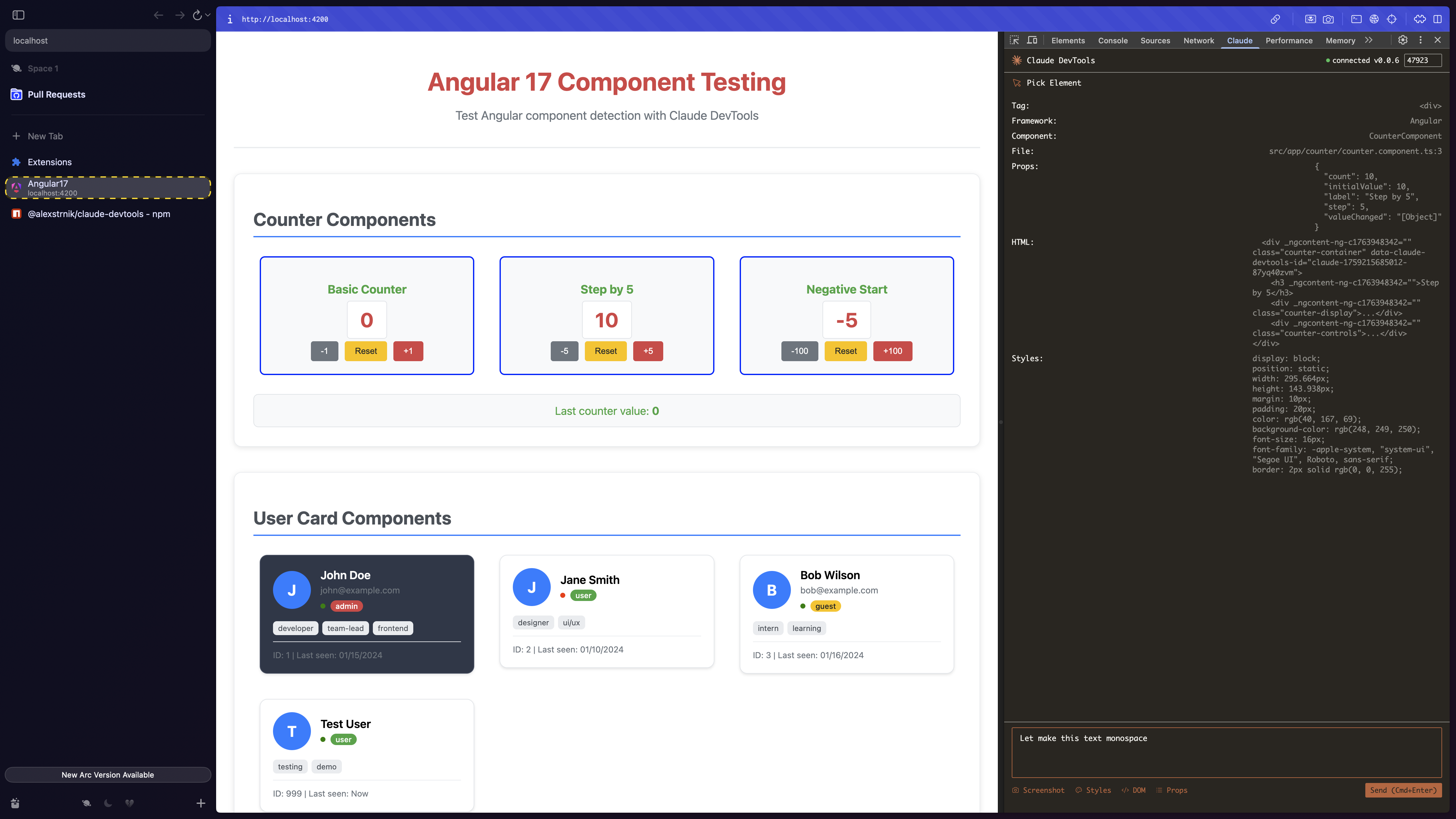
Fix your frontend code right from DevTools.
Pick a component, write your prompt, and send it directly to Claude Code—without leaving the page.
Quick Start
1. Install the host server
npm install -g @alexstrnik/claude-devtools
2. Install the Chrome extension
Option A: Download latest release (Easiest)
- Go to Releases
- Download
claude-devtools-chrome-vX.X.X.zip - Open Chrome → Extensions → Enable Developer mode
- Drag and drop the zip file directly onto the Extensions page
Option B: Clone from source
- Clone this repo:
git clone https://github.com/AlexStrNik/claude-devtools - Open Chrome → Extensions → Enable Developer mode
- Click Load unpacked → select
chrome-extensionfolder
3. Start the host server
In your project directory:
claude-devtools
The claude-devtools command works just like the regular claude CLI. It starts an interactive Claude Code session and accepts all the same arguments (except --version), which are passed directly to the underlying Claude process.
Usage
- Open DevTools → Claude DevTools tab
- Click Pick Element → select a component on the page
- Write your prompt or question
- Hit Send to Claude (or Cmd/Ctrl+Enter)
Your element's context is sent directly to Claude, including:
- Component name, props, and hierarchy paths
- DOM structure and computed styles
- Screenshot (macOS only)
Features
- React support: Full component detection with props and source locations (React <19 and React 19+)
- Preact support: Component hierarchy detection via Preact DevTools (requires Preact DevTools extension)
- Angular support: Complete component hierarchy (tested on Angular 17)
- Vue support: Component detection for Vue 2 and Vue 3
- Svelte support: Component hierarchy with source locations
- Screenshots: Automatic element capture for visual context (macOS only)
- Customizable context: Toggle what data to include before sending
Development
# Clone repository
git clone https://github.com/AlexStrNik/claude-devtools

# Install host dependencies
cd claude-devtools
pnpm install

# Start server
pnpm start
Load the extension from the chrome-extension folder in Chrome DevTools.
Roadmap
- Screenshot support for Linux/Windows
- Additional framework support
License
MIT
Related Packages
Version History
| Version | Released | License |
|---|---|---|
| 0.0.15 | MIT | |
| 0.0.14 | MIT | |
| 0.0.13 | MIT | |
| 0.0.12 | MIT | |
| 0.0.11 | MIT | |
| 0.0.10 | MIT | |
| 0.0.9 | MIT | |
| 0.0.8 | MIT | |
| 0.0.7 | MIT | |
| 0.0.6 | MIT | |
| 0.0.5 | MIT | |
| 0.0.4 | MIT |